Detachable Control Bar in Windows Forms Menu (Menus)
8 Jul 20262 minutes to read
Control bars enable application developers to add dock-able / floatable controls to their form’s toolbar layout. A common example of a control bar is the task pane window found in the Microsoft Office 2003 product suite.
A ControlBar is a full-featured docking container that can host any control and be docked along the border of the host form or floated as a top-level window. Control bars, however, differ from traditional docking windows by adopting the characteristic layout behavior of a toolbar rather than that of a classic dock-able control.
Adding control bar via designer
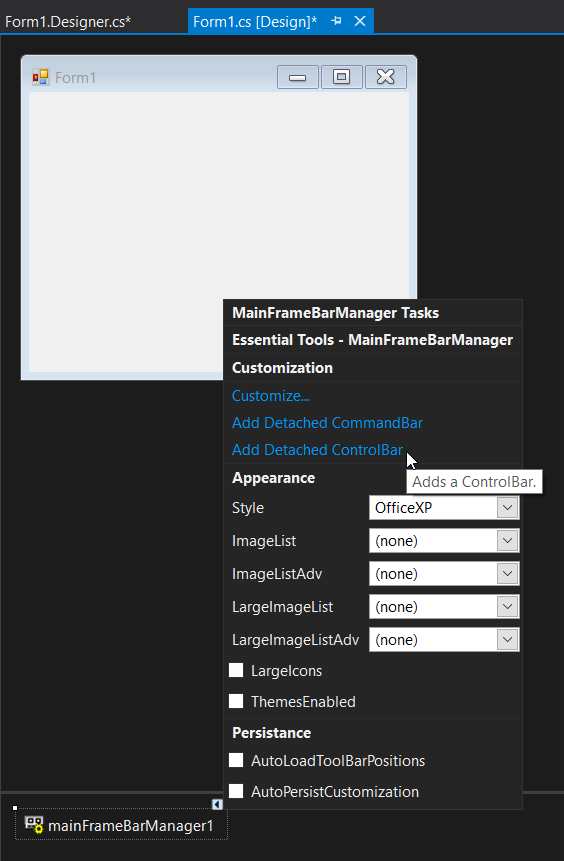
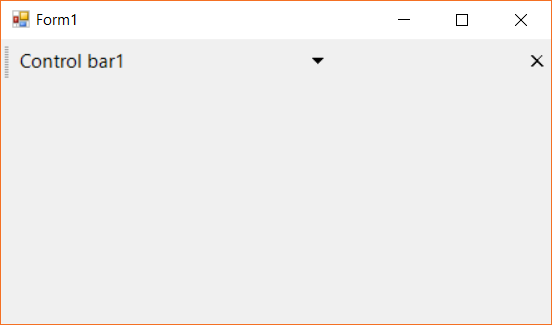
The control bar can be added via the designer settings by selecting the Add Detachable Control Bars option from the smart tag menu. The image below shows the control bar being added to the form via the designer.
Adding control bar via code
The control bar instance can be created with the required settings and added to the DetachedCommandBars collection property of the menu instance. The following code snippet shows the control bar being added to the menu control with top-docked position.
The below code snippet shows the control bar it being added to the menu item.
ControlBar controlbar1 = new ControlBar();
controlbar1.Dock = DockStyle.Top;
controlbar1.Text = "Control bar1";
this.mainFrameBarManager1.DetachedCommandBars.Add(controlbar1);
Dim controlbar1 as New ControlBar()
controlbar1.Dock = DockStyle.Top
controlbar1.Text = "Control bar1"
mainFrameBarManager1.DetachedCommandBars.Add(controlbar1)
Client controls of control bar
A control bar is capable of hosting two controls.
- Caption region
- Client region
Caption region
The controls added in this region will be loaded on the caption region of the control bar. Controls with single-line structure like text box, combo box, buttons, or menu items can be included in this region. The following code snippet shows a text box being added to the caption region.
TextBox textBox1 = new TextBox();
textBox1.Text = "Text";
textBox1.Width = 180;
textBox1.Height = 30;
this.controlBar1.CaptionControl = textBox1;
Dim textBox1 as New TextBox()
textBox1.Text = "Text"
textBox1.Width = 180
textBox1.Height = 30
Me.controlBar1.CaptionControl = textBox1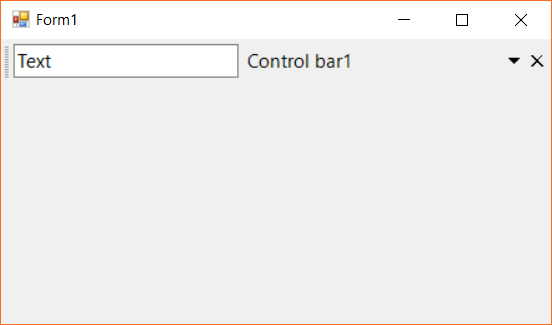
Client region
This region holds the main control that is hosted with the control bar. The control bar with toolbar and card layout controls is illustrated in this-example.