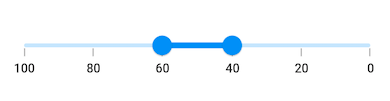
Right-to-Left (RTL) in Flutter Range Slider (SfRangeSlider)
18 Nov 20185 minutes to read
RTL rendering ways
Right-to-left rendering can be achieved in the following ways:
Wrapping the SfRangeSlider with Directionality widget
The Flutter Range Slider can be wrapped inside the Directionality widget and you can set the textDirection property to rtl.
import 'package:flutter/material.dart';
import 'package:syncfusion_flutter_sliders/sliders.dart';

class HomePage extends StatefulWidget {
  @override
  _HomePageState createState() => _HomePageState();
}

class _HomePageState extends State<HomePage> {
  SfRangeValues _values = const SfRangeValues(40.0, 60.0);

  @override
  Widget build(BuildContext context) {
    return MaterialApp(
      home: Scaffold(
        body: Directionality(
          textDirection: TextDirection.rtl,
          child: Center(
            child: SfRangeSlider(
              min: 0.0,
              max: 100.0,
              values: _values,
              interval: 20,
              showTicks: true,
              showLabels: true,
              onChanged: (SfRangeValues newValues) {
                setState(() {
                  _values = newValues;
                });
              },
            ),
          ),
        ),
      ),
    );
  }
}
Changing the locale to RTL languages
The range slider will render in the right-to-left direction if the locale belongs to RTL languages such as Arabic, Persian, Hebrew, Pashto, and Urdu. This can be achieved by specifying the MaterialApp properties such as localizationsDelegates, supportedLocales, locale and adding the flutter_localizations package to your pubspec.yaml file.
dependencies:
  flutter_localizations:
sdk: flutterimport 'package:flutter/material.dart';
import 'package:flutter_localizations/flutter_localizations.dart';
import 'package:syncfusion_flutter_sliders/sliders.dart';
class HomePage extends StatefulWidget {
@override
_HomePageState createState() => _HomePageState();
}
class _HomePageState extends State<HomePage> {
SfRangeValues _values = const SfRangeValues(40.0, 60.0);
@override
Widget build(BuildContext context) {
return MaterialApp(
localizationsDelegates: const [
GlobalMaterialLocalizations.delegate,
GlobalWidgetsLocalizations.delegate,
],
supportedLocales: const [
Locale("fa", "IR"),
],
locale: const Locale("fa", "IR"),
home: Scaffold(
backgroundColor: Colors.white,
body: SfRangeSlider(
min: 0.0,
max: 100.0,
values: _values,
interval: 20.0,
showLabels: true,
showTicks: true,
onChanged: (SfRangeValues newValues) {
setState(() {
_values = newValues;
});
},
),
),
);
}
}NOTE
This RTL support is not applicable for the vertical orientation of the Flutter Range Slider.