Enabled and Disabled States in Flutter Range Slider (SfRangeSlider)
18 Nov 20189 minutes to read
This section explains the enabled and disabled states of the Flutter Range Slider.
Enabled state
The Flutter Range Slider will be in enabled state if onChanged is set.
Horizontal
import 'package:flutter/material.dart';
import 'package:syncfusion_flutter_sliders/sliders.dart';

class HomePage extends StatefulWidget {
  @override
  _HomePageState createState() => _HomePageState();
}

class _HomePageState extends State<HomePage> {
  SfRangeValues _values = const SfRangeValues(3.0, 7.0);

  @override
  Widget build(BuildContext context) {
    return MaterialApp(
        home: Scaffold(
            body: Center(
                child: SfRangeSlider(
      min: 0.0,
      max: 10.0,
      values: _values,
      onChanged: (SfRangeValues newValues) {
        setState(() {
          _values = newValues;
        });
      },
    ))));
  }
}
Vertical
import 'package:flutter/material.dart';
import 'package:syncfusion_flutter_sliders/sliders.dart';

class HomePage extends StatefulWidget {
  @override
  _HomePageState createState() => _HomePageState();
}

class _HomePageState extends State<HomePage> {
  SfRangeValues _values = const SfRangeValues(3.0, 7.0);

  @override
  Widget build(BuildContext context) {
    return MaterialApp(
        home: Scaffold(
            body: Center(
                child: SfRangeSlider.vertical(
      min: 0.0,
      max: 10.0,
      values: _values,
      onChanged: (SfRangeValues newValues) {
        setState(() {
          _values = newValues;
        });
      },
    ))));
  }
}
Disabled state
The range slider will be in disabled state if onChanged is null.
Horizontal
import 'package:flutter/material.dart';
import 'package:syncfusion_flutter_sliders/sliders.dart';

class HomePage extends StatefulWidget {
  @override
  _HomePageState createState() => _HomePageState();
}

class _HomePageState extends State<HomePage> {
  SfRangeValues _values = const SfRangeValues(3.0, 7.0);

  @override
  Widget build(BuildContext context) {
    return MaterialApp(
        home: Scaffold(
            body: Center(
                child: SfRangeSlider(
      min: 0.0,
      max: 10.0,
      values: _values,
      onChanged: null,
    ))));
  }
}
Vertical
import 'package:flutter/material.dart';
import 'package:syncfusion_flutter_sliders/sliders.dart';

class HomePage extends StatefulWidget {
  @override
  _HomePageState createState() => _HomePageState();
}

class _HomePageState extends State<HomePage> {
  SfRangeValues _values = const SfRangeValues(3.0, 7.0);

  @override
  Widget build(BuildContext context) {
    return MaterialApp(
        home: Scaffold(
            body: Center(
                child: SfRangeSlider.vertical(
      min: 0.0,
      max: 10.0,
      values: _values,
      onChanged: null,
    ))));
  }
}
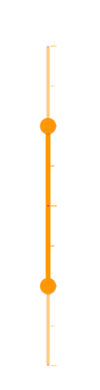
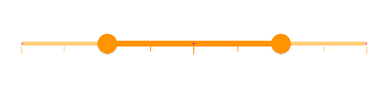
Disabled color
You can change the following:
- The color of the active and inactive track in disabled state using the
disabledActiveTrackColoranddisabledInactiveTrackColorproperties. - The color of the active and inactive major ticks in disabled state using the
disabledActiveTickColoranddisabledInactiveTickColorproperties. - The color of the active and inactive minor ticks in disabled state using the
disabledActiveMinorTickColoranddisabledInactiveMinorTickColorproperties. - The color of the active and inactive dividers in disabled state using the
disabledActiveDividerColoranddisabledInactiveDividerColorproperties. - The color of the thumb in disabled state using the
disabledThumbColorproperty.
NOTE
You must import the
theme.dartlibrary from theCorepackage to useSfRangeSliderTheme.
Horizontal
import 'package:flutter/material.dart';
import 'package:syncfusion_flutter_core/theme.dart';
import 'package:syncfusion_flutter_sliders/sliders.dart';

class HomePage extends StatefulWidget {
  @override
  _HomePageState createState() => _HomePageState();
}

class _HomePageState extends State<HomePage> {
  SfRangeValues _values = const SfRangeValues(4.0, 8.0);

  @override
  Widget build(BuildContext context) {
    return MaterialApp(
        home: Scaffold(
            body: Center(
                child: SfRangeSliderTheme(
      data: SfRangeSliderThemeData(
        disabledActiveTrackColor: Colors.orange,
        disabledInactiveTrackColor: Colors.orange[200],
        disabledActiveTickColor: Colors.orange,
        disabledInactiveTickColor: Colors.orange[200],
        disabledActiveMinorTickColor: Colors.orange,
        disabledInactiveMinorTickColor: Colors.orange[200],
        disabledActiveDividerColor: Colors.purple,
        disabledInactiveDividerColor: Colors.purple[200],
        disabledThumbColor: Colors.orange,
      ),
      child: SfRangeSlider(
        min: 2.0,
        max: 10.0,
        interval: 2,
        showTicks: true,
        minorTicksPerInterval: 1,
        showDividers: true,
        values: _values,
        onChanged: null,
      ),
    ))));
  }
}
Vertical
import 'package:flutter/material.dart';
import 'package:syncfusion_flutter_core/theme.dart';
import 'package:syncfusion_flutter_sliders/sliders.dart';

class HomePage extends StatefulWidget {
  @override
  _HomePageState createState() => _HomePageState();
}

class _HomePageState extends State<HomePage> {
  SfRangeValues _values = const SfRangeValues(4.0, 8.0);

  @override
  Widget build(BuildContext context) {
    return MaterialApp(
        home: Scaffold(
            body: Center(
                child: SfRangeSliderTheme(
      data: SfRangeSliderThemeData(
        disabledActiveTrackColor: Colors.orange,
        disabledInactiveTrackColor: Colors.orange[200],
        disabledActiveTickColor: Colors.orange,
        disabledInactiveTickColor: Colors.orange[200],
        disabledActiveMinorTickColor: Colors.orange,
        disabledInactiveMinorTickColor: Colors.orange[200],
        disabledActiveDividerColor: Colors.purple,
        disabledInactiveDividerColor: Colors.purple[200],
        disabledThumbColor: Colors.orange,
      ),
      child: SfRangeSlider.vertical(
        min: 2.0,
        max: 10.0,
        interval: 2,
        showTicks: true,
        minorTicksPerInterval: 1,
        showDividers: true,
        values: _values,
        onChanged: null,
      ),
    ))));
  }
}