Drag Modes in Flutter Range Slider (SfRangeSlider)
18 Nov 20187 minutes to read
On thumb
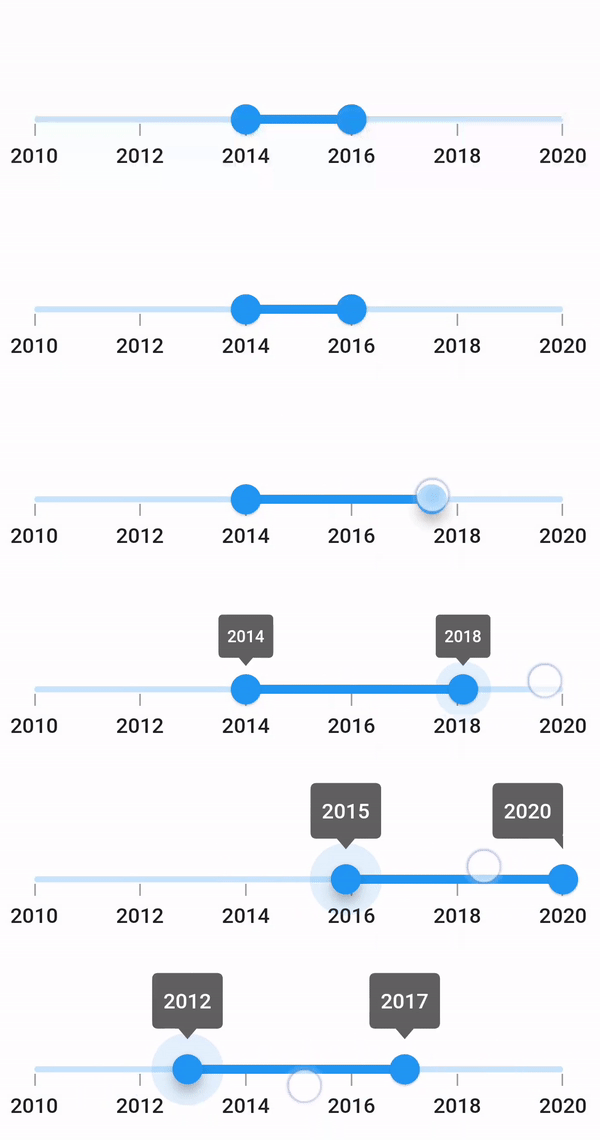
When dragMode is set to SliderDragMode.onThumb, only an individual thumb can be moved by dragging it. The nearest thumb will move to the touch position if interaction is done anywhere other than the thumb. The default value of the dragMode property is SliderDragMode.onThumb.
NOTE
The drag modes are applicable for both horizontal and vertical range sliders. The following example uses a horizontal
SfRangeSlider; to render a vertical range slider, useSfRangeSlider.vertical.
import 'package:flutter/material.dart';
import 'package:intl/intl.dart';
import 'package:syncfusion_flutter_sliders/sliders.dart';

class HomePage extends StatefulWidget {
  @override
  _HomePageState createState() => _HomePageState();
}

class _HomePageState extends State<HomePage> {
  SfRangeValues _values =
      SfRangeValues(DateTime(2014, 01, 01), DateTime(2016, 01, 01));

  @override
  Widget build(BuildContext context) {
    return Scaffold(
      body: Container(
        height: 400,
        width: 400,
        child: SfRangeSlider(
          min: DateTime(2010, 01, 01),
          max: DateTime(2020, 01, 01),
          dragMode: SliderDragMode.onThumb,
          showLabels: true,
          showTicks: true,
          interval: 2,
          dateIntervalType: DateIntervalType.years,
          dateFormat: DateFormat.y(),
          values: _values,
          enableTooltip: true,
          onChanged: (SfRangeValues newValues) {
            setState(() {
              _values = newValues;
            });
          },
        ),
      ),
    );
  }
}
Between thumbs
When dragMode is set to SliderDragMode.betweenThumbs, both the thumbs can be moved at the same time by dragging in the area between the start and end thumbs. The range between the start and end thumbs will always be the same. Hence, it is not possible to move an individual thumb.
NOTE
It is applicable for both horizontal and vertical range slider.
import 'package:flutter/material.dart';
import 'package:intl/intl.dart';
import 'package:syncfusion_flutter_sliders/sliders.dart';

class HomePage extends StatefulWidget {
  @override
  _HomePageState createState() => _HomePageState();
}

class _HomePageState extends State<HomePage> {
  SfRangeValues _values =
      SfRangeValues(DateTime(2012, 01, 01), DateTime(2016, 01, 01));

  @override
  Widget build(BuildContext context) {
    return Scaffold(
      body: Container(
        height: 400,
        width: 400,
        child: SfRangeSlider(
          min: DateTime(2010, 01, 01),
          max: DateTime(2020, 01, 01),
          dragMode: SliderDragMode.betweenThumbs,
          showLabels: true,
          showTicks: true,
          interval: 2,
          dateIntervalType: DateIntervalType.years,
          dateFormat: DateFormat.y(),
          values: _values,
          enableTooltip: true,
          onChanged: (SfRangeValues newValues) {
            setState(() {
              _values = newValues;
            });
          },
        ),
      ),
    );
  }
}
Both thumbs
When dragMode is set to SliderDragMode.both, individual thumb can be moved by dragging it, and also both the thumbs can be moved at the same time by dragging in the area between start and end thumbs.
NOTE
It is applicable for both horizontal and vertical range slider.
import 'package:flutter/material.dart';
import 'package:intl/intl.dart';
import 'package:syncfusion_flutter_sliders/sliders.dart';

class HomePage extends StatefulWidget {
  @override
  _HomePageState createState() => _HomePageState();
}

class _HomePageState extends State<HomePage> {
  SfRangeValues _values =
      SfRangeValues(DateTime(2014, 01, 01), DateTime(2016, 01, 01));

  @override
  Widget build(BuildContext context) {
    return Scaffold(
      body: Container(
        height: 400,
        width: 400,
        child: SfRangeSlider(
          min: DateTime(2010, 01, 01),
          max: DateTime(2020, 01, 01),
          dragMode: SliderDragMode.both,
          showLabels: true,
          showTicks: true,
          interval: 2,
          dateIntervalType: DateIntervalType.years,
          dateFormat: DateFormat.y(),
          values: _values,
          enableTooltip: true,
          onChanged: (SfRangeValues newValues) {
            setState(() {
              _values = newValues;
            });
          },
        ),
      ),
    );
  }
}