How can I help you?
Barcode Customization
15 Apr 20162 minutes to read
Bar Customization
The color of the Barcode can be customized by using the properties of DarkBarBrush and LightBarBrush in the SfBarcode.
The DarkBarBrush represents the color of the dark bar (Black color by default) and the LightBarBrush represents the color of the gap between two adjacent black bars (White color by default).
//Changes the color of darker area of Barcode.
    sfBarcode.DarkBarBrush = Color.Blue;
    //Changes the color of lighter area of Barcode.
    sfBarcode.LightBarBrush = Color.Red;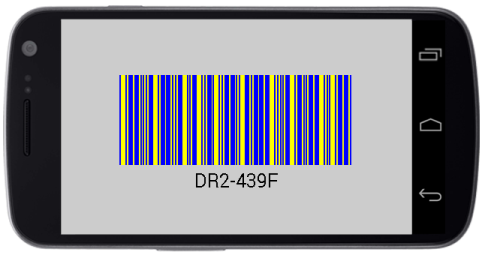
Barcode with bar color customization
NOTE The
DarkBarBrushandLightBarBrushcustomizations are applicable only for one dimensional Barcodes. In order, to recognize a Barcode symbol by a scanner, there must be an adequate contrast between the dark bars and the light spaces. All the Barcode scanners do not have support for colored Barcodes.
Text Customization
The text representing the Barcode can be customized by using the following properties.
- The color of text can be altered by using the
TextColorproperty. - The size of text can be altered by using the
TextSizeproperty. - The horizontal alignment of text can be customized with the help of the
TextPositionproperty. - The gap between Barcode and text can be adjusted by setting the property of
TextGapHeight. - To change the location of text vertically, you can make use of the
TextLocationproperty with options of top and bottom location.
sfBarcode.TextColor = Color.Blue;
    sfBarcode.TextSize = 30;
    Typeface fontFamily = Typeface.Create("helvetica", TypefaceStyle.Bold);
    sfBarcode.TextFont = fontFamily;
    sfBarcode.TextGapHeight = 20;
    sfBarcode.TextLocation = BarcodeTextLocation.Bottom;
    sfBarcode.TextAlignment = TextAlignment.Center;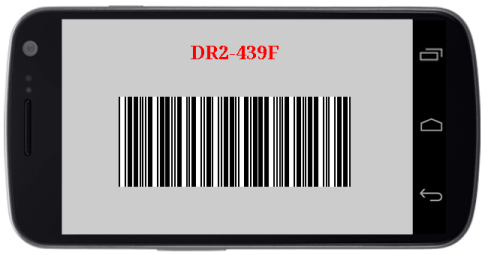
Barcode with text customization