How can I help you?
Empty Content in WPF TreeView (SfTreeView)
25 Mar 20265 minutes to read
The SfTreeView control allows you to display and customize empty content when no data is available. The EmptyContent property can be set to either a string or any object, and it will be displayed when the ItemsSource is null or empty, or when the Nodes collection is empty. Use EmptyContentTemplate to customize the appearance of EmptyContent.
Display text when TreeView has no items
The EmptyContent property in SfTreeView can be set to a string, which will be displayed when no items are present in the TreeView.
<Window x:Class="Samples.EmptyContentDemo"
        xmlns:syncfusion="http://schemas.syncfusion.com/wpf"
        Title="EmptyContent Text" Height="300" Width="400">
    <Grid>
        <syncfusion:SfTreeView x:Name="treeView"
                               ItemsSource="{Binding Items}"
                               EmptyContent="No Items"/>
    </Grid>
</Window>
SfTreeView treeView = new SfTreeView();
treeView.ItemsSource = viewModel.Items;
treeView.EmptyContent = "No Items";Display custom UI when TreeView has no items
The SfTreeView control allows you to fully customize how empty content is displayed by using the EmptyContentTemplate property. This property lets you define a custom UI layout using a DataTemplate.
<Grid>
    <syncfusion:SfTreeView
        Grid.Row="1"
        x:Name="treeView"
        BorderThickness="1"
        AutoExpandMode="AllNodes"
        FocusVisualStyle="{x:Null}"
        IsAnimationEnabled="True"
        ItemsSource="{Binding CollectionView}"
        ChildPropertyName="SubFiles">
        <syncfusion:SfTreeView.ItemTemplate>
            <DataTemplate>
                <Grid>
                    <TextBlock VerticalAlignment="Center"
                           Text="{Binding FileName}" />
                </Grid>
            </DataTemplate>
        </syncfusion:SfTreeView.ItemTemplate>
         <syncfusion:SfTreeView.EmptyContentTemplate>
            <DataTemplate>
                <Border Padding="10" BorderBrush="Blue"
                        BorderThickness="2" CornerRadius="6">
                    <TextBlock Text="No Items Found"
                               FontSize="16" FontWeight="Bold"/>
                </Border>
            </DataTemplate>
        </syncfusion:SfTreeView.EmptyContentTemplate>
    </syncfusion:SfTreeView>
</Grid>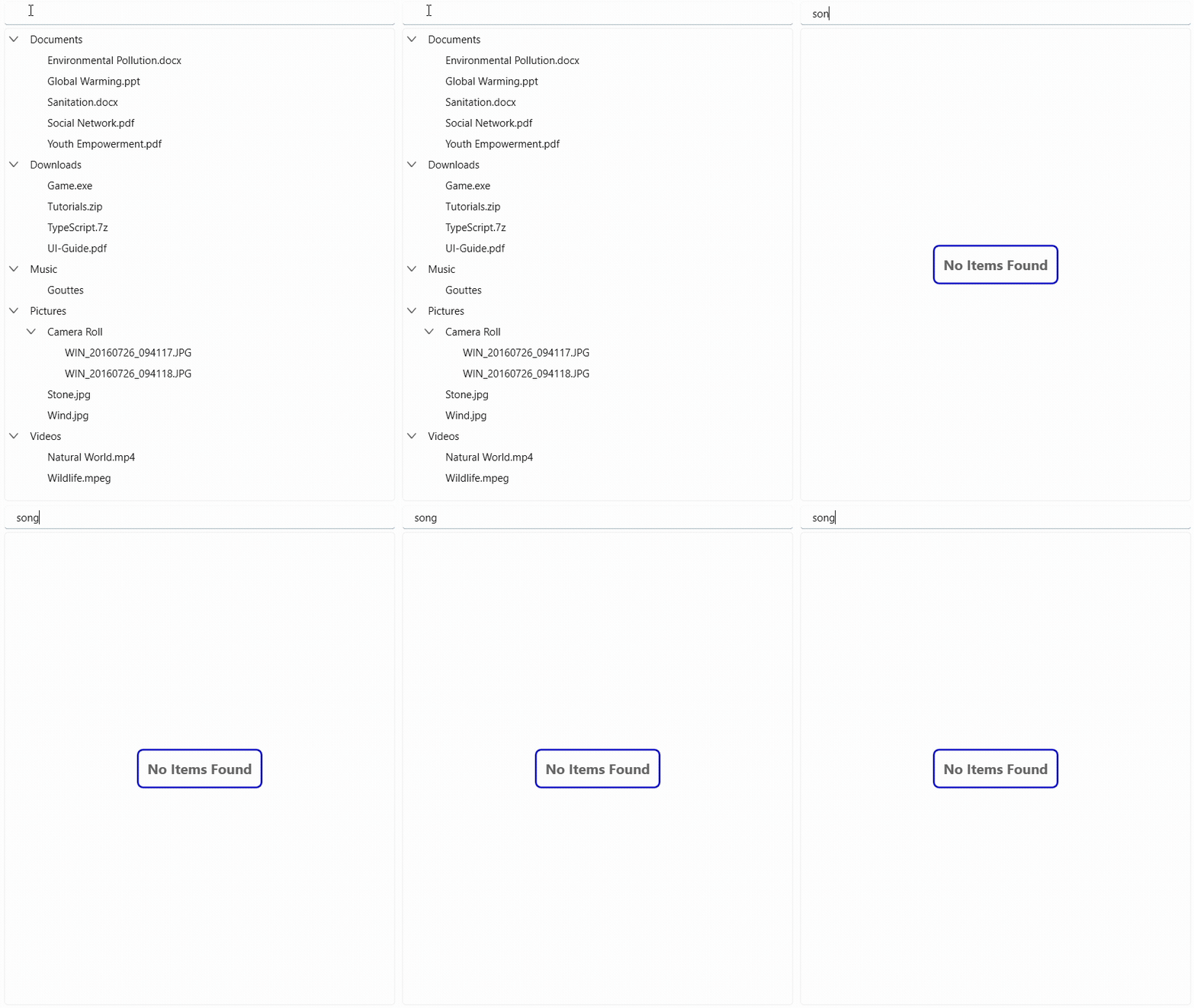
NOTE
View sample in GitHub
Binding Empty Content from ViewModel
SfTreeView supports data binding of EmptyContent, allowing you to update the empty content dynamically from the ViewModel.
<Grid>
    <Grid.DataContext>
	  <local:EmptyContentBindingViewModel/>
	</Grid.DataContext>
    <syncfusion:SfTreeView x:Name="treeView"
                           ItemsSource="{Binding Items}"
                           EmptyContent="{Binding EmptyContentText}"/>
</Grid>
public class EmptyContentBindingViewModel : INotifyPropertyChanged
{
private string _emptyContentText = "No items to display";
public event PropertyChangedEventHandler? PropertyChanged;
public string EmptyContentText
{
get => _emptyContentText;
set
{
if (_emptyContentText == value)
return;
emptyContentText = value;
PropertyChanged?.Invoke(this, new PropertyChangedEventArgs(nameof(EmptyContentText)));
}
}
}