How can I help you?
Changing the flow directions in WPF TaskBar
12 Mar 20241 minute to read
The flow direction for the TaskBar is set through the FlowDirection property.
Here is the code for setting this property.
<!-- Adding TaskBar  -->

<syncfusion:TaskBar Name="taskBar" FlowDirection="RightToLeft">


    <!-- Adding TaskBarItem -->

    <syncfusion:TaskBarItem Name="taskBarItem1" Header="TaskBarItem1">


        <!-- Adding content to TaskBarItem -->

        <StackPanel Margin="10" HorizontalAlignment="Center" 											VerticalAlignment="Stretch">

            <TextBlock TextWrapping="Wrap">

This is TaskBar that have a TaskBarItem</TextBlock>

        </StackPanel>

    </syncfusion:TaskBarItem>

</syncfusion:TaskBar>
// Setting flow direction as right to left
taskBar.FlowDirection = FlowDirection.RightToLeft;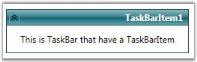
FlowDirection = “RightToLeft”