How can I help you?
Getting Started with WPF Tabbed Window
28 Apr 20263 minutes to read
This section explains how to create a tabbed window interface using the SfChromelessWindow and SfTabControl controls. The Tabbed Window provides a browser-style, document-based user interface that integrates tabs directly into the window chrome, similar to modern IDEs and web browsers.
Assembly Deployment
To integrate the Tabbed Window in you WPF application, add the following required assemblies or NuGet packages:
- Syncfusion.SfChromelessWindow.WPF
- Syncfusion.Shared.WPF
Adding Tabbed Window via XAML
To add the Tabbed Window manually in XAML, follow these steps:
-
Create a new WPF project in Visual Studio with required .NET Framework or .NET Core version.
-
Add the required assembly references or NuGet packages mentioned in the Assembly Deployment section.
-
Import the Syncfusion WPF schema http://schemas.syncfusion.com/wpf in your XAML file.
-
Create a window that uses SfChromelessWindow and set its WindowType property to
Tabbed, and include an SfTabControl with the required tab items.
<syncfusion:SfChromelessWindow
    x:Class="TabbedWindowDemo.MainWindow"
    xmlns="http://schemas.microsoft.com/winfx/2006/xaml/presentation"
    xmlns:x="http://schemas.microsoft.com/winfx/2006/xaml"
    xmlns:syncfusion="http://schemas.syncfusion.com/wpf"
    WindowType="Tabbed"
    Height="450"
    Width="800">

    <syncfusion:SfTabControl>
        <syncfusion:SfTabItem Header="Home" Content="Welcome to Home Tab"/>
        <syncfusion:SfTabItem Header="File" Content="Welcome to File Tab"/>
        <syncfusion:SfTabItem Header="Edit" Content="Welcome to Edit Tab"/>
        <syncfusion:SfTabItem Header="Tools" Content="Welcome to Tools Tab"/>
    </syncfusion:SfTabControl>

</syncfusion:SfChromelessWindow>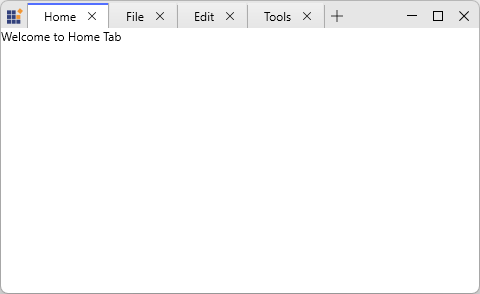
Adding WPF Tabbed Window via C#
To add the Tabbed Window control manually in C#, follow these steps:
-
Create a new WPF project in Visual Studio with the required .NET Framework or .NET Core version.
-
Add the required assembly references or NuGet packages mentioned in the Assembly Deployment section.
-
Include the required namespace, create a window that inherits from SfChromelessWindow, set its WindowType to
Tabbed, and include an SfTabControl with the required tab items.
using Syncfusion.Windows.Controls;

public partial class MainWindow : SfChromelessWindow
{
    public MainWindow()
    {
        InitializeComponent();
        WindowType = WindowType.Tabbed;

        var tabControl = new SfTabControl();

        tabControl.Items.Add(new SfTabItem
        {
            Header = "Document 1",
            Content = new TextBlock { Text = "Document 1 Content" }
        });

        tabControl.Items.Add(new SfTabItem
        {
            Header = "Document 2",
            Content = new TextBlock { Text = "Document 2 Content" }
        });

        Content = tabControl;
    }
}