How can I help you?
Data Binding in WPF Tabbed Window
5 May 20263 minutes to read
This section explains how to bind tabs to a collection in a WPF Tabbed Window using the ItemsSource property of the SfTabControl.
When data binding is used, the tab header and tab content are generated from the bound data by defining appropriate header and content templates.
Populating Tab Items Using ItemsSource
The SfTabControl supports data binding through the ItemsSource property, which allows tabs to be created automatically based on a collection in the ViewModel. Each item in the collection represents a tab, and its properties can be used to define both the tab header and the tab content.
The following example demonstrates how to bind tab items using the MVVM pattern.
Model and ViewModel
// TabModel.cs
public class TabModel
{
    public string Header { get; set; }
    public string Content { get; set; }
}

// MainViewModel.cs
public class MainViewModel : NotificationObject
{
    public ObservableCollection<TabModel> TabItems { get; } = new ObservableCollection<TabModel>();

    public MainViewModel()
    {
        TabItems.Add(new TabModel
        {
            Header = "Tab 1",
            Content = "First tab content"
        });

        TabItems.Add(new TabModel
        {
            Header = "Tab 2",
            Content = "Second tab content"
        });
    }
}
Binding ItemsSource, Header and Content
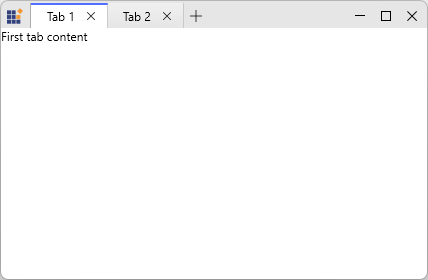
In the following example, the SfTabControl is bound to the TabItems collection. The tab header and tab content are generated from the bound data by defining header and content templates.
<Window.DataContext>
    <local:MainViewModel />
</Window.DataContext>

<syncfusion:SfTabControl ItemsSource="{Binding TabItems}"
                         x:Name="MainTabControl">
    <syncfusion:SfTabControl.ItemContainerStyle>
        <Style TargetType="{x:Type syncfusion:SfTabItem}">
            <Setter Property="HeaderTemplate">
                <Setter.Value>
                    <DataTemplate>
                        <TextBlock Text="{Binding Header}" />
                    </DataTemplate>
                </Setter.Value>
            </Setter>
        </Style>
    </syncfusion:SfTabControl.ItemContainerStyle>

    <syncfusion:SfTabControl.ContentTemplate>
        <DataTemplate>
            <TextBlock Text="{Binding Content}" />
        </DataTemplate>
    </syncfusion:SfTabControl.ContentTemplate>
</syncfusion:SfTabControl>