Custom Range in WinUI RangeSlider
18 Nov 20184 minutes to read
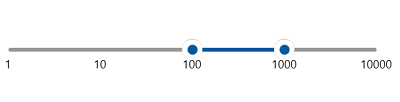
The RangeSlider allows you to define a custom scale range by extending the SfRangeSlider based on your business logic, such as rendering a logarithmic scale.
To create a custom range scale, subclass SfRangeSlider and override the following protected virtual methods:
-
GenerateVisibleLabels()– Generates the list of labels to be displayed on the scale. -
ValueToFactor(double value)– Converts a value on the scale to a normalized factor (0 to 1) used for positioning. -
FactorToValue(double factor)– Converts a normalized factor back to a value on the scale.
<local:LogarithmicRangeSlider Minimum="1"
                              Maximum="10000"
                              RangeStart="100"
                              RangeEnd="1000"
                              ShowLabels="True" />
public class LogarithmicRangeSlider : SfRangeSlider
{
int labelsCount;
public override List<SliderLabelInfo> GenerateVisibleLabels()
{
List<SliderLabelInfo> labelInfos = new List<SliderLabelInfo>();
int minimum = (int)LogBase(this.Minimum, 10);
int maximum = (int)LogBase(this.Maximum, 10);
for (int i = minimum; i <= maximum; i++)
{
double value = Math.Floor(Math.Pow(10, i)); // 10^i gives the label value
SliderLabelInfo label = new SliderLabelInfo()
{
Value = value,
Text = value.ToString()
};
labelInfos.Add(label);
}
labelsCount = labelInfos.Count;
return labelInfos;
}
// Converts a value to its logarithm with the given base.
private double LogBase(double value, int baseValue)
{
return Math.Log(value) / Math.Log(baseValue);
}
public override double ValueToFactor(double value)
{
// Normalize the log of the value to a factor between 0 and 1.
return LogBase(value, 10) / (labelsCount - 1);
}
public override double FactorToValue(double factor)
{
// Convert the normalized factor back to a value on the logarithmic scale.
return Math.Pow(10, factor * (labelsCount - 1));
}
}