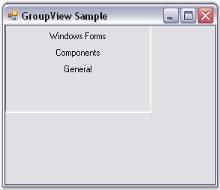
Creating GroupView
27 Sep 20183 minutes to read
This section provides a step-by-step procedure to create a GroupView control through designer and through programmatic approach in a .NET application.
Through designer
To create a GroupView control and add GroupView Items to it,
-
Drag-and-drop a GroupView control from the VS.NET toolbox onto the form. This will create an instance of the GroupView control on the form.

-
In the Properties window, select the GroupViewItems property. The GroupViewItemCollectionEditor will be opened. Click Add, a GroupView Item will be added to the GroupView control.
The text of the GroupView Items is also set using the Collection Editor.


Through code
GroupView control can be created using the GroupView class. GroupView Items can be added to the GroupView control using the GroupView.GroupViewItems collection property.
- Include the required namespace.
using Syncfusion.Windows.Forms.Tools;Imports Syncfusion.Windows.Forms.Tools- Create instances of the GroupView control and GroupView Items.
private Syncfusion.Windows.Forms.Tools.GroupView groupView1;

		private Syncfusion.Windows.Forms.Tools.GroupViewItem groupViewItem1;

		private Syncfusion.Windows.Forms.Tools.GroupViewItem groupViewItem2;

		private Syncfusion.Windows.Forms.Tools.GroupViewItem groupViewItem3;

		this.groupView1=new GroupView();

		this.groupViewItem1=new GroupViewItem();

		this.groupViewItem2=new GroupViewItem();

		this.groupViewItem3=new GroupViewItem();
Private groupView1 As Syncfusion.Windows.Forms.Tools.GroupView
Private groupViewItem1 As Syncfusion.Windows.Forms.Tools.GroupViewItem
Private groupViewItem2 As Syncfusion.Windows.Forms.Tools.GroupViewItem
Private groupViewItem3 As Syncfusion.Windows.Forms.Tools.GroupViewItem
Me.groupView1 = New GroupView()
Me.groupViewItem1 = New GroupViewItem()
Me.groupViewItem2 = New GroupViewItem()
Me.groupViewItem3 = New GroupViewItem()- Add GroupView Items to the GroupView control and specify the size of the GroupView control. Finally add a GroupView control to the Form.
this.groupView2.GroupViewItems.AddRange(new Syncfusion.Windows.Forms.Tools.GroupViewItem[] {

		new Syncfusion.Windows.Forms.Tools.GroupViewItem("Windows Forms", 0, true, null, "GroupViewItem0"),

		new Syncfusion.Windows.Forms.Tools.GroupViewItem("Components", 1, true, null, "GroupViewItem1"),

		new Syncfusion.Windows.Forms.Tools.GroupViewItem("General", 2, true, null, "GroupViewItem2")});

		this.groupView1.Size=new Size(192,120);

this.Controls.Add(this.groupView1);Me.groupView2.GroupViewItems.AddRange(New Syncfusion.Windows.Forms.Tools.GroupViewItem() {New Syncfusion.Windows.Forms.Tools.GroupViewItem("Windows Forms", 0, True, Nothing, "GroupViewItem0"), New Syncfusion.Windows.Forms.Tools.GroupViewItem("Components", 1, True, Nothing, "GroupViewItem1"), New Syncfusion.Windows.Forms.Tools.GroupViewItem("General", 2, True, Nothing, "GroupViewItem2")})
Me.groupView1.Size = New Size(192,120)
Me.Controls.Add(Me.groupView1)