Render Mode in WinForms Context Menu Strip
Render mode is used to customize the appearance of the WinForms Context Menu Strip either through predefined or custom standards. It also refers to what kind of visual style the ToolStripItems use. The RenderMode property provides different painting styles like:
- Professional
- System
- ManagerRenderMode
- Custom
Professional
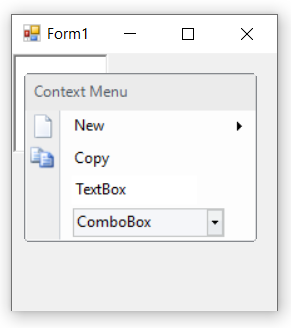
The below code snippet is used to apply “Professional” style renderer.
this.contextMenuStripEx1.RenderMode = System.Windows.Forms.ToolStripRenderMode.Professional;Me.contextMenuStripEx1.RenderMode = System.Windows.Forms.ToolStripRenderMode.Professional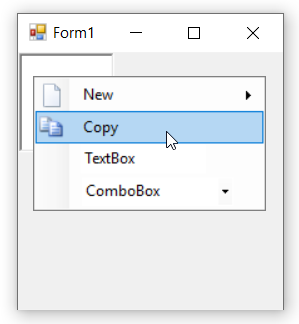
System
The below code snippet is used to apply “System” style renderer.
this.contextMenuStripEx1.RenderMode = System.Windows.Forms.ToolStripRenderMode.System;Me.contextMenuStripEx1.RenderMode = System.Windows.Forms.ToolStripRenderMode.System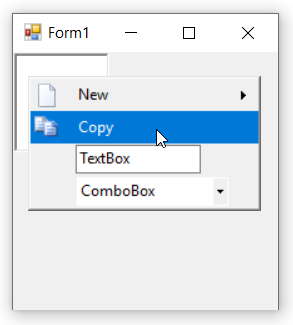
ManagerRenderMode
ManagerRenderMode uses the renderer supplied by the ToolStripManager, which itself depends on the currently selected visual style (for example, the OS theme or a Syncfusion skin). Use this option to honor the application’s visual style automatically.
The below code snippet is used to apply “ManagerRenderMode” style renderer.
this.contextMenuStripEx1.RenderMode = System.Windows.Forms.ToolStripRenderMode.ManagerRenderMode;Me.contextMenuStripEx1.RenderMode = System.Windows.Forms.ToolStripRenderMode.ManagerRenderMode
Custom
The RenderMode property cannot be directly set to the Custom enumeration. To use a custom ToolStripRenderer, set the Renderer property directly instead. Below we set the Renderer property to an Office12ToolStripRenderer or Office2016ToolStripRenderer class object, which is used to change the appearance of the WinForms Context Menu Strip control.
In the form load event, add one of the below code to change the appearance.
//Sets Office Black Color
this.contextMenuStripEx1.Renderer = new Office12ToolStripRenderer(new OfficeBlack ());

//Sets Office Blue Color
this.contextMenuStripEx1.Renderer = new Office12ToolStripRenderer(new OfficeBlue ());

//Sets Office Silver Color
this.contextMenuStripEx1.Renderer = new Office12ToolStripRenderer(new Office12ColorTable());

//Sets Office2016 Colorful (using Office2016ToolStripRenderer)
this.contextMenuStripEx1.Renderer = new Office2016ToolStripRenderer();
'Sets Office Black Color
Me.contextMenuStripEx1.Renderer = New Office12ToolStripRenderer(New OfficeBlack)
'Sets Office Blue Color
Me.contextMenuStripEx1.Renderer = New Office12ToolStripRenderer(New OfficeBlue)
'Sets Office Silver Color
Me.contextMenuStripEx1.Renderer = New Office12ToolStripRenderer(New Office12ColorTable())
'Sets Office2016 Colorful (using Office2016ToolStripRenderer)
Me.contextMenuStripEx1.Renderer = New Office2016ToolStripRenderer()NOTE: The
Office*renderer classes live in theSyncfusion.Windows.Forms/Syncfusion.Tools.Windowsnamespaces. Add the appropriateusing/Importsdirective (for example,using Syncfusion.Windows.Forms;) at the top of the code file.
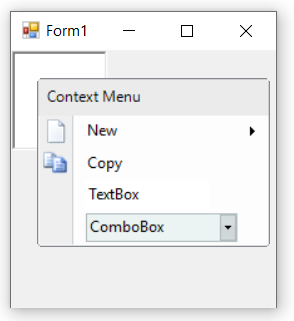
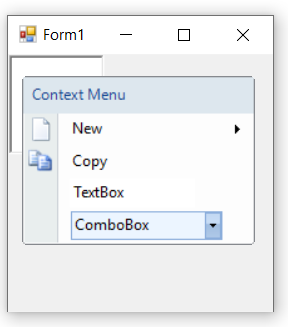
See also
How to add an icon in a header of WinForms Context Menu Strip using CustomRenderer class