Appearance in Windows Forms DateTimePickerAdv
18 Nov 20183 minutes to read
This below topics discusses the background and border settings for the DateTimePickerAdv control.
Background Settings
DateTimePickerAdv control can have custom back color and background images using the properties discussed in this section.
Background Color
The control’s back color can be set using the BackColor and BackgroundColor properties of DateTimePickerAdv.
this.dateTimePickerAdv1.BackColor = System.Drawing.Color.Cornsilk;
this.dateTimePickerAdv1.BackgroundColor = new Syncfusion.Drawing.BrushInfo(Syncfusion.Drawing.GradientStyle.Vertical, System.Drawing.Color.Linen, System.Drawing.Color.BurlyWood);Me.dateTimePickerAdv1.BackColor = System.Drawing.Color.Cornsilk
Me.dateTimePickerAdv1.BackgroundColor = New Syncfusion.Drawing.BrushInfo(Syncfusion.Drawing.GradientStyle.Vertical, System.Drawing.Color.Linen, System.Drawing.Color.BurlyWood)
Background Image
Background image for the DateTimePickerAdv is set using the below property.
this.dateTimePickerAdv2.BackgroundImage = ((System.Drawing.Image)(resources.GetObject("dateTimePickerAdv2.BackgroundImage")));Me.dateTimePickerAdv2.BackgroundImage = DirectCast((resources.GetObject("dateTimePickerAdv2.BackgroundImage")), System.Drawing.Image)
See Also
Border Styles
Border Styles
Border for a MonthCalendarAdv control can be in 2D or 3D modes. The below properties controls the border settings for the MonthCalendarAdv control.
//Setting 3D border style
this.monthCalendarAdv1.BorderStyle = System.Windows.Forms.BorderStyle.Fixed3D;
//Setting "SunkenInner" 3D border style
this.monthCalendarAdv1.Border3DStyle = System.Windows.Forms.Border3DStyle.SunkenInner;
'Setting 3D border style
Me.monthCalendarAdv1.BorderStyle = System.Windows.Forms.BorderStyle.Fixed3D
'Setting "SunkenInner" 3D border style
Me.monthCalendarAdv1.Border3DStyle = System.Windows.Forms.Border3DStyle.SunkenInner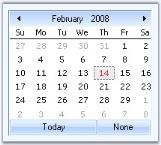
MonthCalendarAdv.ThemedBorder property should be set to false to make the 3D border setting effective. Refer_ Visual Settings
//Setting border to "All" sides
this.monthCalendarAdv1.BorderSides = System.Windows.Forms.Border3DSide.All;
//Setting color for 2D border
this.monthCalendarAdv1.BorderColor = System.Drawing.Color.DodgerBlue;
'Setting border to "All" sides
Me.monthCalendarAdv1.BorderSides = System.Windows.Forms.Border3DSide.All
'Setting color for 2D border
this.monthCalendarAdv1.BorderColor = System.Drawing.Color.DodgerBlue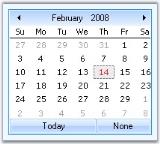
See Also
Background Settings, Visual Settings