Suggestions in Windows Forms AI AssistView
18 Nov 20187 minutes to read
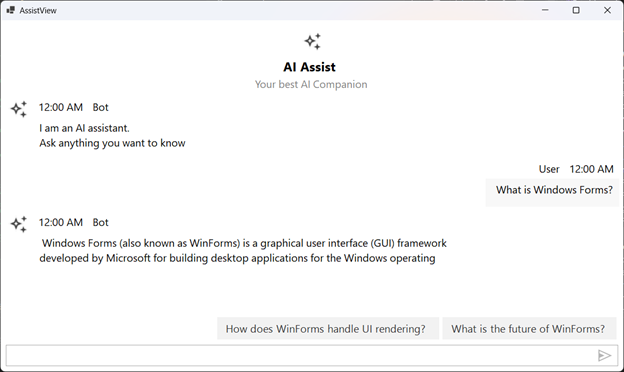
Use the Suggestions property to display AI-driven suggestions in the bottom-right corner of the AssistView, so users can quickly respond or select from relevant options.
Prerequisites
- Required package: Syncfusion.SfAIAssistView.WinForms NuGet package.
- A
ViewModelwithChats,CurrentUser, andSuggestionproperties exists. See Getting Started for setup details. - The
Suggestioncollection is bound to the control’sSuggestionsproperty. The collection should be of a type that implementsINotifyCollectionChanged(for example,ObservableCollection<string>) so updates are reflected automatically. - A bot avatar image is added to the project at
Asset\AI_Assist.png(if the example is extended with one).
ViewModel
The following ViewModel populates Chats with a sample conversation and updates the Suggestion collection once the bot response is added. The collection is mutated in place (via Add) so the bound ObservableCollection notifies the UI of the change:
using System;
using System.Collections.ObjectModel;
using System.ComponentModel;
using System.Threading.Tasks;
using Syncfusion.WinForms.AIAssistView;

public class ViewModel : INotifyPropertyChanged
{
    private ObservableCollection<object> chats;
    private Author currentUser;
    private ObservableCollection<string> suggestion;

    public ViewModel()
    {
        this.Chats = new ObservableCollection<object>();
        this.CurrentUser = new Author { Name = "John" };
        this.Suggestion = new ObservableCollection<string>();
        this.GenerateMessages();
    }

    private async Task GenerateMessages()
    {
        this.Chats.Add(new TextMessage { Author = CurrentUser, Text = "What is Windows Forms?" });
        await Task.Delay(1000);
        this.Chats.Add(new TextMessage
        {
            Author = new Author { Name = "Bot" },
            Text = "Windows Forms (also known as WinForms) is a graphical user interface (GUI) framework developed by Microsoft for building desktop applications for the Windows operating system."
        });

        // Mutate the existing collection so the bound UI updates automatically
        this.Suggestion.Add("What is the future of WinForms?");
        this.Suggestion.Add("How does WinForms handle UI rendering?");
    }

    public ObservableCollection<string> Suggestion
    {
        get { return this.suggestion; }
        set
        {
            this.suggestion = value;
            RaisePropertyChanged(nameof(Suggestion));
        }
    }

    public ObservableCollection<object> Chats
    {
        get { return this.chats; }
        set
        {
            this.chats = value;
            RaisePropertyChanged(nameof(Chats));
        }
    }

    public Author CurrentUser
    {
        get { return this.currentUser; }
        set
        {
            this.currentUser = value;
            RaisePropertyChanged(nameof(CurrentUser));
        }
    }

    public void RaisePropertyChanged(string propName)
    {
        PropertyChanged?.Invoke(this, new PropertyChangedEventArgs(propName));
    }

    public event PropertyChangedEventHandler PropertyChanged;
}
Binding the Suggestions Property
Bind the control’s Suggestions property to the ViewModel.Suggestion collection:
public partial class Form1 : Form
{
    ViewModel viewModel;

    public Form1()
    {
        InitializeComponent();
        viewModel = new ViewModel();

        SfAIAssistView sfAIAssistView1 = new SfAIAssistView();
        sfAIAssistView1.Location = new System.Drawing.Point(41, 40);
        sfAIAssistView1.Size = new System.Drawing.Size(818, 457);
        sfAIAssistView1.Dock = DockStyle.Fill;
        this.Controls.Add(sfAIAssistView1);

        sfAIAssistView1.DataBindings.Add("Messages", viewModel, "Chats", true, DataSourceUpdateMode.OnPropertyChanged);
        sfAIAssistView1.DataBindings.Add("Suggestions", viewModel, "Suggestion", true, DataSourceUpdateMode.OnPropertyChanged);
    }
}
Handling Suggestion Clicks
When a user clicks a suggestion, the text is sent as a new prompt. Handle the PromptRequest event (or Chats_CollectionChanged) to react to the selection:
sfAIAssistView1.PromptRequest += (sender, e) =>
{
    // e.Message contains the selected suggestion
    var message = e.Message as TextMessage;
    if (message == null) return;
    // Process the prompt here, e.g., forward to your AI service
};
Troubleshooting
| Issue | Possible Cause | Resolution |
|---|---|---|
| Suggestions are not displayed |
Suggestion is reassigned to a new instance after the binding is created, breaking the binding. |
Mutate the existing ObservableCollection (e.g., Suggestion.Add(...)) instead of replacing it. |
| Suggestions appear only once and then disappear | The collection is reassigned to a new empty instance. | Clear and refill the existing collection rather than reassigning. |
NullReferenceException when iterating suggestions |
The bound Suggestion is null at the time of binding. |
Initialize the collection in the ViewModel constructor before binding. |