Annotations in UWP Maps
18 Nov 20185 minutes to read
Annotations are notes used to leave some message on the map. In the SfMap, annotations are denoted by the MapAnnotations. MapAnnotations has two major parts:
-
AnnotationLabel: A text that shows some information in text format. -
AnnotationSymbol: A visual object that shows a note symbolically.
Customize AnnotationLabel
The appearance of AnnotationLabel is customized by the following properties:
-
AnnotationLabelForeground: Gets or sets the foreground color of the annotation label. -
AnnotationLabelFontStyle: Gets or sets the font style of the annotation label. -
AnnotationLabelBackground: Gets or sets the background color of the annotation label. -
AnnotationLabelFontFamily: Gets or sets the font family for the annotation label. -
AnnotationLabelFontSize: Gets or sets the annotation label font size.
<syncfusion:SfMap>
    <syncfusion:SfMap.Layers>
        <syncfusion:ShapeFileLayer Uri="MapApp.world1.shp">
            <syncfusion:ShapeFileLayer.Annotations>
                <syncfusion:MapAnnotations Latitude="-22" Longitude="132" AnnotationLabel="Australia" AnnotationLabelFontFamily="Times New Roman" AnnotationLabelFontSize="20" AnnotationLabelFontStyle="Oblique" AnnotationLabelForeground="Red">
                    <syncfusion:MapAnnotations.AnnotationSymbol>
                        <Ellipse Fill="Orange" Height="10" Width="10" />
                    </syncfusion:MapAnnotations.AnnotationSymbol>
                </syncfusion:MapAnnotations>
                <syncfusion:MapAnnotations Latitude="40" Longitude="-98" AnnotationLabel="United States of America" AnnotationLabelFontFamily="Times New Roman" AnnotationLabelFontSize="20" AnnotationLabelFontStyle="Oblique" AnnotationLabelForeground="Red">
                    <syncfusion:MapAnnotations.AnnotationSymbol>
                        <Ellipse Fill="Orange" Height="10" Width="10" />
                    </syncfusion:MapAnnotations.AnnotationSymbol>
                </syncfusion:MapAnnotations>
            </syncfusion:ShapeFileLayer.Annotations>
        </syncfusion:ShapeFileLayer>
    </syncfusion:SfMap.Layers>
</syncfusion:SfMap>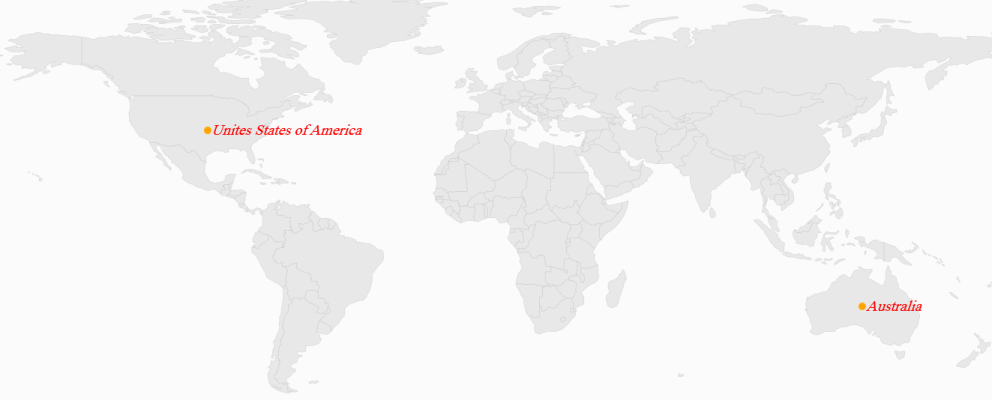
Positioning a MapAnnotation
MapAnnotation can be positioned anywhere on the map based on latitude and longitude. MapAnnotations has two properties called Latitude and Longitude of double type, used to set the latitude and longitude coordinates of the MapAnnotations.
Customizing the Annotation Template
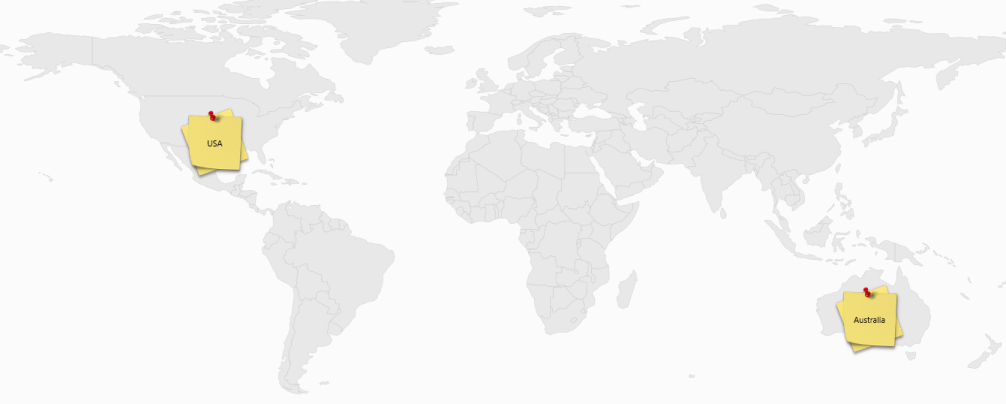
The default appearance of the annotation can be customized by using the AnnotationTemplate property. The AnnotationTemplate property is available in the ShapeFileLayer.
About the AnnotationTemplate Property
AnnotationTemplate is a DataTemplate type, used to customize or override the default template of MapAnnotations.
<syncfusion:SfMap>
    <syncfusion:SfMap.Layers>
        <syncfusion:ShapeFileLayer Uri="MapApp.world1.shp">
            <syncfusion:ShapeFileLayer.AnnotationTemplate>
                <DataTemplate>
                    <Grid Margin="-50,-20,0,0">
                        <ContentPresenter Content="{Binding AnnotationSymbol}"/>
                        <TextBlock Text="{Binding AnnotationLabel}" HorizontalAlignment="Center" VerticalAlignment="Center"/>
                    </Grid>
                </DataTemplate>
            </syncfusion:ShapeFileLayer.AnnotationTemplate>
            <syncfusion:ShapeFileLayer.Annotations>
                <syncfusion:MapAnnotations Latitude="-22" Longitude="132" AnnotationLabel="Australia">
                    <syncfusion:MapAnnotations.AnnotationSymbol>
                        <Image Height="100" Width="100" Source="note.jpg" />
                    </syncfusion:MapAnnotations.AnnotationSymbol>
                </syncfusion:MapAnnotations>
                <syncfusion:MapAnnotations Latitude="40" Longitude="-98" AnnotationLabel="USA">
                    <syncfusion:MapAnnotations.AnnotationSymbol>
                        <Image Height="100" Width="100" Source="note.jpg" />
                    </syncfusion:MapAnnotations.AnnotationSymbol>
                </syncfusion:MapAnnotations>
            </syncfusion:ShapeFileLayer.Annotations>
        </syncfusion:ShapeFileLayer>
    </syncfusion:SfMap.Layers>
</syncfusion:SfMap>