Ticks in UWP Linear Gauge (SfLinearGauge)
10 May 20218 minutes to read
Ticks are used to identify the gauge’s data value by marking the gauge scale in regular increments.
Tick customization
By setting the MajorTickStroke and MinorTickStroke properties, the stroke of the major ticks and minor ticks can be customized. Using the MajorTickStrokeThickness and MinorTickStrokeThickness, the stroke thickness of the major ticks and minor ticks can be customized. The size of the major ticks and minor ticks can be modified using the MajorTickSize and MinorTickSize properties.
<gauge:SfLinearGauge>

        <gauge:SfLinearGauge.MainScale>

            <gauge:LinearScale     MajorTickStroke="SkyBlue"
                                   MinorTickStroke="Brown" LabelStroke="#424242"
                                   MinorTickStrokeThickness="1" MajorTickStrokeThickness="2" MajorTickSize="25"
                                   MinorTickSize="12" LabelSize="15" ScaleBarSize="20"
                                   MinorTicksPerInterval="3" ScaleBarLength="300">

            </gauge:LinearScale>

        </gauge:SfLinearGauge.MainScale>

    </gauge:SfLinearGauge>
SfLinearGauge sfLinearGauge = new SfLinearGauge();
LinearScale linearScale = new LinearScale();
linearScale.LabelSize = 15;
linearScale.MajorTickStroke = new SolidColorBrush(Colors.SkyBlue);
linearScale.MinorTickStroke = new SolidColorBrush(Colors.Brown);
linearScale.MinorTickStrokeThickness = 1;
linearScale.MajorTickStrokeThickness = 2;
linearScale.LabelStroke = new SolidColorBrush(Color.FromArgb(0xff, 0x42, 0x42, 0x42));
linearScale.MajorTickSize = 25;
linearScale.MinorTickSize = 12;
linearScale.ScaleBarLength = 300;
linearScale.MinorTicksPerInterval = 3;
sfLinearGauge.MainScale = linearScale;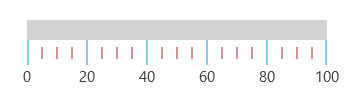
Setting position for tick
The ticks in the scale can be placed above, below, or in between the scale by choosing one of the following options available in the TickPosition property:
- Above
- Below (Default)
- Cross
<gauge:SfLinearGauge>

        <gauge:SfLinearGauge.MainScale>

            <gauge:LinearScale     TickPosition="Above"
                                   MajorTickStroke="Gray" MajorTickSize="25"
                                   MinorTickSize="12" LabelSize="15"
                                   MinorTickStroke="Gray" LabelStroke="#424242"
                                   MinorTicksPerInterval="3" ScaleBarLength="300">

            </gauge:LinearScale>

        </gauge:SfLinearGauge.MainScale>

    </gauge:SfLinearGauge>
SfLinearGauge sfLinearGauge = new SfLinearGauge();
LinearScale linearScale = new LinearScale();
linearScale.TickPosition = LinearTicksPosition.Above;
linearScale.LabelSize = 15;
linearScale.MajorTickStroke = new SolidColorBrush(Colors.Gray);
linearScale.MinorTickStroke = new SolidColorBrush(Colors.Gray);
linearScale.LabelStroke = new SolidColorBrush(Color.FromArgb(0xff, 0x42, 0x42, 0x42));
linearScale.MajorTickSize = 25;
linearScale.MinorTickSize = 12;
linearScale.ScaleBarLength = 300;
linearScale.MinorTicksPerInterval = 3;
sfLinearGauge.MainScale = linearScale;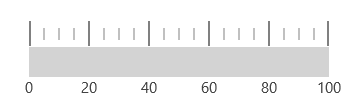
Setting minor ticks per interval
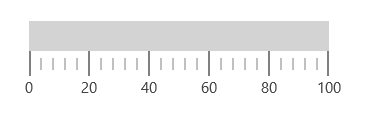
The Interval property is used to calculate the tick counts for a scale. Like ticks, minor ticks can also be calculated by using the MinorTicksPerInterval property.
<gauge:SfLinearGauge>

        <gauge:SfLinearGauge.MainScale>

            <gauge:LinearScale
                                   MajorTickStroke="Gray" MajorTickSize="25"
                                   MinorTickSize="12" LabelSize="15"
                                   MinorTickStroke="Gray" LabelStroke="#424242"
                                   MinorTicksPerInterval="4" ScaleBarLength="300">

            </gauge:LinearScale>

        </gauge:SfLinearGauge.MainScale>

    </gauge:SfLinearGauge>
SfLinearGauge sfLinearGauge = new SfLinearGauge();
LinearScale linearScale = new LinearScale();
linearScale.LabelSize = 15;
linearScale.MajorTickStroke = new SolidColorBrush(Colors.Gray);
linearScale.MinorTickStroke = new SolidColorBrush(Colors.Gray);
linearScale.LabelStroke = new SolidColorBrush(Color.FromArgb(0xff, 0x42, 0x42, 0x42));
linearScale.MajorTickSize = 25;
linearScale.MinorTickSize = 12;
linearScale.ScaleBarLength = 300;
linearScale.MinorTicksPerInterval = 4;
sfLinearGauge.MainScale = linearScale;