Populating Pages in UWP DataPager (SfDataPager)
28 Feb 20253 minutes to read
Binding with data
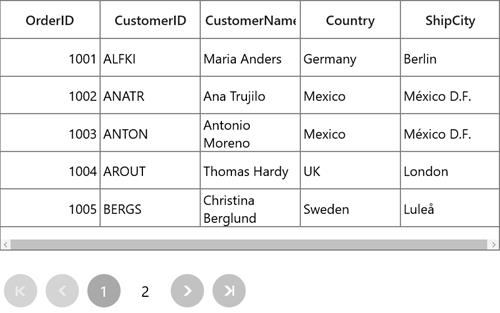
You can use Source property to bind collection of data with SfDataPager. Based on number of items in collection and PageSize, the PageCount will be calculated.
Below code snippet shows, how to bind SfDataPager with data.
<Page>
    <Page.DataContext>
        <local:ViewModel />
    </Page.DataContext>
    <Grid>
        <Grid.RowDefinitions>
            <RowDefinition Height="300"/>
            <RowDefinition Height="*"/>
        </Grid.RowDefinitions>
        <syncfusion:SfDataGrid x:Name="sfGrid"
                                Grid.Row="0"
                                ItemsSource="{Binding
                                ElementName=sfDataPager,Path=PagedSource}"/>
                                <datapager:SfDataPager x:Name="sfDataPager"
                                                        Grid.Row="1"
                                                        PageSize="5"
                                                        NumericButtonCount="5"
                                                        Source="{Binding Orders}" />
    </Grid>
</Page>
Based on number of items in the collection and PageSize and the PageCount is calculated for SfDataPager.
Unbound Mode
You can define the PageCount of SfDataPager by setting UseOnDemandPaging to true and PageCount property.
<datapager:SfDataPager x:Name="sfDataPager"
                         PageCount="2"
                         UseOnDemandPaging="True"/>