Setting offset in UWP Carousel (SfCarousel)
10 May 20213 minutes to read
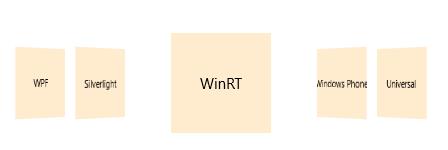
SfCarousalItem can be displayed in different offset in SfCarousel and also can define the offset between selected item and other items in SfCarousel.
Adjusting the distance between unselected items
Offset property is used to customize the distance between carousel items that are not selected.
<layout:SfCarousel x:Name="carousel" SelectedItem="item1" Offset="100">

<layout:SfCarouselItem x:Name="item1">

<Border Background="BlanchedAlmond" Height="100" Width="100">

<TextBlock Text="WPF" VerticalAlignment="Center" HorizontalAlignment="Center"/>

</Border>

</layout:SfCarouselItem>

<layout:SfCarouselItem x:Name="item2">

<Border Background="BlanchedAlmond" Height="100" Width="100">

<TextBlock Text="Silverlight" VerticalAlignment="Center" HorizontalAlignment="Center"/>

</Border>

</layout:SfCarouselItem>

<layout:SfCarouselItem x:Name="item3">

<Border Background="BlanchedAlmond" Height="100" Width="100">

<TextBlock Text="WinRT" VerticalAlignment="Center" HorizontalAlignment="Center"/>

</Border>

</layout:SfCarouselItem>

<layout:SfCarouselItem x:Name="item4">

<Border Background="BlanchedAlmond" Height="100" Width="100">

<TextBlock Text="Windows Phone" VerticalAlignment="Center" HorizontalAlignment="Center"/>

</Border>

</layout:SfCarouselItem>

<layout:SfCarouselItem x:Name="item5">

<Border Background="BlanchedAlmond" Height="100" Width="100">

<TextBlock Text="Universal" VerticalAlignment="Center" HorizontalAlignment="Center"/>

</Border>

</layout:SfCarouselItem>

</layout:SfCarousel>carousel.Offset = 100.0;carousel.Offset = 100.0
Scaling the unselected items
ScaleOffset is used to scale the carousel items that are not selected.
<layout:SfCarousel x:Name="carousel" SelectedItem="item1" ScaleOffset="0.5">

<layout:SfCarouselItem x:Name="item1">

<Border Background="BlanchedAlmond" Height="100" Width="100">

<TextBlock Text="WPF" VerticalAlignment="Center" HorizontalAlignment="Center"/>

</Border>

</layout:SfCarouselItem>

<layout:SfCarouselItem x:Name="item2">

<Border Background="BlanchedAlmond" Height="100" Width="100">

<TextBlock Text="Silverlight" VerticalAlignment="Center" HorizontalAlignment="Center"/>

</Border>

</layout:SfCarouselItem>

<layout:SfCarouselItem x:Name="item3">

<Border Background="BlanchedAlmond" Height="100" Width="100">

<TextBlock Text="WinRT" VerticalAlignment="Center" HorizontalAlignment="Center"/>

</Border>

</layout:SfCarouselItem>

<layout:SfCarouselItem x:Name="item4">

<Border Background="BlanchedAlmond" Height="100" Width="100">

<TextBlock Text="Windows Phone" VerticalAlignment="Center" HorizontalAlignment="Center"/>

</Border>

</layout:SfCarouselItem>

<layout:SfCarouselItem x:Name="item5">

<Border Background="BlanchedAlmond" Height="100" Width="100">

<TextBlock Text="Universal" VerticalAlignment="Center" HorizontalAlignment="Center"/>

</Border>

</layout:SfCarouselItem>

</layout:SfCarousel>carousel.ScaleOffset = 0.5;carousel.ScaleOffset = 0.5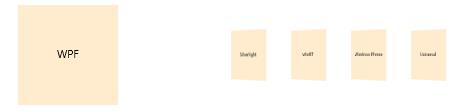
Displacing the selected and unselected items
SelectedItemOffset is set to specify the distance of selected item from other carousel items.
<layout:SfCarousel x:Name="carousel" SelectedItem="item1" SelectedItemOffset="60">

<layout:SfCarouselItem x:Name="item1">

<Border Background="BlanchedAlmond" Height="100" Width="100">

<TextBlock Text="WPF" VerticalAlignment="Center" HorizontalAlignment="Center"/>

</Border>

</layout:SfCarouselItem>

<layout:SfCarouselItem x:Name="item2">

<Border Background="BlanchedAlmond" Height="100" Width="100">

<TextBlock Text="Silverlight" VerticalAlignment="Center" HorizontalAlignment="Center"/>

</Border>

</layout:SfCarouselItem>

<layout:SfCarouselItem x:Name="item3">

<Border Background="BlanchedAlmond" Height="100" Width="100">

<TextBlock Text="WinRT" VerticalAlignment="Center" HorizontalAlignment="Center"/>

</Border>

</layout:SfCarouselItem>

<layout:SfCarouselItem x:Name="item4">

<Border Background="BlanchedAlmond" Height="100" Width="100">

<TextBlock Text="Windows Phone" VerticalAlignment="Center" HorizontalAlignment="Center"/>

</Border>

</layout:SfCarouselItem>

<layout:SfCarouselItem x:Name="item5">

<Border Background="BlanchedAlmond" Height="100" Width="100">

<TextBlock Text="Universal" VerticalAlignment="Center" HorizontalAlignment="Center"/>

</Border>

</layout:SfCarouselItem>

</layout:SfCarousel>carousel.SelectedItemOffset = 60.0;carousel.SelectedItemOffset = 60.0