Month Navigation in UWP Calendar (SfCalendar)
10 May 20212 minutes to read
Navigating between months are much simpler with touch. Navigation buttons are also provided.
Enabling Navigation Button
By default, navigation buttons are collapsed. Navigation button support can be enabled or disabled using the ShowNavigationButton property.
<input:SfCalendar x:Name="calendar" ShowNavigationButton="True"/>SfCalendar calendar = new SfCalendar();
calendar.ShowNavigationButton = true;Dim calendar As New SfCalendar()
calendar.ShowNavigationButton = True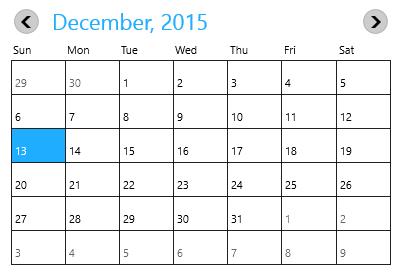
Navigating to Previous Month
Month navigation can also be done programmatically by invoking PreviousMonth method.
calendar.PreviousMonth();calendar.PreviousMonth()Navigating to Next Month
Month navigation can also be done programmatically by invoking NextMonth method
calendar.NextMonth();calendar.NextMonth()Notifying the Previous Button Click
PreviousScrollButtonClicked event is fired when the previous button is clicked.
<input:SfCalendar x:Name="calendar" ShowNavigationButton="True"
PreviousScrollButtonClicked="calendar_PreviousScrollButtonClicked"/>private void calendar_PreviousScrollButtonClicked(object sender, SelectionChangedEventArgs e)
{
}Private Sub calendar_PreviousScrollButtonClicked(ByVal sender As Object, ByVal e As SelectionChangedEventArgs)
End SubNotifying the Next Button Click
NextScrollButtonClicked event is fired when the next button is clicked.
<input:SfCalendar x:Name="calendar" ShowNavigationButton="True"
NextScrollButtonClicked="calendar_NextScrollButtonClicked"/>private void calendar_NextScrollButtonClicked(object sender, SelectionChangedEventArgs e)
{
}Private Sub calendar_NextScrollButtonClicked(ByVal sender As Object, ByVal e As SelectionChangedEventArgs)
End Sub