Populate Data
28 Sep 202320 minutes to read
TreeView can be populated with local or remote data source by using a property dataSource, which is the member of fields property.
In TreeView, you should use “fields” property to go with data source. It specifies the mapping fields for the data source to receive the data, query to process the data and field mappers to map the data members.
Fields
The following table contains the list of members with description for fields property.
| Properties | Description |
|---|---|
|
|
The data source contains the list of data for generating the TreeView list. |
|
|
It specifies the query to retrieve the data from the online server. |
|
|
It specifies the name of the table from which data to be processed from given data source. |
|
|
It specifies the ID of the node. |
|
|
It specifies the parent id of the node |
|
|
It specifies the text content of the node. |
|
|
It specifies the node has child (which is the nested or inner level of nodes). Also it’s used in load on demand of tree data. |
|
|
It specifies the tree node to be in expanded state |
|
|
It specifies the select node at initialize. N> only one node get selected by default. If you enable multiple selection in TreeView then you can able to select one or more nodes at initialize. |
|
|
It specifies the node to be in checked state, if tree node represented with checkboxes. |
|
|
It defines the image location. |
|
|
It defines the image attributes such as height, width, styles, etc. |
|
|
It defines the sprite CSS for the image tag. |
|
|
It defines the HTML attributes such as class and styles for a node ("li" tag). |
|
|
It defines the HTML attributes such as class and styles for a link tag, which is child of node. |
Mapping all fields members with corresponding key from the array of JSON data.
/// <reference path="tsfiles/jquery.d.ts" />
/// <reference path="tsfiles/ej.web.all.d.ts" />


module TreeViewComponent {

        var localData = [

       { id: 1, text: "Item 1", expanded: true, nodeProperty: { class: "textBlue", value: "Item 1" } },

       { id: 2, text: "Item 2", linkProperty: { class: "textUnderline", href: "https://www.syncfusion.com", target: "_blank" } },

       { id: 3, text: "Item 3", selected: true, spriteImage: "mail-icon sprite-calendar" },

       { id: 4, text: "Item 4", checked: true, imageProperty: { width: 20, height: 20 }, imageUrl: "http://cdn.syncfusion.com/13.3.0.7/js/web/flat-azure/images/ajax-loader.gif" },

       { id: 5, parent: 1, text: "Item 1.1" },

       { id: 6, parent: 1, text: "Item 1.2" },

       { id: 7, parent: 1, text: "Item 1.3" },

       { id: 8, parent: 3, text: "Item 3.1" },

       { id: 9, parent: 3, text: "Item 3.2" },

       { id: 10, parent: 5, text: "Item 1.1.1" }

        ];

    $(function () {

        var tree = new ej.TreeView($("#treeView"), {

                showCheckbox: true,

                fields: {

                    id: "id",

                    text: "text",

                    parentId: "parent",

                    dataSource: localData,

                    isChecked: "checked",

                    selected: "selected",

                    spriteCssClass: "spriteImage",

                    imageUrl: "imageUrl",

                    htmlAttribute: "nodeProperty",

                    linkAttribute: "linkProperty",

                    imageAttribute: "imageProperty"

                }

            });

        });
}
NOTE
If you want to display nodes in Root level, exclude parentId attribute or specify “0” in corresponding value.
To find the complete details about fields, refer the sample here.
Local Data
TreeView can be rendered from a self-referential data by providing the two required fields id and parentId.
var localData = [

        { id: 1, text: "Item 1" },

        { id: 2, text: "Item 2" },

        { id: 3, text: "Item 3" },

        { id: 4, text: "Item 4" },

        { id: 5, parent: 1, text: "Item 1.1" }

        ];
Above flat array of JSON data can be directly assigned to dataSource property and mapping data fields with respect to the mapper field in order to create TreeView.
<!--create the TreeView wrapper-->

    <div id="treeView">

</div>/// <reference path="tsfiles/jquery.d.ts" />
/// <reference path="tsfiles/ej.web.all.d.ts" />
module TreeViewComponent {
var localData = [
{ id: 1, text: "Item 1" },
{ id: 2, text: "Item 2" },
{ id: 3, text: "Item 3" },
{ id: 4, text: "Item 4" },
{ id: 5, parent: 1, text: "Item 1.1" },
{ id: 6, parent: 1, text: "Item 1.2" },
{ id: 7, parent: 1, text: "Item 1.3" },
{ id: 8, parent: 3, text: "Item 3.1" },
{ id: 9, parent: 3, text: "Item 3.2" },
{ id: 10, parent: 5, text: "Item 1.1.1" }
];
$(function () {
// initialize and bind the TreeView with local data
var tree = new ej.TreeView($("#treeView"), {
fields: { dataSource: localData, id: "id", parentId: "parent", text: "text" }
});
});
}Nested Object Support
The nested object support is provided for the TreeView component. Please find the following JSON.
var localData = [
          { id: 1, name: { nodeName: "Discover Music"}, hasChild: true, expanded: true },
          { id: 2, parent: 1, name: {nodeName:"Hot Singles" }},
          { id: 3, parent: 1, name: {nodeName:"Rising Artists" }},
          { id: 4, parent: 1, name:{nodeName: "Live Music" }}
        ];
Above flat array of JSON data can be directly assigned to dataSource property and mapping data fields with respect to the mapper field in order to create TreeView.
<!--create the TreeView wrapper-->

    <div id="treeView">

</div>/// <reference path="tsfiles/jquery.d.ts" />
/// <reference path="tsfiles/ej.web.all.d.ts" />
module TreeViewComponent {
var localData = [
{ id: 1, name: { nodeName: "Discover Music"}, hasChild: true, expanded: true },
{ id: 2, parent: 1, name: {nodeName:"Hot Singles" }},
{ id: 3, parent: 1, name: {nodeName:"Rising Artists" }},
{ id: 4, parent: 1, name:{nodeName: "Live Music" }}
];
$(function () {
// initialize and bind the TreeView with local data contains nested object
var tree = new ej.TreeView($("#treeView"), {
fields: { dataSource: localData, id: "id", parentId: "parent", text: "name.nodeName" }
});
});
}Remote Data
When using remote data binding, the adaptor of ej.DataManager plays vital role in processing queries to make them suitable to sends along with data request and also process the response data from the server.
OData
OData is a standardized protocol for creating and consuming data. You can bind oData service data to TreeView in two ways using DataManager.
- Passing OData service link to DataManager
You can provide the OData service URL directly to the ej.DataManager class and then we can assign it to TreeView dataSource.
<!--create the TreeView wrapper-->

    <div id="treeView">

</div>/// <reference path="tsfiles/jquery.d.ts" />
/// <reference path="tsfiles/ej.web.all.d.ts" />
module TreeViewComponent {
var parentData = ej.DataManager("http://js.syncfusion.com/demos/ejServices/Wcf/Northwind.svc/Categories"),
childData = ej.DataManager("http://js.syncfusion.com/demos/ejServices/Wcf/Northwind.svc/Products");
$(function () {
// initialize and bind the TreeView with remote data
var tree = new ej.TreeView($("#treeView"), {
fields: {
dataSource: parentData,
id: "CategoryID", text: "CategoryName",
child: {
dataSource: childData,
id: "ProductID", parentId: "CategoryID", text: "ProductName"
}
}
});
});
}Load on Demand
Load on demand is a technique (Lazy load) that is used to reduce the bandwidth size of consuming huge data. You can load data on demand in TreeView by using loadOnDemand property when you’re going to use huge data.
For local data source, TreeView loads the first level nodes initially. While expand a parent node then TreeView loads it’s their child nodes from the data source based on the parentId member. It reduces the time to render TreeView with huge data.
Refer below code example to load data on demand from local data source.
<!--create the TreeView wrapper-->

<div id="treeview"></div>/// <reference path="tsfiles/jquery.d.ts" />
/// <reference path="tsfiles/ej.web.all.d.ts" />
module TreeViewComponent {
var localData = [
{ id: 1, name: "Local Disk(C:)", hasChild: true },
{ id: 2, name: "Local Disk(D:)", hasChild: true },
{ id: 3, name: "Local Disk(E:)", hasChild: true },
{ id: 4, parentId: 1, name: "Folder 1", hasChild: true },
{ id: 5, parentId: 1, name: "Folder 2" },
{ id: 6, parentId: 1, name: "Folder 3" },
{ id: 7, parentId: 2, name: "Folder 4" },
{ id: 8, parentId: 2, name: "Folder 5", hasChild: true },
{ id: 9, parentId: 2, name: "Folder 6" },
{ id: 10, parentId: 3, name: "Folder 7" },
{ id: 11, parentId: 3, name: "Folder 8" },
{ id: 12, parentId: 3, name: "Folder 9", hasChild: true },
{ id: 13, parentId: 4, name: "File 1" },
{ id: 14, parentId: 4, name: "File 2" },
{ id: 15, parentId: 4, name: "File 3" },
{ id: 16, parentId: 8, name: "File 4" },
{ id: 17, parentId: 8, name: "File 5" },
{ id: 18, parentId: 8, name: "File 6" },
{ id: 19, parentId: 12, name: "File 7" },
{ id: 20, parentId: 12, name: "File 8" },
{ id: 21, parentId: 12, name: "File 9" }
];
$(function () {
var tree = new ej.TreeView($("#treeView"), {
loadOnDemand: true,
fields: { dataSource: localData, id: "id", parentId: "parentId", text: "name", hasChild: "hasChild" },
});
});
}The following screenshot displays the load on demand for local data source in TreeView control.
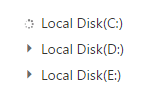
While expanding the parent node
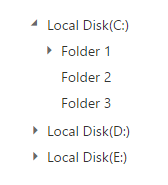
After expanding the parent node
For more details about load on demand for local data source, refer the sample here.
For remote data source, TreeView loads the first level nodes initially. While expand the node from TreeView, the data manager passes the query to the controller. Based on this query, you can filter the data from table and return to TreeView.
Refer below code example to load data on demand from remote data source.
<!--create the TreeView wrapper-->

<div id="treeview"></div>/// <reference path="tsfiles/jquery.d.ts" />
/// <reference path="tsfiles/ej.web.all.d.ts" />
module TreeViewComponent {
$(function () {
// DataManager creation
var dataManger = ej.DataManager({
url: "http://js.syncfusion.com/demos/ejServices/Wcf/Northwind.svc/"
});
// Query creation
var query = ej.Query().from("Categories").select("CategoryID,CategoryName").take(3);
var tree = new ej.TreeView($("#treeView"), {
loadOnDemand: true,
fields: {
dataSource: dataManger, query: query, id: "CategoryID", text: "CategoryName", hasChild: "CategoryName",
child: { dataSource: dataManger, tableName: "Products", parentId: "CategoryID", text: "ProductName" }
}
});
});
}