How can I help you?
Find and Replace
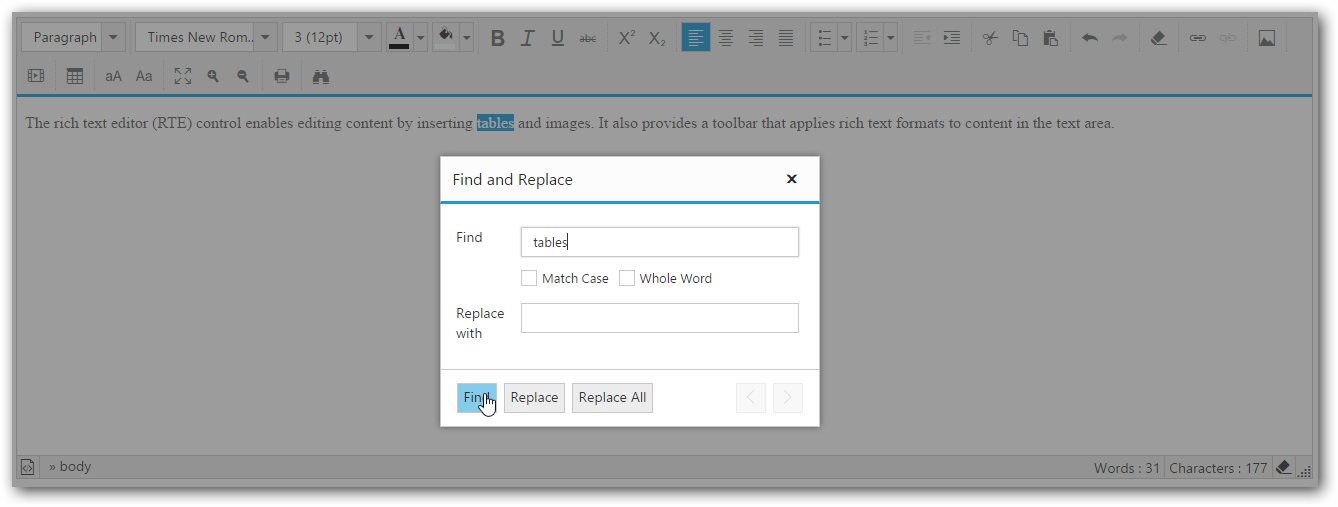
RTE provides find and replace support, which is used to search for a keyword in RTE content and replace the matched keyword with a specified text. In order to use it, we have to enable the find and replace item in the editor toolbar (or) Press CTRL+F key.
<textarea id="rteSample">
<p><b>Description:</b></p>
        <p>The Rich Text Editor (RTE) control is easy to render in the
        client side. Customers can easily edit the contents and get the HTML content for
        the displayed content. A rich text editor control provides users with a toolbar
        that helps them to apply rich text formats to the text entered in the text
        area. </p></textarea>

/// <reference path="tsfiles/jquery.d.ts" />
/// <reference path="tsfiles/ej.web.all.d.ts" />

module RTEComponent {
    $(function () {
        var sample = new ej.RTE($("#rteSample"),{
    tools: {edit: ["findAndReplace"]}
    });
  });
}-
Find and Replace action should happen in a following sequence:
Find => Replace (or) Replace All.
| Action | Descriptions |
|---|---|
| Find | Finds a keyword matches with the editor content.it consist of following filters. * Match Case. * Whole Word. |
| Replace | Replaces the particular selected match with the specified text. |
| ReplaceAll | Replaces the entire matches with the specified text. |
NOTE
Before performing the Replace/ReplaceAll action, we must do the find action to validate the match’s availability.