28 Sep 20173 minutes to read
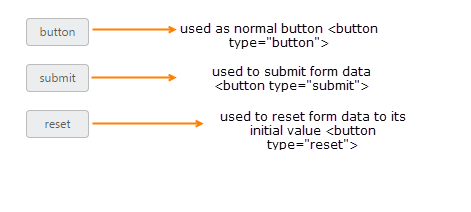
Button is used as normal click able button, submitting form data, resetting the form data to its initial value. According to the usage of button, you can render the button in three types. Using the type property, you can easily render the button in following types.
List of Button types
| Button Types |
Description |
|
button
|
The button is a click able button
|
|
submit
|
The button is a submit button (submits form-data)
|
|
reset
|
The button is a reset button (resets the form-data to its initial values)
|
</table>
The following steps explains you the details about rendering the Button with above mentioned button types.
In the HTML page, add the following button elements to configure Button widget.
HTML
<button id="buttonType_button">button</button>
<br />
<br />
<button id="buttonType_submit">submit</button>
<br />
<br />
<button id="buttonType_reset">reset</button>
JAVASCRIPT
/// <reference path="tsfiles/jquery.d.ts" />
/// <reference path="tsfiles/ej.web.all.d.ts" />

module ButtonComponent {
    $(function () {
        var basicButton = new ej.Button($("#buttonType_button"), {
            size: "mini",
            //this type specifies the normal click able button
            type: "button",
            showRoundedCorner: true
        });
       var basicButton1 = new ej.Button($("#buttonType_submit"), {
            size: "mini",
            //this button is used to submit form data
            type: "submit",
            showRoundedCorner: true
        });
       var basicButton2 = new ej.Button($("#buttonType_reset"), {
            size: "mini",
            //this button is used to reset the form data to its initial value
            type: "reset",
            showRoundedCorner: true
        });
    });
}
Execute the above code to render the following output.