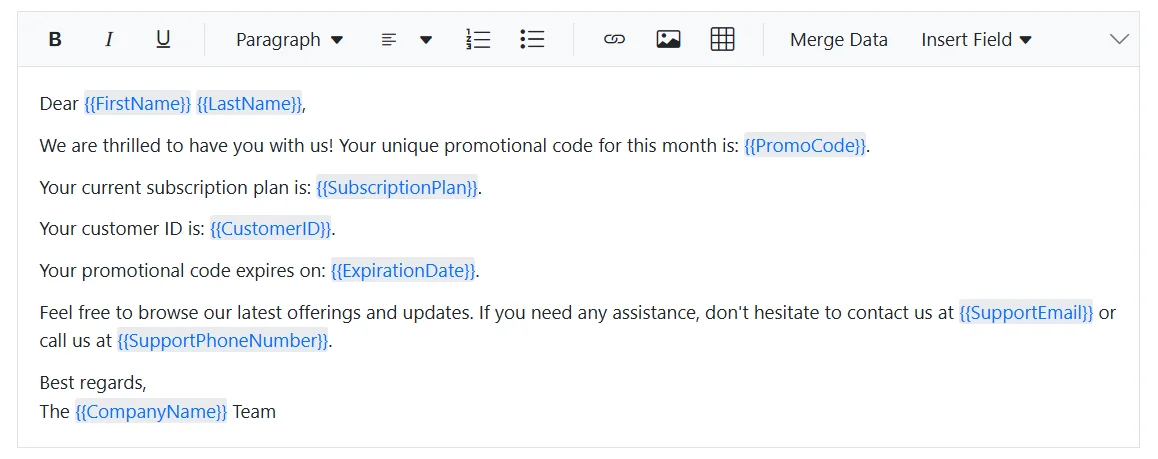
Mail Merge in Blazor Rich Text Editor
The Mail Merge feature in the Blazor Rich Text Editor enables developers to create dynamic, personalized documents by inserting placeholders (merge fields) into the editor content. These placeholders are later replaced with actual data at runtime, making it ideal for generating letters, invoices, and bulk communication templates.
Rendering custom toolbar items
Custom toolbar items are added using the RichTextEditorCustomToolbarItems tag. Each item is defined with:
- Name: Identifier for the toolbar item.
- Template: Razor markup for rendering UI elements such as buttons or dropdowns.
<RichTextEditorCustomToolbarItems>
    <RichTextEditorCustomToolbarItem Name="MergeData">
        <Template>
            <SfButton CssClass="@_buttonClass" OnClick="OnClickHandler" id="merge_data" tabindex="-1" aria-label="Merge User-specific Data" Disabled="@_sourceCodeEnabled">
                <div class="e-tbar-btn-text">Merge Data</div>
            </SfButton>
        </Template>
    </RichTextEditorCustomToolbarItem>
    <RichTextEditorCustomToolbarItem Name="InsertField">
        <Template>
            <SfDropDownButton CssClass="@_dropDownButtonClass" id="insertField" Items="@_items" aria-label="Insert Merge Field" Disabled="@_sourceCodeEnabled">
                <ChildContent>
                    <span style="display:inline-flex;">
                        <span class="e-rte-dropdown-btn-text">Insert Field</span>
                    </span>
                    <DropDownButtonEvents ItemSelected="OnItemSelect" OnOpen="OnDropDownOpen" Closed="OnDropDownClose"></DropDownButtonEvents>
                </ChildContent>
            </SfDropDownButton>
        </Template>
    </RichTextEditorCustomToolbarItem>
</RichTextEditorCustomToolbarItems>
Populating and using insert field dropdown
The Insert Field dropdown in the Blazor Rich Text Editor is designed to let users quickly insert predefined merge fields into the editor content. This dropdown is powered by the SfDropDownButton control, which uses its Items property to bind a collection of menu items.
How the items property works
- The
Itemsproperty accepts a list of DropDownMenuItem objects. - Each item in this list represents a merge field and contains a Text property, which is displayed in the dropdown.
- These text values correspond to the merge fields available for insertion.
<SfDropDownButton Items="@items">
    <ChildContent>Insert Field</ChildContent>
    <DropDownButtonEvents ItemSelected="OnItemSelect" />
</SfDropDownButton>
Here, @items refers to a list of DropDownMenuItem objects defined in the @code block.
private List<DropDownMenuItem> items = new List<DropDownMenuItem>
{
    new DropDownMenuItem { Text = "First Name" },
    new DropDownMenuItem { Text = "Last Name" },
    new DropDownMenuItem { Text = "Support Email" },
    new DropDownMenuItem { Text = "Company Name" },
    new DropDownMenuItem { Text = "Promo Code" },
    new DropDownMenuItem { Text = "Support Phone Number" },
    new DropDownMenuItem { Text = "Customer ID" },
    new DropDownMenuItem { Text = "Expiration Date" },
    new DropDownMenuItem { Text = "Subscription Plan" }
};
When the user selects an item from the dropdown:
- The
OnItemSelect()method retrieves the corresponding field value. - It constructs an HTML snippet with a non-editable span containing the placeholder.
- The snippet is inserted at the current cursor position using ExecuteCommandAsync.
public async Task OnItemSelect(MenuEventArgs args)
{
    if (args.Item.Text != null)
    {
        var value = _mergeData.FirstOrDefault(md => md.Text == args.Item.Text)?.Value;
        string htmlContent = $"<span contenteditable=\"false\" class=\"e-mention-chip\"><span>{{{{{value}}}}}</span></span>";
        var undoOption = new ExecuteCommandOption { Undo = true };
        await this._mailMergeEditor.ExecuteCommandAsync(CommandName.InsertHTML, htmlContent, undoOption);
        await this._mailMergeEditor.SaveSelectionAsync();
    }
}
Role of Mention control in mail merge
Mention control enhances usability by enabling inline field suggestions:
- Activated when the user types
{inside the editor. - Displays a popup list of available merge fields from DataSource.
- On selection, inserts the placeholder using the same logic as the dropdown.
<SfMention DataSource="_mergeData" TItem="MergeData" Target="#_mailMergeEditor" MentionChar="_mentionChar" AllowSpaces="true" PopupWidth='250px' PopupHeight='200px' @ref="mentionObj">
    <DisplayTemplate>
        <span>@((context as MergeData).Value)</span>
    </DisplayTemplate>
    <ChildContent>
        <MentionFieldSettings Text="Text"></MentionFieldSettings>
    </ChildContent>
</SfMention>
This feature is ideal for users who prefer keyboard-driven workflows.
Maintaining cursor position during dropdown operations
When the Insert Field dropdown opens, the editor loses its current selection because focus shifts to the popup. To ensure the placeholder is inserted at the correct position:
- SaveSelectionAsync() is called when the dropdown opens. It stores the current cursor position in the editor before focus changes.
- RestoreSelectionAsync() is called when the dropdown closes. It restores the saved cursor position so that the next insertion happens exactly where the user intended.
Why is this important? Without saving and restoring the selection, placeholders might be inserted at the wrong location (e.g., at the end of the content), breaking the user experience.
public async Task OnDropDownOpen()
{
    if (this._mailMergeEditor != null)
    {
        await this._mailMergeEditor.SaveSelectionAsync();
    }
}
public async Task OnDropDownClose()
{
    if (this._mailMergeEditor != null)
    {
        await this._mailMergeEditor.RestoreSelectionAsync();
    }
}
Handling editor mode changes with OnActionComplete
The OnActionComplete event fires after specific actions in the RichTextEditor, such as switching between Source Code and Preview modes.
- When entering Source Code mode, custom toolbar buttons (Merge Data, Insert Field) should be disabled because HTML editing is manual in this mode.
- When returning to Preview mode, these buttons are re-enabled for normal usage.
private void OnActionCompleteHandler(Syncfusion.Blazor.RichTextEditor.ActionCompleteEventArgs args)
{
    if (args.RequestType == "SourceCode")
    {
        this._buttonClass = "e-tbar-btn e-tbar-btn-text e-overlay";
        this._dropDownButtonClass = "e-rte-elements e-rte-dropdown-menu e-overlay";
        this._sourceCodeEnabled = true;
    }
    if (args.RequestType == "Preview")
    {
        this._buttonClass = "e-tbar-btn e-tbar-btn-text";
        this._dropDownButtonClass = "e-rte-elements e-rte-dropdown-menu";
        this._sourceCodeEnabled = false;
    }
}
Why is this important? This prevents users from triggering merge operations or inserting fields while editing raw HTML, which could cause unexpected behavior.
Executing merge data action
When the Merge Data button is clicked:
- The editor’s current content is retrieved by using Value property.
- A regex-based function scans for placeholders in the format .
- Each placeholder is replaced with its corresponding value from a dictionary.
public void OnClickHandler()
{
    if (this._mailMergeEditor != null)
    {
        var editorContent = this._mailMergeEditor.Value;
        var mergedContent = ReplacePlaceholders(editorContent, this._placeholderData);
        _rteValue = mergedContent;
    }
}

public static string ReplacePlaceholders(string template, Dictionary<string, string> data)
{
    return Regex.Replace(template, @"{{\s*(\w+)\s*}}", match =>
    {
        string key = match.Groups[1].Value.Trim();
        return data.TryGetValue(key, out var value) ? value : match.Value;
    });
}
This ensures all placeholders are dynamically replaced without manual editing.
@using Syncfusion.Blazor.RichTextEditor
@using Syncfusion.Blazor.Buttons
@using Syncfusion.Blazor.SplitButtons
@using Syncfusion.Blazor.DropDowns
@using System.Text.RegularExpressions

<div class="control-section">
    <div class="control-wrapper">
        <div class="">
            <SfRichTextEditor ID="_mailMergeEditor" @bind-Value="_rteValue" SaveInterval="1" @ref="_mailMergeEditor">
                <RichTextEditorToolbarSettings Items="@_tools">
                    <RichTextEditorEvents OnActionComplete="@OnActionCompleteHandler" />
                    <RichTextEditorCustomToolbarItems>
                        <RichTextEditorCustomToolbarItem Name="MergeData">
                            <Template>
                                <SfButton CssClass="@_buttonClass" OnClick="OnClickHandler" id="merge_data" tabindex="-1" aria-label="Merge User-specific Data" Disabled="@_sourceCodeEnabled">
                                    <div class="e-tbar-btn-text">Merge Data</div>
                                </SfButton>
                            </Template>
                        </RichTextEditorCustomToolbarItem>
                        <RichTextEditorCustomToolbarItem Name="InsertField">
                            <Template>
                                <SfDropDownButton CssClass="@_dropDownButtonClass" id="insertField" aria-label="Insert Merge Field" Disabled="@_sourceCodeEnabled">
                                    <ChildContent>
                                        <DropDownMenuItems>
                                            <DropDownMenuItem Text="First Name"></DropDownMenuItem>
                                            <DropDownMenuItem Text="Last Name"></DropDownMenuItem>
                                            <DropDownMenuItem Text="Support Email"></DropDownMenuItem>
                                            <DropDownMenuItem Text="Company Name"></DropDownMenuItem>
                                            <DropDownMenuItem Text="Promo Code"></DropDownMenuItem>
                                            <DropDownMenuItem Text="Support Phone Number"></DropDownMenuItem>
                                            <DropDownMenuItem Text="Customer ID"></DropDownMenuItem>
                                            <DropDownMenuItem Text="Expiration Date"></DropDownMenuItem>
                                            <DropDownMenuItem Text="Subscription Plan"></DropDownMenuItem>
                                        </DropDownMenuItems>
                                        <span style="display:inline-flex;">
                                            <span class="e-rte-dropdown-btn-text">Insert Field</span>
                                        </span>
                                        <DropDownButtonEvents ItemSelected="OnItemSelect" OnOpen="OnDropDownOpen" Closed="OnDropDownClose"></DropDownButtonEvents>
                                    </ChildContent>
                                </SfDropDownButton>
                            </Template>
                        </RichTextEditorCustomToolbarItem>
                    </RichTextEditorCustomToolbarItems>
                </RichTextEditorToolbarSettings>
            </SfRichTextEditor>
            <SfMention DataSource="_mergeData" TItem="MergeData" Target="#_mailMergeEditor" MentionChar="_mentionChar" AllowSpaces="true" PopupWidth='250px' PopupHeight='200px' @ref="mentionObj">
                <DisplayTemplate>
                    <span></span>
                </DisplayTemplate>
                <ChildContent>
                    <MentionFieldSettings Text="Text"></MentionFieldSettings>
                </ChildContent>
            </SfMention>
        </div>
    </div>
</div>
<style>
    .tailwind #insertField,
    .tailwind3 #insertField {
        font-size: 14px
    }

    .tailwind3 #merge_data,
    .tailwind3-dark #merge_data {
        font-weight: 400;
    }
</style>

@code {
    private SfMention<MergeData>? mentionObj;
    private SfRichTextEditor? _mailMergeEditor;
    private string _buttonClass = "e-tbar-btn e-tbar-btn-text";
    private string _dropDownButtonClass = "e-rte-elements e-rte-dropdown-menu";
    private bool _sourceCodeEnabled = false;
    private string _rteValue = @"<p>Dear <span contenteditable=""false"" class=""e-mention-chip""><span></span></span> <span contenteditable=""false"" class=""e-mention-chip""><span></span></span>,</p>
    <p>We are thrilled to have you with us! Your unique promotional code for this month is: <span contenteditable=""false"" class=""e-mention-chip""><span></span></span>.</p>
    <p>Your current subscription plan is: <span contenteditable=""false"" class=""e-mention-chip""><span></span></span>.</p>
    <p>Your customer ID is: <span contenteditable=""false"" class=""e-mention-chip""><span></span></span>.</p>
    <p>Your promotional code expires on: <span contenteditable=""false"" class=""e-mention-chip""><span></span></span>.</p>
    <p>Feel free to browse our latest offerings and updates. If you need any assistance, don't hesitate to contact us at <a href=""mailto:""><span contenteditable=""false"" class=""e-mention-chip""><span></span></span></a> or call us at <span contenteditable=""false"" class=""e-mention-chip""><span></span></span>.</p>
    <p>Best regards,<br>The <span contenteditable=""false"" class=""e-mention-chip""><span></span></span> Team</p>";
    private char _mentionChar = '{';
    public class MergeData
    {
        public string? Text { get; set; }
        public string? Value { get; set; }
    }
    private List<MergeData> _mergeData = new List<MergeData>
    {
        new MergeData { Text = "First Name", Value = "FirstName" },
        new MergeData { Text = "Last Name", Value = "LastName" },
        new MergeData { Text = "Support Email", Value = "SupportEmail" },
        new MergeData { Text = "Company Name", Value = "CompanyName" },
        new MergeData { Text = "Promo Code", Value = "PromoCode" },
        new MergeData { Text = "Support Phone Number", Value = "SupportPhoneNumber" },
        new MergeData { Text = "Customer ID", Value = "CustomerID" },
        new MergeData { Text = "Expiration Date", Value = "ExpirationDate" },
        new MergeData { Text = "Subscription Plan", Value = "SubscriptionPlan" }
    };
    private List<ToolbarItemModel> _tools = new List<ToolbarItemModel>()
    {
        new ToolbarItemModel() { Command = ToolbarCommand.Bold },
        new ToolbarItemModel() { Command = ToolbarCommand.Italic },
        new ToolbarItemModel() { Command = ToolbarCommand.Underline },
        new ToolbarItemModel() { Command = ToolbarCommand.Separator },
        new ToolbarItemModel() { Command = ToolbarCommand.Formats },
        new ToolbarItemModel() { Command = ToolbarCommand.Alignments },
        new ToolbarItemModel() { Command = ToolbarCommand.OrderedList },
        new ToolbarItemModel() { Command = ToolbarCommand.UnorderedList },
        new ToolbarItemModel() { Command = ToolbarCommand.Separator },
        new ToolbarItemModel() { Command = ToolbarCommand.CreateLink },
        new ToolbarItemModel() { Command = ToolbarCommand.Image },
        new ToolbarItemModel() { Command = ToolbarCommand.CreateTable },
        new ToolbarItemModel() { Command = ToolbarCommand.Separator },
        new ToolbarItemModel() { Name = "MergeData", TooltipText = "Merge Data" },
        new ToolbarItemModel() { Name = "InsertField", TooltipText = "Insert Field" },
        new ToolbarItemModel() { Command = ToolbarCommand.SourceCode },
        new ToolbarItemModel() { Command = ToolbarCommand.Separator },
        new ToolbarItemModel() { Command = ToolbarCommand.Undo },
        new ToolbarItemModel() { Command = ToolbarCommand.Redo }
    };
    private Dictionary<string, string> _placeholderData = new Dictionary<string, string>
    {
        { "FirstName", "John" },
        { "LastName", "Doe" },
        { "PromoCode", "ABC123" },
        { "SubscriptionPlan", "Premium" },
        { "CustomerID", "123456" },
        { "ExpirationDate", "2024-12-31" },
        { "SupportEmail", "[email protected]" },
        { "SupportPhoneNumber", "+1-800-555-5555" },
        { "CompanyName", "Example Inc." }
    };
    public void OnClickHandler()
    {
        if (this._mailMergeEditor != null)
        {
            var editorContent = this._mailMergeEditor.Value;
            var mergedContent = ReplacePlaceholders(editorContent ?? string.Empty, this._placeholderData);
            _rteValue = mergedContent;
        }
    }
    public async Task OnDropDownOpen()
    {
        if (this._mailMergeEditor != null)
        {
            await this._mailMergeEditor.SaveSelectionAsync();
        }
    }
    public async Task OnDropDownClose()
    {
        if (this._mailMergeEditor != null)
        {
            await this._mailMergeEditor.RestoreSelectionAsync();
        }
    }
    public async Task OnItemSelect(MenuEventArgs args)
    {
        if (args.Item.Text != null)
        {
            var value = _mergeData.FirstOrDefault(md => md.Text == args.Item.Text)?.Value;
            string htmlContent = $"<span contenteditable=\"false\" class=\"e-mention-chip\"><span>}}}</span></span> ";
            var undoOption = new ExecuteCommandOption { Undo = true };
            if (this._mailMergeEditor != null)
            {
                await this._mailMergeEditor.ExecuteCommandAsync(CommandName.InsertHTML, htmlContent, undoOption);
                await this._mailMergeEditor.SaveSelectionAsync();
            }
        }
    }
    private void OnActionCompleteHandler(Syncfusion.Blazor.RichTextEditor.ActionCompleteEventArgs args)
    {
        if (args.RequestType == "SourceCode")
        {
            this._buttonClass = "e-tbar-btn e-tbar-btn-text e-overlay";
            this._dropDownButtonClass = "e-rte-elements e-rte-dropdown-menu e-overlay";
            this._sourceCodeEnabled = true;
        }
        if (args.RequestType == "Preview")
        {
            this._buttonClass = "e-tbar-btn e-tbar-btn-text";
            this._dropDownButtonClass = "e-rte-elements e-rte-dropdown-menu";
            this._sourceCodeEnabled = false;
        }
    }
    public static string ReplacePlaceholders(string template, Dictionary<string, string> data)
    {
        return Regex.Replace(template, @"", match =>
        {
            string key = match.Groups[1].Value.Trim();
            return data.TryGetValue(key, out var value) ? value : match.Value;
        });
    }
}