Table Blocks in Blazor Block Editor
The Block Editor allows you to render structured data in rows and columns by setting the block’s BlockType property to Table. You can customize the table layout, header, row numbers, and define columns and rows using the Properties property. In addition, you can format cells with keyboard shortcuts, use slash commands inside cells to add blocks, and manage rows and columns quickly with dot and plus buttons.
Configure table block
For Table blocks, you can configure layout and structure using the Properties property. This property supports the following options:
| Property | Description | Default Value |
|---|---|---|
| Width | Specifies the display width of the table. | 100% |
| EnableHeader | Specifies whether to enable a header row for the table. When true, the first row becomes a header row. |
true |
| EnableRowNumbers | Specifies whether to enable row numbers for the table. | true |
| ReadOnly | Specifies whether to render the table in read-only mode, disabling edits. | false |
| Columns | Defines the columns of the table, including their types and headers. | [] |
| Rows | Defines the rows of the table, each containing cells tied to columns. | [] |
The following example demonstrates how to pre-configure a Table block in the editor with columns and rows:
@using Syncfusion.Blazor.BlockEditor

<SfBlockEditor Blocks="@BlockData"></SfBlockEditor>

@code {
    private List<BlockModel> BlockData = new()
    {
        new BlockModel
        {
            BlockType = BlockType.Table,
            Properties = new TableBlockSettings
            {
                Columns =
                {
                    new TableColumnModel
                    {
                        ID = "col1"
                    },
                    new TableColumnModel
                    {
                        ID = "col2"
                    }
                },
                Rows =
                {
                    new TableRowModel
                    {
                        ID = "row1",
                        Cells =
                        {
                            new TableCellModel
                            {
                                ColumnId = "col1",
                                Blocks =
                                {
                                    new BlockModel
                                    {
                                        ID = "c1_p",
                                        BlockType = BlockType.Paragraph,
                                        Content = new() {new ContentModel{ContentType = ContentType.Text, Content = "Cell1"}}
                                    }
                                }
                            },
                            new TableCellModel
                            {
                                ColumnId = "col2",
                                Blocks =
                                {
                                    new BlockModel
                                    {
                                        ID = "c2_p",
                                        BlockType = BlockType.Paragraph,
                                        Content = new() {new ContentModel{ContentType = ContentType.Text, Content = "Cell2"}}
                                    }
                                }
                            }
                        }
                    },
                    new TableRowModel
                    {
                        ID = "row2",
                        Cells =
                        {
                            new TableCellModel
                            {
                                ColumnId = "col1",
                                Blocks =
                                {
                                    new BlockModel
                                    {
                                        ID = "c3_p",
                                        BlockType = BlockType.Paragraph,
                                        Content = new() {new ContentModel{ContentType = ContentType.Text, Content = "Cell3"}}
                                    }
                                }
                            },
                            new TableCellModel
                            {
                                ColumnId = "col2",
                                Blocks =
                                {
                                    new BlockModel
                                    {
                                        ID = "c4_p",
                                        BlockType = BlockType.Paragraph,
                                        Content = new() {new ContentModel{ContentType = ContentType.Text, Content = "Cell4"}}
                                    }
                                }
                            }
                        }
                    }
                }
            }
        },
        new BlockModel
        {
            BlockType = BlockType.Paragraph,
            Content = new() {new ContentModel{ContentType = ContentType.Text, Content = "This is a paragraph block example."}}
        }
    };
}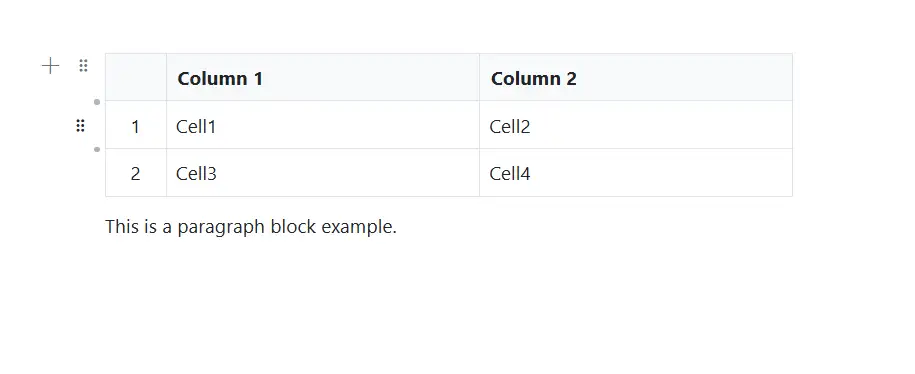
Table resizing
The Block Editor supports table column resizing. You can drag column borders to adjust column width dynamically, or auto‑fit based on content. Only columns can be resized (rows have fixed heights), and if resizing exceeds the layout width, a scrollbar will appear to maintain structure and layout integrity.
Table cell content
You can add various block types inside table cells using the Blocks collection within each TableCellModel. Supported content includes paragraphs, text formatting, links, and inline content. Use slash commands inside cells to insert additional blocks.
Table multiple row column selection and deletion
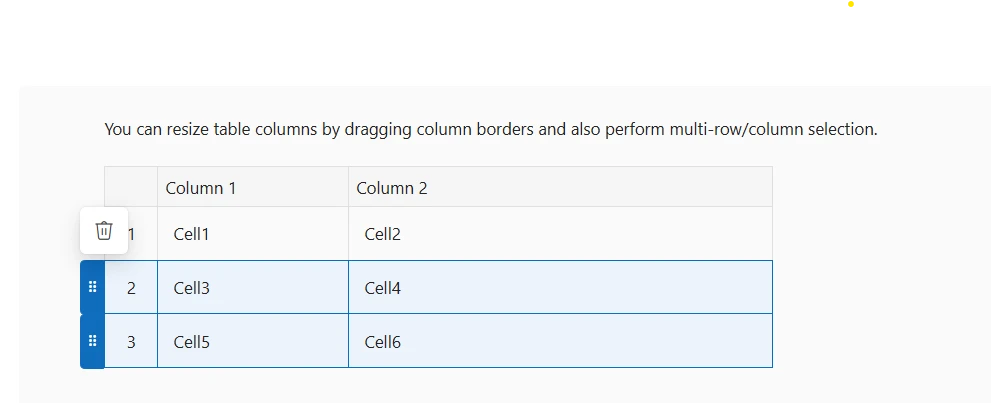
The Block Editor supports selecting full rows, single or multiple using the mouse or with Shift + arrow key actions, which activate grippers for easy control. Shift-based multiple selection is also supported: select a row, hold Shift, and click a non-adjacent row (e.g., the third), and all rows in between are included. Selected rows or columns can then be deleted through the Delete popup, and full table deletion is also supported for complete removal.
This sample demonstrates the Table block’s resize scenario and multi row/column selection in the Block Editor:
@using Syncfusion.Blazor.BlockEditor

<SfBlockEditor Blocks="@BlockData"></SfBlockEditor>

@code {
    private List<BlockModel> BlockData = new()
    {
        new BlockModel
        {
            BlockType = BlockType.Paragraph,
            Content = new() {new ContentModel{ContentType = ContentType.Text, Content = "You can resize table columns by dragging column borders and also perform multi-row/column selection."}}
        },
        new BlockModel
        {
            BlockType = BlockType.Table,
            Properties = new TableBlockSettings
            {
                Columns =
                {
                    new TableColumnModel
                    {
                        ID = "col1"
                    },
                    new TableColumnModel
                    {
                        ID = "col2"
                    }
                },
                Rows =
                {
                    new TableRowModel
                    {
                        ID = "row1",
                        Cells =
                        {
                            new TableCellModel
                            {
                                ColumnId = "col1",
                                Blocks =
                                {
                                    new BlockModel
                                    {
                                        ID = "c1_p",
                                        BlockType = BlockType.Paragraph,
                                        Content = new() {new ContentModel{ContentType = ContentType.Text, Content = "Cell1"}}
                                    }
                                }
                            },
                            new TableCellModel
                            {
                                ColumnId = "col2",
                                Blocks =
                                {
                                    new BlockModel
                                    {
                                        ID = "c2_p",
                                        BlockType = BlockType.Paragraph,
                                        Content = new() {new ContentModel{ContentType = ContentType.Text, Content = "Cell2"}}
                                    }
                                }
                            }
                        }
                    },
                    new TableRowModel
                    {
                        ID = "row2",
                        Cells =
                        {
                            new TableCellModel
                            {
                                ColumnId = "col1",
                                Blocks =
                                {
                                    new BlockModel
                                    {
                                        ID = "c3_p",
                                        BlockType = BlockType.Paragraph,
                                        Content = new() {new ContentModel{ContentType = ContentType.Text, Content = "Cell3"}}
                                    }
                                }
                            },
                            new TableCellModel
                            {
                                ColumnId = "col2",
                                Blocks =
                                {
                                    new BlockModel
                                    {
                                        ID = "c4_p",
                                        BlockType = BlockType.Paragraph,
                                        Content = new() {new ContentModel{ContentType = ContentType.Text, Content = "Cell4"}}
                                    }
                                }
                            }
                        }
                    },
                    new TableRowModel
                    {
                        ID = "row3",
                        Cells =
                        {
                            new TableCellModel
                            {
                                ColumnId = "col1",
                                Blocks =
                                {
                                    new BlockModel
                                    {
                                        BlockType = BlockType.Paragraph,
                                        Content = new() {new ContentModel{ContentType = ContentType.Text, Content = "Cell5"}}
                                    }
                                }
                            },
                            new TableCellModel
                            {
                                ColumnId = "col2",
                                Blocks =
                                {
                                    new BlockModel
                                    {
                                        BlockType = BlockType.Paragraph,
                                        Content = new() {new ContentModel{ContentType = ContentType.Text, Content = "Cell6"}}
                                    }
                                }
                            }
                        }
                    }
                }
            }
        }
    };
}