Globalization in ASP.NET Core Block Editor
The Block Editor control supports localization, right-to-left (RTL) text direction, and culture-specific formatting to provide a global user experience.
Localization
The Block Editor can be localized to any culture by defining the text in the corresponding culture. The default locale is en (English). The following table shows the default text of the Block Editor in the en culture, which can be overridden for other locales.
| KEY | Text |
|---|---|
paragraph |
Write something or ‘/’ for commands. |
heading1 |
Heading 1 |
heading2 |
Heading 2 |
heading3 |
Heading 3 |
heading4 |
Heading 4 |
collapsibleParagraph |
Collapsible Paragraph |
collapsibleHeading1 |
Collapsible Heading 1 |
collapsibleHeading2 |
Collapsible Heading 2 |
collapsibleHeading3 |
Collapsible Heading 3 |
collapsibleHeading4 |
Collapsible Heading 4 |
bulletList |
Add item |
numberedList |
Add item |
checklist |
Todo |
callout |
Write a callout |
addIconTooltip |
Click to insert below |
dragIconTooltipActionMenu |
Click to open |
dragIconTooltip |
(Hold to drag) |
insertLink |
Insert Link |
linkText |
Text |
linkTextPlaceholder |
Link text |
linkUrl |
URL |
linkUrlPlaceholder |
https://example.com |
linkTitle |
Title |
linkTitlePlaceholder |
Link title |
linkOpenInNewWindow |
Open in new window |
linkInsert |
Insert |
linkRemove |
Remove |
linkCancel |
Cancel |
codeCopyTooltip |
Copy code |
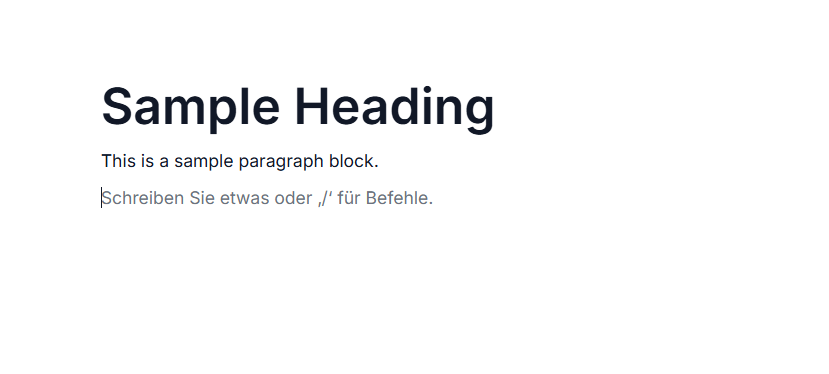
The below example shows adding the German culture locale(de-DE)
@using Syncfusion.EJ2.BlockEditor

<div id='blockeditor-container'>
    <ejs-blockeditor id="block-editor" locale="de" blocks="@ViewBag.BlocksData"></ejs-blockeditor>
</div>

<style>
    #blockeditor-container {
        margin: 20px auto;
    }
</style>
using Syncfusion.EJ2.BlockEditor;
public List<BlockModel> BlocksData { get; set; } = new List<BlockModel>();
public class BlockModel
{
public string id { get; set; }
public string blockType { get; set; }
public object properties { get; set; }
public List<object> content { get; set; }
}
public ActionResult Locale()
{
BlocksData.Add(new BlockModel() {
id = "block-1",
blockType = "Heading",
properties = new { level = 1},
content = new List<object>()
{
new{
contentType = "Text",
content = "Sample Heading"
}
}
});
BlocksData.Add(new BlockModel() {
id = "block-2",
blockType = "Paragraph",
content = new List<object>()
{
new {
contentType = "Text",
content = "This is a sample paragraph block."
}
}
});
BlocksData.Add(new BlockModel()
{
id = "block-3",
blockType = "Paragraph"
});
ViewBag.BlocksData = BlocksData;
return View();
}
RTL
RTL switches the text direction and layout of the Block Editor control from right to left by setting the EnableRtl property to true. When enabled, icons, layouts, and text alignment are automatically mirrored to support RTL languages such as Arabic, Hebrew, and Persian.
@using Syncfusion.EJ2.BlockEditor

<div id='blockeditor-container'>
    <ejs-blockeditor id="block-editor" enableRtl="true" blocks="@ViewBag.BlocksData"></ejs-blockeditor>
</div>

<style>
    #blockeditor-container {
        margin: 20px auto;
    }
</style>
using Syncfusion.EJ2.BlockEditor;
public List<BlockModel> BlocksData { get; set; } = new List<BlockModel>();
public class BlockModel
{
public string id { get; set; }
public string blockType { get; set; }
public object properties { get; set; }
public List<object> content { get; set; }
}
public ActionResult Rtl()
{
BlocksData.Add(new BlockModel() {
id = "block-1",
blockType = "Heading",
properties = new { level = 1},
content = new List<object>()
{
new{
contentType = "Text",
content = "Sample Heading"
}
}
});
BlocksData.Add(new BlockModel() {
id = "block-2",
blockType = "Paragraph",
content = new List<object>()
{
new {
contentType = "Text",
content = "This is a sample paragraph block."
}
}
});
BlocksData.Add(new BlockModel()
{
id = "block-3",
blockType = "Paragraph"
});
ViewBag.BlocksData = BlocksData;
return View();
}