Paste Cleanup in Angular Rich Text Editor
The Rich Text Editor simplifies the conversion of Microsoft Word content to HTML format, preserving formatting and styles. The pasteCleanup settings property (see pasteCleanupSettingsModel) allows you to control the formatting and styles when pasting content into the editor. The following settings are available to clean up the content:
| API | Description | Type |
|---|---|---|
prompt |
Displays a dialog box when content is pasted, allowing users to choose how the content should be inserted—either as plain text, with formatting, or cleaned HTML. | boolean |
plainText |
Pastes the content as plain text. | boolean |
keepFormat |
Retains the original formatting of the pasted content, including styles, fonts, and structure. | boolean |
deniedTags |
Specifies a list of HTML tags to be removed from the pasted content, such as <script>, <iframe>, or <style>. Helps eliminate unwanted or unsafe elements. |
string[] |
deniedAttrs |
Filters out the specified attributes from the pasted content. | string[] |
allowedStyleProps |
Specifies the list of CSS style properties allowed in the pasted content. See the full list of allowed properties in the documentation. | string[] |
Rich Text Editor features are segregated into individual feature-wise modules. To enable paste cleanup, include
PasteCleanupServicein the component’sprovidersarray.
Paste options in the prompt dialog
When prompt is set to true, pasting the content in the editor will open a dialog box that contains three options Keep, Clean, and Plain Text as radio buttons:
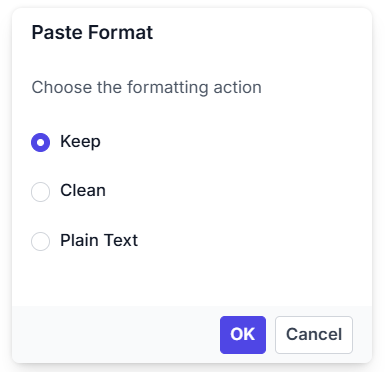
-
Keep: Maintains the same format as the copied content. -
Clean: Clears all style formats from the copied content. -
Plain Text: Pastes the copied content as plain text without any formatting or style (including the removal of all tags).
When
promptis set totrue, the API propertiesplainTextandkeepFormatare not considered when pasting the content.
Plain text pasting
Setting plainText to true converts the copied content to plain text by removing all HTML tags and styles. Only the plain text is pasted into the editor.
When
plainTextis set totrue, setprompttofalse. ThekeepFormatproperty is not considered in this mode.
Keep format
When keepFormat is set to true, the pasted content retains its original formatting, including styles, fonts, and structure. However, the formatting is still subject to filtering based on the allowedStyleProps, deniedTags, and deniedAttrs settings:
- Only the style properties listed in
allowedStylePropswill be preserved. - Any HTML tags listed in
deniedTagswill be removed. - Any attributes listed in
deniedAttrswill be stripped from the pasted content.
This ensures that while the formatting is retained, it remains clean, safe, and consistent with your application’s styling rules.
When
keepFormatis set totrue, set bothpromptandplainTexttofalse.
Clean formatting
When prompt, plainText, and keepFormat are all set to false, the Rich Text Editor performs clean format paste cleanup. In this mode, all inline styles from the pasted content are removed, eliminating any custom or external styling and ensuring a consistent appearance within the editor.
Despite the removal of styling, essential structural HTML tags such as <p>, <ul>, and <table> are preserved. This maintains the original layout and semantic integrity of the content. However, the formatting is still subject to filtering based on the deniedTags and deniedAttrs settings:
-
deniedTags: Tags listed here will still be removed from the pasted content. -
deniedAttrs: Attributes listed here will also be stripped from the pasted content.
The
allowedStylePropssetting only applies ifkeepFormatis set totrue.
Denied tags
When deniedTags values are set, the specified tags are removed from the pasted content. For example:
-
'a': removes all anchor tags. -
'a[!href]': removes anchor tags without thehrefattribute. -
'a[href, target]': removes anchor tags with bothhrefandtargetattributes.
This setting is ignored when
plainTextis set totrue. It only works when eitherkeepFormatis set totrue, or whenprompt,plainText, andkeepFormatare all set tofalse, which triggers clean format behavior.
Denied attributes
When deniedAttrs values are set, the specified attributes are removed from all tags in the pasted content. For example:
'id', 'title': removes id and title attributes from all tags.
This setting is ignored when
plainTextis set totrue.
It only works when eitherkeepFormatis set totrue, or whenprompt,plainText, andkeepFormatare all set tofalse, which triggers clean format behavior.
Allowing specific style properties
By default, a predefined set of basic style properties is allowed when content is pasted into the Rich Text Editor.
When you configure the allowedStyleProps setting, only the styles that match the specified list of allowed properties are retained. All other style properties are removed from the pasted content.
You can find the full list of allowed style properties in the official Syncfusion documentation.
This setting works only when
keepFormatis set totrue. IfkeepFormatisfalseorplainTextistrue, style filtering viaallowedStylePropsis not applied.
For example:
allowedStyleProps: ['color', 'margin']: this allows only the style properties color and margin in each pasted element.
In the following example, the paste cleanup related settings are explained with its module configuration
import { Component } from '@angular/core';
import { RichTextEditorModule, ToolbarService, HtmlEditorService, QuickToolbarService, ImageService, LinkService, TableService, PasteCleanupService, ToolbarSettingsModel, PasteCleanupSettingsModel } from '@syncfusion/ej2-angular-richtexteditor';

@Component({
    imports: [
        RichTextEditorModule
    ],
    standalone: true,
    selector: 'app-root',
    template: `<ejs-richtexteditor id='editor' [toolbarSettings]='tools' [pasteCleanupSettings]="pasteCleanupSettings" [(value)]='value'></ejs-richtexteditor>`,
    providers: [ToolbarService, HtmlEditorService, QuickToolbarService, ImageService, LinkService, TableService, PasteCleanupService]
})

export class AppComponent {
    public value: string = "<p>RichTextEditor is a WYSIWYG editing control which will reduce the effort for users while trying to express their formatting word content as HTML or Markdown format.</p><p><b>Paste Cleanup properties:</b></p><ul><li><p>prompt - specifies whether to enable the prompt when pasting in RichTextEditor.</p></li><li><p>plainText - specifies whether to paste as plain text or not in RichTextEditor.</p></li><li><p>keepFormat- specifies whether to keep or remove the format when pasting in RichTextEditor.</p></li><li><p>deniedTags - specifies the tags to restrict when pasting in RichTextEditor.</p></li><li><p>deniedAttributes - specifies the attributes to restrict when pasting in RichTextEditor.</p></li><li><p>allowedStyleProperties - specifies the allowed style properties when pasting in RichTextEditor.</p></li></ul>";
    public tools: ToolbarSettingsModel = {
        type: 'MultiRow' as ToolbarSettingsModel['type'],
        items: ['Bold', 'Italic', 'Underline', 'StrikeThrough',
            'FontName', 'FontSize', 'FontColor', 'BackgroundColor',
            'LowerCase', 'UpperCase', '|',
            'Formats', 'Alignments', 'OrderedList', 'UnorderedList',
            'Outdent', 'Indent', '|',
            'CreateLink', 'Image', '|', 'ClearFormat', 'Print',
            'SourceCode', 'FullScreen', '|', 'Undo', 'Redo']
    };
    public pasteCleanupSettings: PasteCleanupSettingsModel = {
        prompt: true,
        plainText: false,
        keepFormat: false,
        deniedTags: ['a'],
        deniedAttrs: ['class', 'title', 'id'],
        allowedStyleProps: ['color', 'margin', 'font-size']
    };
}
import { bootstrapApplication } from '@angular/platform-browser';
import { AppComponent } from './app.component';
bootstrapApplication(AppComponent).catch((err) => console.error(err));Get pasted content
You can get the pasted text as HTML using the afterPasteCleanup event.
import { Component } from '@angular/core';
import { RichTextEditorModule, ToolbarService, HtmlEditorService, QuickToolbarService, PasteCleanupService} from '@syncfusion/ej2-angular-richtexteditor';
@Component({
imports: [
RichTextEditorModule
],
standalone: true,
selector: 'app-root',
template: `<ejs-richtexteditor id='editor' [value]='value' (afterPasteCleanup)='onAfterPasteCleanup($event)'></ejs-richtexteditor>`,
providers: [ToolbarService, HtmlEditorService, QuickToolbarService, PasteCleanupService]
})
export class AppComponent {
public value: string = "<p>The Rich Text Editor component is a WYSIWYG (\"what you see is what you get\") editor that provides the best user experience to create and update the content. Users can format their content using standard toolbar commands.</p> <p><b>Key features:</b></p> <ul><li>Provides <IFRAME> and <DIV> modes</li><li>Capable of handling markdown editing.</li><li>Contains a modular library to load the necessary functionality on demand.</li><li>Provides a fully customizable toolbar.</li><li>Provides HTML view to edit the source directly for developers.</li><li>Supports third-party library integration.</li><li>Allows preview of modified content before saving it.</li><li>Handles images, hyperlinks, videos, uploads, etc.</li><li>Contains undo/redo manager.</li><li>Creates bulleted and numbered lists.</li></ul>";
public onAfterPasteCleanup(args: any): void {
// Here you can get the pasted Html string using args.value
console.log(args.value);
}
}import { bootstrapApplication } from '@angular/platform-browser';
import { AppComponent } from './app.component';
bootstrapApplication(AppComponent).catch((err) => console.error(err));Customize pasted content
The Rich Text Editor lets you customize copied content prior to pasting it into the editor. By configuring the afterPasteCleanup event, you can precisely control formatting and content modifications after the paste action is executed.
In the following example, the afterPasteCleanup event is configured to remove images from the copied content. To understand this feature better, try pasting content that includes an image into the editor.
import { Component } from '@angular/core';
import { RichTextEditorModule, ToolbarService, HtmlEditorService, QuickToolbarService, ImageService, LinkService, TableService, PasteCleanupService, ToolbarSettingsModel, PasteCleanupSettingsModel, PasteCleanupArgs } from '@syncfusion/ej2-angular-richtexteditor';
import { detach } from '@syncfusion/ej2-base';

@Component({
    imports: [
        RichTextEditorModule
    ],
    standalone: true,
    selector: 'app-root',
    template: `<ejs-richtexteditor id='editor' [toolbarSettings]='tools' [pasteCleanupSettings]="pasteCleanupSettings" [(value)]='value' (afterPasteCleanup)='afterPasteCleanupHandler($event)'></ejs-richtexteditor>`,
    providers: [ToolbarService, HtmlEditorService, QuickToolbarService, ImageService, LinkService, TableService, PasteCleanupService]
})

export class AppComponent {
    public value: string = "<p>RichTextEditor is a WYSIWYG editing control which will reduce the effort for users while trying to express their formatting word content as HTML or Markdown format.</p><p><b>Paste Cleanup properties:</b></p><ul><li><p>prompt - specifies whether to enable the prompt when pasting in RichTextEditor.</p></li><li><p>plainText - specifies whether to paste as plain text or not in RichTextEditor.</p></li><li><p>keepFormat- specifies whether to keep or remove the format when pasting in RichTextEditor.</p></li><li><p>deniedTags - specifies the tags to restrict when pasting in RichTextEditor.</p></li><li><p>deniedAttributes - specifies the attributes to restrict when pasting in RichTextEditor.</p></li><li><p>allowedStyleProperties - specifies the allowed style properties when pasting in RichTextEditor.</p></li></ul>";
    public tools: ToolbarSettingsModel = {
        type: 'MultiRow' as ToolbarSettingsModel['type'],
        items: ['Bold', 'Italic', 'Underline', 'StrikeThrough',
            'FontName', 'FontSize', 'FontColor', 'BackgroundColor',
            'LowerCase', 'UpperCase', '|',
            'Formats', 'Alignments', 'Blockquote', 'OrderedList', 'UnorderedList',
            'Outdent', 'Indent', '|',
            'CreateLink', 'Image', '|', 'ClearFormat', 'Print',
            'SourceCode', 'FullScreen', '|', 'Undo', 'Redo']
    };
    public pasteCleanupSettings: PasteCleanupSettingsModel = {
        prompt: true,
        plainText: false,
        keepFormat: false,
        deniedTags: ['a'],
        deniedAttrs: ['class', 'title', 'id'],
        allowedStyleProps: ['color', 'margin', 'font-size']
    };
    public afterPasteCleanupHandler(args: PasteCleanupArgs) {
        const divElement: HTMLElement = document.createElement('div');
        divElement.innerHTML = args.value;
        const pasteCleanupImage: HTMLElement = divElement.querySelector('.pasteContent_Img') as HTMLElement;
        if (pasteCleanupImage) {
            detach(pasteCleanupImage);
            args.value = divElement.innerHTML;
        }
    }
}
import { bootstrapApplication } from '@angular/platform-browser';
import { AppComponent } from './app.component';
bootstrapApplication(AppComponent).catch((err) => console.error(err));