Customization in .NET MAUI Smart Data Grid
18 Nov 20187 minutes to read
The SfSmartDataGrid provides options to customize its behavior and features, including predefined suggestions, initial prompts, enabling or disabling smart actions, and programmatic control of the AssistView.
Suggestions
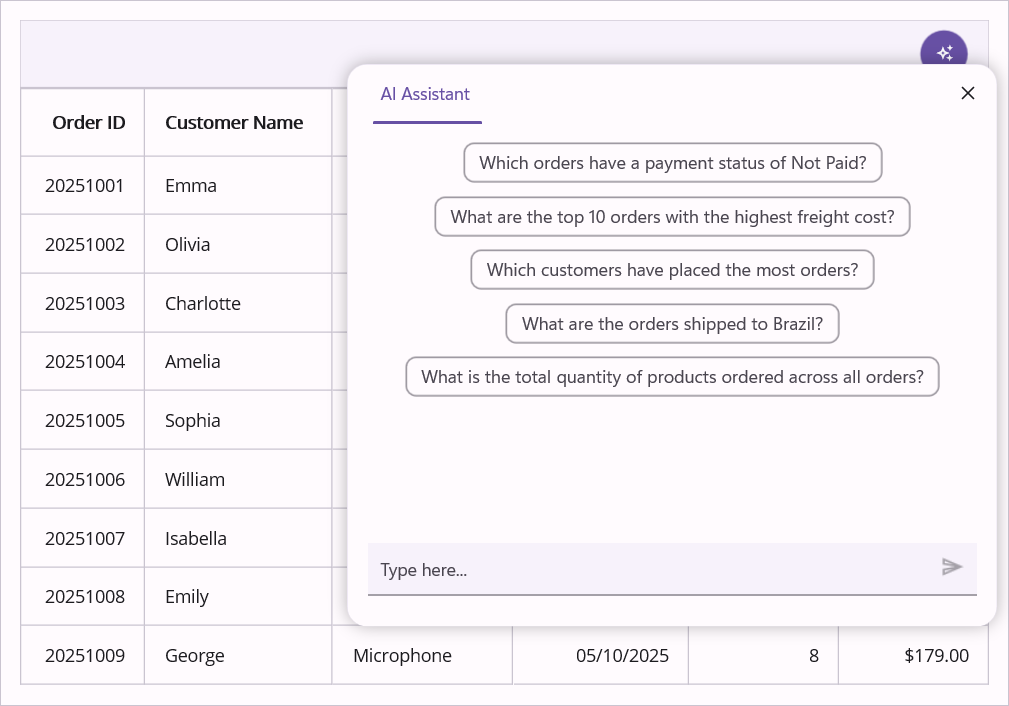
The SuggestedPrompts property in DataGridAssistViewSettings provides a predefined list of suggestions displayed in the AssistView banner. These quick-access suggestions help users discover common operations without typing commands manually.
<smart:SfSmartDataGrid ItemsSource="{Binding OrderInfoCollection}">
        <smart:SfSmartDataGrid.AssistViewSettings>
            <smart:DataGridAssistViewSettings SuggestedPrompts="{Binding Suggestions}"/>
        </smart:SfSmartDataGrid.AssistViewSettings>
    </smart:SfSmartDataGrid>
public class OrderInfoRepository
{
public ObservableCollection<ISuggestion> Suggestions { get; set; } = new ObservableCollection<ISuggestion>
{
new AssistSuggestion() { Text = "Which orders have a payment status of Not Paid?" },
new AssistSuggestion() { Text = "What are the top 10 orders with the highest freight cost?" },
new AssistSuggestion() { Text = "Which customers have placed the most orders?" },
new AssistSuggestion() { Text = "What are the orders shipped to Brazil?" },
new AssistSuggestion() { Text = "What is the total quantity of products ordered across all orders?" },
};
}
Prompt
The Prompt property in DataGridAssistViewSettings defines an initial command automatically executed when the AssistView opens for the first time. The prompt uses the same syntax as user-entered commands (see AI-Powered Features for supported commands).
Note: The prompt is only executed once on first open. Invalid or unsupported prompts are silently ignored with no error notification.
<smart:SfSmartDataGrid ItemsSource="{Binding OrderInfoCollection}">
        <smart:SfSmartDataGrid.AssistViewSettings>
            <smart:DataGridAssistViewSettings Prompt="Sort by OrderDate ascending" />
        </smart:SfSmartDataGrid.AssistViewSettings>
</smart:SfSmartDataGrid>SmartGrid.AssistViewSettings.Prompt = "Sort by OrderDate ascending";EnableSmartActions
The EnableSmartActions property in DataGridAssistViewSettings controls whether AI commands modify the grid. By default, this property is set to true, enabling automatic execution of sorting, grouping, filtering, and highlighting operations. Set to false to prevent all grid modifications (useful for preview or read-only modes).
<smart:SfSmartDataGrid ItemsSource="{Binding OrderInfoCollection}">
        <smart:SfSmartDataGrid.AssistViewSettings>
            <smart:DataGridAssistViewSettings EnableSmartActions="True" />
        </smart:SfSmartDataGrid.AssistViewSettings>
</smart:SfSmartDataGrid>SmartGrid.AssistViewSettings.EnableSmartActions = true;Programmatic AssistView Control
Use the ShowAssistView and CloseAssistView methods on the SfSmartDataGrid instance to display or hide the AssistView popup programmatically. By default, ShowAssistView() opens the popup anchored to the default AssistView button. Optionally pass a View object to anchor the popup to a different UI element (e.g., a custom button).
Return Types:
-
ShowAssistView():void -
CloseAssistView():void
// Show AssistView popup anchored to the default assist button
SmartGrid.ShowAssistView();

// Show AssistView popup anchored to a specific view (e.g., a button)
Button customButton = new Button { Text = "Ask AI" };
SmartGrid.ShowAssistView(customButton);

// Close the AssistView popup
SmartGrid.CloseAssistView();
Apply Smart Actions Programmatically
The GetResponseAsync method on the SfSmartDataGrid instance executes AI commands programmatically without displaying the AssistView UI. Pass a prompt string using the same syntax as user-entered commands. This is useful for background processing, API automation, or custom UI integration.
Method Signature:
public async Task<bool> GetResponseAsync(string prompt)Return Value: Task<bool> — Returns true if the command executed successfully; false if invalid or unsupported.
// Execute command asynchronously
bool result = await SmartGrid.GetResponseAsync("Sort the OrderID by Descending");

if (result)
{
    Debug.WriteLine("Command executed successfully");
}
else
{
    Debug.WriteLine("Invalid or unsupported command");
}
Events
Events allow you to intercept and customize behavior at specific points in the AssistView life cycle. All events support cancellation through a Cancel property to prevent default actions.
Event Execution Order:
-
AssistViewOpening— Before popup displays -
AssistViewRequest— When user sends a command -
AssistViewClosing— Before popup closes
AssistViewOpening
The DataGridAssistViewSettings.AssistViewOpening event fires before the AssistView popup displays. Use this to validate permissions, initialize state, or cancel the operation by setting Cancel = true.
<smart:SfSmartDataGrid ItemsSource="{Binding OrderInfoCollection}">
        <smart:SfSmartDataGrid.AssistViewSettings>
            <smart:DataGridAssistViewSettings AssistViewOpening="OnAssistViewOpening" />
        </smart:SfSmartDataGrid.AssistViewSettings>
    </smart:SfSmartDataGrid>
private void OnAssistViewOpening(object sender, AssistViewOpeningEventArgs e)
{
// Example: Prevent opening if user lacks permissions
if (!CurrentUser.HasAssistViewPermission)
{
e.Cancel = true;
}
}AssistViewRequest
The SfSmartDataGrid.AssistViewRequest event fires when a user or code sends a command. The event provides the Prompt text and allows cancellation to prevent execution.
<smart:SfSmartDataGrid ItemsSource="{Binding OrderInfoCollection}"
                           AssistViewRequest="OnAssistViewRequest">
    </smart:SfSmartDataGrid>
private void OnAssistViewRequest(object sender, AssistViewRequestEventArgs e)
{
Debug.WriteLine($"Command executed: {e.Prompt}");
// Example: Block delete operations
if (e.Prompt.Contains("delete", StringComparison.OrdinalIgnoreCase))
{
e.Cancel = true;
ShowUserMessage("Delete operations are not allowed");
}
}AssistViewClosing
The DataGridAssistViewSettings.AssistViewClosing event fires before the AssistView popup closes. Set Cancel = true to keep the popup open.
<smart:SfSmartDataGrid ItemsSource="{Binding OrderInfoCollection}">
        <smart:SfSmartDataGrid.AssistViewSettings>
            <smart:DataGridAssistViewSettings AssistViewClosing="OnAssistViewClosing" />
        </smart:SfSmartDataGrid.AssistViewSettings>
    </smart:SfSmartDataGrid>
private void OnAssistViewClosing(object sender, AssistViewClosingEventArgs e)
{
// Example: Confirm before closing if unsaved changes exist
if (HasUnsavedChanges)
{
e.Cancel = true;
PromptUserToSave();
}
}