Empty View in .NET MAUI AI AssistView
18 Jun 202612 minutes to read
The SfAIAssistView control allows you to display and customize the empty view content when no request or response has been added.
Display empty view when AI AssistView has no items
The EmptyView property can also be set to a string or a view, which will be displayed when no request or response is available to display in the control.
<ContentPage xmlns:syncfusion="clr-namespace:Syncfusion.Maui.AIAssistView;assembly=Syncfusion.Maui.AIAssistView">

   <syncfusion:SfAIAssistView x:Name="sfAIAssistView"
                              AssistItems="{Binding AssistItems}"
                              EmptyView="Ask AI Anything">
    </syncfusion:SfAIAssistView>
</ContentPage>
public partial class MainPage : ContentPage
{
SfAIAssistView sfAIAssistView;
public MainPage()
{
InitializeComponent();
sfAIAssistView = new SfAIAssistView();
GettingStartedViewModel viewModel = new GettingStartedViewModel();
sfAIAssistView.AssistItems = viewModel.AssistItems;
sfAIAssistView.EmptyView = "Ask AI Anything";
Content = sfAIAssistView;
}
}Empty view customization
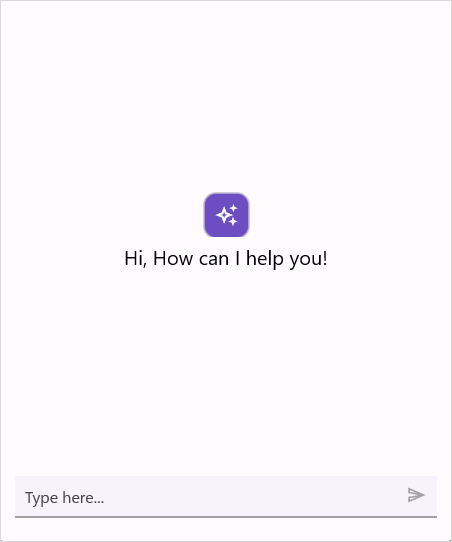
The SfAIAssistView control allows you to fully customize the empty view appearance by using the EmptyViewTemplate property. This property lets you define a custom layout and style for the EmptyView.
<ContentPage xmlns:syncfusion="clr-namespace:Syncfusion.Maui.AIAssistView;assembly=Syncfusion.Maui.AIAssistView">
<syncfusion:SfAIAssistView x:Name="sfAIAssistView"
AssistItems="{Binding AssistItems}"
EmptyView="No Items">
<syncfusion:SfAIAssistView.EmptyViewTemplate>
<DataTemplate>
<Grid RowDefinitions="45,30"
RowSpacing="10"
HorizontalOptions="Center"
VerticalOptions="Center">
<Border Background="#6C4EC2"
Stroke="#CAC4D0"
HorizontalOptions="Center" >
<Border.StrokeShape>
<RoundRectangle CornerRadius="12"/>
</Border.StrokeShape>
<Label Text=""
FontSize="24"
HorizontalTextAlignment="Center" VerticalTextAlignment="Center" FontFamily="MauiSampleFontIcon"
TextColor="White"
HeightRequest="45" WidthRequest="45" HorizontalOptions="Center" />
</Border>
<Label Text="Hi, How can I help you!"
HorizontalOptions="Center" Grid.Row="1" FontFamily="Roboto-Regular"
FontSize="20"/>
</Grid>
</DataTemplate>
</syncfusion:SfAIAssistView.EmptyViewTemplate>
</syncfusion:SfAIAssistView>
</ContentPage>public partial class MainPage : ContentPage
{
SfAIAssistView sfAIAssistView;
public MainPage()
{
InitializeComponent();
sfAIAssistView = new SfAIAssistView
{
EmptyView = "No Items"
};
GettingStartedViewModel viewModel = new GettingStartedViewModel();
sfAIAssistView.AssistItems = viewModel.AssistItems;
sfAIAssistView.EmptyViewTemplate = CreateEmptyViewTemplate();
Content = sfAIAssistView;
}
private DataTemplate CreateEmptyViewTemplate()
{
return new DataTemplate(() =>
{
var grid = new Grid
{
RowDefinitions =
{
new RowDefinition { Height = new GridLength(45) },
new RowDefinition { Height = new GridLength(30) }
},
RowSpacing = 10,
HorizontalOptions = LayoutOptions.Center,
VerticalOptions = LayoutOptions.Center
};
var border = new Border
{
Background = Color.FromArgb("#6C4EC2"),
Stroke = Color.FromArgb("#CAC4D0"),
HorizontalOptions = LayoutOptions.Center,
StrokeShape = new RoundRectangle { CornerRadius = 12 }
};
var iconLabel = new Label
{
Text = "\ue7e1",
FontSize = 24,
FontFamily = "MauiSampleFontIcon",
TextColor = Colors.White,
WidthRequest = 45,
HeightRequest = 45,
HorizontalTextAlignment = TextAlignment.Center,
VerticalTextAlignment = TextAlignment.Center,
HorizontalOptions = LayoutOptions.Center
};
border.Content = iconLabel;
var messageLabel = new Label
{
Text = "Hi, How can I help you!",
FontSize = 20,
FontFamily = "Roboto-Regular",
HorizontalOptions = LayoutOptions.Center
};
Grid.SetRow(messageLabel, 1);
grid.Children.Add(border);
grid.Children.Add(messageLabel);
return grid;
});
}
}
NOTE
- The
EmptyViewTemplatewill only be applied when theEmptyViewproperty is explicitly defined. IfEmptyViewis not set, the template will not be displayed.EmptyViewcan be set to custom data model and the appearance of theEmptyViewcan be customized by using theEmptyViewTemplate.
NOTE