Value Formatting with .NET MAUI Numeric UpDown
This section explains how to change the value format of the Numeric UpDown control using the CustomFormat properties.
Currency, percentage and decimal format
The value of the Numeric UpDown control can be formatted using the CustomFormat property. By default, the value is formatted based on the current culture’s decimal format. The default value of the CustomFormat properties is null.
The following example shows how to set the CurrencyFormatter, DecimalFormatter, and PercentFormatter for the NumberFormatter property.
Using the N, C, and P format values, we can apply numeric, currency, and percent custom formats in the CustomFormat property.
You can apply various custom formats available in this page, which are supported for the
doubletype.
// Format stock price in currency.
<editors:SfNumericUpDown CustomFormat="C2"/>

// Format product discount in percent.
<editors:SfNumericUpDown CustomFormat="P2"/>

// Format worked hours in decimal.
<editors:SfNumericUpDown CustomFormat="N2"/>
// Format stock price in currency.
stockPrice.CustomFormat = "C2";
// Format product discount in percent.
productDiscount.CustomFormat = "P2";
// Format worked hours in decimal.
hoursWorked.CustomFormat = "N2";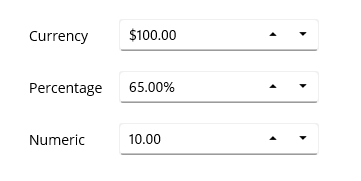
Format the integer digits
You can change the decimal digits of the value in the Numeric UpDown control using the CustomFormat properties.
For the CustomFormat property, use the 0 format specifier to set the minimum number of decimal digits.
0 (Zero placeholder) replaces the zero with the corresponding digit present in the value; otherwise, zero appends with the leftmost position of the value.
// Format stock price in currency.
<editors:SfNumericUpDown CustomFormat = "$00000.00"/>

// Format product discount in percentage.
<editors:SfNumericUpDown CustomFormat = "00000.00%"/>

// Format worked hours in decimal.
<editors:SfNumericUpDown CustomFormat = "00000.00"/>
// Format stock price in currency.
stockPrice.CustomFormat = "$00000.00";
// Format product discount in percentage.
productDiscount.CustomFormat = "00000.00%";
// Format worked hours in decimal.
hoursWorked.CustomFormat = "00000.00";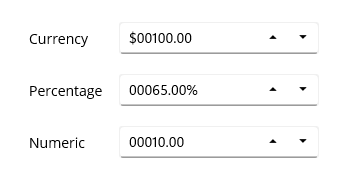
Format the fractional digits
You can change the fractional digits of the value in the Numeric UpDown control using the CustomFormat Properties.
For the CustomFormat property, use the 0 format specifier to set the minimum number of fractional digits.
0 (Zero placeholder) replaces the zero with the corresponding digit in the value.
<editors:SfNumericUpDown CustomFormat = "$000.000"/>
<editors:SfNumericUpDown CustomFormat = "00.000%"/>
<editors:SfNumericUpDown CustomFormat = "00.000"/>stockPrice.CustomFormat = "$000.000";
productDiscount.CustomFormat = "00.000%";
hoursWorked.CustomFormat = "00.000";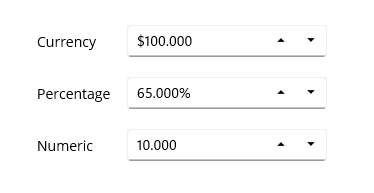
Apply custom format
You can apply custom formats to the Numeric UpDown control using the 0 and # format specifiers. Using these format specifiers, you can set the minimum and the maximum number of fractional digits in the CustomFormat property.
-
0 (Zero placeholder) replaces the zero with the corresponding digit present in the value; otherwise, zero appends with the leftmost position of the value.
-
# (Digit placeholder) replaces the number sign symbol with the corresponding digit present in the value; otherwise, no digit will append to the value.
In the following example, the value of the CustomFormat property is #.00##, hence it will allow a maximum of 4 fractional digits and a minimum of 2 fractional digits.
<editors:SfNumericUpDown CustomFormat = "$00.00##"/>
<editors:SfNumericUpDown CustomFormat = "00.00##%"/>
<editors:SfNumericUpDown CustomFormat = "00.00##"/>stockPrice.CustomFormat = "$00.00##";
productDiscount.CustomFormat = "00.00##%";
hoursWorked.CustomFormat = "00.00##";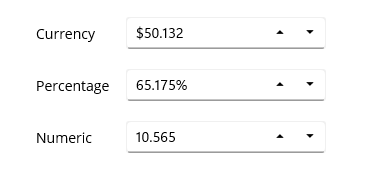
Culture support
The culture support allows the control to be configured for a specific language. To configure this, use the culture property.
CultureInfo culture = new CultureInfo("en-US");
NumericUpDown.Culture = culture;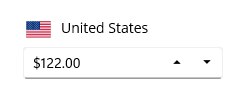
Customize percentage display
When the Numeric UpDown is in percentage format, the value can be displayed in two ways as follows:
Value: Displays the actual value with percentage symbol.
<editors:SfNumericUpDown x:Name="NumericUpDown"
                        CustomFormat="p"
                        Value="1000"
                        PercentDisplayMode="Value">
</editors:SfNumericUpDown>
SfNumericUpDown sfNumericUpDown= new SfNumericUpDown();
SfNumericUpDown sfNumericUpDown = new SfNumericUpDown();
sfNumericUpDown.Value = 1000;
sfNumericUpDown.CustomFormat = "p";
sfNumericUpDown.PercentDisplayMode = PercentDisplayMode.Value;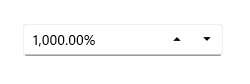
Compute: Displays the computed value with percentage symbol.
<editors:SfNumericUpDown x:Name="NumericUpDown"
                        CustomFormat="p"
                        Value="1000"
                        PercentDisplayMode="Value">
</editors:SfNumericUpDown>
SfNumericUpDown sfNumericUpDown= new SfNumericUpDown();
sfNumericUpDown.Value = 1000;
sfNumericUpDown.CustomFormat = "p";
sfNumericUpDown.PercentDisplayMode = PercentDisplayMode.Compute;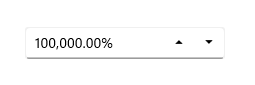
Default value of PercentDisplayMode is
Compute.
Manage maximum decimal digits
The maximum number of digits to be displayed after the decimal point can be specified by using the MaximumNumberDecimalDigits property.
The
MaximumNumberDecimalDigitsproperty can only be set to a positive value and does not work when a CustomFormat is provided. The default value of MaximumNumberDecimalDigits is 2.
<editors:SfNumericUpDown x:Name="NumericUpDown"
                        Value="1000.23232"
                        MaximumNumberDecimalDigits="3">
</editors:SfNumericUpDown>
SfNumericUpDown sfNumericUpDown= new SfNumericUpDown();
sfNumericUpDown.Value = 1000.23232;
sfNumericUpDown.MaximumNumberDecimalDigits = 3;