About Syncfusion® .NET MAUI Navigation Drawer Control
The Syncfusion® .NET MAUI Navigation Drawer is a simpler component for creating a navigation pane in your application. It consists of a content area and a sliding pane that extends from the edge of the page. The pane can be opened either by swiping from the screen edges or programmatically.
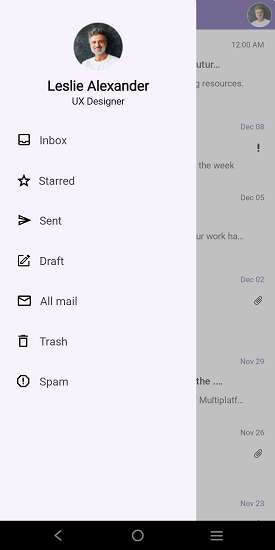
Business use cases
- Mobile and desktop applications that require side navigation menus for accessing multiple screens or modules.
- Business applications that organize navigation hierarchies in a structured and user-friendly layout.
- Dashboard applications that provide quick access to features through a collapsible navigation pane.
- Applications that require gesture-based navigation with smooth sliding transitions.
Key features
- Flexible pane positioning allows displaying the navigation pane from left, right, top, or bottom edges.
- Animated transition allows opening and closing the pane using effects such as SlideOnTop, Push, and Reveal.
- Gesture and programmatic control allows opening and closing the navigation drawer through swipe interactions or API calls.
- Content and navigation separation allows maintaining a clear layout between the main content area and the navigation pane.
Globalization
The following table summarizes the globalization support available in this control.
 Full Support
 Not Applicable
| Control | Localization | RTL | Time zone | Screen reader | Keyboard navigation |
|---|---|---|---|---|---|
| Navigation Drawer | |
|
|
|
|
Related controls
- Accordion for collapsible content sections.
- Expander for single expandable content.
- Tab View for tabbed content navigation.
See Also
- Getting Started shows a step‑by‑step guide to begin using the Navigation Drawer control.
- Setting Sliding Panel Content explains how to configure and manage the side pane content.
- Animation helps customize animation and transition effects.
- UI Kit provides interactive demos and ready‑made UI examples.
Resources
Feature Tour
Get a quick overview of key features and capabilities to kick start your journey.
Explore Features
Showcase Samples
Explore real-world sample apps to see components in action and learn by example.
View Samples
Tutorial Videos
Watch step‑by‑step video guides to quickly understand concepts and implementation.
Watch now
Knowledge Base
Find practical solutions, troubleshooting tips and how‑to guides for common scenarios.
Search KB's