Axis Padding in .NET MAUI Chart
10 Jan 20252 minutes to read
PlotOffsetStart
The PlotOffsetStart property is used to provide padding to the axis at start position. The following code sample demonstrates the padding applied to Start position for both x and y-axes.
<chart:SfCartesianChart>
    . . .
    <chart:SfCartesianChart.XAxes>
        <chart:CategoryAxis PlotOffsetStart="30"/>
    </chart:SfCartesianChart.XAxes>

    <chart:SfCartesianChart.YAxes>
        <chart:NumericalAxis PlotOffsetStart="30"/>
    </chart:SfCartesianChart.YAxes>
    . . .
</chart:SfCartesianChart>
SfCartesianChart chart = new SfCartesianChart();
. . .
CategoryAxis primaryAxis = new CategoryAxis()
{
PlotOffsetStart = 30 // Set the offset at the start of the plot area for the X-axis
};
chart.XAxes.Add(primaryAxis);
NumericalAxis secondaryAxis = new NumericalAxis()
{
PlotOffsetStart = 30 // Set the offset at the start of the plot area for the Y-axis
};
chart.YAxes.Add(secondaryAxis);
. . .
this.Content = chart;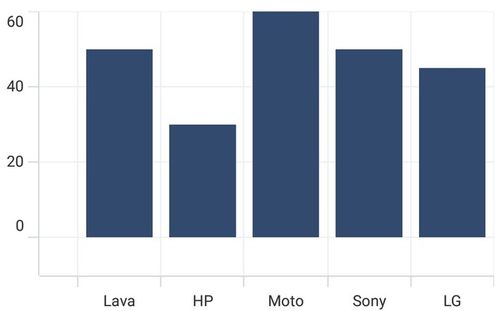
PlotOffsetEnd
The PlotOffsetEnd property is used to provide padding to the axis at end position. The following code sample demonstrates the padding applied to end position for both x and y-axes.
<chart:SfCartesianChart>
    . . .
    <chart:SfCartesianChart.XAxes>
        <chart:CategoryAxis PlotOffsetEnd="30"/>
    </chart:SfCartesianChart.XAxes>

    <chart:SfCartesianChart.YAxes>
        <chart:NumericalAxis PlotOffsetEnd="30"/>
    </chart:SfCartesianChart.YAxes>
    . . .
</chart:SfCartesianChart>
SfCartesianChart chart = new SfCartesianChart();
. . .
CategoryAxis primaryAxis = new CategoryAxis()
{
PlotOffsetEnd = 30 // Set the offset at the end of the plot area for the Y-axis
};
chart.XAxes.Add(primaryAxis);
NumericalAxis secondaryAxis = new NumericalAxis()
{
PlotOffsetEnd = 30 // Set the offset at the end of the plot area for the Y-axis.
};
chart.YAxes.Add(secondaryAxis);
. . .
this.Content = chart;