Getting Started
10 Aug 20179 minutes to read
This section explains briefly about how to create a Scroller in your application with JavaScript.
Create your first Scroller in JavaScript
Essential JavaScript Scroller control can be rendered based on the target panel height and width, and includes more customization options.
NOTE
To render the scroller control, it is necessary to have two level of wrapper (div) element for the scroll content. The outer wrapper must be used for the scroller control and inner wrapper is used to add the content including dynamic content
Add Scroller Control to your JavaScript Application
Create a HTML file and paste the following template to the HTML file to create the ejScroller.
<!DOCTYPE html>
<html>
   <head>
      <title>Getting Started Essential JS</title>
      <!-- Style sheet for default theme (flat azure) -->
      <link href="http://cdn.syncfusion.com/32.1.19/js/web/flat-azure/ej.web.all.min.css" rel="stylesheet" />
      <!--Scripts-->
      <script src="http://cdn.syncfusion.com/js/assets/external/jquery-1.10.2.min.js"></script>
      <script src="http://cdn.syncfusion.com/32.1.19/js/web/ej.web.all.min.js"></script>
      <!--Add custom scripts here -->
   </head>
   <body>
      <div class="content-container-fluid">
         <div class="row">
            <div class="cols-sample-area">
               <div class="control">
                  <div id="scrollerContent"> <!--first level wrapper div element -->
                        <div class="sampleContent"><!--second level wrapper div element -->
                           <h3 style="font-size: 20px;">MVC</h3>
                           <div>
                              <p>Model–view–controller (MVC) is a software architecture pattern which separates the
                                 representation of information from the user's interaction with it.
                                 The model consists of application data, business rules, logic, and functions. A view can be any
                                 output representation of data, such as a chart or a diagram. Multiple views of the same data
                                 are possible, such as a bar chart for management and a tabular view for accountants.
                                 The controller mediates input, converting it to commands for the model or view.The central
                                 ideas behind MVC are code reusable and in addition to dividing the application into three
                                 kinds of components, the MVC design defines the interactions between them.
                              </p>
                              <ul>
                                 <li>
                                    <b>A controller </b>can send commands to its associated view to change the view's presentation of the model (e.g., by scrolling through a document).
                                    It can also send commands to the model to update the model's state (e.g., editing a document).
                                 </li>
                                 <li>
                                    <b>A model</b> notifies its associated views and controllers when there has been a change in its state. This notification allows the views to produce updated output, and the controllers to change the available set of commands.
                                    A passive implementation of MVC omits these notifications, because the application does not require them or the software platform does not support them.
                                 </li>
                                 <li>
                                    <b>A view</b> requests from the model the information that it needs to generate an output representation to the user.
                                 </li>
                              </ul>
                           </div>
                        </div>
                  </div>
               </div>
            </div>
         </div>
      </div>
   </body>
</html>
Initialize ejScroller in the target area in the script.
$(function() {
            $("#scrollerContent").ejScroller({
                height: 300,
                width: 600
            });
        });
Configure the styles.
<style type="text/css">
        .control {
            border: 1px solid #bbbcbb;
            width: 600px;
            margin: 0 auto;
            height: 300px;
        }
        .sampleContent {
            width: 700px;
            padding:15px;
        }
</style>
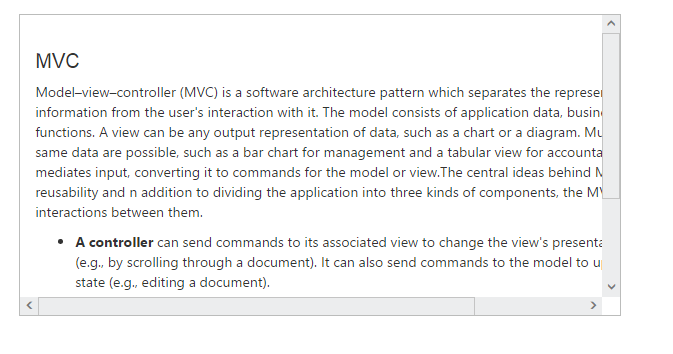
Scroller control is added to the application.