Custom Adaptor for Data Binding in Blazor Gantt Chart
The SfDataManager supports custom adaptors, giving you complete programmatic control over every data operation in the Blazor Gantt Chart. A custom adaptor is the right choice when your data source is not a standard REST endpoint for example, when task data must be loaded from an in-memory cache, a file system, a legacy system with a proprietary API, or a third-party SDK that does not expose a conventional HTTP interface.
To implement custom data binding, extend the DataAdaptor abstract class and override the relevant methods for reading and CRUD operations.
The DataAdaptor abstract class includes both synchronous and asynchronous method signatures, which can be overridden in the custom adaptor. The following are the method signatures available in this class:
public abstract class DataAdaptor
{
    /// <summary>
    /// Performs data read operation synchronously.
    /// </summary>
    public virtual object Read(DataManagerRequest dataManagerRequest, string key = null)

    /// <summary>
    /// Performs data read operation asynchronously.
    /// </summary>
    public virtual Task<object> ReadAsync(DataManagerRequest dataManagerRequest, string key = null)

    /// <summary>
    /// Performs insert operation synchronously.
    /// </summary>
    public virtual object Insert(DataManager dataManager, object data, string key)
    /// <summary>
    /// Performs insert operation asynchronously.
    /// </summary>
    public virtual Task<object> InsertAsync(DataManager dataManager, object data, string key)

    /// <summary>
    /// Performs remove operation synchronously.
    /// </summary>
    public virtual object Remove(DataManager dataManager, object data, string keyField, string key)

    /// <summary>
    /// Performs remove operation asynchronously.
    /// </summary>
    public virtual Task<object> RemoveAsync(DataManager dataManager, object data, string keyField, string key)

    /// <summary>
    /// Performs update operation synchronously.
    /// </summary>
    public virtual object Update(DataManager dataManager, object data, string keyField, string key)

    /// <summary>
    /// Performs update operation asynchronously.
    /// </summary>
    public virtual Task<object> UpdateAsync(DataManager dataManager, object data, string keyField, string key)

    /// <summary>
    /// Performs batch CRUD operations synchronously.
    /// </summary>
    public virtual object BatchUpdate(DataManager dataManager, object changedRecords, object addedRecords, object deletedRecords, string keyField, string key, int? dropIndex)

    /// <summary>
    /// Performs batch CRUD operations asynchronously.
    /// </summary>
    public virtual Task<object> BatchUpdateAsync(DataManager dataManager, object changedRecords, object addedRecords, object deletedRecords, string keyField, string key, int? dropIndex)
}
Data Binding
Custom data binding in Blazor Gantt Chart is achieved by providing a custom adaptor class and overriding the Read or ReadAsync methods of the DataAdaptor abstract class.
The following example demonstrates how to implement custom data binding using a custom adaptor:
@using Syncfusion.Blazor.Gantt;
@using Syncfusion.Blazor.Data;
@using Syncfusion.Blazor;

<SfGantt TValue="TaskData" Height="450px" Width="1000px" >
     <SfDataManager AdaptorInstance="@typeof(CustomAdaptor)" Adaptor="Adaptors.CustomAdaptor"></SfDataManager>
    <GanttTaskFields Id="TaskId" Name="TaskName" StartDate="StartDate" EndDate="EndDate" Progress="Progress" Duration="Duration"  ParentID="ParentID">
    </GanttTaskFields>
</SfGantt>

@code{
    public static List<TaskData> GanttData { get; set; }
    public class TaskData
    {
        public int? TaskID { get; set; }
        public string TaskName { get; set; }
        public DateTime StartDate { get; set; }
        public DateTime EndDate { get; set; }
        public int Progress { get; set; }
        public int Duration { get; set; }
        public int? ParentID { get; set; }
        public TaskData() { }
    }
    protected override void OnInitialized()
    {
        GanttData = GetTaskCollection().ToList();
    }
    public static List<TaskData> GetTaskCollection()
    {
        List<TaskData> DataCollection = new List<TaskData>();
        Random rand = new Random();
        var x = 0;
        for (var i = 1; i <= 2; i++)
        {
            var name = rand.Next(0, 100);
            TaskData Parent = new TaskData()
            {
                TaskID = ++x,
                TaskName = "Task " + x,
                StartDate = new DateTime(2017, 1, 9),
                EndDate = new DateTime(2017, 1, 13),
                Duration = 5,
                Progress = rand.Next(100),
                ParentID = null,
            };
            DataCollection.Add(Parent);
            for (var j = 1; j <= 4; j++)
            {
                var childName = rand.Next(0, 100);
                DataCollection.Add(new TaskData()
                {
                    TaskID = ++x,
                    TaskName = "Task " + x,
                    StartDate = new DateTime(2017, 1, 9),
                    EndDate = new DateTime(2019, 1, 13),
                    Duration = 5,
                    Progress = rand.Next(100),
                    ParentID = Parent.TaskID,

                });
            }
        }
        return DataCollection;
    }

    // Implementing custom adaptor by extending the DataAdaptor class.
    public class CustomAdaptor : DataAdaptor
    {
        // Performs data Read operation
        public override object Read(DataManagerRequest dm, string key = null)
        {
            IEnumerable<TaskData> dataSource = GanttData;
            if (dm.Search != null && dm.Search.Count > 0)
            {
                // Searching
                dataSource = DataOperations.PerformSearching(dataSource, dm.Search);
            }
            if (dm.Sorted != null && dm.Sorted.Count > 0)
            {
                // Sorting
                dataSource = DataOperations.PerformSorting(dataSource, dm.Sorted);
            }
            if (dm.Where != null && dm.Where.Count > 0)
            {
                // Filtering
                // ParentID is used internally by the Blazor Gantt Chart to build the task hierarchy
                if (dm.Where[0].Field != null && dm.Where[0].Field == @nameof(TaskData.ParentID)){}
                else
                {
                    dataSource = DataOperations.PerformFiltering(dataSource, dm.Where, dm.Where[0].Operator);
                }
            }
            int count = dataSource.Cast<TaskData>().Count();
            if (dm.Skip != 0)
            {
                dataSource = DataOperations.PerformSkip(dataSource, dm.Skip);
            }
            if (dm.Take != 0)
            {
                dataSource = DataOperations.PerformTake(dataSource, dm.Take);
            }
            return dm.RequiresCounts ? new DataResult() { Result = dataSource, Count = count } : (object)dataSource;
        }
    }
}
ReadAsync return format: If the DataManagerRequest.RequiresCounts property is true, the
Read/ReadAsyncmethod must return a DataResult containing both Result (a collection of records) and Count (the total number of records). When false, return only the collection of records. Example:return new DataResult() { Result = filteredRecords, Count = totalCount };
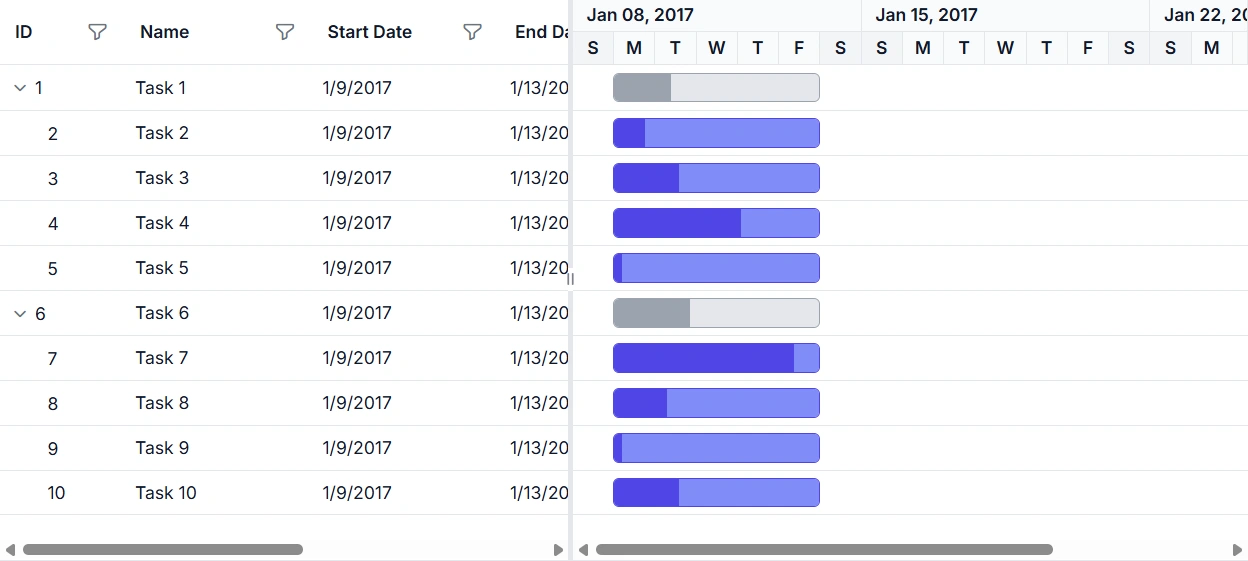
The following image shows the custom-bind data displayed in the Blazor Gantt Chart:
If the
Read/ReadAsyncmethod is not overridden in the custom adaptor, the default read handler will be used.
Inject service into custom adaptor
To inject a service into the custom adaptor for data operations, follow the steps shown below.
First, register the CustomAdaptor class as scoped service in the Program.cs file.
// Registering services in the Program.cs file.
builder.Services.AddSingleton<TaskDataAccessLayer>();
builder.Services.AddScoped<CustomAdaptor>();
builder.Services.AddScoped<ServiceClass>();
The following example demonstrates how to inject a service into the Custom Adaptor and using it for data operations:
@using Syncfusion.Blazor.Gantt;
@using Syncfusion.Blazor.Data;
@using Syncfusion.Blazor;

<SfGantt TValue="TaskData" Height="450px" Width="1000px">
     <SfDataManager AdaptorInstance="@typeof(CustomAdaptor)" Adaptor="Adaptors.CustomAdaptor"></SfDataManager>
    <GanttTaskFields Id="TaskId" Name="TaskName" StartDate="StartDate" EndDate="EndDate" Progress="Progress" Duration="Duration"  ParentID="ParentID">
    </GanttTaskFields>
</SfGantt>

@code{
    public static List<TaskData> GanttData { get; set; }
    public static List<TaskData> gantt = new List<TaskData>();
    public class TaskData
    {
        public int? TaskID { get; set; }
        public string TaskName { get; set; }
        public DateTime StartDate { get; set; }
        public DateTime EndDate { get; set; }
        public int Progress { get; set; }
        public int Duration { get; set; }
        public int? ParentID { get; set; }
        public TaskData() { }
    }
    public static List<TaskData> GetGantt()
    {
        if (gantt.Count == 0)
        {
            int root = -1;
            for (var t = 1; t <= 8; t++)
            {
                string math = (60 % 3) == 0 ? "High" : (60 % 2) == 0 ? "Release Breaker" : "Critical";
                root++;
                int rootItem = gantt.Count + root + 1;
                gantt.Add(new TaskData() { TaskID = rootItem, TaskName = "Parent Task " + rootItem.ToString(), StartDate = new DateTime(2022, 06, 07), EndDate = new DateTime(2022, 08, 25), Progress = 70, ParentID = null, Duration = 20 });
                int parent = gantt.Count;
                for (var c = 0; c < 3; c++)
                {
                    root++;
                    string val = ((parent + c + 1) % 3 == 0) ? "Low" : "Critical";
                    int parn = parent + c + 1;
                    int iD = gantt.Count + root + 1;
                    gantt.Add(new TaskData() { TaskID = iD, TaskName = "Child Task " + iD.ToString(), StartDate = new DateTime(2022, 06, 07), EndDate = new DateTime(2022, 08, 25), Progress = 30, ParentID = rootItem, Duration = 5 });
                    if ((((parent + c + 1) % 3) == 0))
                    {
                        int immParent = gantt.Count;
                        for (var s = 0; s <= 1; s++)
                        {
                            root++;
                            gantt.Add(new TaskData() { TaskID = gantt.Count + root + 1, TaskName = "Sub Task " + (gantt.Count + root + 1).ToString(), StartDate = new DateTime(2022, 06, 07), EndDate = new DateTime(2022, 08, 25), Progress = 50, ParentID = iD, Duration = 8 });
                        }
                    }
                }
            }
        }
        return gantt;
    }

    // Implementing custom adaptor by extending the DataAdaptor class.
    public class CustomAdaptor : DataAdaptor
    {
        // Inject the required service instance.
        [Inject]
        public TaskDataAccessLayer context { get; set; } = new TaskDataAccessLayer();
        // Performs data Read operation
        public override object Read(DataManagerRequest dm, string key = null)
        {
            IEnumerable<TaskData> dataSource = GanttData;
            if (dm.Search != null && dm.Search.Count > 0)
            {
                // Searching
                dataSource = DataOperations.PerformSearching(dataSource, dm.Search);
            }
            if (dm.Sorted != null && dm.Sorted.Count > 0)
            {
                // Sorting
                dataSource = DataOperations.PerformSorting(dataSource, dm.Sorted);
            }

            if (dm.Where != null && dm.Where.Count > 0)
            {
                // ParentID is used internally by the Blazor Gantt Chart to build the task hierarchy
                if (dm.Where[0].Field != null && dm.Where[0].Field == @nameof(TaskData.ParentID)) { }
                else
                {
                    dataSource = DataOperations.PerformFiltering(dataSource, dm.Where, dm.Where[0].Operator);
                }
            }
            int count = dataSource.Cast<TaskData>().Count();
            if (dm.Skip != 0)
            {
                dataSource = DataOperations.PerformSkip(dataSource, dm.Skip);
            }
            if (dm.Take != 0)
            {
                dataSource = DataOperations.PerformTake(dataSource, dm.Take);
            }
            return dm.RequiresCounts ? new DataResult() { Result = dataSource, Count = count } : (object)dataSource;
        }
    }
    protected override void OnInitialized()
    {
        GanttData = GetGantt().ToList();
    }
}
Handling searching operation
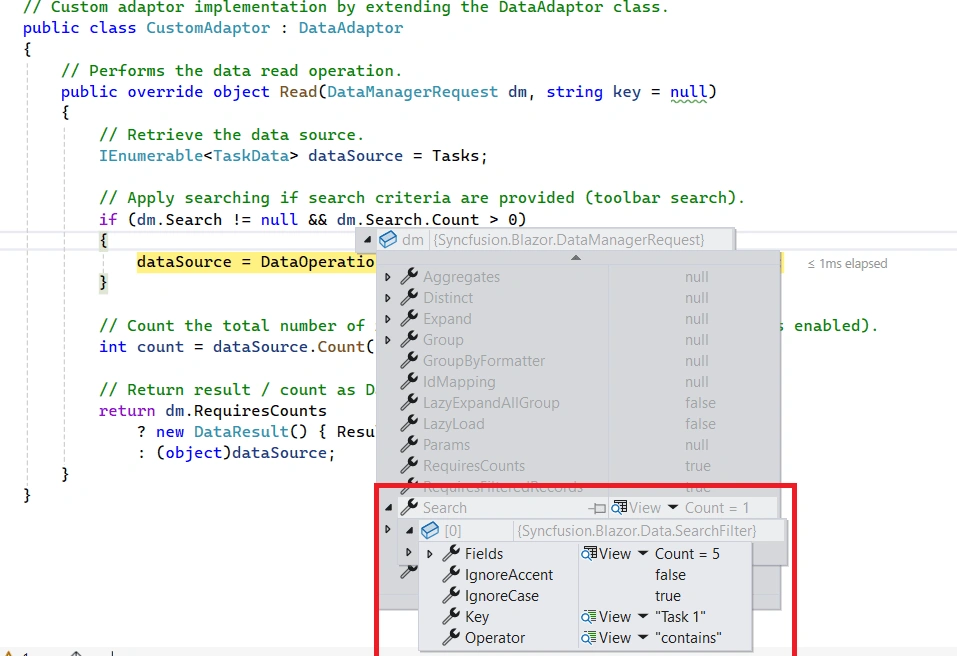
When using a custom adaptor, override the Read or ReadAsync method of the DataAdaptor abstract class to handle server-side operations. The DataManagerRequest object carries the operation-specific criteria — for searching, it is available in dm.Search, as shown in the image below:
The following example demonstrates how to implement searching operation for custom-bound data:
@using Syncfusion.Blazor
@using Syncfusion.Blazor.Data
@using Syncfusion.Blazor.Gantt
@using System.Collections

<SfGantt TValue="TaskData" Height="450px" Toolbar="@(new List<string>() { "Search" })">

    <SfDataManager AdaptorInstance="@typeof(CustomAdaptor)" Adaptor="Adaptors.CustomAdaptor">
    </SfDataManager>

    <GanttTaskFields Id="TaskId"
                     Name="TaskName"
                     StartDate="StartDate"
                     EndDate="EndDate"
                     Progress="Progress">
    </GanttTaskFields>

    <GanttColumns>
        <GanttColumn Field="TaskId" HeaderText="Task ID" Width="100"></GanttColumn>
        <GanttColumn Field="TaskName" HeaderText="Task Name" Width="220"></GanttColumn>
        <GanttColumn Field="StartDate" HeaderText="Start Date" Format="d" Width="140"></GanttColumn>
        <GanttColumn Field="EndDate" HeaderText="End Date" Format="d" Width="140"></GanttColumn>
        <GanttColumn Field="Progress" HeaderText="Progress" Width="120"></GanttColumn>
    </GanttColumns>
</SfGantt>

@code {
    public static List<TaskData> Tasks { get; set; } = new();

    protected override void OnInitialized()
    {
        var baseDate = new DateTime(2026, 04, 01);
        var rand = new Random();

        Tasks = Enumerable.Range(1, 75).Select(x => new TaskData
        {
            TaskID = x,
            TaskName = $"Task {x}",
            StartDate = baseDate.AddDays(x % 10),
            EndDate = baseDate.AddDays((x % 10) + 3),
            Progress = rand.Next(0, 101)
        }).ToList();
    }

    public class TaskData
    {
        public int TaskId { get; set; }
        public string TaskName { get; set; } = string.Empty;
        public DateTime? StartDate { get; set; }
        public DateTime? EndDate { get; set; }
        public int Progress { get; set; }
    }

    // Custom adaptor implementation by extending the DataAdaptor class.
    public class CustomAdaptor : DataAdaptor
    {
        // Performs the data read operation.
        public override object Read(DataManagerRequest dm, string key = null)
        {
            // Retrieve the data source.
            IEnumerable<TaskData> dataSource = Tasks;

            // Apply searching if search criteria are provided (toolbar search).
            if (dm.Search != null && dm.Search.Count > 0)
            {
                dataSource = DataOperations.PerformSearching(dataSource, dm.Search);
            }

            // Count the total number of records.
            int count = dataSource.Count();

            // Return result / count as DataResult if requested.
            return dm.RequiresCounts
                ? new DataResult() { Result = dataSource, Count = count }
                : (object)dataSource;
        }
    }
}
Handling filtering operation
Override the Read or ReadAsync method to handle filtering. The filter criteria are available in dm.Where within the DataManagerRequest object, as shown in the image below:
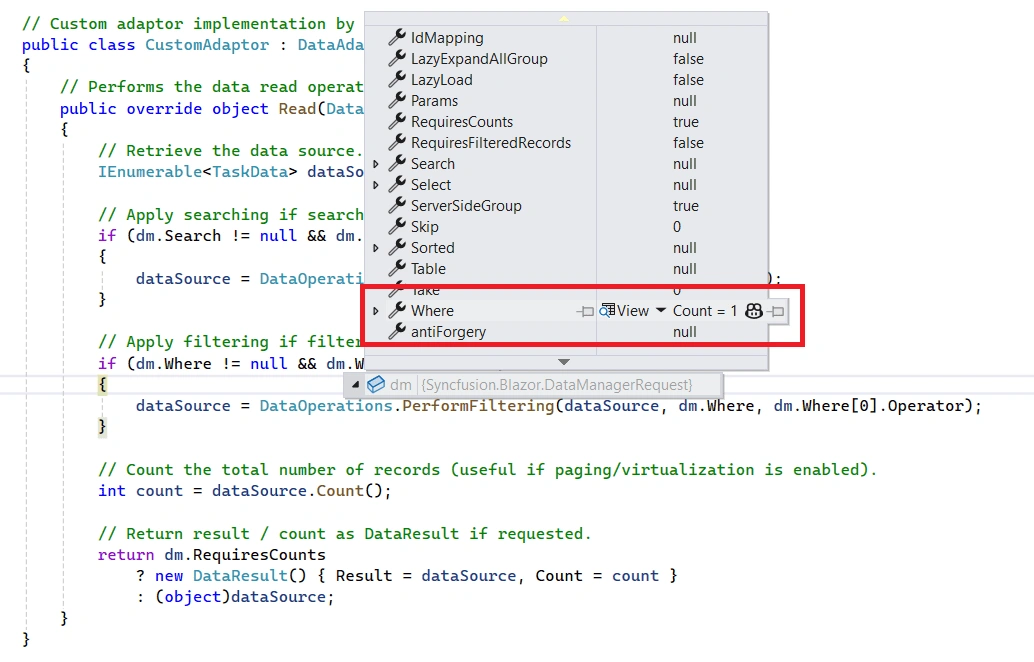
Based on this information, the custom data source can be filtered using the built-in PerformFiltering method of the DataOperations class.
You can also create your own custom filtering logic and bind the filtered data to the Blazor Gantt Chart.
The following example demonstrates how to implement the filtering operation for custom-bound data:
@using Syncfusion.Blazor
@using Syncfusion.Blazor.Data
@using Syncfusion.Blazor.Gantt
@using System.Collections

<SfGantt TValue="TaskData" Height="450px" AllowFiltering="true">

    <SfDataManager AdaptorInstance="@typeof(CustomAdaptor)" Adaptor="Adaptors.CustomAdaptor">
    </SfDataManager>

    <GanttTaskFields Id="TaskId"
                     Name="TaskName"
                     StartDate="StartDate"
                     EndDate="EndDate"
                     Progress="Progress">
    </GanttTaskFields>

    <GanttColumns>
        <GanttColumn Field="TaskId" HeaderText="Task ID" Width="100"></GanttColumn>
        <GanttColumn Field="TaskName" HeaderText="Task Name" Width="220"></GanttColumn>
        <GanttColumn Field="StartDate" HeaderText="Start Date" Format="d" Width="140"></GanttColumn>
        <GanttColumn Field="EndDate" HeaderText="End Date" Format="d" Width="140"></GanttColumn>
        <GanttColumn Field="Progress" HeaderText="Progress" Width="120"></GanttColumn>
    </GanttColumns>
</SfGantt>

@code {
    public static List<TaskData> Tasks { get; set; } = new();

    protected override void OnInitialized()
    {
        var baseDate = new DateTime(2026, 04, 01);
        var rand = new Random();

        Tasks = Enumerable.Range(1, 75).Select(x => new TaskData
        {
            TaskID = x,
            TaskName = $"Task {x}",
            StartDate = baseDate.AddDays(x % 10),
            EndDate = baseDate.AddDays((x % 10) + 3),
            Progress = rand.Next(0, 101)
        }).ToList();
    }

    public class TaskData
    {
        public int TaskId { get; set; }
        public string TaskName { get; set; }
        public DateTime? StartDate { get; set; }
        public DateTime? EndDate { get; set; }
        public int Progress { get; set; }
    }

    // Custom adaptor implementation by extending the DataAdaptor class.
    public class CustomAdaptor : DataAdaptor
    {
        // Performs the data read operation.
        public override object Read(DataManagerRequest dm, string key = null)
        {
            // Retrieve the data source.
            IEnumerable<TaskData> dataSource = Tasks;

            // Apply filtering if filter criteria are provided.
            if (dm.Where != null && dm.Where.Count > 0)
            {
                // ParentID is used internally by the Blazor Gantt Chart to build the task hierarchy
                if (dm.Where[0].Field != null && dm.Where[0].Field == @nameof(TaskData.ParentID)) { }
                else
                {
                    dataSource = DataOperations.PerformFiltering(dataSource, dm.Where, dm.Where[0].Operator);
                }
            }

            // Count the total number of records
            int count = dataSource.Count();

            // Return result / count as DataResult if requested.
            return dm.RequiresCounts
                ? new DataResult() { Result = dataSource, Count = count }
                : (object)dataSource;
        }
    }
}
Handling sorting operation
Override the Read or ReadAsync method to handle sorting. The sort criteria are available in dm.Sorted within the DataManagerRequest object, as shown in the image below:
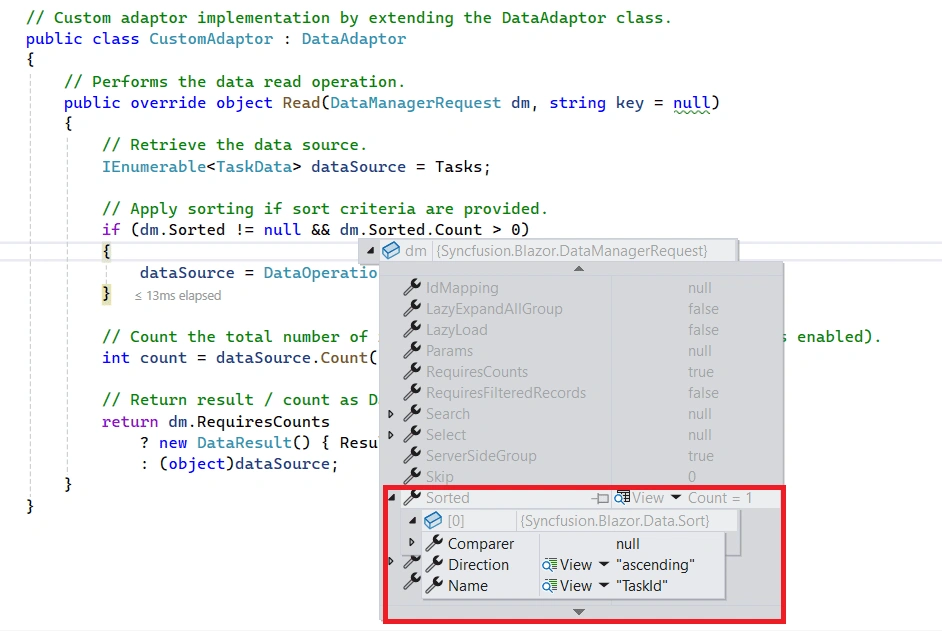
Perform sort data using the built‑in PerformSorting method of the DataOperations class.
- Alternatively, you can also implement a custom sorting method and bind the sorted data to the Blazor Gantt Chart.
The following example demonstrates how to implement the sorting operation for custom-bound data:
@using Syncfusion.Blazor
@using Syncfusion.Blazor.Data
@using Syncfusion.Blazor.Gantt
@using System.Collections

<SfGantt TValue="TaskData" Height="450px" AllowSorting="true">

    <SfDataManager AdaptorInstance="@typeof(CustomAdaptor)" Adaptor="Adaptors.CustomAdaptor">
    </SfDataManager>

    <GanttTaskFields Id="TaskId"
                     Name="TaskName"
                     StartDate="StartDate"
                     EndDate="EndDate"
                     Progress="Progress">
    </GanttTaskFields>

    <GanttColumns>
        <GanttColumn Field="TaskId" HeaderText="Task ID" Width="100"></GanttColumn>
        <GanttColumn Field="TaskName" HeaderText="Task Name" Width="220"></GanttColumn>
        <GanttColumn Field="StartDate" HeaderText="Start Date" Format="d" Width="140"></GanttColumn>
        <GanttColumn Field="EndDate" HeaderText="End Date" Format="d" Width="140"></GanttColumn>
        <GanttColumn Field="Progress" HeaderText="Progress" Width="120"></GanttColumn>
    </GanttColumns>
</SfGantt>

@code {
    public static List<TaskData> Tasks { get; set; } = new();

    protected override void OnInitialized()
    {
        var baseDate = new DateTime(2026, 04, 01);
        var rand = new Random();

        Tasks = Enumerable.Range(1, 75).Select(x => new TaskData
        {
            TaskID = x,
            TaskName = $"Task {x}",
            StartDate = baseDate.AddDays(x % 10),
            EndDate = baseDate.AddDays((x % 10) + 3),
            Progress = rand.Next(0, 101)
        }).ToList();
    }

    public class TaskData
    {
        public int TaskId { get; set; }
        public string TaskName { get; set; } = string.Empty;
        public DateTime? StartDate { get; set; }
        public DateTime? EndDate { get; set; }
        public int Progress { get; set; }
    }

    // Custom adaptor implementation by extending the DataAdaptor class.
    public class CustomAdaptor : DataAdaptor
    {
        // Performs the data read operation.
        public override object Read(DataManagerRequest dm, string key = null)
        {
            // Retrieve the data source.
            IEnumerable<TaskData> dataSource = Tasks;

            // Apply sorting if sort criteria are provided.
            if (dm.Sorted != null && dm.Sorted.Count > 0)
            {
                dataSource = DataOperations.PerformSorting(dataSource, dm.Sorted);
            }

            // Count the total number of records
            int count = dataSource.Count();

            // Return result / count as DataResult if requested.
            return dm.RequiresCounts
                ? new DataResult() { Result = dataSource, Count = count }
                : (object)dataSource;
        }
    }
}
Handling CRUD operations
The CRUD operations for custom-bound data can be implemented by overriding the following CRUD methods of the DataAdaptor abstract class:
- When using batch editing in the Blazor Gantt Chart, use the
BatchUpdate/BatchUpdateAsyncmethod to handle the corresponding CRUD operation.
The following example demonstrates how to implement CRUD operations for custom-bound data:
@using Syncfusion.Blazor.Gantt;
@using Syncfusion.Blazor.Data;
@using Syncfusion.Blazor;

<SfGantt TValue="TaskData" Height="450px" Width="1000px" Toolbar="@(new List<string>() { "Add", "Edit", "Delete", "Update", "Cancel", "Search"})">
     <SfDataManager AdaptorInstance="@typeof(CustomAdaptor)" Adaptor="Adaptors.CustomAdaptor"></SfDataManager>
    <GanttTaskFields Id="TaskId" Name="TaskName" StartDate="StartDate" EndDate="EndDate" Progress="Progress" Duration="Duration"  ParentID="ParentID">
    </GanttTaskFields>
     <GanttEditSettings AllowEditing="true" AllowAdding="true" AllowDeleting="true"></GanttEditSettings>
     <GanttEvents RowUpdating="RowUpdatingHandler" TValue="TaskData"></GanttEvents>
</SfGantt>

@code{
    public static List<TaskData> GanttData { get; set; }
    public static List<TaskData> gantt = new List<TaskData>();
    public static int index = 0;

    public void RowUpdatingHandler(GanttRowUpdatingEventArgs<TaskData> args)
    {
        index = args.Index;
    }

    public class TaskData
    {
        public int? TaskID { get; set; }
        public string TaskName { get; set; }
        public DateTime StartDate { get; set; }
        public DateTime EndDate { get; set; }
        public int Progress { get; set; }
        public int Duration { get; set; }
        public int? ParentID { get; set; }
        public TaskData() { }
    }

    protected override void OnInitialized()
    {
        GanttData = GetGantt().ToList();
    }
    public static List<TaskData> GetGantt()
    {
        if (gantt.Count == 0)
        {
            int root = -1;
            for (var t = 1; t <= 8; t++)
            {
                string math = (42 % 3) == 0 ? "High" : (42 % 2) == 0 ? "Release Breaker" : "Critical";
                root++;
                int rootItem = gantt.Count + root + 1;
                gantt.Add(new TaskData() { TaskID = rootItem, TaskName = "Parent Task " + rootItem.ToString(), StartDate = new DateTime(2022, 06, 07), EndDate = new DateTime(2022, 08, 25), Progress = 70, ParentID = null, Duration = 20 });
                int parent = gantt.Count;
                for (var c = 0; c < 3; c++)
                {
                    root++;
                    string val = ((parent + c + 1) % 3 == 0) ? "Low" : "Critical";
                    int parn = parent + c + 1;
                    int iD = gantt.Count + root + 1;
                    gantt.Add(new TaskData() { TaskID = iD, TaskName = "Child Task " + iD.ToString(), StartDate = new DateTime(2022, 06, 07), EndDate = new DateTime(2022, 08, 25), Progress = 30, ParentID = rootItem, Duration = 5 });
                    if ((((parent + c + 1) % 3) == 0))
                    {
                        int immParent = gantt.Count;
                        for (var s = 0; s <= 1; s++)
                        {
                            root++;
                            gantt.Add(new TaskData() { TaskID = gantt.Count + root + 1, TaskName = "Sub Task " + (gantt.Count + root + 1).ToString(), StartDate = new DateTime(2022, 06, 07), EndDate = new DateTime(2022, 08, 25), Progress = 50, ParentID = iD, Duration = 8 });
                        }
                    }
                }
            }
        }
        return gantt;
    }

    // Implementing custom adaptor by extending the DataAdaptor class.
    public class CustomAdaptor : DataAdaptor
    {
        // Performs data Read operation.
        public override object Read(DataManagerRequest dm, string key = null)
        {
            IEnumerable<TaskData> dataSource = GanttData;
            if (dm.Search != null && dm.Search.Count > 0)
            {
                // Searching
                dataSource = DataOperations.PerformSearching(dataSource, dm.Search);
            }
            if (dm.Sorted != null && dm.Sorted.Count > 0)
            {
                // Sorting
                dataSource = DataOperations.PerformSorting(dataSource, dm.Sorted);
            }
            if (dm.Where != null && dm.Where.Count > 0)
            {
                // Apply filtering if filter criteria are provided.
                // ParentID is used internally by the Blazor Gantt Chart to build the task hierarchy
                if (dm.Where[0].Field != null && dm.Where[0].Field == @nameof(TaskData.ParentID)) { }
                else
                {
                    dataSource = DataOperations.PerformFiltering(dataSource, dm.Where, dm.Where[0].Operator);
                }
            }
            int count = dataSource.Cast<TaskData>().Count();
            if (dm.Skip != 0)
            {
                dataSource = DataOperations.PerformSkip(dataSource, dm.Skip);
            }
            if (dm.Take != 0)
            {
                dataSource = DataOperations.PerformTake(dataSource, dm.Take);
            }
            return dm.RequiresCounts ? new DataResult() { Result = dataSource, Count = count } : (object)dataSource;
        }
        public override object Insert(DataManager dm, object value, string key)
        {
            GanttData.Insert(index, value as TaskData);
            return value;
        }

        // Performs Remove operation.
        public override object Remove(DataManager dm, object value, string keyField, string key)
        {
            GanttData.Remove(GanttData.Where(or => or.TaskID == int.Parse(value.ToString())).FirstOrDefault());
            return value;
        }

        // Performs Update operation.
        public override object Update(DataManager dm, object value, string keyField, string key)
        {
            var data = GanttData.FirstOrDefault(t => t.TaskID == (value as TaskData).TaskID);
            if (data != null)
            {
                data.TaskName = (value as TaskData).TaskName;
                data.StartDate = (value as TaskData).StartDate;
                data.EndDate = (value as TaskData).EndDate;
                data.Duration = (value as TaskData).Duration;
                data.Progress = (value as TaskData).Progress;
                // Update other properties as required.
            }
            return value;
        }
    }
}
You can refer to the Blazor Gantt Chart feature tour page for its groundbreaking feature representations. You can also explore the Blazor Gantt Chart example to understand how to present and manipulate data.
How to pass additional parameters to custom adaptor
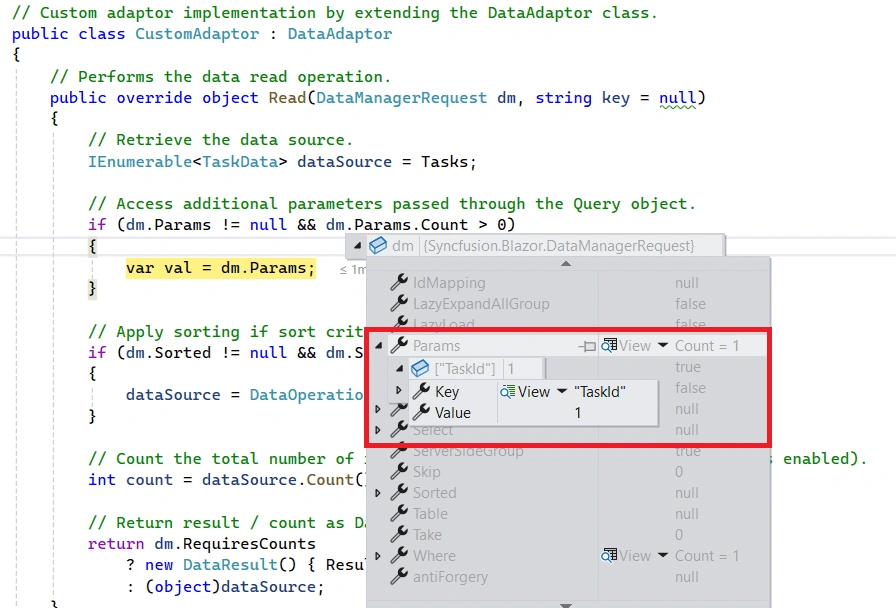
The Blazor Gantt Chart allows sending custom parameters along with data requests. This is useful when additional information must be sent to the server.
Use the Query property of the Blazor Gantt Chart along with the AddParams method of the Query class to send custom parameters.
To enable custom parameters in data requests for the Blazor Gantt Chart, follow these steps:
-
Bind the Query object to the Blazor Gantt Chart:
Assign the initialized Query object to the Blazor Gantt ChartQueryproperty. -
Initialize the Query object:
Create a new instance of theQueryclass and use theAddParamsmethod to add your custom parameters. -
Access parameters in the custom adaptor:
Access the parameters viaParamsinside the custom adaptor and apply them as required for server-side logic.
The following example demonstrates how to send additional parameters to the server.
@using Syncfusion.Blazor
@using Syncfusion.Blazor.Data
@using Syncfusion.Blazor.Gantt
@using System.Collections

<SfGantt TValue="TaskData" Height="450px" Query="@Query">

    <SfDataManager AdaptorInstance="@typeof(CustomAdaptor)" Adaptor="Adaptors.CustomAdaptor">
    </SfDataManager>

    <GanttTaskFields Id="TaskId"
                     Name="TaskName"
                     StartDate="StartDate"
                     EndDate="EndDate"
                     Progress="Progress">
    </GanttTaskFields>

    <GanttColumns>
        <GanttColumn Field="TaskId" HeaderText="Task ID" Width="100"></GanttColumn>
        <GanttColumn Field="TaskName" HeaderText="Task Name" Width="220"></GanttColumn>
        <GanttColumn Field="StartDate" HeaderText="Start Date" Format="d" Width="140"></GanttColumn>
        <GanttColumn Field="EndDate" HeaderText="End Date" Format="d" Width="140"></GanttColumn>
        <GanttColumn Field="Progress" HeaderText="Progress" Width="120"></GanttColumn>
    </GanttColumns>
</SfGantt>

@code {
    public static List<TaskData> Tasks { get; set; } = new();
    public Query Query = new Query().AddParams("TaskID", 1);

    protected override void OnInitialized()
    {
        var baseDate = new DateTime(2026, 04, 01);
        var rand = new Random();

        Tasks = Enumerable.Range(1, 75).Select(x => new TaskData
        {
            TaskID = x,
            TaskName = $"Task {x}",
            StartDate = baseDate.AddDays(x % 10),
            EndDate = baseDate.AddDays((x % 10) + 3),
            Progress = rand.Next(0, 101)
        }).ToList();
    }

    public class TaskData
    {
        public int TaskId { get; set; }
        public string TaskName { get; set; } = string.Empty;
        public DateTime? StartDate { get; set; }
        public DateTime? EndDate { get; set; }
        public int Progress { get; set; }
    }

    // Custom adaptor implementation by extending the DataAdaptor class.
    public class CustomAdaptor : DataAdaptor
    {
        // Performs the data read operation.
        public override object Read(DataManagerRequest dm, string key = null)
        {
            // Retrieve the data source.
            IEnumerable<TaskData> dataSource = Tasks;

            // Access additional parameters passed through the Query object.
            if (dm.Params != null && dm.Params.Count > 0)
            {
                var val = dm.Params;
            }

            // Count the total number of records.
            int count = dataSource.Count();

            // Return result / count as DataResult if requested.
            return dm.RequiresCounts
                ? new DataResult() { Result = dataSource, Count = count }
                : (object)dataSource;
        }
    }
}
Real-world use cases
The CustomAdaptor is the right choice when the task data cannot be fetched from a standard REST endpoint or when the data operations require logic that no built-in adaptor can provide. Typical use cases include:
- In-memory or static data sources – Applications that load task data from a local list, an embedded JSON file, or an application-level cache can bind that data to the Blazor Gantt Chart without standing up a separate API service.
- Legacy systems with proprietary APIs – When task records are stored in an older system that exposes a non-standard interface (SOAP, gRPC, a vendor SDK), the custom adaptor wraps that interface and presents it to the Blazor Gantt Chart as a normal data source.
-
Third-party SDK integration – Productivity suites, ERP platforms, and project management tools often ship with their own client SDKs. A custom adaptor calls the SDK directly inside the
Readmethod and maps the response to the Blazor Gantt Chart data model. - Complex business rules during data operations – When inserting or updating a task requires validating against related records, recalculating dependent fields, or triggering side effects, that logic can be placed directly in the adaptor methods rather than in the server controller.
- Offline-first and PWA applications – Applications that store tasks in IndexedDB or local storage can use a custom adaptor to read and write that local store, keeping the Blazor Gantt Chart functional even when the device is offline.
- Testing and prototyping – A custom adaptor backed by a static list lets teams build and validate the full Blazor Gantt Chart UI — including CRUD, searching, filtering, and sorting — before the real backend is ready.
Benefits of using the CustomAdaptor with the Blazor Gantt Chart
-
Complete control over every data operation – You write the
Read,Insert,Update,Remove, andBatchUpdatemethods yourself, so the adaptor can handle any data source or business rule without being constrained by a predefined wire format. -
Works with any data source – Unlike REST-based adaptors, the
CustomAdaptoris not tied to HTTP. It can read from in-memory collections, file systems, local storage, third-party SDKs, or any other source that .NET can access. - Inline business logic – Validation, field recalculation, and dependent-record updates can be applied inside the adaptor methods, keeping that logic close to the data layer and out of the UI components.
- No server dependency – Because the adaptor runs inside the Blazor application, there is no need for a separate API project or a network round-trip for data operations, which simplifies deployment and reduces latency.
-
Supports both synchronous and asynchronous operations – The
DataAdaptorbase class provides bothRead/ReadAsyncandInsert/InsertAsyncsignatures, so you can useasync/awaitto call remote services or databases without blocking the UI. - Seamless integration with dependency injection – Registering the adaptor as a scoped service lets you inject repositories, caching layers, logging, and any other application service directly into the adaptor class.
- Ideal for testing and prototyping – Swapping the real adaptor for a test adaptor backed by a fixed list requires no changes to the Blazor Gantt Chart component itself, making unit and integration testing straightforward.