WIP Validation and Work-in-Progress Limits in ASP.NET MVC Kanban
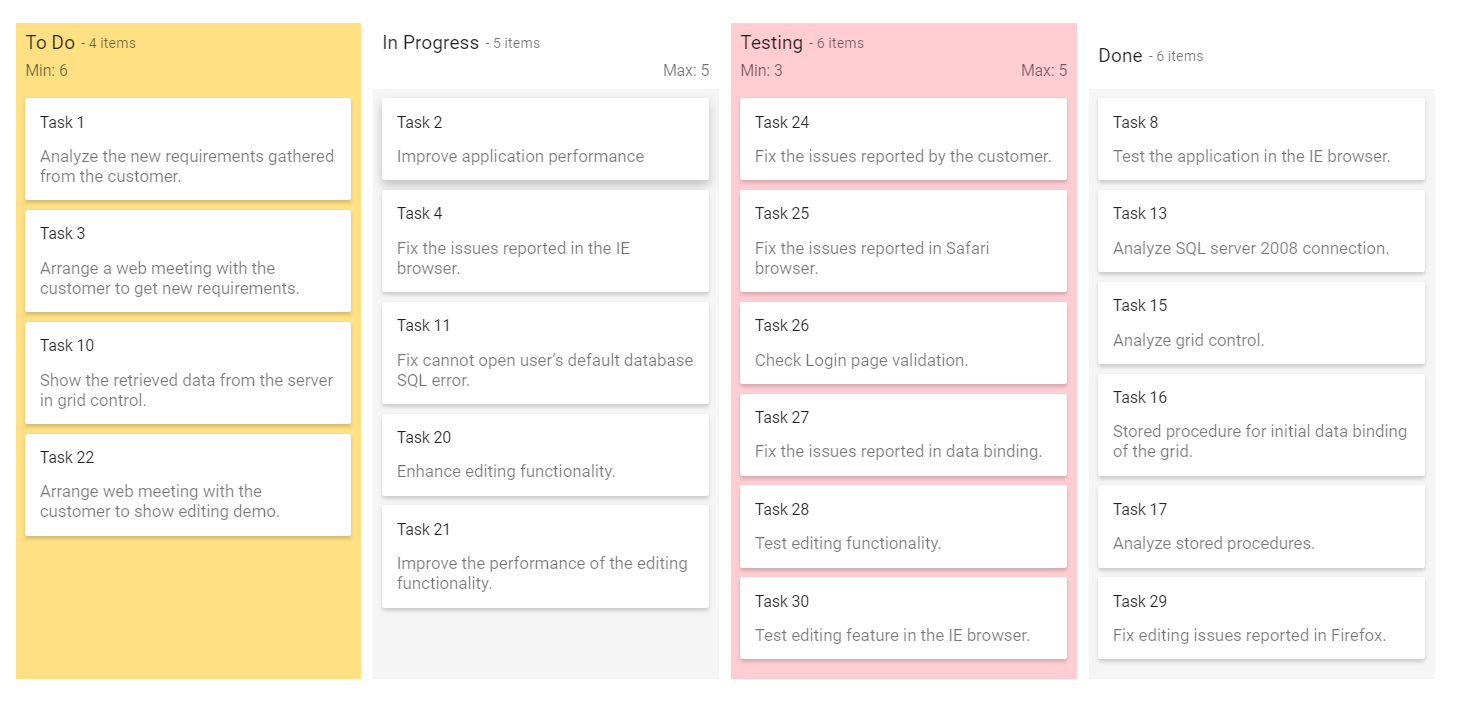
Validate particular column using the MinCount or MaxCount properties. The corresponding columns gets different appearance when validation fails. In default layout, ConstraintType property accept only Column type. In swimlane layout, accept both Column and Swimlane constraint type.
There are two types of constraints:
- Column
- Swimlane
By default, the column count validation is performed based on Kanban Columns.
Minimum card limit
The MinCount property is used to specify the minimum cards hold on particular column or swimlane cell. If the column or swimlane total card count falls short of the minimum count value, it shows the column or cell background color with validation fails.
Maximum card limit
The MaxCount property is used to specify the maximum cards hold on particular column or swimlane cell. If the column or swimlane cell total card count exceeds the maximum count value, it shows the column or cell background color with validation fails.
@Html.EJS().Kanban("kanban").KeyField("Status").DataSource((IEnumerable<object>)ViewBag.data).Columns(col=> {
       col.HeaderText("To Do").KeyField("Open").ShowItemCount(true).MinCount(6).Add();
       col.HeaderText("In Progress").KeyField("InProgress").ShowItemCount(true).MaxCount(5).Add();
       col.HeaderText("Testing").KeyField("Testing").ShowItemCount(true).MaxCount(5).MinCount(3).Add();
       col.HeaderText("Done").KeyField("Close").ShowItemCount(true).Add();
        }).CardSettings(card =>  {
        card.ContentField("Summary").HeaderField("Id");
       }).Render()
public class KanbanDataModels
{
public string Id { get; set; }
public string Title { get; set; }
public string Status { get; set; }
public string Summary { get; set; }
public string Type { get; set; }
public string Priority { get; set; }
public string Tags { get; set; }
public Double Estimate { get; set; }
public string Assignee { get; set; }
public int RankId { get; set; }
public string Color { get; set; }
public List<KanbanDataModels> KanbanTasks()
{
List<KanbanDataModels> TaskDetails = new List<KanbanDataModels>();
TaskDetails.Add(new KanbanDataModels { Id = "Task 1", Title = "Task - 29001", Status = "Open", Summary = "Analyze the new requirements gathered from the customer.", Type = "Story", Priority = "Low", Tags = "Analyze,Customer", Estimate = 3.5, Assignee = "Nancy Davloio", RankId = 1, Color = "#8b447a" });
TaskDetails.Add(new KanbanDataModels { Id = "Task 2", Title = "Task - 29002", Status = "InProgress", Summary = "Improve application performance", Type = "Improvement", Priority = "Normal", Tags = "Improvement", Estimate = 6, Assignee = "Andrew Fuller", RankId = 1, Color = "#7d7297" });
TaskDetails.Add(new KanbanDataModels { Id = "Task 3", Title = "Task - 29003", Status = "Open", Summary = "Arrange a web meeting with the customer to get new requirements.", Type = "Others", Priority = "Critical", Tags = "Meeting", Estimate = 5.5, Assignee = "Janet Leverling", RankId = 2, Color = "#27AE60" });
TaskDetails.Add(new KanbanDataModels { Id = "Task 4", Title = "Task - 29004", Status = "InProgress", Summary = "Fix the issues reported in the IE browser.", Type = "Bug", Priority = "Release Breaker", Tags = "IE", Estimate = 2.5, Assignee = "Janet Leverling", RankId = 2, Color = "#cc0000" });
TaskDetails.Add(new KanbanDataModels { Id = "Task 5", Title = "Task - 29005", Status = "Review", Summary = "Fix the issues reported by the customer.", Type = "Bug", Priority = "Low", Tags = "Customer", Estimate = 3.5, Assignee = "Steven walker", RankId = 1, Color = "#cc0000" });
TaskDetails.Add(new KanbanDataModels { Id = "Task 6", Title = "Task - 29007", Status = "Validate", Summary = "Validate new requirements", Type = "Improvement", Priority = "Low", Tags = "Validation", Estimate = 1.5, Assignee = "Robert King", RankId = 1, Color = "#7d7297" });
TaskDetails.Add(new KanbanDataModels { Id = "Task 7", Title = "Task - 29009", Status = "Review", Summary = "Fix the issues reported in Safari browser.", Type = "Bug", Priority = "Release Breaker", Tags = "Fix,Safari", Estimate = 1.5, Assignee = "Nancy Davloio", RankId = 2, Color = "#cc0000" });
TaskDetails.Add(new KanbanDataModels { Id = "Task 8", Title = "Task - 29010", Status = "Close", Summary = "Test the application in the IE browser.", Type = "Story", Priority = "Low", Tags = "Review,IE", Estimate = 5.5, Assignee = "Margaret hamilt", RankId = 3, Color = "#8b447a" });
TaskDetails.Add(new KanbanDataModels { Id = "Task 9", Title = "Task - 29011", Status = "Validate", Summary = "Validate the issues reported by the customer.", Type = "Story", Priority = "High", Tags = "Validation,Fix", Estimate = 1, Assignee = "Steven walker", RankId = 1, Color = "#8b447a" });
TaskDetails.Add(new KanbanDataModels { Id = "Task 10", Title = "Task - 29015", Status = "Open", Summary = "Show the retrieved data from the server in grid control.", Type = "Story", Priority = "High", Tags = "Database,SQL", Estimate = 5.5, Assignee = "Margaret hamilt", RankId = 4, Color = "#8b447a" });
TaskDetails.Add(new KanbanDataModels { Id = "Task 11", Title = "Task - 29016", Status = "InProgress", Summary = "Fix cannot open user’s default database SQL error.", Priority = "Critical", Type = "Bug", Tags = "Database,Sql2008", Estimate = 2.5, Assignee = "Janet Leverling", RankId = 4, Color = "#cc0000" });
TaskDetails.Add(new KanbanDataModels { Id = "Task 12", Title = "Task - 29017", Status = "Review", Summary = "Fix the issues reported in data binding.", Type = "Story", Priority = "Normal", Tags = "Databinding", Estimate = 3.5, Assignee = "Janet Leverling", RankId = 4, Color = "#8b447a" });
TaskDetails.Add(new KanbanDataModels { Id = "Task 13", Title = "Task - 29018", Status = "Close", Summary = "Analyze SQL server 2008 connection.", Type = "Story", Priority = "Release Breaker", Tags = "Grid,Sql", Estimate = 2, Assignee = "Andrew Fuller", RankId = 4, Color = "#8b447a" });
TaskDetails.Add(new KanbanDataModels { Id = "Task 14", Title = "Task - 29019", Status = "Validate", Summary = "Validate databinding issues.", Type = "Story", Priority = "Low", Tags = "Validation", Estimate = 1.5, Assignee = "Margaret hamilt", RankId = 1, Color = "#8b447a" });
TaskDetails.Add(new KanbanDataModels { Id = "Task 15", Title = "Task - 29020", Status = "Close", Summary = "Analyze grid control.", Type = "Story", Priority = "High", Tags = "Analyze", Estimate = 2.5, Assignee = "Margaret hamilt", RankId = 5, Color = "#8b447a" });
TaskDetails.Add(new KanbanDataModels { Id = "Task 16", Title = "Task - 29021", Status = "Close", Summary = "Stored procedure for initial data binding of the grid.", Type = "Others", Priority = "Release Breaker", Tags = "Databinding", Estimate = 1.5, Assignee = "Steven walker", RankId = 6, Color = "#27AE60" });
TaskDetails.Add(new KanbanDataModels { Id = "Task 17", Title = "Task - 29022", Status = "Close", Summary = "Analyze stored procedures.", Type = "Story", Priority = "Release Breaker", Tags = "Procedures", Estimate = 5.5, Assignee = "Janet Leverling", RankId = 7, Color = "#8b447a" });
TaskDetails.Add(new KanbanDataModels { Id = "Task 18", Title = "Task - 29023", Status = "Validate", Summary = "Validate editing issues.", Type = "Story", Priority = "Critical", Tags = "Editing", Estimate = 1, Assignee = "Nancy Davloio", RankId = 1, Color = "#8b447a" });
TaskDetails.Add(new KanbanDataModels { Id = "Task 19", Title = "Task - 29024", Status = "Review", Summary = "Test editing functionality.", Type = "Story", Priority = "Normal", Tags = "Editing,Test", Estimate = 0.5, Assignee = "Nancy Davloio", RankId = 5, Color = "#8b447a" });
TaskDetails.Add(new KanbanDataModels { Id = "Task 20", Title = "Task - 29025", Status = "Open", Summary = "Enhance editing functionality.", Type = "Improvement", Priority = "Low", Tags = "Editing", Estimate = 3.5, Assignee = "Andrew Fuller", RankId = 5, Color = "#7d7297" });
TaskDetails.Add(new KanbanDataModels { Id = "Task 21", Title = "Task - 29026", Status = "InProgress", Summary = "Improve the performance of the editing functionality.", Type = "Epic", Priority = "High", Tags = "Performance", Estimate = 6, Assignee = "Nancy Davloio", RankId = 5, Color = "#6d7492" });
TaskDetails.Add(new KanbanDataModels { Id = "Task 22", Title = "Task - 29027", Status = "Open", Summary = "Arrange web meeting with the customer to show editing demo.", Type = "Others", Priority = "High", Tags = "Meeting,Editing", Estimate = 5.5, Assignee = "Steven walker", RankId = 6, Color = "#27AE60" });
TaskDetails.Add(new KanbanDataModels { Id = "Task 23", Title = "Task - 29029", Status = "Review", Summary = "Fix the editing issues reported by the customer.", Type = "Bug", Priority = "Low", Tags = "Editing,Fix", Estimate = 3.5, Assignee = "Janet Leverling", RankId = 6, Color = "#cc0000" });
TaskDetails.Add(new KanbanDataModels { Id = "Task 24", Title = "Task - 29030", Status = "Testing", Summary = "Fix the issues reported by the customer.", Type = "Bug", Priority = "Critical", Tags = "Customer", Estimate = 3.5, Assignee = "Steven walker", RankId = 1 });
TaskDetails.Add(new KanbanDataModels { Id = "Task 25", Title = "Task - 29031", Status = "Testing", Summary = "Fix the issues reported in Safari browser.", Type = "Bug", Priority = "Release Breaker", Tags = "Fix,Safari", Estimate = 1.5, Assignee = "Nancy Davloio", RankId = 2 });
TaskDetails.Add(new KanbanDataModels { Id = "Task 26", Title = "Task - 29032", Status = "Testing", Summary = "Check Login page validation.", Type = "Story", Priority = "Release Breaker", Tags = "Testing", Estimate = 0.5, Assignee = "Michael Suyama", RankId = 3 });
TaskDetails.Add(new KanbanDataModels { Id = "Task 27", Title = "Task - 29033", Status = "Testing", Summary = "Fix the issues reported in data binding.", Type = "Story", Priority = "Normal", Tags = "Databinding", Estimate = 3.5, Assignee = "Janet Leverling", RankId = 4 });
TaskDetails.Add(new KanbanDataModels { Id = "Task 28", Title = "Task - 29034", Status = "Testing", Summary = "Test editing functionality.", Type = "Story", Priority = "Normal", Tags = "Editing,Test", Estimate = 0.5, Assignee = "Nancy Davloio", RankId = 5 });
TaskDetails.Add(new KanbanDataModels { Id = "Task 29", Title = "Task - 29035", Status = "Testing", Summary = "Fix editing issues reported in Firefox.", Type = "Bug", Priority = "Critical", Tags = "Editing,Fix", Estimate = 1.5, Assignee = "Robert King", RankId = 7 });
TaskDetails.Add(new KanbanDataModels { Id = "Task 30", Title = "Task - 29036", Status = "Testing", Summary = "Test editing feature in the IE browser.", Type = "Story", Priority = "Normal", Tags = "Testing", Estimate = 5.5, Assignee = "Janet Leverling", RankId = 10 });
return TaskDetails;
}
}public class HomeController : Controller
{
public ActionResult Index()
{
ViewBag.data = new KanbanDataModels().KanbanTasks();
return View();
}
}Output be like the below.