Globalization and Localization Support in ASP.NET MVC Kanban
The localization library allows you to localize the default text content of the Kanban to different cultures using the Locale property.
In Kanban, total count and min or max count text alone will be localized based on culture.
| Locale key | en-US (default) |
|---|---|
| items | items |
| min | Min |
| max | Max |
| cardsSelected | Cards Selected |
| addTitle | Add New Card |
| editTitle | Edit Card Details |
| deleteTitle | Delete Card |
| deleteContent | Are you sure you want to delete this card? |
| save | Save |
| delete | Delete |
| cancel | Cancel |
| yes | Yes |
| no | No |
| close | Close |
| noCard | No cards to display |
| unassigned | Unassigned |
Loading translations
To load translation object in an application, use load function of L10n class.
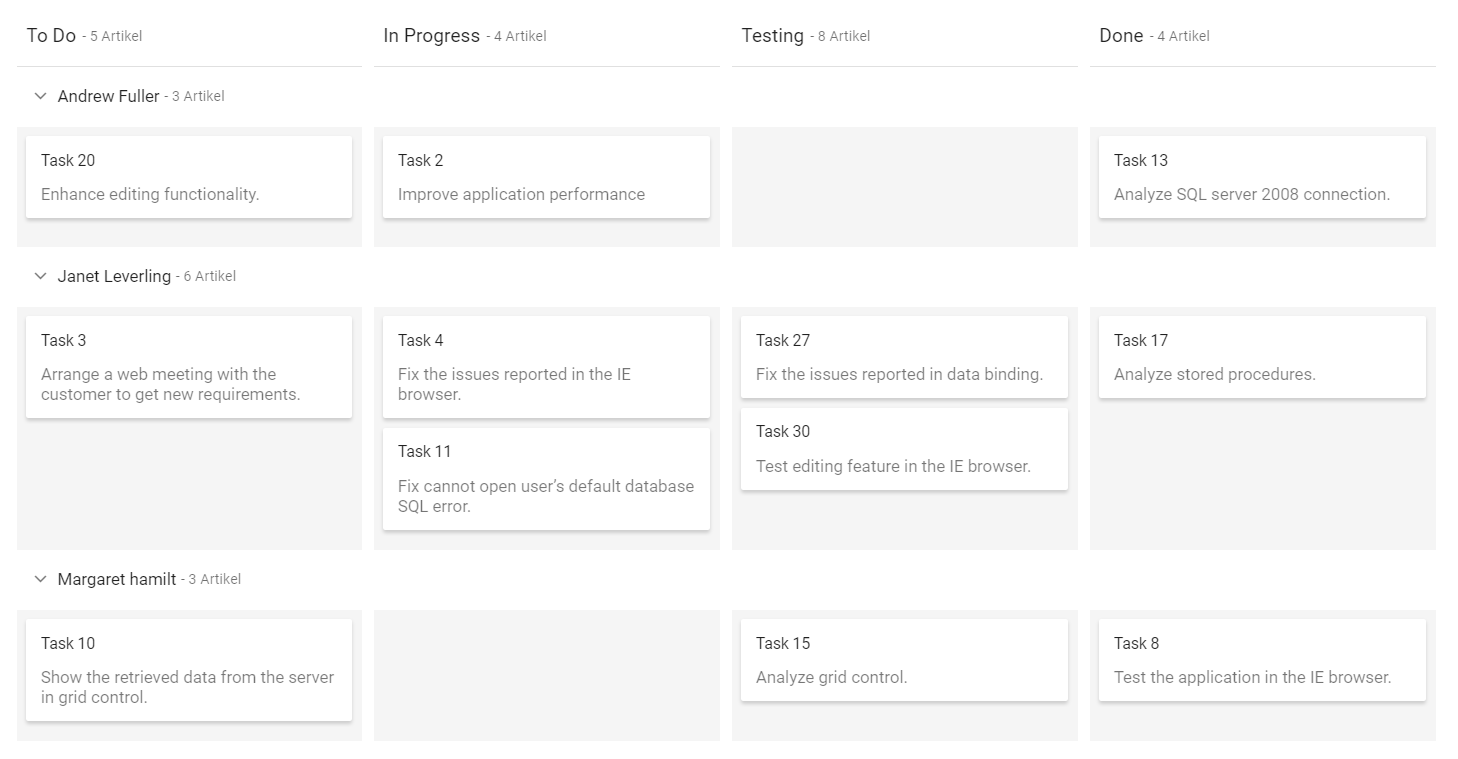
The following example demonstrates the Kanban in Deutsch culture.
@Html.EJS().Kanban("kanban").KeyField("Status").DataSource((IEnumerable<object>)ViewBag.data).Columns(col =>
            {
           col.HeaderText("To Do").KeyField("Open").Add();
           col.HeaderText("In Progress").KeyField("InProgress").Add();
           col.HeaderText("Testing").KeyField("Testing").Add();
           col.HeaderText("Done").KeyField("Close").Add();
       }).CardSettings(card =>  {
           card.ContentField("Summary").HeaderField("Id");
       }).Locale("de").SwimlaneSettings(swim => {
           swim.KeyField("Assignee");
       }).Render()
<script>
    ej.base.L10n.load({
        'de': {
            'kanban': {
                'items': 'Artikel',
                'min': 'Min',
                'max': 'Max',
                'cardsSelected': 'Karten ausgewählt',
                'addTitle': 'Neue Karte hinzufügen',
                'editTitle': 'Kartendetails bearbeiten',
                'deleteTitle': 'Karte löschen',
                'deleteContent': 'Möchten Sie diese Karte wirklich löschen?',
                'save': 'speichern',
                'delete': 'Löschen',
                'cancel': 'Stornieren',
                'yes': 'Ja',
                'no': 'Nein',
                'close': 'Schließen',
                'noCard': 'Keine Karten zum Anzeigen',
                'unassigned': 'nicht zugewiesen'

            }
        }
    })
</script>
public class KanbanDataModels
{
public string Id { get; set; }
public string Title { get; set; }
public string Status { get; set; }
public string Summary { get; set; }
public string Type { get; set; }
public string Priority { get; set; }
public string Tags { get; set; }
public Double Estimate { get; set; }
public string Assignee { get; set; }
public int RankId { get; set; }
public string Color { get; set; }
public List<KanbanDataModels> KanbanTasks()
{
List<KanbanDataModels> TaskDetails = new List<KanbanDataModels>();
TaskDetails.Add(new KanbanDataModels { Id = "Task 1", Title = "Task - 29001", Status = "Open", Summary = "Analyze the new requirements gathered from the customer.", Type = "Story", Priority = "Low", Tags = "Analyze,Customer", Estimate = 3.5, Assignee = "Nancy Davloio", RankId = 1, Color = "#8b447a" });
TaskDetails.Add(new KanbanDataModels { Id = "Task 2", Title = "Task - 29002", Status = "InProgress", Summary = "Improve application performance", Type = "Improvement", Priority = "Normal", Tags = "Improvement", Estimate = 6, Assignee = "Andrew Fuller", RankId = 1, Color = "#7d7297" });
TaskDetails.Add(new KanbanDataModels { Id = "Task 3", Title = "Task - 29003", Status = "Open", Summary = "Arrange a web meeting with the customer to get new requirements.", Type = "Others", Priority = "Critical", Tags = "Meeting", Estimate = 5.5, Assignee = "Janet Leverling", RankId = 2, Color = "#27AE60" });
TaskDetails.Add(new KanbanDataModels { Id = "Task 4", Title = "Task - 29004", Status = "InProgress", Summary = "Fix the issues reported in the IE browser.", Type = "Bug", Priority = "Release Breaker", Tags = "IE", Estimate = 2.5, Assignee = "Janet Leverling", RankId = 2, Color = "#cc0000" });
TaskDetails.Add(new KanbanDataModels { Id = "Task 5", Title = "Task - 29005", Status = "Review", Summary = "Fix the issues reported by the customer.", Type = "Bug", Priority = "Low", Tags = "Customer", Estimate = 3.5, Assignee = "Steven walker", RankId = 1, Color = "#cc0000" });
TaskDetails.Add(new KanbanDataModels { Id = "Task 6", Title = "Task - 29007", Status = "Validate", Summary = "Validate new requirements", Type = "Improvement", Priority = "Low", Tags = "Validation", Estimate = 1.5, Assignee = "Robert King", RankId = 1, Color = "#7d7297" });
TaskDetails.Add(new KanbanDataModels { Id = "Task 7", Title = "Task - 29009", Status = "Review", Summary = "Fix the issues reported in Safari browser.", Type = "Bug", Priority = "Release Breaker", Tags = "Fix,Safari", Estimate = 1.5, Assignee = "Nancy Davloio", RankId = 2, Color = "#cc0000" });
TaskDetails.Add(new KanbanDataModels { Id = "Task 8", Title = "Task - 29010", Status = "Close", Summary = "Test the application in the IE browser.", Type = "Story", Priority = "Low", Tags = "Review,IE", Estimate = 5.5, Assignee = "Margaret hamilt", RankId = 3, Color = "#8b447a" });
TaskDetails.Add(new KanbanDataModels { Id = "Task 9", Title = "Task - 29011", Status = "Validate", Summary = "Validate the issues reported by the customer.", Type = "Story", Priority = "High", Tags = "Validation,Fix", Estimate = 1, Assignee = "Steven walker", RankId = 1, Color = "#8b447a" });
TaskDetails.Add(new KanbanDataModels { Id = "Task 10", Title = "Task - 29015", Status = "Open", Summary = "Show the retrieved data from the server in grid control.", Type = "Story", Priority = "High", Tags = "Database,SQL", Estimate = 5.5, Assignee = "Margaret hamilt", RankId = 4, Color = "#8b447a" });
TaskDetails.Add(new KanbanDataModels { Id = "Task 11", Title = "Task - 29016", Status = "InProgress", Summary = "Fix cannot open user’s default database SQL error.", Priority = "Critical", Type = "Bug", Tags = "Database,Sql2008", Estimate = 2.5, Assignee = "Janet Leverling", RankId = 4, Color = "#cc0000" });
TaskDetails.Add(new KanbanDataModels { Id = "Task 12", Title = "Task - 29017", Status = "Review", Summary = "Fix the issues reported in data binding.", Type = "Story", Priority = "Normal", Tags = "Databinding", Estimate = 3.5, Assignee = "Janet Leverling", RankId = 4, Color = "#8b447a" });
TaskDetails.Add(new KanbanDataModels { Id = "Task 13", Title = "Task - 29018", Status = "Close", Summary = "Analyze SQL server 2008 connection.", Type = "Story", Priority = "Release Breaker", Tags = "Grid,Sql", Estimate = 2, Assignee = "Andrew Fuller", RankId = 4, Color = "#8b447a" });
TaskDetails.Add(new KanbanDataModels { Id = "Task 14", Title = "Task - 29019", Status = "Validate", Summary = "Validate databinding issues.", Type = "Story", Priority = "Low", Tags = "Validation", Estimate = 1.5, Assignee = "Margaret hamilt", RankId = 1, Color = "#8b447a" });
TaskDetails.Add(new KanbanDataModels { Id = "Task 15", Title = "Task - 29020", Status = "Close", Summary = "Analyze grid control.", Type = "Story", Priority = "High", Tags = "Analyze", Estimate = 2.5, Assignee = "Margaret hamilt", RankId = 5, Color = "#8b447a" });
TaskDetails.Add(new KanbanDataModels { Id = "Task 16", Title = "Task - 29021", Status = "Close", Summary = "Stored procedure for initial data binding of the grid.", Type = "Others", Priority = "Release Breaker", Tags = "Databinding", Estimate = 1.5, Assignee = "Steven walker", RankId = 6, Color = "#27AE60" });
TaskDetails.Add(new KanbanDataModels { Id = "Task 17", Title = "Task - 29022", Status = "Close", Summary = "Analyze stored procedures.", Type = "Story", Priority = "Release Breaker", Tags = "Procedures", Estimate = 5.5, Assignee = "Janet Leverling", RankId = 7, Color = "#8b447a" });
TaskDetails.Add(new KanbanDataModels { Id = "Task 18", Title = "Task - 29023", Status = "Validate", Summary = "Validate editing issues.", Type = "Story", Priority = "Critical", Tags = "Editing", Estimate = 1, Assignee = "Nancy Davloio", RankId = 1, Color = "#8b447a" });
TaskDetails.Add(new KanbanDataModels { Id = "Task 19", Title = "Task - 29024", Status = "Review", Summary = "Test editing functionality.", Type = "Story", Priority = "Normal", Tags = "Editing,Test", Estimate = 0.5, Assignee = "Nancy Davloio", RankId = 5, Color = "#8b447a" });
TaskDetails.Add(new KanbanDataModels { Id = "Task 20", Title = "Task - 29025", Status = "Open", Summary = "Enhance editing functionality.", Type = "Improvement", Priority = "Low", Tags = "Editing", Estimate = 3.5, Assignee = "Andrew Fuller", RankId = 5, Color = "#7d7297" });
TaskDetails.Add(new KanbanDataModels { Id = "Task 21", Title = "Task - 29026", Status = "InProgress", Summary = "Improve the performance of the editing functionality.", Type = "Epic", Priority = "High", Tags = "Performance", Estimate = 6, Assignee = "Nancy Davloio", RankId = 5, Color = "#6d7492" });
TaskDetails.Add(new KanbanDataModels { Id = "Task 22", Title = "Task - 29027", Status = "Open", Summary = "Arrange web meeting with the customer to show editing demo.", Type = "Others", Priority = "High", Tags = "Meeting,Editing", Estimate = 5.5, Assignee = "Steven walker", RankId = 6, Color = "#27AE60" });
TaskDetails.Add(new KanbanDataModels { Id = "Task 23", Title = "Task - 29029", Status = "Review", Summary = "Fix the editing issues reported by the customer.", Type = "Bug", Priority = "Low", Tags = "Editing,Fix", Estimate = 3.5, Assignee = "Janet Leverling", RankId = 6, Color = "#cc0000" });
TaskDetails.Add(new KanbanDataModels { Id = "Task 24", Title = "Task - 29030", Status = "Testing", Summary = "Fix the issues reported by the customer.", Type = "Bug", Priority = "Critical", Tags = "Customer", Estimate = 3.5, Assignee = "Steven walker", RankId = 1 });
TaskDetails.Add(new KanbanDataModels { Id = "Task 25", Title = "Task - 29031", Status = "Testing", Summary = "Fix the issues reported in Safari browser.", Type = "Bug", Priority = "Release Breaker", Tags = "Fix,Safari", Estimate = 1.5, Assignee = "Nancy Davloio", RankId = 2 });
TaskDetails.Add(new KanbanDataModels { Id = "Task 26", Title = "Task - 29032", Status = "Testing", Summary = "Check Login page validation.", Type = "Story", Priority = "Release Breaker", Tags = "Testing", Estimate = 0.5, Assignee = "Michael Suyama", RankId = 3 });
TaskDetails.Add(new KanbanDataModels { Id = "Task 27", Title = "Task - 29033", Status = "Testing", Summary = "Fix the issues reported in data binding.", Type = "Story", Priority = "Normal", Tags = "Databinding", Estimate = 3.5, Assignee = "Janet Leverling", RankId = 4 });
TaskDetails.Add(new KanbanDataModels { Id = "Task 28", Title = "Task - 29034", Status = "Testing", Summary = "Test editing functionality.", Type = "Story", Priority = "Normal", Tags = "Editing,Test", Estimate = 0.5, Assignee = "Nancy Davloio", RankId = 5 });
TaskDetails.Add(new KanbanDataModels { Id = "Task 29", Title = "Task - 29035", Status = "Testing", Summary = "Fix editing issues reported in Firefox.", Type = "Bug", Priority = "Critical", Tags = "Editing,Fix", Estimate = 1.5, Assignee = "Robert King", RankId = 7 });
TaskDetails.Add(new KanbanDataModels { Id = "Task 30", Title = "Task - 29036", Status = "Testing", Summary = "Test editing feature in the IE browser.", Type = "Story", Priority = "Normal", Tags = "Testing", Estimate = 5.5, Assignee = "Janet Leverling", RankId = 10 });
return TaskDetails;
}
}public class HomeController : Controller
{
public ActionResult Index()
{
ViewBag.data = new KanbanDataModels().KanbanTasks();
return View();
}
}Output be like the below.
Right to left (RTL)
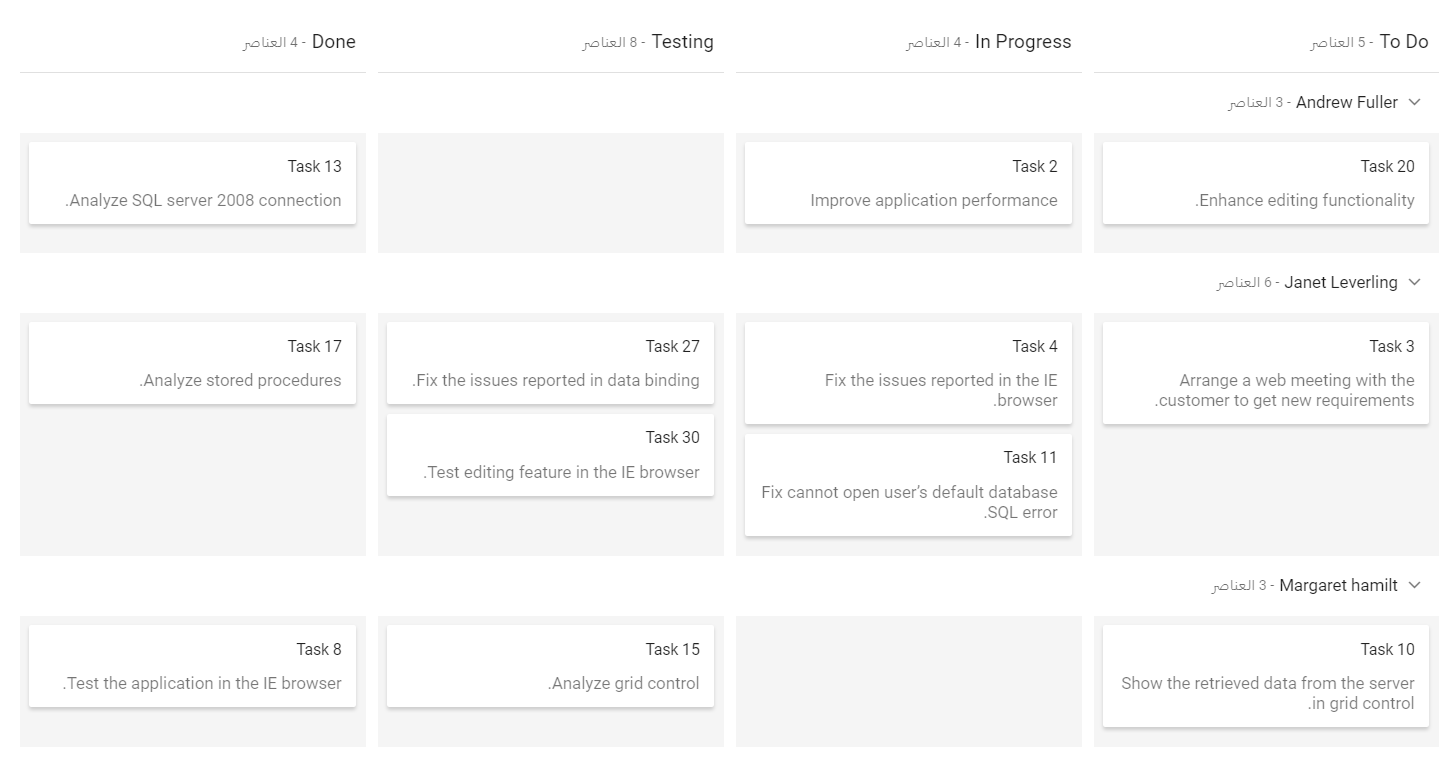
The Kanban provides an option to switch its text direction and layout from right to left. It improves the user experiences and accessibility for users who use right-to-left languages (Arabic, Farsi, Urdu, etc.). To enable right-to-left mode in Kanban, set the EnableRtl to true.
@Html.EJS().Kanban("kanban").KeyField("Status").EnableRtl(true).DataSource((IEnumerable<object>)ViewBag.data).Columns(col =>
                {
                col.HeaderText("To Do").KeyField("Open").Add();
                col.HeaderText("In Progress").KeyField("InProgress").Add();
                col.HeaderText("Testing").KeyField("Testing").Add();
                col.HeaderText("Done").KeyField("Close").Add();
            }).CardSettings(card => {
           card.ContentField("Summary").HeaderField("Id");
       }).SwimlaneSettings(swim => {
           swim.KeyField("Assignee");
       }).Locale("ar").Render()
<script>
    ej.base.L10n.load({
        'ar': {
            'kanban': {
                'items': 'العناصر',
                'min': 'أنا',
                'max': 'ماكس',
                'cardsSelected': 'تم تحديد البطاقات',
                'addTitle': 'إضافة بطاقة جديدة',
                'editTitle': 'تحرير تفاصيل البطاقة',
                'deleteTitle': 'حذف البطاقة',
                'deleteContent': 'هل أنت متأكد أنك تريد حذف هذه البطاقة؟',
                'save': 'حفظ',
                'delete': 'حذف',
                'cancel': 'إلغاء',
                'yes': 'نعم',
                'no': 'لا',
                'close': 'قريب'
                'noCard': 'لا توجد بطاقات لعرضها',
                'unassigned': 'غير معين'
            }
        }
    })
</script>
public class KanbanDataModels
{
public string Id { get; set; }
public string Title { get; set; }
public string Status { get; set; }
public string Summary { get; set; }
public string Type { get; set; }
public string Priority { get; set; }
public string Tags { get; set; }
public Double Estimate { get; set; }
public string Assignee { get; set; }
public int RankId { get; set; }
public string Color { get; set; }
public List<KanbanDataModels> KanbanTasks()
{
List<KanbanDataModels> TaskDetails = new List<KanbanDataModels>();
TaskDetails.Add(new KanbanDataModels { Id = "Task 1", Title = "Task - 29001", Status = "Open", Summary = "Analyze the new requirements gathered from the customer.", Type = "Story", Priority = "Low", Tags = "Analyze,Customer", Estimate = 3.5, Assignee = "Nancy Davloio", RankId = 1, Color = "#8b447a" });
TaskDetails.Add(new KanbanDataModels { Id = "Task 2", Title = "Task - 29002", Status = "InProgress", Summary = "Improve application performance", Type = "Improvement", Priority = "Normal", Tags = "Improvement", Estimate = 6, Assignee = "Andrew Fuller", RankId = 1, Color = "#7d7297" });
TaskDetails.Add(new KanbanDataModels { Id = "Task 3", Title = "Task - 29003", Status = "Open", Summary = "Arrange a web meeting with the customer to get new requirements.", Type = "Others", Priority = "Critical", Tags = "Meeting", Estimate = 5.5, Assignee = "Janet Leverling", RankId = 2, Color = "#27AE60" });
TaskDetails.Add(new KanbanDataModels { Id = "Task 4", Title = "Task - 29004", Status = "InProgress", Summary = "Fix the issues reported in the IE browser.", Type = "Bug", Priority = "Release Breaker", Tags = "IE", Estimate = 2.5, Assignee = "Janet Leverling", RankId = 2, Color = "#cc0000" });
TaskDetails.Add(new KanbanDataModels { Id = "Task 5", Title = "Task - 29005", Status = "Review", Summary = "Fix the issues reported by the customer.", Type = "Bug", Priority = "Low", Tags = "Customer", Estimate = 3.5, Assignee = "Steven walker", RankId = 1, Color = "#cc0000" });
TaskDetails.Add(new KanbanDataModels { Id = "Task 6", Title = "Task - 29007", Status = "Validate", Summary = "Validate new requirements", Type = "Improvement", Priority = "Low", Tags = "Validation", Estimate = 1.5, Assignee = "Robert King", RankId = 1, Color = "#7d7297" });
TaskDetails.Add(new KanbanDataModels { Id = "Task 7", Title = "Task - 29009", Status = "Review", Summary = "Fix the issues reported in Safari browser.", Type = "Bug", Priority = "Release Breaker", Tags = "Fix,Safari", Estimate = 1.5, Assignee = "Nancy Davloio", RankId = 2, Color = "#cc0000" });
TaskDetails.Add(new KanbanDataModels { Id = "Task 8", Title = "Task - 29010", Status = "Close", Summary = "Test the application in the IE browser.", Type = "Story", Priority = "Low", Tags = "Review,IE", Estimate = 5.5, Assignee = "Margaret hamilt", RankId = 3, Color = "#8b447a" });
TaskDetails.Add(new KanbanDataModels { Id = "Task 9", Title = "Task - 29011", Status = "Validate", Summary = "Validate the issues reported by the customer.", Type = "Story", Priority = "High", Tags = "Validation,Fix", Estimate = 1, Assignee = "Steven walker", RankId = 1, Color = "#8b447a" });
TaskDetails.Add(new KanbanDataModels { Id = "Task 10", Title = "Task - 29015", Status = "Open", Summary = "Show the retrieved data from the server in grid control.", Type = "Story", Priority = "High", Tags = "Database,SQL", Estimate = 5.5, Assignee = "Margaret hamilt", RankId = 4, Color = "#8b447a" });
TaskDetails.Add(new KanbanDataModels { Id = "Task 11", Title = "Task - 29016", Status = "InProgress", Summary = "Fix cannot open user’s default database SQL error.", Priority = "Critical", Type = "Bug", Tags = "Database,Sql2008", Estimate = 2.5, Assignee = "Janet Leverling", RankId = 4, Color = "#cc0000" });
TaskDetails.Add(new KanbanDataModels { Id = "Task 12", Title = "Task - 29017", Status = "Review", Summary = "Fix the issues reported in data binding.", Type = "Story", Priority = "Normal", Tags = "Databinding", Estimate = 3.5, Assignee = "Janet Leverling", RankId = 4, Color = "#8b447a" });
TaskDetails.Add(new KanbanDataModels { Id = "Task 13", Title = "Task - 29018", Status = "Close", Summary = "Analyze SQL server 2008 connection.", Type = "Story", Priority = "Release Breaker", Tags = "Grid,Sql", Estimate = 2, Assignee = "Andrew Fuller", RankId = 4, Color = "#8b447a" });
TaskDetails.Add(new KanbanDataModels { Id = "Task 14", Title = "Task - 29019", Status = "Validate", Summary = "Validate databinding issues.", Type = "Story", Priority = "Low", Tags = "Validation", Estimate = 1.5, Assignee = "Margaret hamilt", RankId = 1, Color = "#8b447a" });
TaskDetails.Add(new KanbanDataModels { Id = "Task 15", Title = "Task - 29020", Status = "Close", Summary = "Analyze grid control.", Type = "Story", Priority = "High", Tags = "Analyze", Estimate = 2.5, Assignee = "Margaret hamilt", RankId = 5, Color = "#8b447a" });
TaskDetails.Add(new KanbanDataModels { Id = "Task 16", Title = "Task - 29021", Status = "Close", Summary = "Stored procedure for initial data binding of the grid.", Type = "Others", Priority = "Release Breaker", Tags = "Databinding", Estimate = 1.5, Assignee = "Steven walker", RankId = 6, Color = "#27AE60" });
TaskDetails.Add(new KanbanDataModels { Id = "Task 17", Title = "Task - 29022", Status = "Close", Summary = "Analyze stored procedures.", Type = "Story", Priority = "Release Breaker", Tags = "Procedures", Estimate = 5.5, Assignee = "Janet Leverling", RankId = 7, Color = "#8b447a" });
TaskDetails.Add(new KanbanDataModels { Id = "Task 18", Title = "Task - 29023", Status = "Validate", Summary = "Validate editing issues.", Type = "Story", Priority = "Critical", Tags = "Editing", Estimate = 1, Assignee = "Nancy Davloio", RankId = 1, Color = "#8b447a" });
TaskDetails.Add(new KanbanDataModels { Id = "Task 19", Title = "Task - 29024", Status = "Review", Summary = "Test editing functionality.", Type = "Story", Priority = "Normal", Tags = "Editing,Test", Estimate = 0.5, Assignee = "Nancy Davloio", RankId = 5, Color = "#8b447a" });
TaskDetails.Add(new KanbanDataModels { Id = "Task 20", Title = "Task - 29025", Status = "Open", Summary = "Enhance editing functionality.", Type = "Improvement", Priority = "Low", Tags = "Editing", Estimate = 3.5, Assignee = "Andrew Fuller", RankId = 5, Color = "#7d7297" });
TaskDetails.Add(new KanbanDataModels { Id = "Task 21", Title = "Task - 29026", Status = "InProgress", Summary = "Improve the performance of the editing functionality.", Type = "Epic", Priority = "High", Tags = "Performance", Estimate = 6, Assignee = "Nancy Davloio", RankId = 5, Color = "#6d7492" });
TaskDetails.Add(new KanbanDataModels { Id = "Task 22", Title = "Task - 29027", Status = "Open", Summary = "Arrange web meeting with the customer to show editing demo.", Type = "Others", Priority = "High", Tags = "Meeting,Editing", Estimate = 5.5, Assignee = "Steven walker", RankId = 6, Color = "#27AE60" });
TaskDetails.Add(new KanbanDataModels { Id = "Task 23", Title = "Task - 29029", Status = "Review", Summary = "Fix the editing issues reported by the customer.", Type = "Bug", Priority = "Low", Tags = "Editing,Fix", Estimate = 3.5, Assignee = "Janet Leverling", RankId = 6, Color = "#cc0000" });
TaskDetails.Add(new KanbanDataModels { Id = "Task 24", Title = "Task - 29030", Status = "Testing", Summary = "Fix the issues reported by the customer.", Type = "Bug", Priority = "Critical", Tags = "Customer", Estimate = 3.5, Assignee = "Steven walker", RankId = 1 });
TaskDetails.Add(new KanbanDataModels { Id = "Task 25", Title = "Task - 29031", Status = "Testing", Summary = "Fix the issues reported in Safari browser.", Type = "Bug", Priority = "Release Breaker", Tags = "Fix,Safari", Estimate = 1.5, Assignee = "Nancy Davloio", RankId = 2 });
TaskDetails.Add(new KanbanDataModels { Id = "Task 26", Title = "Task - 29032", Status = "Testing", Summary = "Check Login page validation.", Type = "Story", Priority = "Release Breaker", Tags = "Testing", Estimate = 0.5, Assignee = "Michael Suyama", RankId = 3 });
TaskDetails.Add(new KanbanDataModels { Id = "Task 27", Title = "Task - 29033", Status = "Testing", Summary = "Fix the issues reported in data binding.", Type = "Story", Priority = "Normal", Tags = "Databinding", Estimate = 3.5, Assignee = "Janet Leverling", RankId = 4 });
TaskDetails.Add(new KanbanDataModels { Id = "Task 28", Title = "Task - 29034", Status = "Testing", Summary = "Test editing functionality.", Type = "Story", Priority = "Normal", Tags = "Editing,Test", Estimate = 0.5, Assignee = "Nancy Davloio", RankId = 5 });
TaskDetails.Add(new KanbanDataModels { Id = "Task 29", Title = "Task - 29035", Status = "Testing", Summary = "Fix editing issues reported in Firefox.", Type = "Bug", Priority = "Critical", Tags = "Editing,Fix", Estimate = 1.5, Assignee = "Robert King", RankId = 7 });
TaskDetails.Add(new KanbanDataModels { Id = "Task 30", Title = "Task - 29036", Status = "Testing", Summary = "Test editing feature in the IE browser.", Type = "Story", Priority = "Normal", Tags = "Testing", Estimate = 5.5, Assignee = "Janet Leverling", RankId = 10 });
return TaskDetails;
}
}public class HomeController : Controller
{
public ActionResult Index()
{
ViewBag.data = new KanbanDataModels().KanbanTasks();
return View();
}
}Output be like the below.