Task Scheduling with Duration Units in ASP.NET MVC Gantt Chart
Duration units
Duration units define how task duration values are interpreted and calculated in the Gantt Chart. Duration units can be configured globally for the entire project or individually for each task.
The Gantt Chart control supports the following duration units:
- Day: Standard for general planning.
- Hour: For detailed task management.
- Minute: For short-duration tasks.
-
Week: Represents a duration calculated using the configured
daysPerWeekvalue. -
Month: Represents a duration calculated using the configured
daysPerMonthvalue.
Configure using:
-
durationUnit: Sets global unit (default:
day). - taskFields.durationUnit: Maps per-task units.
-
daysPerWeek: Specifies the number of working days that constitute one week duration. -
daysPerMonth: Specifies the number of working days that constitute one month duration. - Duration field values: You can specify the duration unit directly in the duration value (for example, “5 minutes”, “2 weeks”, or “1 month”).
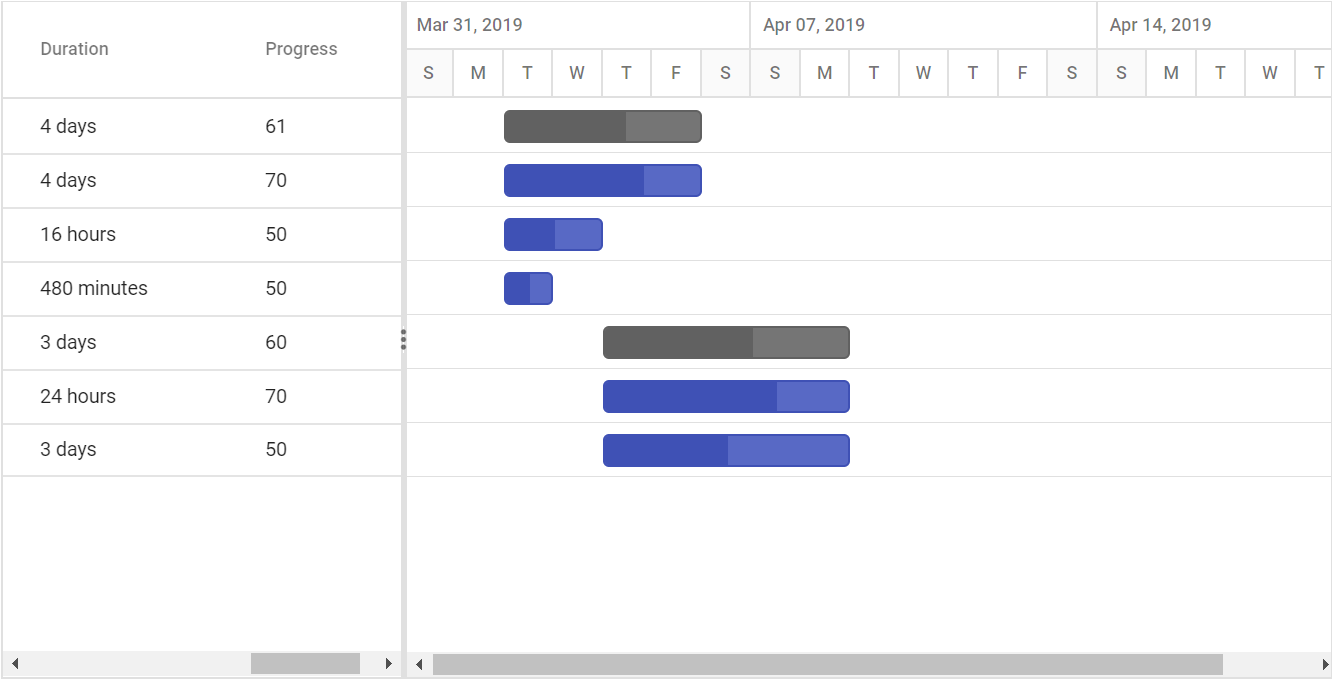
The following example maps duration units:
@using Syncfusion.EJ2.Gantt

@(Html.EJS().Gantt("Gantt")
    .DataSource((IEnumerable<object>)ViewBag.DataSource)
    .Height("450px")
    .DaysPerWeek(5)
    .DaysPerMonth(20)
    .SplitterSettings(new GanttSplitterSettings
    {
        ColumnIndex = 4
    })
    .TaskFields(ts => ts
        .Id("TaskID")
        .Name("TaskName")
        .StartDate("StartDate")
        .Duration("Duration")
        .Progress("Progress")
        .DurationUnit("DurationUnit")
        .ParentID("ParentID"))
    .Render())
public IActionResult Index()
{
ViewBag.DataSource = ganttData();
return View();
}
public static List<GanttDataSource> ganttData()
{
List<GanttDataSource> GanttDataSourceCollection = new List<GanttDataSource>();
GanttDataSource Record1 = new GanttDataSource()
{
TaskId = 1,
TaskName = "Project initiation",
StartDate = new DateTime(2019, 04, 02),
EndDate = new DateTime(2019, 04, 21),
SubTasks = new List<GanttDataSource>(),
};
GanttDataSource Child1 = new GanttDataSource()
{
TaskId = 2,
TaskName = "Identify site location",
StartDate = new DateTime(2019, 04, 02),
Duration = 4,
Progress = 70,
DurationUnit="day"
};
GanttDataSource Child2 = new GanttDataSource()
{
TaskId = 3,
TaskName = "Perform soil test",
StartDate = new DateTime(2019, 04, 02),
Duration = 16,
Progress = 50,
DurationUnit = "hour"
};
GanttDataSource Child3 = new GanttDataSource()
{
TaskId = 4,
TaskName = "Soil test approval",
StartDate = new DateTime(2019, 04, 02),
Duration = 480,
Progress = 50,
DurationUnit = "minute"
};
Record1.SubTasks.Add(Child1);
Record1.SubTasks.Add(Child2);
Record1.SubTasks.Add(Child3);
GanttDataSource Record2 = new GanttDataSource()
{
TaskId = 5,
TaskName = "Project estimation",
StartDate = new DateTime(2019, 04, 02),
EndDate = new DateTime(2019, 04, 21),
SubTasks = new List<GanttDataSource>()
};
GanttDataSource Child4 = new GanttDataSource()
{
TaskId = 6,
TaskName = "Develop floor plan for estimation",
StartDate = new DateTime(2019, 04, 04),
Duration = 24,
Progress = 70,
DurationUnit = "hour"
};
GanttDataSource Child5 = new GanttDataSource()
{
TaskId = 7,
TaskName = "List materials",
StartDate = new DateTime(2019, 04, 04),
Duration = 3,
Progress = 50,
DurationUnit = "day"
};
Record2.SubTasks.Add(Child4);
Record2.SubTasks.Add(Child5);
GanttDataSourceCollection.Add(Record1);
GanttDataSourceCollection.Add(Record2);
return GanttDataSourceCollection;
}
public class GanttDataSource
{
public int TaskId { get; set; }
public string TaskName { get; set; }
public DateTime StartDate { get; set; }
public DateTime EndDate { get; set; }
public int? Duration { get; set; }
public int Progress { get; set; }
public string DurationUnit { get; set; }
public List<GanttDataSource> SubTasks { get; set; }
}
The default value of the
DurationUnitproperty isday.
Defining duration unit along with duration field
Duration units for the tasks can also be defined along with the duration values, the below code snippet explains the duration unit for a task along with duration value,
@Html.EJS().Gantt("Gantt").DataSource((IEnumerable<object>)ViewBag.DataSource).Height("450px").TaskFields(ts => ts.Id("TaskId").Name(
                "TaskName").StartDate("StartDate").EndDate("EndDate").Duration("Duration").Progress("Progress").Child("SubTasks")).Render()
public IActionResult Index()
{
ViewBag.DataSource = ganttData();
return View();
}
public static List<GanttDataSource> ganttData()
{
List<GanttDataSource> GanttDataSourceCollection = new List<GanttDataSource>();
GanttDataSource Record1 = new GanttDataSource()
{
TaskId = 1,
TaskName = "Project initiation",
StartDate = new DateTime(2019, 04, 02),
EndDate = new DateTime(2019, 04, 21),
SubTasks = new List<GanttDataSource>(),
};
GanttDataSource Child1 = new GanttDataSource()
{
TaskId = 2,
TaskName = "Identify site location",
StartDate = new DateTime(2019, 04, 02),
Duration = "3days",
Progress = 70,
};
GanttDataSource Child2 = new GanttDataSource()
{
TaskId = 3,
TaskName = "Perform soil test",
StartDate = new DateTime(2019, 04, 02),
Duration = "12hours",
Progress = 50
};
GanttDataSource Child3 = new GanttDataSource()
{
TaskId = 4,
TaskName = "Soil test approval",
StartDate = new DateTime(2019, 04, 02),
Duration = "1800minutes",
Progress = 50
};
Record1.SubTasks.Add(Child1);
Record1.SubTasks.Add(Child2);
Record1.SubTasks.Add(Child3);
GanttDataSource Record2 = new GanttDataSource()
{
TaskId = 5,
TaskName = "Project estimation",
StartDate = new DateTime(2019, 04, 02),
EndDate = new DateTime(2019, 04, 21),
SubTasks = new List<GanttDataSource>()
};
GanttDataSource Child4 = new GanttDataSource()
{
TaskId = 6,
TaskName = "Develop floor plan for estimation",
StartDate = new DateTime(2019, 04, 04),
Duration = "480minutes",
Progress = 70
};
GanttDataSource Child5 = new GanttDataSource()
{
TaskId = 7,
TaskName = "List materials",
StartDate = new DateTime(2019, 04, 04),
Duration = "3days",
Progress = 50
};
Record2.SubTasks.Add(Child4);
Record2.SubTasks.Add(Child5);
GanttDataSourceCollection.Add(Record1);
GanttDataSourceCollection.Add(Record2);
return GanttDataSourceCollection;
}
public class GanttDataSource
{
public int TaskId { get; set; }
public string TaskName { get; set; }
public DateTime StartDate { get; set; }
public DateTime EndDate { get; set; }
public string Duration { get; set; }
public int Progress { get; set; }
public List<GanttDataSource> SubTasks { get; set; }
}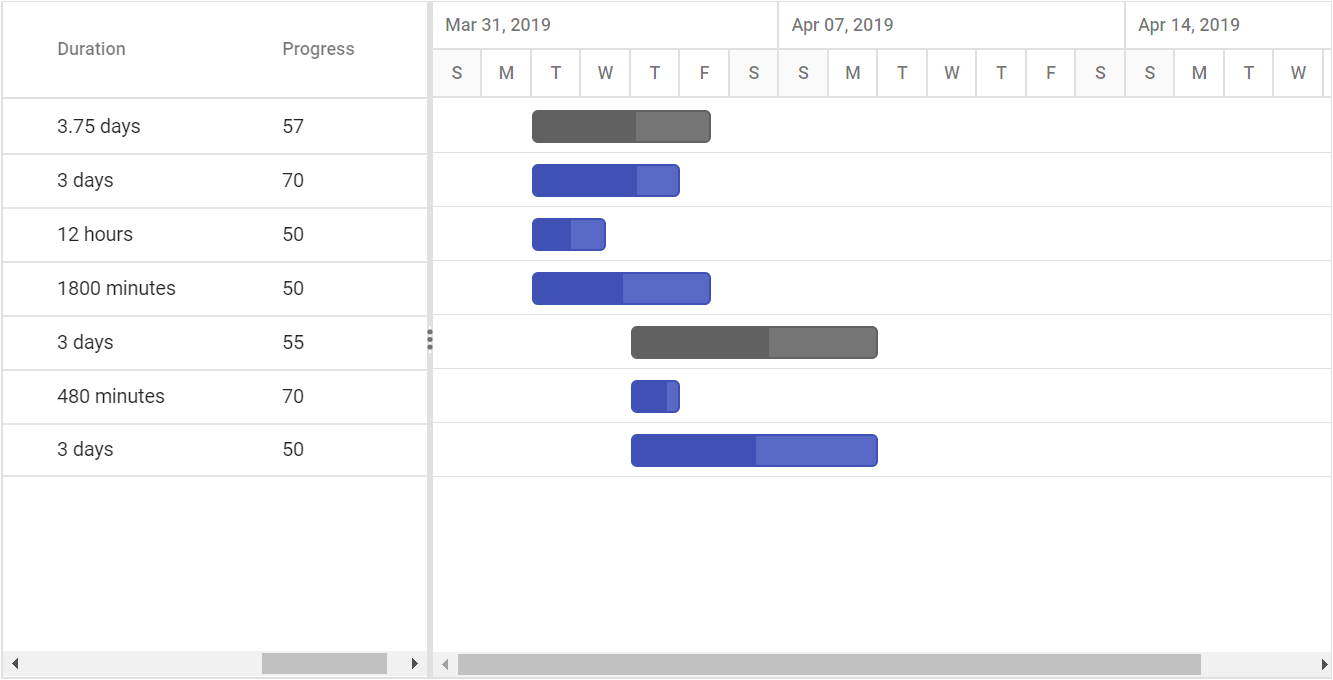
The edit type of the duration column in Gantt is string, to support editing the duration field along with duration units.
Unscheduled Tasks
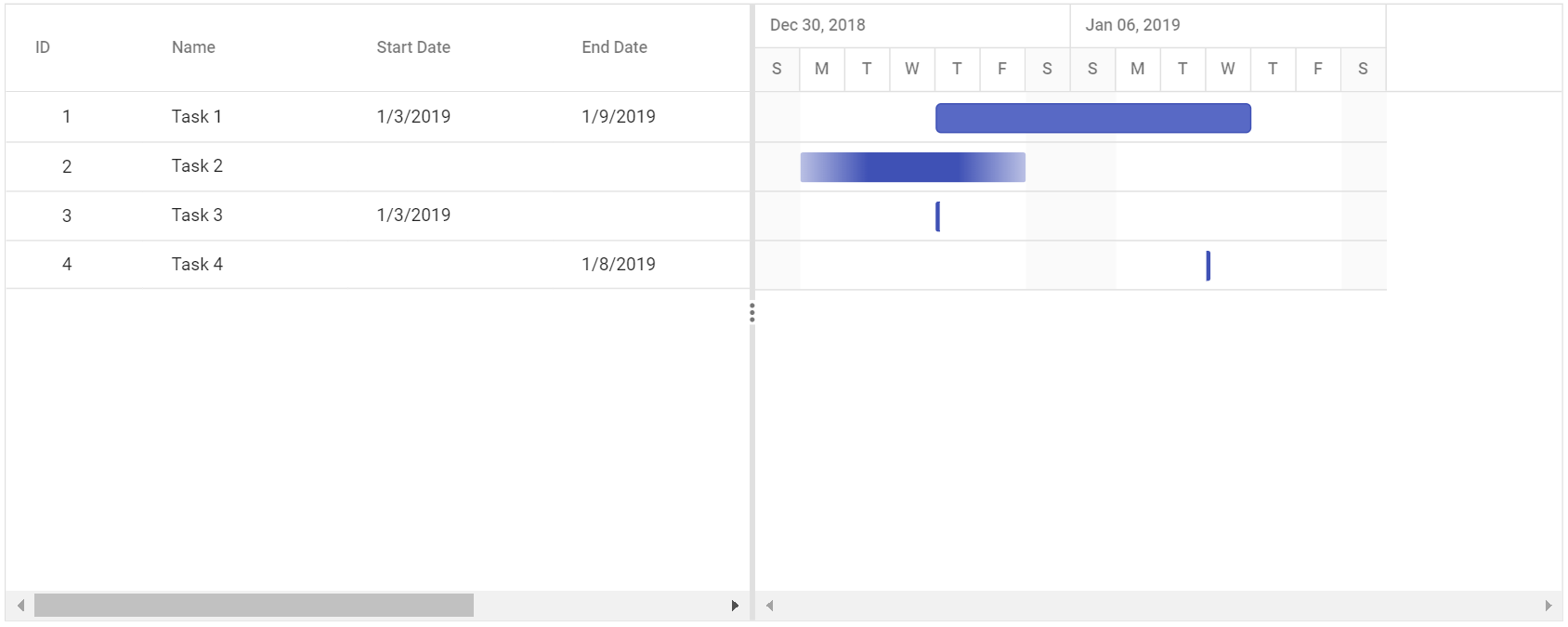
Unscheduled tasks are planned for a project without any definite schedule dates. The Gantt control supports rendering the unscheduled tasks. You can create or update the tasks with anyone of start date, end date, and duration values or none. You can enable or disable the unscheduled tasks by using the AllowUnscheduledTasks property. The following images represent the various types of unscheduled tasks in Gantt.
Start Date Only

End Date Only

Duration Only

Milestone
A milestone is a task that has no start and end dates, but it has a duration value of zero. It is represented as follows.

Define unscheduled tasks in data source
You can define the various types of unscheduled tasks in the data source as follows,
@Html.EJS().Gantt("Gantt").DataSource((IEnumerable<object>)ViewBag.DataSource).Height("450px").AllowUnscheduledTasks(true).TaskFields(ts =>
         ts.Id("TaskId").Name("TaskName").StartDate("StartDate").Duration("Duration").Progress("Progress").EndDate("EndDate")).Render()
public IActionResult Index()
{
ViewBag.DataSource = ganttData();
return View();
}
public static List<GanttDataSource> ganttData()
{
List<GanttDataSource> GanttDataSourceCollection = new List<GanttDataSource>();
GanttDataSourceCollection.Add(new GanttDataSource()
{
TaskId = 1,
TaskName = "Project initiation",
Duration = 4
});
GanttDataSourceCollection.Add(new GanttDataSource()
{
TaskId = 2,
TaskName = "Identify site location",
StartDate = new DateTime(2019, 04, 02)
});
GanttDataSourceCollection.Add(new GanttDataSource()
{
TaskId = 3,
TaskName = "Perform soil test",
EndDate = new DateTime(2019, 04, 08)
});
GanttDataSourceCollection.Add(new GanttDataSource()
{
TaskId = 4,
TaskName = "Soil test approval",
StartDate = new DateTime(2019, 04, 02),
EndDate = new DateTime(2019, 04, 06),
Progress=50
});
GanttDataSourceCollection.Add(new GanttDataSource()
{
TaskId = 5,
TaskName = "Project estimation",
Duration=0
});
return GanttDataSourceCollection;
}
public class GanttDataSource
{
public int TaskId { get; set; }
public string TaskName { get; set; }
public DateTime? StartDate { get; set; }
public DateTime? EndDate { get; set; }
public int? Duration { get; set; }
public int Progress { get; set; }
}
If the
AllowUnscheduledTasksproperty is set to false, then the Gantt control automatically calculates the scheduled date values with a default value of duration 1 and the project start date is considered as the start date for the task.
Working Time Range
In the Gantt control, working hours in a day for a project can be defined by using the DayWorkingTime property. Based on the working hours, automatic date scheduling and duration validations for a task are performed.
The following code snippet explains how to define the working time range for the project in Gantt.
@Html.EJS().Gantt("Gantt").DataSource((IEnumerable<object>)ViewBag.DataSource).Height("450px").TaskFields(ts =>
  ts.Id("TaskId").Name("TaskName").StartDate("StartDate").Duration("Duration").Progress("Progress").EndDate(
     "EndDate").Child("SubTasks")).TimelineSettings(tl => tl.TopTier(tt => tt.Format("MMM dd, yyyy").Unit(
        Syncfusion.EJ2.Gantt.TimelineViewMode.Day)).BottomTier(bt => bt.Unit(Syncfusion.EJ2.Gantt.TimelineViewMode.Hour).Format("h.mm a")
        ).TimelineUnitSize(60)).DayWorkingTime(dw =>{dw.From(9).To(18).Add();}).Render()
public IActionResult Index()
{
ViewBag.DataSource = ganttData();
return View();
}
public static List<GanttDataSource> ganttData()
{
List<GanttDataSource> GanttDataSourceCollection = new List<GanttDataSource>();
GanttDataSource Record1 = new GanttDataSource()
{
TaskId = 1,
TaskName = "Project initiation",
StartDate = new DateTime(2019, 04, 02),
EndDate = new DateTime(2019, 04, 21),
SubTasks = new List<GanttDataSource>(),
};
GanttDataSource Child1 = new GanttDataSource()
{
TaskId = 2,
TaskName = "Identify site location",
StartDate = new DateTime(2019, 04, 02),
Duration = 1,
Progress = 70,
};
GanttDataSource Child2 = new GanttDataSource()
{
TaskId = 3,
TaskName = "Perform soil test",
StartDate = new DateTime(2019, 04, 02),
Duration = 1,
Progress = 50
};
GanttDataSource Child3 = new GanttDataSource()
{
TaskId = 4,
TaskName = "Soil test approval",
StartDate = new DateTime(2019, 04, 02),
Duration = 1,
Progress = 50
};
Record1.SubTasks.Add(Child1);
Record1.SubTasks.Add(Child2);
Record1.SubTasks.Add(Child3);
GanttDataSource Record2 = new GanttDataSource()
{
TaskId = 5,
TaskName = "Project estimation",
StartDate = new DateTime(2019, 04, 02),
EndDate = new DateTime(2019, 04, 21),
SubTasks = new List<GanttDataSource>()
};
GanttDataSource Child4 = new GanttDataSource()
{
TaskId = 6,
TaskName = "Develop floor plan for estimation",
StartDate = new DateTime(2019, 04, 04),
Duration = 1,
Progress = 70
};
GanttDataSource Child5 = new GanttDataSource()
{
TaskId = 7,
TaskName = "List materials",
StartDate = new DateTime(2019, 04, 04),
Duration = 1,
Progress = 50
};
Record2.SubTasks.Add(Child4);
Record2.SubTasks.Add(Child5);
GanttDataSourceCollection.Add(Record1);
GanttDataSourceCollection.Add(Record2);
return GanttDataSourceCollection;
}
public class GanttDataSource
{
public int TaskId { get; set; }
public string TaskName { get; set; }
public DateTime StartDate { get; set; }
public DateTime EndDate { get; set; }
public int? Duration { get; set; }
public int Progress { get; set; }
public List<GanttDataSource> SubTasks { get; set; }
}The following screen shot shows working time range in Gantt control.
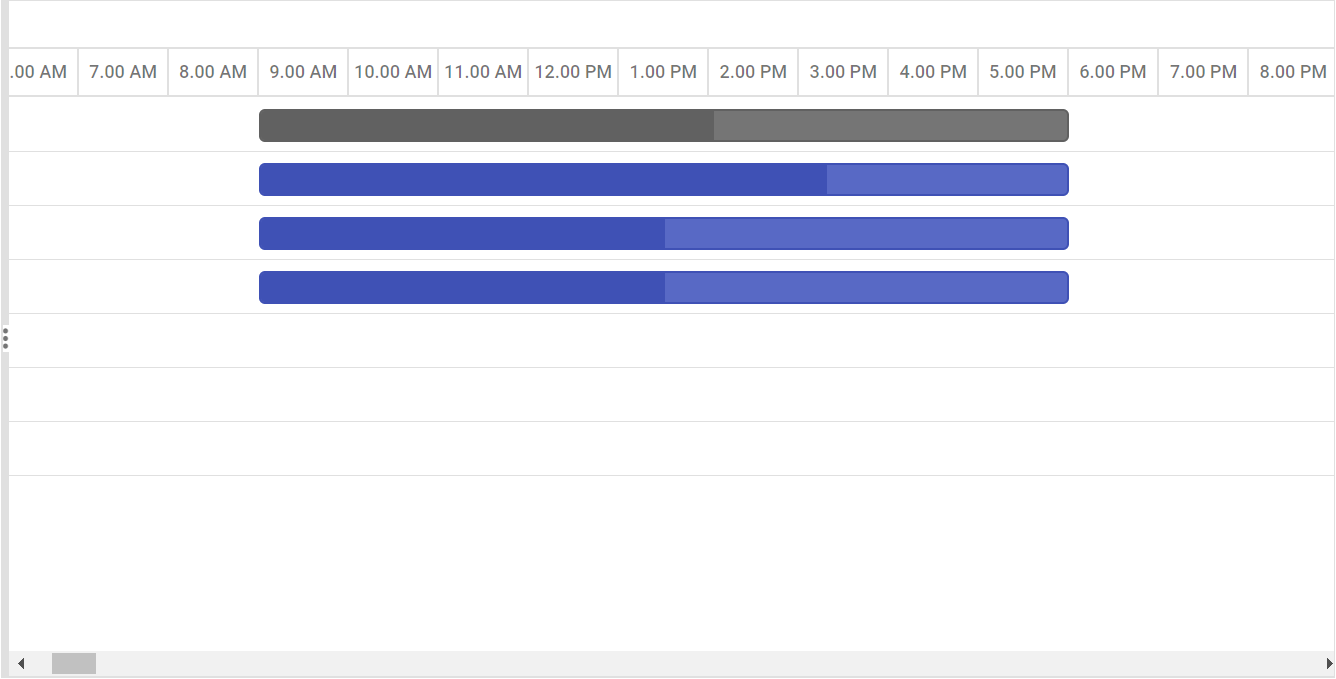
_ Individual tasks can lie between any time within the defined working time range of the project.
_ TheDayWorkingTimeproperty is used to define the working time for the whole project.
Weekend/Non-working days
Non-working days/weekend are used to represent the non-productive days in a project. You can define the non-working days in a week using the WorkWeek property in Gantt.
@Html.EJS().Gantt("Gantt").DataSource((IEnumerable<object>)ViewBag.DataSource).Height("450px").WorkWeek(new string[] { "Sunday",
            "Monday", "Tuesday", "Wednesday", "Thursday" }).TaskFields(ts => ts.Id("TaskId").Name("TaskName").StartDate("StartDate").EndDate(
                "EndDate").Duration("Duration").Progress("Progress").Child("SubTasks")).HighlightWeekends(true).Render()
public IActionResult Index()
{
ViewBag.DataSource = GanttData.ProjectNewData();
return View();
}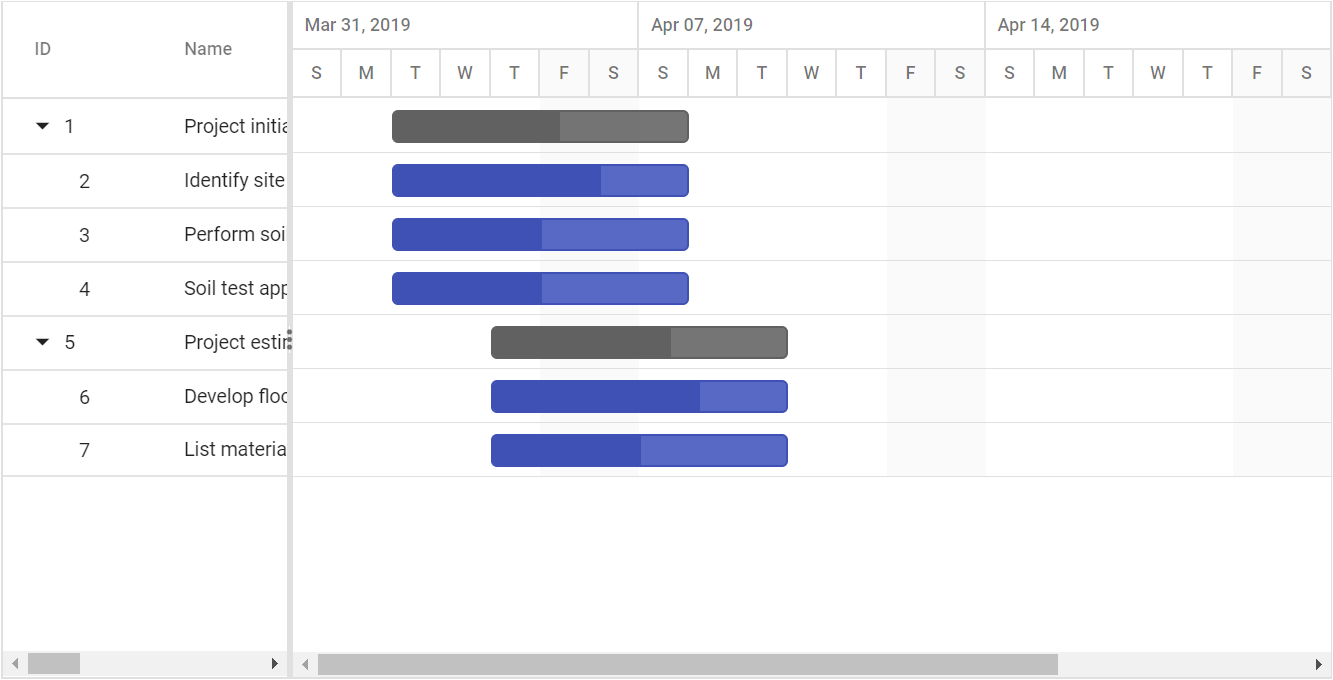
By default, Saturdays and Sundays are considered as non-working days/weekend in a project.
In the Gantt control, you can make weekend as working day by setting theIncludeWeekendproperty totrue.
To show or hide weekend in timeline, use timelineSettings.showWeekend property intimelineSettings. To know more aboutshowWeekend, refer here.
Configure days per week and month
The daysPerWeek property specifies how many working days constitute one week, directly impacting how week-based durations are calculated. For example, if daysPerWeek is 5, then 1 week equals 5 working days.
Similarly, the daysPerMonth property specifies how many working days constitute one month, affecting how month-based durations are converted to actual working days for scheduling calculations. For example, if daysPerMonth is 20, then 1 month equals 20 working days.
The following example configures daysPerWeek and daysPerMonth properties:
@using Syncfusion.EJ2.Gantt

<div style="padding-bottom:10px">
    <label>Days Per Week:</label>
    <input type="number" id="daysPerWeek" value="5" min="1" max="7" />

    <label style="margin-left:10px">Days Per Month:</label>
    <input type="number" id="daysPerMonth" value="20" min="1" max="31" />

    <button id="updateButton">Update</button>
</div>

@(Html.EJS().Gantt("Gantt")
    .DataSource((IEnumerable<object>)ViewBag.DataSource)
    .Height("380px")
    .DaysPerWeek(5)
    .DaysPerMonth(20)
    .TaskFields(ts => ts
        .Id("TaskID")
        .Name("TaskName")
        .StartDate("StartDate")
        .Duration("Duration")
        .Progress("Progress")
        .DurationUnit("DurationUnit")
        .ParentID("ParentID"))
    .SplitterSettings(sp => sp.ColumnIndex(4))
    .Render())

<script>
    document.getElementById('updateButton').addEventListener('click', function () {

        var daysPerWeek = parseInt(document.getElementById('daysPerWeek').value);
        var daysPerMonth = parseInt(document.getElementById('daysPerMonth').value);

        if (daysPerWeek < 1 || daysPerWeek > 7) {
            alert('Days per Week must be between 1 and 7');
            return;
        }

        if (daysPerMonth < 1 || daysPerMonth > 31) {
            alert('Days per Month must be between 1 and 31');
            return;
        }

        var gantt = document.getElementById('Gantt').ej2_instances[0];

        gantt.daysPerWeek = daysPerWeek;
        gantt.daysPerMonth = daysPerMonth;
    });
</script>
public class HomeController : Controller
{
public ActionResult Index()
{
ViewBag.DataSource = GetTaskCollection();
return View();
}
public static List<GanttDataSource> GetTaskCollection()
{
return new List<GanttDataSource>()
{
new GanttDataSource
{
TaskID = 1,
TaskName = "Project Planning",
ParentID = null,
StartDate = new DateTime(2019, 4, 2),
EndDate = new DateTime(2019, 4, 21),
IsParent = true
},
new GanttDataSource
{
TaskID = 2,
TaskName = "Planning Phase",
ParentID = 1,
StartDate = new DateTime(2019, 4, 2),
Duration = 1,
DurationUnit = "week",
Progress = 50,
IsParent = false
},
new GanttDataSource
{
TaskID = 3,
TaskName = "Resource Allocation",
ParentID = 1,
StartDate = new DateTime(2019, 4, 9),
Duration = 2,
DurationUnit = "week",
Predecessor = "2FS",
Progress = 70,
IsParent = false
},
new GanttDataSource
{
TaskID = 4,
TaskName = "Design Phase",
ParentID = null,
StartDate = new DateTime(2019, 4, 23),
EndDate = new DateTime(2019, 5, 21),
IsParent = true
},
new GanttDataSource
{
TaskID = 5,
TaskName = "Design Mockups",
ParentID = 4,
StartDate = new DateTime(2019, 4, 23),
Duration = 1,
DurationUnit = "month",
Progress = 60,
IsParent = false
},
new GanttDataSource
{
TaskID = 6,
TaskName = "Design Review",
ParentID = 4,
StartDate = new DateTime(2019, 5, 21),
Duration = 1,
DurationUnit = "week",
Predecessor = "5FS",
Progress = 40,
IsParent = false
},
new GanttDataSource
{
TaskID = 7,
TaskName = "Development",
ParentID = null,
StartDate = new DateTime(2019, 5, 28),
EndDate = new DateTime(2019, 7, 21),
IsParent = true
},
new GanttDataSource
{
TaskID = 8,
TaskName = "Backend Development",
ParentID = 7,
StartDate = new DateTime(2019, 5, 28),
Duration = 2,
DurationUnit = "week",
Progress = 35,
IsParent = false
},
new GanttDataSource
{
TaskID = 9,
TaskName = "Frontend Development",
ParentID = 7,
StartDate = new DateTime(2019, 6, 11),
Duration = 1,
DurationUnit = "month",
Predecessor = "8FS",
Progress = 25,
IsParent = false
},
new GanttDataSource
{
TaskID = 10,
TaskName = "Testing",
ParentID = 7,
StartDate = new DateTime(2019, 7, 9),
Duration = 2,
DurationUnit = "week",
Predecessor = "9FS",
Progress = 10,
IsParent = false
}
};
}
public class GanttDataSource
{
public int TaskID { get; set; }
public string TaskName { get; set; }
public int? ParentID { get; set; }
public DateTime? StartDate { get; set; }
public DateTime? EndDate { get; set; }
public int? Duration { get; set; }
public string DurationUnit { get; set; }
public string Predecessor { get; set; }
public int? Progress { get; set; }
public bool IsParent { get; set; }
}
}