Frozen Columns with Left and Right Pinning in ASP.NET MVC Gantt Chart
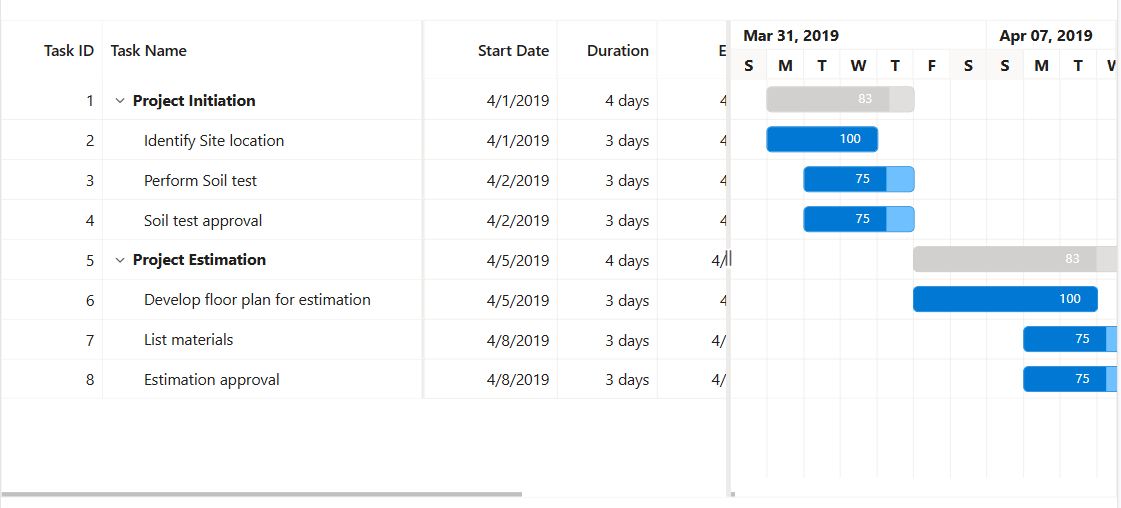
The Syncfusion® ASP.NET MVC Gantt Chart control provides a frozen columns feature that keeps selected columns fixed while scrolling horizontally through large datasets. This functionality ensures that critical information remains visible at all times, improving readability and user experience. By maintaining key columns in view, it simplifies navigation and makes referencing important data points easier when working with extensive project details.
To enable frozen columns, use the FrozenColumns property in the Gantt Chart control. In the following example, the FrozenColumns property is set to 2, which keeps the first two columns fixed on the left while the remaining columns can be scrolled horizontally.
<div id="ganttContainer" style="height:1500px;margin-left:0px;margin-right:0px;">
	@Html.EJS().Gantt("GanttContainer").DataSource((IEnumerable<object>)ViewBag.DataSource).Height("430px").TreeColumnIndex(1).FrozenColumns(2).GridLines(Syncfusion.EJ2.Gantt.GridLine.Both).AllowSelection(false).SplitterSettings(new Syncfusion.EJ2.Gantt.GanttSplitterSettings { Position = "65%" }).LabelSettings(new Syncfusion.EJ2.Gantt.GanttLabelSettings { TaskLabel = "Progress" }).TaskFields(new Syncfusion.EJ2.Gantt.GanttTaskFields { Id = "TaskID", Name = "TaskName", StartDate = "StartDate", EndDate = "EndDate", Duration = "Duration", Dependency = "Predecessor", Progress = "Progress", ParentID = "ParentID" }).Columns(col =>
		{
		col.Field("TaskID").HeaderText("Task ID").TextAlign(Syncfusion.EJ2.Grids.TextAlign.Right).Width("90").Add();
		col.Field("TaskName").HeaderText("Task Name").TextAlign(Syncfusion.EJ2.Grids.TextAlign.Left).Width("290").Add();
		col.Field("StartDate").HeaderText("Start Date").TextAlign(Syncfusion.EJ2.Grids.TextAlign.Right).Format("yMd").Width("120").Add();
		col.Field("Duration").HeaderText("Duration").TextAlign(Syncfusion.EJ2.Grids.TextAlign.Right).Width("90").Add();
		col.Field("EndDate").HeaderText("End Date").TextAlign(Syncfusion.EJ2.Grids.TextAlign.Right).Format("yMd").Width("120").Add();
		col.Field("Progress").HeaderText("Progress").TextAlign(Syncfusion.EJ2.Grids.TextAlign.Left).Width("120").Add();
		col.Field("Predecessor").HeaderText("Predecessor").TextAlign(Syncfusion.EJ2.Grids.TextAlign.Left).Width("120").Add();
		}).Render()
</div>
using Microsoft.AspNetCore.Mvc.RazorPages;
namespace WebApplication.Pages
{
public class IndexModel : PageModel
{
public List<GanttDataSource> DataSource { get; set; } = new();
public void OnGet()
{
DataSource = GetGanttData();
}
public static List<GanttDataSource> GetGanttData()
{
return new List<GanttDataSource>
{
new GanttDataSource { TaskID = 1, TaskName = "Project Initiation", StartDate = new DateTime(2019, 4, 2), EndDate = new DateTime(2019, 4, 21) },
new GanttDataSource { TaskID = 2, TaskName = "Identify Site location", StartDate = new DateTime(2019, 4, 2), Duration = 4, Progress = 90, ParentID = 1 },
new GanttDataSource { TaskID = 3, TaskName = "Perform Soil test", StartDate = new DateTime(2019, 4, 2), Duration = 4, Progress = 40, ParentID = 1 },
new GanttDataSource { TaskID = 4, TaskName = "Soil test approval", StartDate = new DateTime(2019, 4, 2), Duration = 4, Predecessor = "2FS", Progress = 10, ParentID = 1 },
new GanttDataSource { TaskID = 5, TaskName = "Project Estimation", StartDate = new DateTime(2019, 4, 2), EndDate = new DateTime(2019, 4, 21) },
new GanttDataSource { TaskID = 6, TaskName = "Develop floor plan for estimation", StartDate = new DateTime(2019, 4, 4), Duration = 3, Progress = 85, ParentID = 5 },
new GanttDataSource { TaskID = 7, TaskName = "List materials", StartDate = new DateTime(2019, 4, 4), Duration = 3, Progress = 15, ParentID = 5 },
new GanttDataSource { TaskID = 8, TaskName = "Estimation approval", StartDate = new DateTime(2019, 4, 4), Duration = 3, Predecessor = "6SS", Progress = 70, ParentID = 5 }
};
}
}
public class GanttDataSource
{
public int TaskID { get; set; }
public string? TaskName { get; set; }
public DateTime StartDate { get; set; }
public DateTime? EndDate { get; set; }
public int? Duration { get; set; }
public int? Progress { get; set; }
public string? Predecessor { get; set; }
public int? ParentID { get; set; }
}
}
Freeze particular columns
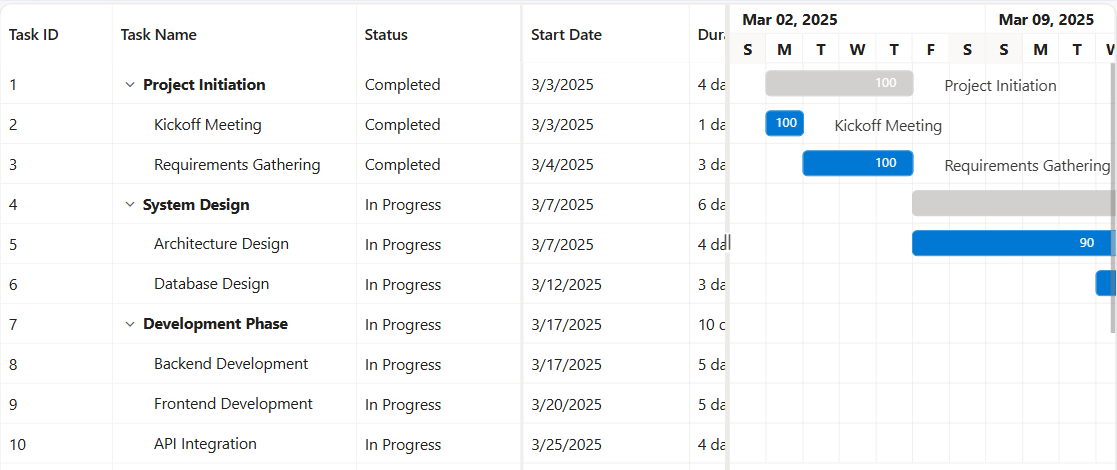
The Syncfusion® ASP.NET MVC Gantt Chart provides a feature that enables freezing specific columns, significantly enhancing data visibility and improving the user experience. The IsFrozen property is used at the column level to freeze a specific column at any desired index on the left side, offering flexibility in managing which columns are frozen.
To freeze a particular column in the Gantt, set the IsFrozen property of the column to true. The following example demonstrates how to freeze a particular column in the Gantt Chart using the IsFrozen property.
<div id="ganttContainer" style="height:1500px;margin:0;">
	@Html.EJS().Gantt("GanttContainer").Height("430px").DataSource((IEnumerable<object>)ViewBag.DataSource).TreeColumnIndex(1).GridLines(Syncfusion.EJ2.Gantt.GridLine.Both).SplitterSettings(s => s.Position("65%")).LabelSettings(l => l.TaskLabel("Progress")).TaskFields(tf =>
		{
		tf.Id("TaskID")
		.Name("TaskName")
		.StartDate("StartDate")
		.EndDate("EndDate")
		.Duration("Duration")
		.Progress("Progress")
		.Dependency("Predecessor")
		.ParentID("ParentID");
		}).Columns(col =>
		{
		col.Field("TaskID").HeaderText("Task ID").IsFrozen(true).Add();
		col.Field("TaskName").HeaderText("Task Name").Width("220").IsFrozen(true).Add();
		col.Field("StartDate").HeaderText("Start Date").Add();
		col.Field("Duration").HeaderText("Duration").Add();
		col.Field("Progress").HeaderText("Progress").Add();
		col.Field("Status").HeaderText("Status").IsFrozen(true).Add();
		}).Render()
</div>
using Microsoft.AspNetCore.Mvc.RazorPages;
namespace WebApplication4.Pages
{
public class IndexModel : PageModel
{
public List<GanttDataSource> DataSource { get; set; } = new();
public void OnGet()
{
DataSource = GetGanttData();
}
public static List<GanttDataSource> GetGanttData()
{
return new List<GanttDataSource>
{
// 1. Project Initiation (Parent)
new() {
TaskID = 1,
TaskName = "Project Initiation",
Progress = 100,
Status = "Completed"
},
new() {
TaskID = 2,
TaskName = "Kickoff Meeting",
ParentID = 1,
StartDate = new DateTime(2025, 3, 3),
Duration = 1,
Progress = 100,
Status = "Completed"
},
new() {
TaskID = 3,
TaskName = "Requirements Gathering",
ParentID = 1,
StartDate = new DateTime(2025, 3, 4),
Duration = 3,
Progress = 100,
Status = "Completed"
},
// 4. System Design (Parent)
new() {
TaskID = 4,
TaskName = "System Design",
Progress = 80, // Average of children
Status = "In Progress"
},
new() {
TaskID = 5,
TaskName = "Architecture Design",
ParentID = 4,
StartDate = new DateTime(2025, 3, 7),
Duration = 4,
Progress = 90,
Status = "In Progress"
},
new() {
TaskID = 6,
TaskName = "Database Design",
ParentID = 4,
StartDate = new DateTime(2025, 3, 12),
Duration = 3,
Progress = 70,
Status = "In Progress"
},
// 7. Development Phase (Parent)
new() {
TaskID = 7,
TaskName = "Development Phase",
Progress = 62, // Average
Status = "In Progress"
},
new() {
TaskID = 8,
TaskName = "Backend Development",
ParentID = 7,
StartDate = new DateTime(2025, 3, 15),
Duration = 5,
Progress = 70,
Status = "In Progress"
},
new() {
TaskID = 9,
TaskName = "Frontend Development",
ParentID = 7,
StartDate = new DateTime(2025, 3, 20),
Duration = 5,
Progress = 55,
Status = "In Progress"
},
new() {
TaskID = 10,
TaskName = "API Integration",
ParentID = 7,
StartDate = new DateTime(2025, 3, 25),
Duration = 4,
Progress = 60,
Status = "In Progress"
},
// 11. Testing Cycle (Parent)
new() {
TaskID = 11,
TaskName = "Testing Cycle",
Progress = 60, // Approx average
Status = "In Progress"
},
new() {
TaskID = 12,
TaskName = "Test Planning",
ParentID = 11,
StartDate = new DateTime(2025, 3, 29),
Duration = 3,
Progress = 90,
Status = "In Progress"
},
new() {
TaskID = 13,
TaskName = "Test Execution",
ParentID = 11,
StartDate = new DateTime(2025, 4, 1),
Duration = 4,
Progress = 60,
Status = "In Progress"
},
new() {
TaskID = 14,
TaskName = "Bug Fixing",
ParentID = 11,
StartDate = new DateTime(2025, 4, 5),
Duration = 4,
Progress = 30,
Status = "In Progress"
},
// 15. Deployment & Go-Live (Parent)
new() {
TaskID = 15,
TaskName = "Deployment & Go-Live",
Progress = 0,
Status = "Not Started"
},
new() {
TaskID = 16,
TaskName = "Final Release",
ParentID = 15,
StartDate = new DateTime(2025, 4, 9),
Duration = 3,
Progress = 0,
Status = "Not Started"
}
};
}
public class GanttDataSource
{
public int TaskID { get; set; }
public string? TaskName { get; set; }
public DateTime StartDate { get; set; }
public DateTime? EndDate { get; set; }
public int? Duration { get; set; }
public int? Progress { get; set; }
public string? Predecessor { get; set; }
public int? ParentID { get; set; }
public string? Status { get; set; }
}
}
}
Freeze direction
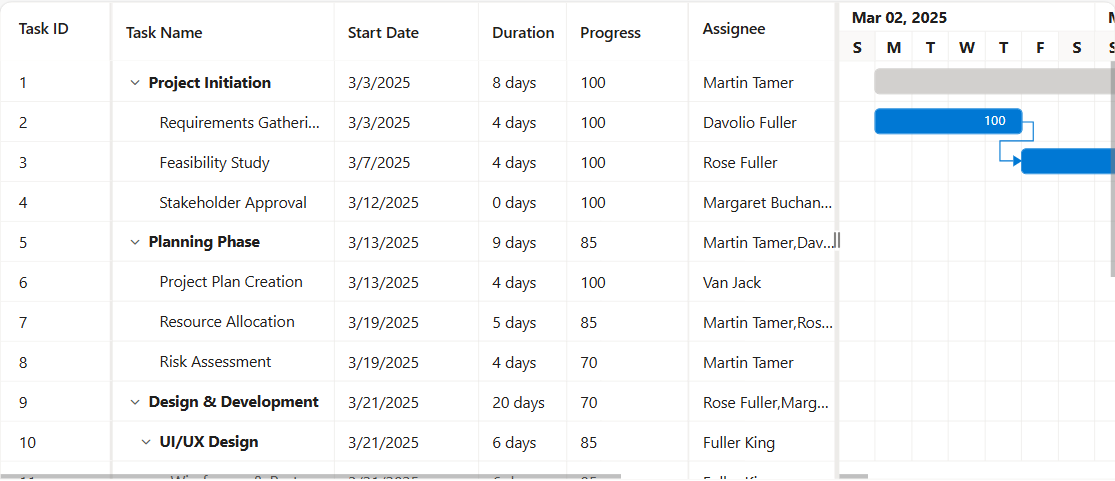
In the Syncfusion® ASP.NET MVC Gantt, the freeze direction feature allows you to position frozen columns either to the left, right, or in a fixed position, while still allowing the remaining columns to be horizontally movable. To achieve this, the Column.Freeze property can be utilized. This property is used to specify the freeze direction for individual columns. The types of the Column.Freeze directions:
-
Left: When the
Column.Freezeproperty is set to Left, specific columns will be frozen on the left side. -
Right: When the
Column.Freezeproperty is set to Right, certain columns will be frozen on the right side. -
Fixed: The fixed direction locks a column at a fixed position within the Gantt Chart columns. This ensures that the column is always visible during horizontal scroll.
In the following example, the TaskID column is frozen on the left side, the resources column is frozen on the right side and the Progress column is frozen on the fixed of the content table.
<div id="ganttContainer" style="height:1500px;margin:0;">
	@Html.EJS().Gantt("GanttContainer").DataSource((IEnumerable<object>)ViewBag.DataSource).Resources((IEnumerable<object>)ViewBag.Resources).Height("430px").TreeColumnIndex(1).GridLines(Syncfusion.EJ2.Gantt.GridLine.Both).AllowSelection(false).HighlightWeekends(true).SplitterSettings(s => s.Position("65%")).LabelSettings(l => l.TaskLabel("Progress")).TaskFields(tf => { tf.Id("TaskID").Name("TaskName").StartDate("StartDate").EndDate("EndDate").Duration("Duration").Progress("Progress").Dependency("Predecessor").ParentID("ParentID").ResourceInfo("Resources"); }).ResourceFields(rf => { rf.Id("ResourceId").Name("ResourceName"); }).Columns(col =>
	{
		col.Field("TaskID").HeaderText("Task ID").Width("90").TextAlign(Syncfusion.EJ2.Grids.TextAlign.Right).Freeze("Left").Add();
		col.Field("TaskName").HeaderText("Task Name").Width("200").TextAlign(Syncfusion.EJ2.Grids.TextAlign.Left).Add();
		col.Field("StartDate").HeaderText("Start Date").Width("130").Format("yMd").TextAlign(Syncfusion.EJ2.Grids.TextAlign.Right).Add();
		col.Field("Duration").HeaderText("Duration").Width("110").TextAlign(Syncfusion.EJ2.Grids.TextAlign.Right).Add();
		col.Field("EndDate").HeaderText("End Date").Width("130").Format("yMd").TextAlign(Syncfusion.EJ2.Grids.TextAlign.Right).Add();
		col.Field("Progress").HeaderText("Progress").Width("110").TextAlign(Syncfusion.EJ2.Grids.TextAlign.Center).Freeze("Fixed").Add();
		col.Field("Predecessor").HeaderText("Dependency").Width("120").Add();
		col.Field("Resources").HeaderText("Assignee").Width("150").Freeze("Right").Add();
	}).Render()
</div>
public ActionResult Index()
{
ViewBag.DataSource = GanttData();
ViewBag.Resources = GetResources();
return View();
}
private List<ResourceModel> GetResources()
{
return new List<ResourceModel>
{
new ResourceModel { ResourceId = 1, ResourceName = "Martin Tamer" },
new ResourceModel { ResourceId = 2, ResourceName = "Rose Fuller" },
new ResourceModel { ResourceId = 3, ResourceName = "Margaret Buchanan" },
new ResourceModel { ResourceId = 4, ResourceName = "Fuller King" },
new ResourceModel { ResourceId = 5, ResourceName = "Davolio Fuller" },
new ResourceModel { ResourceId = 6, ResourceName = "Van Jack" }
};
}
public static List<GanttDataSource> GanttData()
{
return new List<GanttDataSource>
{
new GanttDataSource { TaskID = 1, TaskName = "Project Initiation", StartDate = new DateTime(2025, 3, 1), EndDate = new DateTime(2025, 3, 10), Duration = 8, Progress = 100, Resources = new List<int> { 1 } },
new GanttDataSource { TaskID = 2, TaskName = "Requirements Gathering", StartDate = new DateTime(2025, 3, 1), EndDate = new DateTime(2025, 3, 5), Duration = 4, Progress = 100, Resources = new List<int> { 5 }, ParentID = 1 },
new GanttDataSource { TaskID = 3, TaskName = "Feasibility Study", StartDate = new DateTime(2025, 3, 3), EndDate = new DateTime(2025, 3, 7), Duration = 4, Progress = 100, Resources = new List<int> { 2 }, ParentID = 1, Predecessor = "2FS" },
new GanttDataSource { TaskID = 4, TaskName = "Stakeholder Approval", StartDate = new DateTime(2025, 3, 8), EndDate = new DateTime(2025, 3, 8), Duration = 0, Progress = 100, Resources = new List<int> { 3 }, ParentID = 1, Predecessor = "3FS" },
new GanttDataSource { TaskID = 5, TaskName = "Planning Phase", StartDate = new DateTime(2025, 3, 10), EndDate = new DateTime(2025, 3, 20), Duration = 9, Progress = 90, Resources = new List<int> { 1, 5 }, Predecessor = "4FS" },
new GanttDataSource { TaskID = 6, TaskName = "Project Plan Creation", StartDate = new DateTime(2025, 3, 10), EndDate = new DateTime(2025, 3, 14), Duration = 4, Progress = 100, Resources = new List<int> { 6 }, ParentID = 5 },
new GanttDataSource { TaskID = 7, TaskName = "Resource Allocation", StartDate = new DateTime(2025, 3, 12), EndDate = new DateTime(2025, 3, 17), Duration = 5, Progress = 85, Resources = new List<int> { 1, 2 }, ParentID = 5, Predecessor = "6FS" },
new GanttDataSource { TaskID = 8, TaskName = "Risk Assessment", StartDate = new DateTime(2025, 3, 15), EndDate = new DateTime(2025, 3, 19), Duration = 4, Progress = 70, Resources = new List<int> { 1 }, ParentID = 5, Predecessor = "6FS" },
new GanttDataSource { TaskID = 9, TaskName = "Design & Development", StartDate = new DateTime(2025, 3, 20), EndDate = new DateTime(2025, 4, 18), Duration = 28, Progress = 65, Resources = new List<int> { 2, 3 }, Predecessor = "5FS" },
new GanttDataSource { TaskID =10, TaskName = "UI/UX Design", StartDate = new DateTime(2025, 3, 20), EndDate = new DateTime(2025, 3, 28), Duration = 8, Progress = 90, Resources = new List<int> { 4 }, ParentID = 9 },
new GanttDataSource { TaskID =11, TaskName = "Wireframes & Prototypes", StartDate = new DateTime(2025, 3, 20), EndDate = new DateTime(2025, 3, 26), Duration = 6, Progress = 85, Resources = new List<int> { 4 }, ParentID = 10 },
new GanttDataSource { TaskID =12, TaskName = "Backend Development", StartDate = new DateTime(2025, 3, 25), EndDate = new DateTime(2025, 4, 10), Duration = 14, Progress = 60, Resources = new List<int> { 2 }, ParentID = 9, Predecessor = "11FS" },
new GanttDataSource { TaskID =13, TaskName = "API Design", StartDate = new DateTime(2025, 3, 25), EndDate = new DateTime(2025, 3, 29), Duration = 4, Progress = 100, Resources = new List<int> { 2 }, ParentID = 12 },
new GanttDataSource { TaskID =14, TaskName = "Frontend Development", StartDate = new DateTime(2025, 3, 28), EndDate = new DateTime(2025, 4, 12), Duration = 14, Progress = 55, Resources = new List<int> { 3 }, ParentID = 9, Predecessor = "11FS" },
new GanttDataSource { TaskID =15, TaskName = "Testing Phase", StartDate = new DateTime(2025, 4, 10), EndDate = new DateTime(2025, 4, 24), Duration = 12, Progress = 40, Resources = new List<int> { 6 }, Predecessor = "14FS" },
new GanttDataSource { TaskID =16, TaskName = "Unit Testing", StartDate = new DateTime(2025, 4, 10), EndDate = new DateTime(2025, 4, 15), Duration = 5, Progress = 60, Resources = new List<int> { 6 }, ParentID = 15 },
new GanttDataSource { TaskID =17, TaskName = "Integration Testing", StartDate = new DateTime(2025, 4, 16), EndDate = new DateTime(2025, 4, 21), Duration = 5, Progress = 30, Resources = new List<int> { 6 }, ParentID = 15, Predecessor = "16FS" },
new GanttDataSource { TaskID =18, TaskName = "Deployment", StartDate = new DateTime(2025, 4, 24), EndDate = new DateTime(2025, 4, 24), Duration = 0, Progress = 0, Resources = new List<int> { 5 }, Predecessor = "17FS" },
new GanttDataSource { TaskID =19, TaskName = "Project Closure", StartDate = new DateTime(2025, 4, 25), EndDate = new DateTime(2025, 4, 29), Duration = 4, Progress = 0, Resources = new List<int> { 1 }, Predecessor = "18FS" },
new GanttDataSource { TaskID =20, TaskName = "Final Documentation", StartDate = new DateTime(2025, 4, 25), EndDate = new DateTime(2025, 4, 28), Duration = 3, Progress = 0, Resources = new List<int> { 1, 3 }, ParentID = 19 }
};
}
// Updated model classes to support resource allocation
public class GanttDataSource
{
public int TaskID { get; set; }
public string TaskName { get; set; }
public DateTime? StartDate { get; set; }
public DateTime? EndDate { get; set; }
public int? Duration { get; set; }
public int? Progress { get; set; }
public string Predecessor { get; set; }
public int? ParentID { get; set; }
public List<int> Resources { get; set; } = new List<int>();
}
public class ResourceModel
{
public int ResourceId { get; set; }
public string ResourceName { get; set; }
}The freeze direction is not compatible when both the
isFrozenandfrozenColumnsproperties are enabled simultaneously.
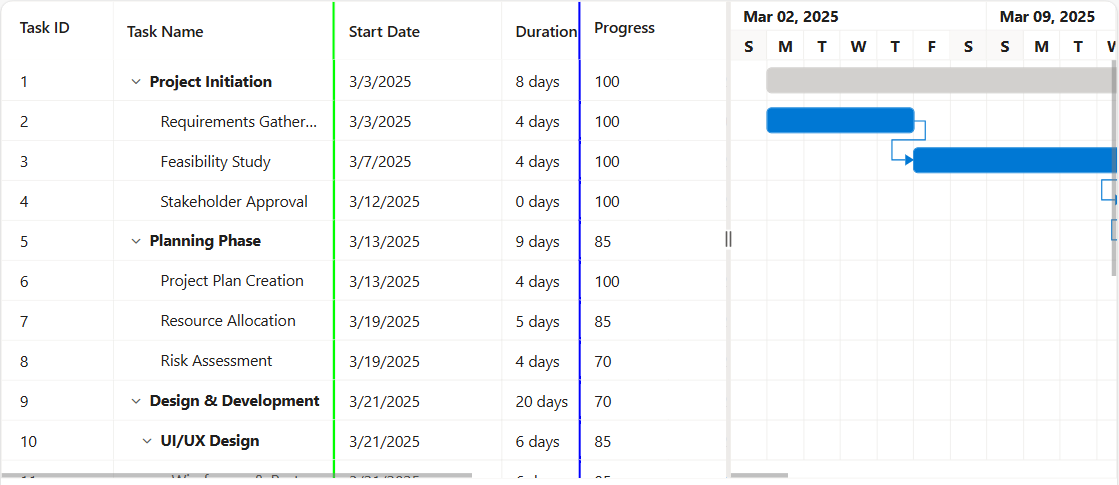
Change default frozen line color
The frozen line borders of frozen columns in the Syncfusion® ASP.NET MVC Gantt Chart control can be customized by applying custom CSS styles to the respective frozen columns. This allows to change the border color of left, right, and fixed frozen columns to match your application’s design and theme.
To change the default frozen line color, use the following CSS class names and apply the desired border color:
For left frozen columns:
.e-gantt .e-leftfreeze.e-freezeleftborder {
  border-right-color: rgb(0, 255, 0) !important;
}
For right frozen columns:
.e-gantt .e-rightfreeze.e-freezerightborder {
  border-left-color: rgb(0, 0, 255) !important;
}
For fixed frozen columns, both left and right borders need to be specified as mentioned below:
.e-gantt .e-leftfreeze.e-freezeleftborder {
  border-right-color: rgb(0, 255, 0) !important;
}

.e-gantt .e-rightfreeze.e-freezerightborder {
  border-left-color: rgb(0, 0, 255) !important;
}
The following example demonstrates how to change the default frozen line color using CSS:
<div id="ganttContainer" style="height:1500px;margin-left:0px;margin-right:0px;">
	@Html.EJS().Gantt("GanttContainer").DataSource((IEnumerable<object>)ViewBag.DataSource).Height("430px").TreeColumnIndex(1).GridLines(Syncfusion.EJ2.Gantt.GridLine.Both).AllowSelection(false).SplitterSettings(new Syncfusion.EJ2.Gantt.GanttSplitterSettings { Position = "65%" }).LabelSettings(new Syncfusion.EJ2.Gantt.GanttLabelSettings { TaskLabel = "Progress" }).TaskFields(new Syncfusion.EJ2.Gantt.GanttTaskFields { Id = "TaskID", Name = "TaskName", StartDate = "StartDate", EndDate = "EndDate", Duration = "Duration", Dependency = "Predecessor", Progress = "Progress", ParentID = "ParentID" }).Columns(col =>
		{
		col.Field("TaskID").HeaderText("Task ID").TextAlign(Syncfusion.EJ2.Grids.TextAlign.Right).Width("90").Freeze("Left").Add();
		col.Field("TaskName").HeaderText("Task Name").TextAlign(Syncfusion.EJ2.Grids.TextAlign.Left).Width("290").Freeze("Left").Add();
		col.Field("StartDate").HeaderText("Start Date").TextAlign(Syncfusion.EJ2.Grids.TextAlign.Right).Format("yMd").Width("120").Add();
		col.Field("Duration").HeaderText("Duration").TextAlign(Syncfusion.EJ2.Grids.TextAlign.Right).Width("90").Add();
		col.Field("EndDate").HeaderText("End Date").TextAlign(Syncfusion.EJ2.Grids.TextAlign.Right).Format("yMd").Width("120").Add();
		col.Field("Progress").HeaderText("Progress").TextAlign(Syncfusion.EJ2.Grids.TextAlign.Left).Width("120").Freeze("Right").Add();
		col.Field("Predecessor").HeaderText("Predecessor").TextAlign(Syncfusion.EJ2.Grids.TextAlign.Left).Width("120").Add();
		}).Render()
</div>
<style>
	.e-gantt .e-leftfreeze.e-freezeleftborder {
		border-right-color: rgb(0, 255, 0) !important;
	}

	.e-gantt .e-rightfreeze.e-freezerightborder {
		border-left-color: rgb(0, 0, 255) !important;
	}

	.e-gantt .e-leftfreeze.e-freezeleftborder {
		border-right-color: rgb(0, 255, 0) !important;
	}

	.e-gantt .e-rightfreeze.e-freezerightborder {
		border-left-color: rgb(0, 0, 255) !important;
	}
</style>
using Microsoft.AspNetCore.Mvc.RazorPages;
namespace WebApplication.Pages
{
public class IndexModel : PageModel
{
public List<GanttDataSource> DataSource { get; set; } = new();
public void OnGet()
{
DataSource = GetGanttData();
}
public static List<GanttDataSource> GetGanttData()
{
return new List<GanttDataSource>
{
new GanttDataSource { TaskID = 1, TaskName = "Project Initiation", StartDate = new DateTime(2019, 4, 2), EndDate = new DateTime(2019, 4, 21) },
new GanttDataSource { TaskID = 2, TaskName = "Identify Site location", StartDate = new DateTime(2019, 4, 2), Duration = 4, Progress = 90, ParentID = 1 },
new GanttDataSource { TaskID = 3, TaskName = "Perform Soil test", StartDate = new DateTime(2019, 4, 2), Duration = 4, Progress = 40, ParentID = 1 },
new GanttDataSource { TaskID = 4, TaskName = "Soil test approval", StartDate = new DateTime(2019, 4, 2), Duration = 4, Predecessor = "2FS", Progress = 10, ParentID = 1 },
new GanttDataSource { TaskID = 5, TaskName = "Project Estimation", StartDate = new DateTime(2019, 4, 2), EndDate = new DateTime(2019, 4, 21) },
new GanttDataSource { TaskID = 6, TaskName = "Develop floor plan for estimation", StartDate = new DateTime(2019, 4, 4), Duration = 3, Progress = 85, ParentID = 5 },
new GanttDataSource { TaskID = 7, TaskName = "List materials", StartDate = new DateTime(2019, 4, 4), Duration = 3, Progress = 15, ParentID = 5 },
new GanttDataSource { TaskID = 8, TaskName = "Estimation approval", StartDate = new DateTime(2019, 4, 4), Duration = 3, Predecessor = "6SS", Progress = 70, ParentID = 5 }
};
}
}
public class GanttDataSource
{
public int TaskID { get; set; }
public string? TaskName { get; set; }
public DateTime StartDate { get; set; }
public DateTime? EndDate { get; set; }
public int? Duration { get; set; }
public int? Progress { get; set; }
public string? Predecessor { get; set; }
public int? ParentID { get; set; }
}
}