Getting Started with ASP.NET Core Kanban
This section briefly explains how to include the ASP.NET Core Kanban control in your ASP.NET Core application using Visual Studio, and Visual Studio Code.
Ready to streamline your ASP.NET Core development? Discover the full potential of ASP.NET Core controls with AI Coding Assistant. Effortlessly integrate, configure, and enhance your projects with intelligent, context-aware code suggestions, streamlined setups, and real-time insights—all seamlessly integrated into your preferred AI-powered IDEs like Visual Studio, Visual Studio Code, Cursor, Code Studio and more. Explore AI Coding Assistant
Create an ASP.NET Core Web App with Razor pages
Create an ASP.NET Core Web App using Visual Studio via Microsoft Templates or the Syncfusion® ASP.NET Core Extension. For detailed instructions, refer to the ASP.NET Core Web App Getting Started documentation.
Run the following command to create a new ASP.NET Core Web App.
dotnet new webapp -o RazorPagesMovie
code -r RazorPagesMovie
Alternatively, create an ASP.NET Core Web App using Visual Studio Code via Microsoft Templates, or the Syncfusion® ASP.NET Core Extension, or the C# Dev Kit extension.
Install the required ASP.NET Core packages
Install the Syncfusion.AspNetCore.Kanban and Syncfusion.AspNetCore.Themes NuGet packages. All Syncfusion ASP.NET Core packages are available on nuget.org. See the NuGet packages topic for the details.
- Go to Tools → NuGet Package Manager → Manage NuGet Packages for Solution.
- Search the required NuGet packages (
Syncfusion.AspNetCore.KanbanandSyncfusion.AspNetCore.Themes) and install them.
Alternatively, you can install the same packages using the Package Manager Console with the following commands.
Install-Package Syncfusion.AspNetCore.Kanban -Version 35.1.37
Install-Package Syncfusion.AspNetCore.Themes -Version 35.1.37
Open the terminal and run the following commands.
dotnet add package Syncfusion.AspNetCore.Kanban -v 35.1.37
dotnet add package Syncfusion.AspNetCore.Themes -v 35.1.37
Add ASP.NET Core Tag Helpers
After the packages are installed, open the ~/Pages/_ViewImports.cshtml file and import the Syncfusion.AspNetCore.Base and Syncfusion.AspNetCore.Kanban Tag Helpers.
@addTagHelper *, Syncfusion.AspNetCore.Base
@addTagHelper *, Syncfusion.AspNetCore.Kanban
Add stylesheet and script resources
The theme stylesheet and script can be referenced from CDN. Include the stylesheet and script references inside the <head> of ~/Pages/Shared/_Layout.cshtml file.
<head>
    ...
    @* ASP.NET Core controls styles *@
    <link rel="stylesheet" href="_content/Syncfusion.AspNetCore.Themes/styles/fluent2.css" />
    @* ASP.NET Core controls scripts *@
    <script src="_content/Syncfusion.AspNetCore.Kanban/scripts/sf-kanban.min.js"></script>
</head>
Register the Script Manager
Open the ~/Pages/Shared/_Layout.cshtml file and register the script manager <ejs-scripts> at the end of the <body> element as follows.
<body>
    ...
    @* ASP.NET Core Script Manager *@
    <ejs-scripts></ejs-scripts>
</body>
Add ASP.NET Core Kanban control
Add the ASP.NET Core Kanban control in the ~/Pages/Index.cshtml file.
@page
@model RazorPagesMovie.Pages.IndexModel

<ejs-kanban id="Kanban">
    <e-kanban-columns>
        <e-kanban-column headerText="To Do" keyField="Open"></e-kanban-column>
        <e-kanban-column headerText="In Progress" keyField="InProgress"></e-kanban-column>
        <e-kanban-column headerText="Testing" keyField="Testing"></e-kanban-column>
        <e-kanban-column headerText="Done" keyField="Close"></e-kanban-column>
    </e-kanban-columns>
    <e-kanban-cardsettings headerField="Id" contentField="Summary"></e-kanban-cardsettings>
</ejs-kanban>
Run the application
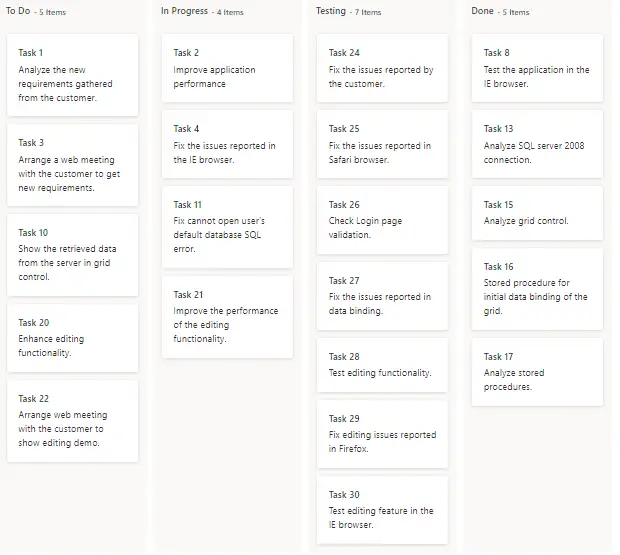
Press Ctrl+F5 (Windows) or ⌘+F5 (macOS) to launch the application. The ASP.NET Core Kanban control will render in your default web browser.
Open the terminal and run the following command.
dotnet run
Populating cards
To populate the empty Kanban with cards, define the list or remote data using the dataSource property. To define dataSource, the mandatory fields in the list should be relevant to keyField. In the following example, you can see the cards defined with default fields such as ID, Summary, and Status.
Enable swimlane
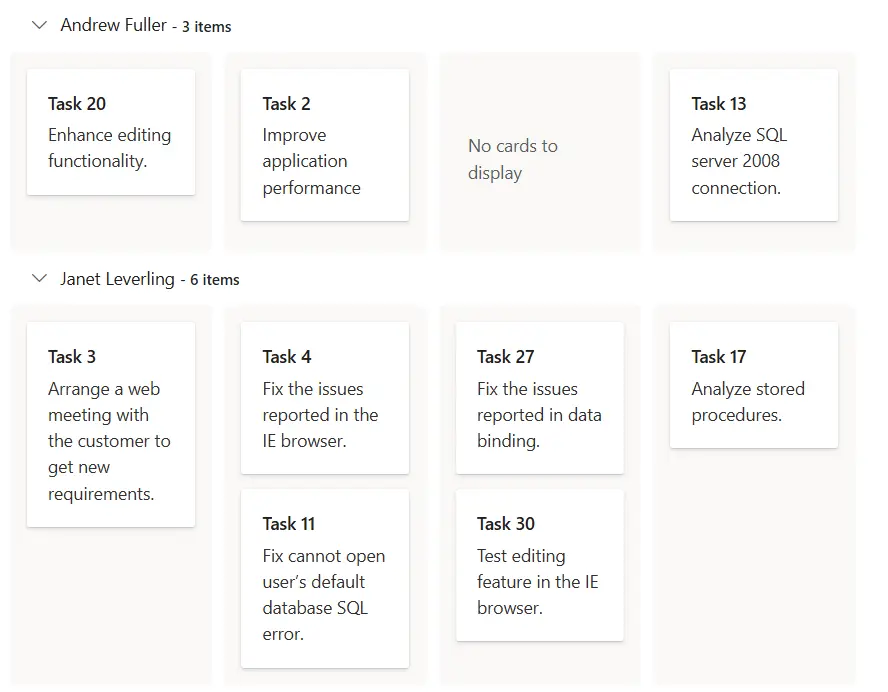
Swimlane can be enabled by mapping the tags swimlaneSettings.keyField to appropriate column name in dataSource. This enables the grouping of the cards based on the mapped column values.
@page
@model RazorPagesMovie.Pages.IndexModel

@{
    List<KanbanDataModels> TaskDetails = new List<KanbanDataModels>();
    TaskDetails.Add(new KanbanDataModels { Id = "Task 1", Title = "Task  - 29001", Status = "Open", Summary = "Analyze the new requirements gathered from the customer.", Type = "Story", Priority = "Low", Tags = "Analyze,Customer", Estimate = 3.5, Assignee = "Nancy Davloio", RankId = 1, Color = "#8b447a" });
    TaskDetails.Add(new KanbanDataModels { Id = "Task 2", Title = "Task  - 29002", Status = "InProgress", Summary = "Improve application performance", Type = "Improvement", Priority = "Normal", Tags = "Improvement", Estimate = 6, Assignee = "Andrew Fuller", RankId = 1, Color = "#7d7297" });
    TaskDetails.Add(new KanbanDataModels { Id = "Task 3", Title = "Task  - 29003", Status = "Open", Summary = "Arrange a web meeting with the customer to get new requirements.", Type = "Others", Priority = "Critical", Tags = "Meeting", Estimate = 5.5, Assignee = "Janet Leverling", RankId = 2, Color = "#27AE60" });
    TaskDetails.Add(new KanbanDataModels { Id = "Task 4", Title = "Task  - 29004", Status = "InProgress", Summary = "Fix the issues reported in the IE browser.", Type = "Bug", Priority = "Release Breaker", Tags = "IE", Estimate = 2.5, Assignee = "Janet Leverling", RankId = 2, Color = "#cc0000" });
    TaskDetails.Add(new KanbanDataModels { Id = "Task 5", Title = "Task  - 29005", Status = "Review", Summary = "Fix the issues reported by the customer.", Type = "Bug", Priority = "Low", Tags = "Customer", Estimate = 3.5, Assignee = "Steven walker", RankId = 1, Color = "#cc0000" });
    TaskDetails.Add(new KanbanDataModels { Id = "Task 6", Title = "Task  - 29007", Status = "Validate", Summary = "Validate new requirements", Type = "Improvement", Priority = "Low", Tags = "Validation", Estimate = 1.5, Assignee = "Robert King", RankId = 1, Color = "#7d7297" });
    TaskDetails.Add(new KanbanDataModels { Id = "Task 7", Title = "Task  - 29009", Status = "Review", Summary = "Fix the issues reported in Safari browser.", Type = "Bug", Priority = "Release Breaker", Tags = "Fix,Safari", Estimate = 1.5, Assignee = "Nancy Davloio", RankId = 2, Color = "#cc0000" });
    TaskDetails.Add(new KanbanDataModels { Id = "Task 8", Title = "Task  - 29010", Status = "Close", Summary = "Test the application in the IE browser.", Type = "Story", Priority = "Low", Tags = "Review,IE", Estimate = 5.5, Assignee = "Margaret hamilt", RankId = 3, Color = "#8b447a" });
    TaskDetails.Add(new KanbanDataModels { Id = "Task 9", Title = "Task  - 29011", Status = "Validate", Summary = "Validate the issues reported by the customer.", Type = "Story", Priority = "High", Tags = "Validation,Fix", Estimate = 1, Assignee = "Steven walker", RankId = 1, Color = "#8b447a" });
    TaskDetails.Add(new KanbanDataModels { Id = "Task 10", Title = "Task  - 29015", Status = "Open", Summary = "Show the retrieved data from the server in grid control.", Type = "Story", Priority = "High", Tags = "Database,SQL", Estimate = 5.5, Assignee = "Margaret hamilt", RankId = 4, Color = "#8b447a" });
    TaskDetails.Add(new KanbanDataModels { Id = "Task 11", Title = "Task  - 29016", Status = "InProgress", Summary = "Fix cannot open user’s default database SQL error.", Priority = "Critical", Type = "Bug", Tags = "Database,Sql2008", Estimate = 2.5, Assignee = "Janet Leverling", RankId = 4, Color = "#cc0000" });
    TaskDetails.Add(new KanbanDataModels { Id = "Task 12", Title = "Task  - 29017", Status = "Review", Summary = "Fix the issues reported in data binding.", Type = "Story", Priority = "Normal", Tags = "Databinding", Estimate = 3.5, Assignee = "Janet Leverling", RankId = 4, Color = "#8b447a" });
    TaskDetails.Add(new KanbanDataModels { Id = "Task 13", Title = "Task  - 29018", Status = "Close", Summary = "Analyze SQL server 2008 connection.", Type = "Story", Priority = "Release Breaker", Tags = "Grid,Sql", Estimate = 2, Assignee = "Andrew Fuller", RankId = 4, Color = "#8b447a" });
    TaskDetails.Add(new KanbanDataModels { Id = "Task 14", Title = "Task  - 29019", Status = "Validate", Summary = "Validate databinding issues.", Type = "Story", Priority = "Low", Tags = "Validation", Estimate = 1.5, Assignee = "Margaret hamilt", RankId = 1, Color = "#8b447a" });
    TaskDetails.Add(new KanbanDataModels { Id = "Task 15", Title = "Task  - 29020", Status = "Close", Summary = "Analyze grid control.", Type = "Story", Priority = "High", Tags = "Analyze", Estimate = 2.5, Assignee = "Margaret hamilt", RankId = 5, Color = "#8b447a" });
    TaskDetails.Add(new KanbanDataModels { Id = "Task 16", Title = "Task  - 29021", Status = "Close", Summary = "Stored procedure for initial data binding of the grid.", Type = "Others", Priority = "Release Breaker", Tags = "Databinding", Estimate = 1.5, Assignee = "Steven walker", RankId = 6, Color = "#27AE60" });
    TaskDetails.Add(new KanbanDataModels { Id = "Task 17", Title = "Task  - 29022", Status = "Close", Summary = "Analyze stored procedures.", Type = "Story", Priority = "Release Breaker", Tags = "Procedures", Estimate = 5.5, Assignee = "Janet Leverling", RankId = 7, Color = "#8b447a" });
    TaskDetails.Add(new KanbanDataModels { Id = "Task 18", Title = "Task  - 29023", Status = "Validate", Summary = "Validate editing issues.", Type = "Story", Priority = "Critical", Tags = "Editing", Estimate = 1, Assignee = "Nancy Davloio", RankId = 1, Color = "#8b447a" });
    TaskDetails.Add(new KanbanDataModels { Id = "Task 19", Title = "Task  - 29024", Status = "Review", Summary = "Test editing functionality.", Type = "Story", Priority = "Normal", Tags = "Editing,Test", Estimate = 0.5, Assignee = "Nancy Davloio", RankId = 5, Color = "#8b447a" });
    TaskDetails.Add(new KanbanDataModels { Id = "Task 20", Title = "Task  - 29025", Status = "Open", Summary = "Enhance editing functionality.", Type = "Improvement", Priority = "Low", Tags = "Editing", Estimate = 3.5, Assignee = "Andrew Fuller", RankId = 5, Color = "#7d7297" });
    TaskDetails.Add(new KanbanDataModels { Id = "Task 21", Title = "Task  - 29026", Status = "InProgress", Summary = "Improve the performance of the editing functionality.", Type = "Epic", Priority = "High", Tags = "Performance", Estimate = 6, Assignee = "Nancy Davloio", RankId = 5, Color = "#6d7492" });
    TaskDetails.Add(new KanbanDataModels { Id = "Task 22", Title = "Task  - 29027", Status = "Open", Summary = "Arrange web meeting with the customer to show editing demo.", Type = "Others", Priority = "High", Tags = "Meeting,Editing", Estimate = 5.5, Assignee = "Steven walker", RankId = 6, Color = "#27AE60" });
    TaskDetails.Add(new KanbanDataModels { Id = "Task 23", Title = "Task  - 29029", Status = "Review", Summary = "Fix the editing issues reported by the customer.", Type = "Bug", Priority = "Low", Tags = "Editing,Fix", Estimate = 3.5, Assignee = "Janet Leverling", RankId = 6, Color = "#cc0000" });
    TaskDetails.Add(new KanbanDataModels { Id = "Task 24", Title = "Task  - 29030", Status = "Testing", Summary = "Fix the issues reported by the customer.", Type = "Bug", Priority = "Critical", Tags = "Customer", Estimate = 3.5, Assignee = "Steven walker", RankId = 1 });
    TaskDetails.Add(new KanbanDataModels { Id = "Task 25", Title = "Task  - 29031", Status = "Testing", Summary = "Fix the issues reported in Safari browser.", Type = "Bug", Priority = "Release Breaker", Tags = "Fix,Safari", Estimate = 1.5, Assignee = "Nancy Davloio", RankId = 2 });
    TaskDetails.Add(new KanbanDataModels { Id = "Task 26", Title = "Task  - 29032", Status = "Testing", Summary = "Check Login page validation.", Type = "Story", Priority = "Release Breaker", Tags = "Testing", Estimate = 0.5, Assignee = "Michael Suyama", RankId = 3 });
    TaskDetails.Add(new KanbanDataModels { Id = "Task 27", Title = "Task  - 29033", Status = "Testing", Summary = "Fix the issues reported in data binding.", Type = "Story", Priority = "Normal", Tags = "Databinding", Estimate = 3.5, Assignee = "Janet Leverling", RankId = 4 });
    TaskDetails.Add(new KanbanDataModels { Id = "Task 28", Title = "Task  - 29034", Status = "Testing", Summary = "Test editing functionality.", Type = "Story", Priority = "Normal", Tags = "Editing,Test", Estimate = 0.5, Assignee = "Nancy Davloio", RankId = 5 });
    TaskDetails.Add(new KanbanDataModels { Id = "Task 29", Title = "Task  - 29035", Status = "Testing", Summary = "Fix editing issues reported in Firefox.", Type = "Bug", Priority = "Critical", Tags = "Editing,Fix", Estimate = 1.5, Assignee = "Robert King", RankId = 7 });
    TaskDetails.Add(new KanbanDataModels { Id = "Task 30", Title = "Task  - 29036", Status = "Testing", Summary = "Test editing feature in the IE browser.", Type = "Story", Priority = "Normal", Tags = "Testing", Estimate = 5.5, Assignee = "Janet Leverling", RankId = 10 });
}

<ejs-kanban id="Kanban" keyField="Status" dataSource="@TaskDetails">
    <e-kanban-columns>
        <e-kanban-column headerText="To Do" keyField="Open"></e-kanban-column>
        <e-kanban-column headerText="In Progress" keyField="InProgress"></e-kanban-column>
        <e-kanban-column headerText="Testing" keyField="Testing"></e-kanban-column>
        <e-kanban-column headerText="Done" keyField="Close"></e-kanban-column>
    </e-kanban-columns>
    <e-kanban-swimlanesettings keyField="Assignee"></e-kanban-swimlanesettings>
    <e-kanban-cardsettings headerField="Id" contentField="Summary"></e-kanban-cardsettings>
</ejs-kanban>
using Microsoft.AspNetCore.Mvc;
using Microsoft.AspNetCore.Mvc.RazorPages;
namespace RazorPagesMovie.Pages;
public class IndexModel : PageModel
{
public void OnGet()
{
}
}
public class KanbanDataModels
{
public string Id { get; set; }
public string Title { get; set; }
public string Status { get; set; }
public string Summary { get; set; }
public string Type { get; set; }
public string Priority { get; set; }
public string Tags { get; set; }
public Double Estimate { get; set; }
public string Assignee { get; set; }
public int RankId { get; set; }
public string Color { get; set; }
}