Row Spanning in ASP.NET Core Gantt Chart
The ASP.NET Core Gantt Chart component supports row cell spanning, allowing multiple cells in a row to merge into a single cell. This is useful for displaying shared information across rows without duplication.
To enable row spanning, use the rowSpan attribute inside the queryCellInfo event. This event is triggered for each grid cell, where you can define the number of rows a cell should span based on its data.
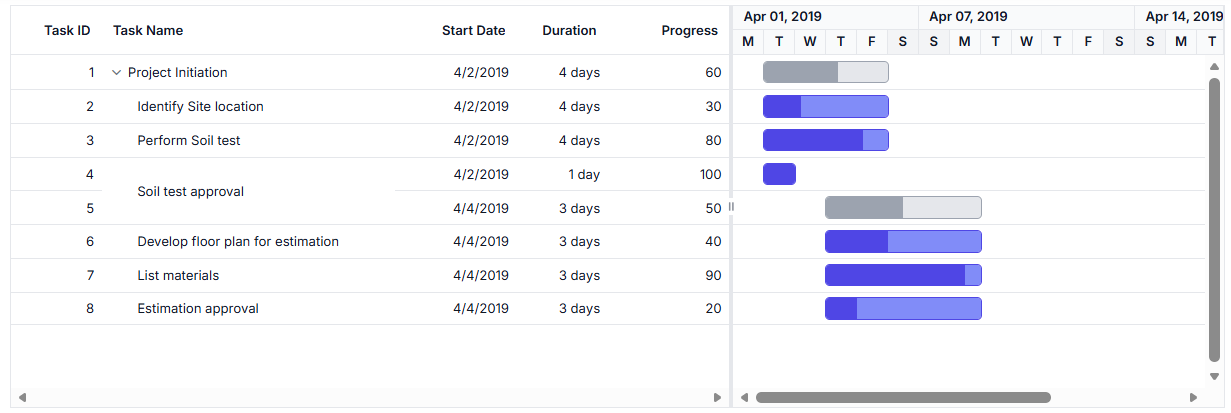
In the example below, the Soil test approval cell spans across two rows in the TaskName column.
@page
@model CoreSamples.Pages.IndexModel

<ejs-gantt id="Gantt" dataSource="@Model.GanttData" height="430px" treeColumnIndex="1" queryCellInfo="queryCellInfo">
    <e-gantt-taskfields id="TaskId" name="TaskName" startDate="StartDate" endDate="EndDate" duration="Duration"
                        progress="Progress" parentID="ParentId"></e-gantt-taskfields>
    <e-gantt-splittersettings position="75%"></e-gantt-splittersettings>
    <e-gantt-columns>
        <e-gantt-column field="TaskId" headerText="Task ID" textAlign="Right" width="90"></e-gantt-column>
        <e-gantt-column field="TaskName" headerText="Task Name" textAlign="Left" width="290"></e-gantt-column>
        <e-gantt-column field="StartDate" headerText="Start Date" textAlign="Right" width="120"></e-gantt-column>
        <e-gantt-column field="Duration" headerText="Duration" textAlign="Right" width="90"></e-gantt-column>
        <e-gantt-column field="Progress" headerText="Progress" textAlign="Right" width="120"></e-gantt-column>
    </e-gantt-columns>
</ejs-gantt>

<script>
    function queryCellInfo(args) {
        if (args.data.TaskId === 4 && args.column.field === "TaskName") {
            args.rowSpan = 2;
        }
    }
</script>
using Microsoft.AspNetCore.Mvc.RazorPages;
using System;
using System.Collections.Generic;
namespace CoreSamples.Pages
{
public class IndexModel : PageModel
{
public List<GanttDataSource> GanttData { get; set; }
public void OnGet()
{
GanttData = new List<GanttDataSource>()
{
new GanttDataSource { TaskId = 1, TaskName = "Project Initiation", StartDate = new DateTime(2019, 4, 2), EndDate = new DateTime(2019, 4, 21) },
new GanttDataSource { TaskId = 2, TaskName = "Identify Site location", StartDate = new DateTime(2019, 4, 2), Duration = 4, Progress = 30, ParentId = 1 },
new GanttDataSource { TaskId = 3, TaskName = "Perform Soil test", StartDate = new DateTime(2019, 4, 2), Duration = 4, Progress = 80, ParentId = 1 },
new GanttDataSource { TaskId = 4, TaskName = "Soil test approval", StartDate = new DateTime(2019, 4, 2), Duration = 1, Progress = 100, ParentId = 1 },
new GanttDataSource { TaskId = 5, TaskName = "Project Estimation", StartDate = new DateTime(2019, 4, 2), EndDate = new DateTime(2019, 4, 21) },
new GanttDataSource { TaskId = 6, TaskName = "Develop floor plan for estimation", StartDate = new DateTime(2019, 4, 4), Duration = 3, Progress = 40, ParentId = 5 },
new GanttDataSource { TaskId = 7, TaskName = "List materials", StartDate = new DateTime(2019, 4, 4), Duration = 3, Progress = 90, ParentId = 5 },
new GanttDataSource { TaskId = 8, TaskName = "Estimation approval", StartDate = new DateTime(2019, 4, 4), Duration = 3, Progress = 20, ParentId = 5 },
};
}
}
public class GanttDataSource
{
public int? TaskId { get; set; }
public string TaskName { get; set; }
public DateTime? StartDate { get; set; }
public DateTime? EndDate { get; set; }
public int? Duration { get; set; }
public int? Progress { get; set; }
public int? ParentId { get; set; }
}
}