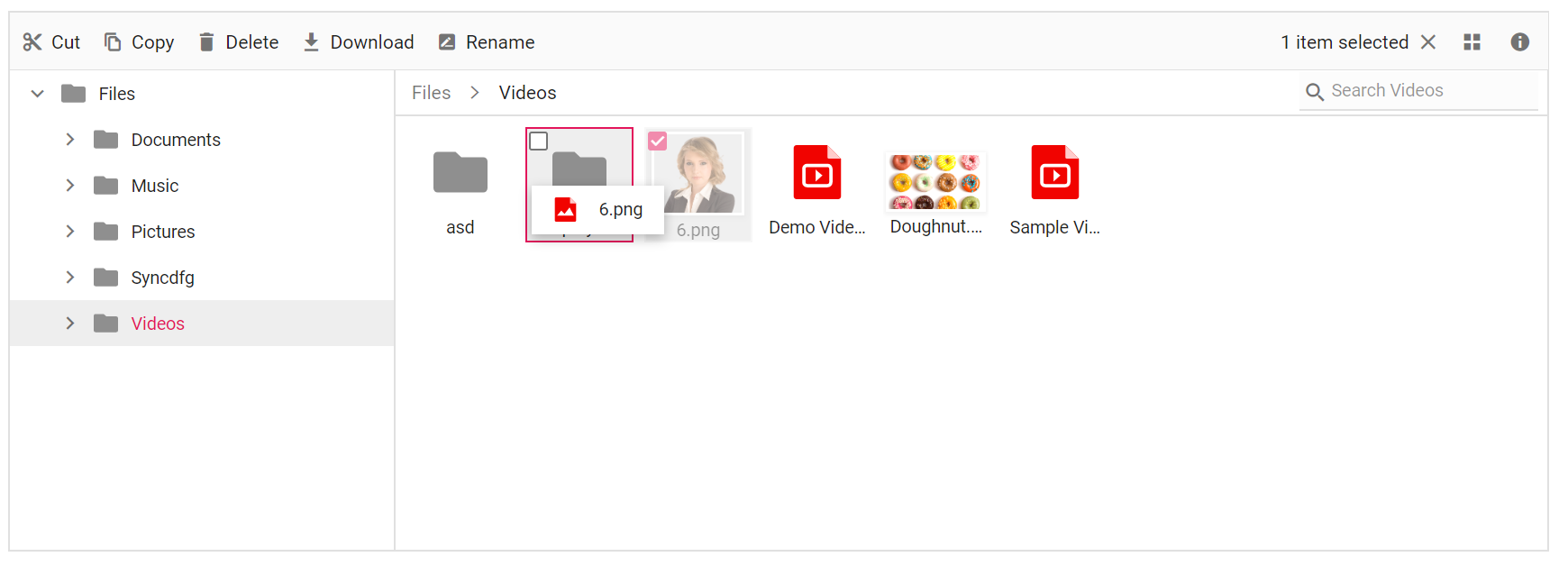
Drag and Drop in ASP.NET Core File Manager
The File Manager allows moving files or folders between directories using the allowDragAndDrop property. It also supports uploading a file by dragging it from Windows Explorer to the File Manager control. You can enable or disable this support by using the allowDragAndDrop property of File Manager.
The events triggered in drag and drop support are:
-
fileDragStart- Triggers when the file/folder dragging is started. -
fileDragging- Triggers while dragging the file/folder. -
fileDragStop- Triggers when the file/folder is about to be dropped at the target. -
fileDropped- Triggers when the file/folder is dropped.
<div class=" control-section">
    <div class="sample-container">
        <!--  Filemanager control declaration -->
        <ejs-filemanager id="file" allowDragAndDrop="true" fileDragStart="onFileDragStart" fileDragStop="onFileDragStop" fileDragging="onFileDragging" fileDropped="onFileDropped">
            <e-filemanager-ajaxsettings url="/Home/FileOperations"
                                        downloadUrl="/Home/Download"
                                        uploadUrl="/Home/Upload"
                                        getImageUrl="/Home/GetImage">
            </e-filemanager-ajaxsettings>
        </ejs-filemanager>
        <!-- end of File Manager control -->
    </div>
</div>
<script>
    function onFileDragStart() {
        console.log("Drag start");
    }
    function onFileDragStop() {
        console.log("Drag stop");
    }
    function onFileDragging() {
        console.log("File Dragging");
    }
      function onFileDropped() {
        console.log("File Dropped");
    }
</script>
using System;
using System.Collections.Generic;
using System.Linq;
//File Manager's base functions are available in the below package
using Syncfusion.EJ2.FileManager.Base;
//File Manager's operations are available in the below package
using Syncfusion.EJ2.FileManager.PhysicalFileProvider;
using Newtonsoft.Json;
// use the package for hosting
using Microsoft.AspNetCore.Mvc;
using Microsoft.AspNetCore.Hosting;
using Microsoft.AspNetCore.Http;
using Microsoft.AspNetCore.Http.Features;
namespace WebApplication.Controllers
{
public class HomeController : Controller
{
public PhysicalFileProvider operation;
public string basePath;
// Root Path in which files and folders are available.
string root = "wwwroot\\Files";
public HomeController(IHostingEnvironment hostingEnvironment)
{
// Map the path of the files to be accessed with the host
this.basePath = hostingEnvironment.ContentRootPath;
this.operation = new PhysicalFileProvider();
// Assign the mapped path as root folder
this.operation.RootFolder(this.basePath + "\\" + this.root);
}
public object FileOperations([FromBody] FileManagerDirectoryContent args)
{
// Restricting modification of the root folder
if (args.Action == "delete" || args.Action == "rename")
{
if ((args.TargetPath == null) && (args.Path == ""))
{
FileManagerResponse response = new FileManagerResponse();
ErrorDetails er = new ErrorDetails
{
Code = "401",
Message = "Restricted to modify the root folder."
};
response.Error = er;
return this.operation.ToCamelCase(response);
}
}
// Processing the File Manager operations
switch (args.Action)
{
case "read":
// Path - Current path; ShowHiddenItems - Boolean value to show/hide hidden items
return this.operation.ToCamelCase(this.operation.GetFiles(args.Path, args.ShowHiddenItems));
case "delete":
// Path - Current path where of the folder to be deleted; Names - Name of the files to be deleted
return this.operation.ToCamelCase(this.operation.Delete(args.Path, args.Names));
case "copy":
// Path - Path from where the file was copied; TargetPath - Path where the file/folder is to be copied; RenameFiles - Files with same name in the copied location that is confirmed for renaming; TargetData - Data of the copied file
return this.operation.ToCamelCase(this.operation.Copy(args.Path, args.TargetPath, args.Names, args.RenameFiles, args.TargetData));
case "move":
// Path - Path from where the file was cut; TargetPath - Path where the file/folder is to be moved; RenameFiles - Files with same name in the moved location that is confirmed for renaming; TargetData - Data of the moved file
return this.operation.ToCamelCase(this.operation.Move(args.Path, args.TargetPath, args.Names, args.RenameFiles, args.TargetData));
case "details":
// Path - Current path where details of file/folder is requested; Name - Names of the requested folders
return this.operation.ToCamelCase(this.operation.Details(args.Path, args.Names));
case "create":
// Path - Current path where the folder is to be created; Name - Name of the new folder
return this.operation.ToCamelCase(this.operation.Create(args.Path, args.Name));
case "search":
// Path - Current path where the search is performed; SearchString - String typed in the searchbox; CaseSensitive - Boolean value which specifies whether the search must be casesensitive
return this.operation.ToCamelCase(this.operation.Search(args.Path, args.SearchString, args.ShowHiddenItems, args.CaseSensitive));
case "rename":
// Path - Current path of the renamed file; Name - Old file name; NewName - New file name
return this.operation.ToCamelCase(this.operation.Rename(args.Path, args.Name, args.NewName));
}
return null;
}
// Processing the Upload operation
public IActionResult Upload(string path, IList<IFormFile> uploadFiles, string action)
{
// Here we have restricted the upload operation for our online samples
if (Response.HttpContext.Request.Host.Value == "ej2.syncfusion.com")
{
Response.Clear();
Response.ContentType = "application/json; charset=utf-8";
Response.StatusCode = 403;
Response.HttpContext.Features.Get<IHttpResponseFeature>().ReasonPhrase = "File Manager's upload functionality is restricted in the online demo. If you need to test upload functionality, please install Syncfusion Essential Studio on your machine and run the demo";
}
// Use below code for performing upload operation
else
{
FileManagerResponse uploadResponse;
//Invoking upload operation with the required paramaters
// path - Current path where the file is to uploaded; uploadFiles - Files to be uploaded; action - name of the operation(upload)
uploadResponse = operation.Upload(path, uploadFiles, action, null);
}
return Content("");
}
// Processing the Download operation
public IActionResult Download(string downloadInput)
{
FileManagerDirectoryContent args = JsonConvert.DeserializeObject<FileManagerDirectoryContent>(downloadInput);
//Invoking download operation with the required paramaters
// path - Current path where the file is downloaded; Names - Files to be downloaded;
return operation.Download(args.Path, args.Names);
}
// Processing the GetImage operation
public IActionResult GetImage(FileManagerDirectoryContent args)
{
//Invoking GetImage operation with the required paramaters
// path - Current path of the image file; Id - Image file id;
return this.operation.GetImage(args.Path, args.Id, false, null, null);
}
public IActionResult Index()
{
return View();
}
}
}The output will look like the image below.