Comments in Blazor DOCX Editor
12 Oct 20263 minutes to read
The Blazor DOCX Editor (Document Editor) provides comprehensive support for adding, navigating, and managing comments within a document. These features facilitate collaborative review and feedback cycles. Operations can be performed both through the built-in user interface and programmatically using APIs.
Add a new comment
Use the InsertCommentAsync method to insert a comment for the selected text.
await container.DocumentEditor.Editor.InsertCommentAsync("Test comment");Comment navigation
Navigate to the next or previous comment using the following code snippet.
//Navigate to next comment
await container.DocumentEditor.Selection.NavigateNextCommentAsync();

//Navigate to previous comment
await container.DocumentEditor.Selection.NavigatePreviousCommentAsync();
Delete comment
You can delete the current comment in the document using the DeleteCommentAsync method as shown in the following code snippet.
await container.DocumentEditor.Editor.DeleteCommentAsync();Delete all comments
You can delete all the comments in the document using DeleteAllCommentsAsync method as shown in the following code snippet.
await container.DocumentEditor.Editor.DeleteAllCommentsAsync();Protect the document in comments-only mode
The DOCX Editor supports a special protection mode that restricts user actions to adding or editing comments only. When CommentsOnly protection is active, users cannot change the document content.
The DOCX Editor provides APIs to protect and unprotect the document using EnforceProtectionAsync and StopProtectionAsync.
The following example code illustrates how to enforce and stop protection in the Document Editor container.
@using Syncfusion.Blazor.DocumentEditor

<button @onclick="protectDocument">Protection</button>
<SfDocumentEditorContainer @ref="container" EnableToolbar="true"></SfDocumentEditorContainer>

@code {
    SfDocumentEditorContainer container;
    protected async void protectDocument(object args)
    {
        //enforce protection
        await container.DocumentEditor.Editor.EnforceProtectionAsync("123", ProtectionType.CommentsOnly);
        //stop the document protection
        await container.DocumentEditor.Editor.StopProtectionAsync("123");
    }
}
Comment only protection can be enabled in UI by using Restrict Editing pane
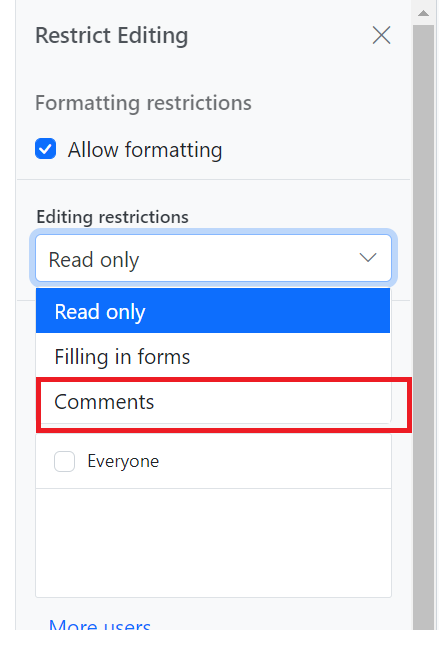
In the
EnforceProtectionmethod, the first parameter is the password and the second parameter is the protection type. Possible values of protection type areNoProtection | ReadOnly | FormFieldsOnly | CommentsOnly. In theStopProtectionmethod, the parameter is the password.
Highlight comments by author
When highlightCommentsByAuthor is enabled, each comment marker is displayed in the author’s avatar color. Selecting a comment highlights the corresponding text and comment pane border in that color. If multiple comments appear on the same line, the marker retains the first author’s avatar color.
The following example illustrates how to enable comment highlights in the DOCX Editor using the highlightCommentsByAuthor property in the CommentSettings API Reference.
@using Syncfusion.Blazor.DocumentEditor;

<SfDocumentEditorContainer @ref="container" EnableToolbar=true DocumentEditorSettings="Settings">
</SfDocumentEditorContainer>

@code {
    private DocumentEditorSettingsModel Settings = new DocumentEditorSettingsModel
    {
        CommentSettings = new CommentSettingsModel
        {
            HighlightCommentsByAuthor = true
        }
    };
}
Online demo
Explore how to add, view, and manage comments in Word documents using the Blazor DOCX Editor in this live demo.