Working with lists in PowerPoint Library
3 Aug 202624 minutes to read
Creating a Simple List
Essential® Presentation allows you to create simple and multi-level lists that make the content easier to read. In PowerPoint, Presentation lists consist of the following types:
For a complete reference of the enums and properties used to configure lists, see the API Reference section.
Numbered List
IndentLevelNumberaccepts values from0to8, where0indicates no indent.ListFormat.Sizeis expressed as a percentage of the text size (range25to400).
The following code example illustrates how to create a numbered list:
//Creates a new Presentation instance.
IPresentation pptxDoc = Presentation.Create();
//Adds a blank slide into the Presentation
ISlide slide = pptxDoc.Slides.Add(SlideLayoutType.Blank);
// Adds a textbox to hold the list
IShape textBoxShape = slide.AddTextBox(65, 140, 410, 270);
//Adds a new paragraph with the text in the left hand side textbox.
IParagraph paragraph = textBoxShape.TextBody.AddParagraph("AdventureWorks Cycles, the fictitious company on which the AdventureWorks sample databases are based, is a large, multinational manufacturing company.");
//Sets the list type as Numbered
paragraph.ListFormat.Type = ListType.Numbered;
//Sets the numbered style (list numbering) as Arabic number following by period.
paragraph.ListFormat.NumberStyle = NumberedListStyle.ArabicPeriod;
//Sets the starting value as 1
paragraph.ListFormat.StartValue = 1;
//Sets the list level as 1
paragraph.IndentLevelNumber = 1;
//Sets the hanging value
paragraph.FirstLineIndent = -20;
//Sets the bullet character size. Here, 100 means 100% of the text. Possible values can range from 25 to 400.
paragraph.ListFormat.Size = 100;
//Adds another paragraph with the text in the left hand side textbox.
paragraph = textBoxShape.TextBody.AddParagraph("The company manufactures and sells metal and composite bicycles to North American, European and Asian commercial markets.");
//Sets the list type as Numbered
paragraph.ListFormat.Type = ListType.Numbered;
//Sets the numbered style (list numbering) as Arabic number following by period.
paragraph.ListFormat.NumberStyle = NumberedListStyle.ArabicPeriod;
//Sets the list level as 1
paragraph.IndentLevelNumber = 1;
//Sets the hanging value
paragraph.FirstLineIndent = -20;
//Sets the bullet character size. Here, 100 means 100% of the text. Possible values can range from 25 to 400.
paragraph.ListFormat.Size = 100;
//Adds another paragraph with the text in the left hand side textbox.
paragraph = textBoxShape.TextBody.AddParagraph("While its base operation is located in Washington with 290 employees, several regional sales teams are located throughout their market base.");
//Sets the list type as Numbered
paragraph.ListFormat.Type = ListType.Numbered;
//Sets the numbered style (list numbering) as Arabic number following by period.
paragraph.ListFormat.NumberStyle = NumberedListStyle.ArabicPeriod;
//Sets the list level as 1
paragraph.IndentLevelNumber = 1;
//Sets the hanging value
paragraph.FirstLineIndent = -20;
//Sets the bullet character size. Here, 100 means 100% of the text. Possible values can range from 25 to 400.
paragraph.ListFormat.Size = 100;
//Saves the Presentation to the file system.
pptxDoc.Save("Sample.pptx");
//Closes the Presentation
pptxDoc.Close();
//Creates a new Presentation instance.
IPresentation pptxDoc = Presentation.Create();
//Adds a blank slide into the Presentation
ISlide slide = pptxDoc.Slides.Add(SlideLayoutType.Blank);
//Adds a textbox to hold the list
IShape textBoxShape = slide.AddTextBox(65, 140, 410, 270);
// Adds a new paragraph with the text in the left hand side textbox.
IParagraph paragraph = textBoxShape.TextBody.AddParagraph("AdventureWorks Cycles, the fictitious company on which the AdventureWorks sample databases are based, is a large, multinational manufacturing company.");
//Sets the list type as Numbered
paragraph.ListFormat.Type = ListType.Numbered;
//Sets the numbered style (list numbering) as Arabic number following by period.
paragraph.ListFormat.NumberStyle = NumberedListStyle.ArabicPeriod;
//Sets the starting value as 1
paragraph.ListFormat.StartValue = 1;
//Sets the list level as 1
paragraph.IndentLevelNumber = 1;
//Sets the hanging value
paragraph.FirstLineIndent = -20;
//Sets the bullet character size. Here, 100 means 100% of the text. Possible values can range from 25 to 400.
paragraph.ListFormat.Size = 100;
//Adds another paragraph with the text in the left hand side textbox.
paragraph = textBoxShape.TextBody.AddParagraph("The company manufactures and sells metal and composite bicycles to North American, European and Asian commercial markets.");
//Sets the list type as Numbered
paragraph.ListFormat.Type = ListType.Numbered;
//Sets the numbered style (list numbering) as Arabic number following by period.
paragraph.ListFormat.NumberStyle = NumberedListStyle.ArabicPeriod;
//Sets the list level as 1
paragraph.IndentLevelNumber = 1;
//Sets the hanging value
paragraph.FirstLineIndent = -20;
//Sets the bullet character size. Here, 100 means 100% of the text. Possible values can range from 25 to 400.
paragraph.ListFormat.Size = 100;
//Adds another paragraph with the text in the left hand side textbox.
paragraph = textBoxShape.TextBody.AddParagraph("While its base operation is located in Washington with 290 employees, several regional sales teams are located throughout their market base.");
//Sets the list type as Numbered
paragraph.ListFormat.Type = ListType.Numbered;
//Sets the numbered style (list numbering) as Arabic number following by period.
paragraph.ListFormat.NumberStyle = NumberedListStyle.ArabicPeriod;
//Sets the list level as 1
paragraph.IndentLevelNumber = 1;
//Sets the hanging value
paragraph.FirstLineIndent = -20;
//Sets the bullet character size. Here, 100 means 100% of the text. Possible values can range from 25 to 400.
paragraph.ListFormat.Size = 100;
//Saves the Presentation to the file system.
pptxDoc.Save("Sample.pptx");
Process.Start("Sample.pptx");
//Closes the Presentation
pptxDoc.Close();'Creates a new Presentation instance.
Dim pptxDoc As IPresentation = Presentation.Create()
'Adds the slide into the Presentation
Dim slide As ISlide = pptxDoc.Slides.Add(SlideLayoutType.Blank)
'Adds a textbox to hold the list
Dim textBoxShape As IShape = slide.AddTextBox(65, 140, 410, 270)
'Adds a new paragraph with the text in the left hand side textbox.
Dim paragraph As IParagraph = textBoxShape.TextBody.AddParagraph("AdventureWorks Cycles, the fictitious company on which the AdventureWorks sample databases are based, is a large, multinational manufacturing company.")
'Sets the list type as Numbered
paragraph.ListFormat.Type = ListType.Numbered
'Sets the numbered style (list numbering) as Arabic number following by period.
paragraph.ListFormat.NumberStyle = NumberedListStyle.ArabicPeriod
'Sets the starting value as 1
paragraph.ListFormat.StartValue = 1
'Sets the list level as 1
paragraph.IndentLevelNumber = 1
'Sets the hanging value
paragraph.FirstLineIndent = -20
'Sets the bullet character size. Here, 100 means 100% of the text. Possible values can range from 25 to 400.
paragraph.ListFormat.Size = 100
'Adds another paragraph with the text in the left hand side textbox.
paragraph = textBoxShape.TextBody.AddParagraph("The company manufactures and sells metal and composite bicycles to North American, European and Asian commercial markets.")
'Sets the list type as Numbered
paragraph.ListFormat.Type = ListType.Numbered
'Sets the numbered style (list numbering) as Arabic number following by period.
paragraph.ListFormat.NumberStyle = NumberedListStyle.ArabicPeriod
'Sets the list level as 1
paragraph.IndentLevelNumber = 1
'Sets the hanging value
paragraph.FirstLineIndent = -20
'Sets the bullet character size. Here, 100 means 100% of the text. Possible values can range from 25 to 400.
paragraph.ListFormat.Size = 100
'Adds another paragraph with the text in the left hand side textbox.
paragraph = textBoxShape.TextBody.AddParagraph("While its base operation is located in Washington with 290 employees, several regional sales teams are located throughout their market base.")
'Sets the list type as Numbered
paragraph.ListFormat.Type = ListType.Numbered
'Sets the numbered style (list numbering) as Arabic number following by period.
paragraph.ListFormat.NumberStyle = NumberedListStyle.ArabicPeriod
'Sets the list level as 1
paragraph.IndentLevelNumber = 1
'Sets the hanging value
paragraph.FirstLineIndent = -20
'Sets the bullet character size. Here, 100 means 100% of the text. Possible values can range from 25 to 400.
paragraph.ListFormat.Size = 100
'Saves the Presentation to the file system.
pptxDoc.Save("Sample.pptx")
Process.Start("Sample.pptx")
'Closes the Presentation
pptxDoc.Close()You can download a complete working sample from GitHub.
Bulleted List
Convert.ToChar(183)represents the middle dot (·) used as the bullet character in this sample.ListType.Bulletedrequires aBulletCharacterandFontNameto render the bullet glyph.
The following code example demonstrates how to create a simple bulleted list.
//Creates a new Presentation instance.
IPresentation pptxDoc = Presentation.Create();
//Adds the slide into the Presentation
ISlide slide = pptxDoc.Slides.Add(SlideLayoutType.Blank);
// Adds a textbox to hold the list
IShape textBoxShape = slide.AddTextBox(65, 140, 410, 250);
//Adds a new paragraph with the text in the left hand side textbox.
IParagraph paragraph = textBoxShape.TextBody.AddParagraph("AdventureWorks Cycles, the fictitious company on which the AdventureWorks sample databases are based, is a large, multinational manufacturing company.");
//Sets the list type as bulleted
paragraph.ListFormat.Type = ListType.Bulleted;
//Sets the bullet character for this list
paragraph.ListFormat.BulletCharacter = Convert.ToChar(183);
//Sets the hanging value
paragraph.FirstLineIndent = -20;
//Sets the list level as 1
paragraph.IndentLevelNumber = 1;
//Sets the font for the bullet character
paragraph.ListFormat.FontName = "Symbol";
//Sets the bullet character size. Here, 100 means 100% of the text. Possible values can range from 25 to 400.
paragraph.ListFormat.Size = 100;
//Adds another paragraph with the text in the left hand side textbox.
paragraph = textBoxShape.TextBody.AddParagraph("The company manufactures and sells metal and composite bicycles to North American, European and Asian commercial markets.");
//Sets the list type as bulleted
paragraph.ListFormat.Type = ListType.Bulleted;
//Sets the bullet character for this list
paragraph.ListFormat.BulletCharacter = Convert.ToChar(183);
//Sets the hanging value
paragraph.FirstLineIndent = -20;
//Sets the list level as 1
paragraph.IndentLevelNumber = 1;
//Sets the font for the bullet character
paragraph.ListFormat.FontName = "Symbol";
//Sets the bullet character size. Here, 100 means 100% of the text. Possible values can range from 25 to 400.
paragraph.ListFormat.Size = 100;
//Adds another paragraph with the text in the left hand side textbox.
paragraph = textBoxShape.TextBody.AddParagraph("While its base operation is located in Washington with 290 employees, several regional sales teams are located throughout their market base.");
//Sets the list type as bulleted
paragraph.ListFormat.Type = ListType.Bulleted;
//Sets the bullet character for this list
paragraph.ListFormat.BulletCharacter = Convert.ToChar(183);
//Sets the hanging value
paragraph.FirstLineIndent = -20;
//Sets the list level as 1
paragraph.IndentLevelNumber = 1;
//Sets the font for the bullet character
paragraph.ListFormat.FontName = "Symbol";
//Sets the bullet character size. Here, 100 means 100% of the text. Possible values can range from 25 to 400.
paragraph.ListFormat.Size = 100;
//Saves the Presentation to the file system.
pptxDoc.Save("Sample.pptx");
//Closes the Presentation
pptxDoc.Close();
//Creates a new Presentation instance.
IPresentation pptxDoc = Presentation.Create();
//Adds the slide into the Presentation
ISlide slide = pptxDoc.Slides.Add(SlideLayoutType.Blank);
//Adds a textbox to hold the list
IShape textBoxShape = slide.AddTextBox(65, 140, 410, 250);
// Adds a new paragraph with the text in the left hand side textbox.
IParagraph paragraph = textBoxShape.TextBody.AddParagraph("AdventureWorks Cycles, the fictitious company on which the AdventureWorks sample databases are based, is a large, multinational manufacturing company.");
//Sets the list type as bulleted
paragraph.ListFormat.Type = ListType.Bulleted;
//Sets the bullet character for this list
paragraph.ListFormat.BulletCharacter = Convert.ToChar(183);
//Sets the hanging value
paragraph.FirstLineIndent = -20;
//Sets the list level as 1
paragraph.IndentLevelNumber = 1;
//Sets the font for the bullet character
paragraph.ListFormat.FontName = "Symbol";
//Sets the bullet character size. Here, 100 means 100% of the text. Possible values can range from 25 to 400.
paragraph.ListFormat.Size = 100;
//Adds another paragraph with the text in the left hand side textbox.
paragraph = textBoxShape.TextBody.AddParagraph("The company manufactures and sells metal and composite bicycles to North American, European and Asian commercial markets.");
//Sets the list type as bulleted
paragraph.ListFormat.Type = ListType.Bulleted;
//Sets the bullet character for this list
paragraph.ListFormat.BulletCharacter = Convert.ToChar(183);
//Sets the hanging value
paragraph.FirstLineIndent = -20;
//Sets the list level as 1
paragraph.IndentLevelNumber = 1;
//Sets the font for the bullet character
paragraph.ListFormat.FontName = "Symbol";
//Sets the bullet character size. Here, 100 means 100% of the text. Possible values can range from 25 to 400.
paragraph.ListFormat.Size = 100;
//Adds another paragraph with the text in the left hand side textbox.
paragraph = textBoxShape.TextBody.AddParagraph("While its base operation is located in Washington with 290 employees, several regional sales teams are located throughout their market base.");
//Sets the list type as bulleted
paragraph.ListFormat.Type = ListType.Bulleted;
//Sets the bullet character for this list
paragraph.ListFormat.BulletCharacter = Convert.ToChar(183);
//Sets the hanging value
paragraph.FirstLineIndent = -20;
//Sets the list level as 1
paragraph.IndentLevelNumber = 1;
//Sets the font for the bullet character
paragraph.ListFormat.FontName = "Symbol";
//Sets the bullet character size. Here, 100 means 100% of the text. Possible values can range from 25 to 400.
paragraph.ListFormat.Size = 100;
//Saves the Presentation to the file system.
pptxDoc.Save("Sample.pptx");
Process.Start("Sample.pptx");
//Closes the Presentation
pptxDoc.Close();'Creates a new Presentation instance.
Dim pptxDoc As IPresentation = Presentation.Create()
'Adds the slide into the Presentation
Dim slide As ISlide = pptxDoc.Slides.Add(SlideLayoutType.Blank)
'Adds a textbox to hold the list
Dim textBoxShape As IShape = slide.AddTextBox(65, 140, 410, 250)
'Adds a new paragraph with the text in the left hand side textbox.
Dim paragraph As IParagraph = textBoxShape.TextBody.AddParagraph("AdventureWorks Cycles, the fictitious company on which the AdventureWorks sample databases are based, is a large, multinational manufacturing company.")
'Sets the list type as bulleted
paragraph.ListFormat.Type = ListType.Bulleted
'Sets the bullet character for this list
paragraph.ListFormat.BulletCharacter = Convert.ToChar(183)
'Sets the hanging value
paragraph.FirstLineIndent = -20
'Sets the list level as 1
paragraph.IndentLevelNumber = 1
'Sets the font for the bullet character
paragraph.ListFormat.FontName = "Symbol"
'Sets the bullet character size. Here, 100 means 100% of the text. Possible values can range from 25 to 400.
paragraph.ListFormat.Size = 100
'Adds another paragraph with the text in the left hand side textbox.
paragraph = textBoxShape.TextBody.AddParagraph("The company manufactures and sells metal and composite bicycles to North American, European and Asian commercial markets.")
'Sets the list type as bulleted
paragraph.ListFormat.Type = ListType.Bulleted
'Sets the bullet character for this list
paragraph.ListFormat.BulletCharacter = Convert.ToChar(183)
'Sets the hanging value
paragraph.FirstLineIndent = -20
'Sets the list level as 1
paragraph.IndentLevelNumber = 1
'Sets the font for the bullet character
paragraph.ListFormat.FontName = "Symbol"
'Sets the bullet character size. Here, 100 means 100% of the text. Possible values can range from 25 to 400.
paragraph.ListFormat.Size = 100
'Adds another paragraph with the text in the left hand side textbox.
paragraph = textBoxShape.TextBody.AddParagraph("While its base operation is located in Washington with 290 employees, several regional sales teams are located throughout their market base.")
'Sets the list type as bulleted
paragraph.ListFormat.Type = ListType.Bulleted
'Sets the bullet character for this list
paragraph.ListFormat.BulletCharacter = Convert.ToChar(183)
'Sets the hanging value
paragraph.FirstLineIndent = -20
'Sets the list level as 1
paragraph.IndentLevelNumber = 1
'Sets the font for the bullet character
paragraph.ListFormat.FontName = "Symbol"
'Sets the bullet character size. Here, 100 means 100% of the text. Possible values can range from 25 to 400.
paragraph.ListFormat.Size = 100
'Saves the Presentation to the file system.
pptxDoc.Save("Sample.pptx")
Process.Start("Sample.pptx")
'Closes the Presentation
pptxDoc.Close()You can download a complete working sample from GitHub.
Picture List
ListType.Picturereplaces the bullet glyph with a custom image supplied throughListFormat.Picture(Stream).- The image file (
Image.pngin the samples below) must exist on disk at runtime. In cross-platform samples, the image is opened through aFileStream; in Windows-specific samples,Syncfusion.Drawing.Image.FromFileis used.ListFormat.Sizefor a picture list is expressed as a percentage of the text size (range25to400).
The following code example demonstrates how to create a simple picture list.
//Creates a new Presentation instance.
IPresentation pptxDoc = Presentation.Create();
//Adds the slide into the Presentation
ISlide slide = pptxDoc.Slides.Add(SlideLayoutType.Blank);
//Adds a textbox to hold the list
IShape textBoxShape = slide.AddTextBox(65, 140, 410, 270);
//Opens the image file used as the picture bullet.
FileStream pictureStream = new FileStream("Image.png", FileMode.Open, FileAccess.Read);
//Adds a new paragraph with the text in the left hand side textbox.
IParagraph paragraph = textBoxShape.TextBody.AddParagraph("AdventureWorks Cycles, the fictitious company on which the AdventureWorks sample databases are based, is a large, multinational manufacturing company.");
//Sets the list type as Picture
paragraph.ListFormat.Type = ListType.Picture;
//Sets the image for the list.
paragraph.ListFormat.Picture(pictureStream);
//Sets the picture size. Here, 100 means 100% of the text. Possible values can range from 25 to 400.
paragraph.ListFormat.Size = 150;
//Sets the list level as 1
paragraph.IndentLevelNumber = 1;
//Sets the hanging value
paragraph.FirstLineIndent = -20;
//Adds another paragraph with the text in the left hand side textbox.
paragraph = textBoxShape.TextBody.AddParagraph("The company manufactures and sells metal and composite bicycles to North American, European and Asian commercial markets.");
//Sets the list type as Picture
paragraph.ListFormat.Type = ListType.Picture;
//Sets the image for the list.
paragraph.ListFormat.Picture(pictureStream);
//Sets the picture size. Here, 100 means 100% of the text. Possible values can range from 25 to 400.
paragraph.ListFormat.Size = 150;
//Sets the list level as 1
paragraph.IndentLevelNumber = 1;
//Sets the hanging value
paragraph.FirstLineIndent = -20;
//Saves the Presentation to the file system.
pptxDoc.Save("Sample.pptx");
//Closes the picture stream.
pictureStream.Close();
//Closes the Presentation
pptxDoc.Close();
//Creates a new Presentation instance.
IPresentation pptxDoc = Presentation.Create();
//Adds the slide into the Presentation
ISlide slide = pptxDoc.Slides.Add(SlideLayoutType.Blank);
// Adds a textbox to hold the list
IShape textBoxShape = slide.AddTextBox(65, 140, 410, 270);
// Adds a new paragraph with the text in the left hand side textbox.
IParagraph paragraph = textBoxShape.TextBody.AddParagraph("AdventureWorks Cycles, the fictitious company on which the AdventureWorks sample databases are based, is a large, multinational manufacturing company.");
//Sets the list type as Picture
paragraph.ListFormat.Type = ListType.Picture;
//Sets the image for the list.
paragraph.ListFormat.Picture(new MemoryStream(Syncfusion.Drawing.Image.FromFile("Image.png").ImageData));
//Sets the picture size. Here, 100 means 100% of the text. Possible values can range from 25 to 400.
paragraph.ListFormat.Size = 150;
//Sets the list level as 1
paragraph.IndentLevelNumber = 1;
//Sets the hanging value
paragraph.FirstLineIndent = -20;
//Adds another paragraph with the text in the left hand side textbox.
paragraph = textBoxShape.TextBody.AddParagraph("The company manufactures and sells metal and composite bicycles to North American, European and Asian commercial markets.");
//Sets the list type as Picture
paragraph.ListFormat.Type = ListType.Picture;
//Sets the image for the list.
paragraph.ListFormat.Picture(new MemoryStream(Syncfusion.Drawing.Image.FromFile("Image.png").ImageData));
//Sets the picture size. Here, 100 means 100% of the text. Possible values can range from 25 to 400.
paragraph.ListFormat.Size = 150;
//Sets the list level as 1
paragraph.IndentLevelNumber = 1;
//Sets the hanging value
paragraph.FirstLineIndent = -20;
//Saves the Presentation to the file system.
pptxDoc.Save("Sample.pptx");
//Closes the Presentation
pptxDoc.Close();'Creates a new Presentation instance.
Dim pptxDoc As IPresentation = Presentation.Create()
'Adds the slide into the Presentation
Dim slide As ISlide = pptxDoc.Slides.Add(SlideLayoutType.Blank)
'Adds a textbox to hold the list
Dim textBoxShape As IShape = slide.AddTextBox(65, 140, 410, 270)
'Adds a new paragraph with the text in the left hand side textbox.
Dim paragraph As IParagraph = textBoxShape.TextBody.AddParagraph("AdventureWorks Cycles, the fictitious company on which the AdventureWorks sample databases are based, is a large, multinational manufacturing company.")
'Sets the list type as Picture
paragraph.ListFormat.Type = ListType.Picture
'Sets the image for the list.
paragraph.ListFormat.Picture(New MemoryStream (Syncfusion.Drawing.Image.FromFile("Image.png").ImageData))
'Sets the picture size. Here, 100 means 100% of the text. Possible values can range from 25 to 400.
paragraph.ListFormat.Size = 150
'Sets the list level as 1
paragraph.IndentLevelNumber = 1
'Sets the hanging value
paragraph.FirstLineIndent = -20
'Adds another paragraph with the text in the left hand side textbox.
paragraph = textBoxShape.TextBody.AddParagraph("The company manufactures and sells metal and composite bicycles to North American, European and Asian commercial markets.")
'Sets the list type as Picture
paragraph.ListFormat.Type = ListType.Picture
'Sets the image for the list.
paragraph.ListFormat.Picture(New MemoryStream (Syncfusion.Drawing.Image.FromFile("Image.png").ImageData))
'Sets the picture size. Here, 100 means 100% of the text. Possible values can range from 25 to 400.
paragraph.ListFormat.Size = 150
'Sets the list level as 1
paragraph.IndentLevelNumber = 1
'Sets the hanging value
paragraph.FirstLineIndent = -20
'Saves the Presentation to the file system.
pptxDoc.Save("Sample.pptx")
'Closes the Presentation
pptxDoc.Close()You can download a complete working sample from GitHub.
Creating a Multilevel List
- When a paragraph jumps to a deeper
IndentLevelNumber, the numbering for the previous level pauses and resumes at the same value when the level returns.- The valid
IndentLevelNumberrange is0to8, matching Microsoft PowerPoint.
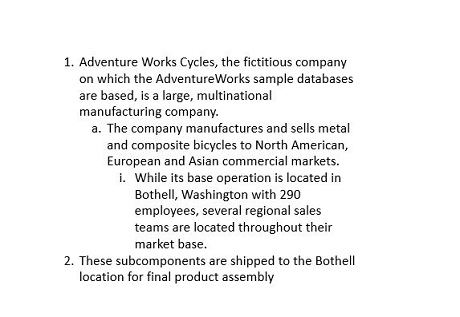
You can create a multi-level list by setting the indentation levels. By default, the level begins at 0 and increments by 1 for each level. A list can be incremented or decremented from levels 0 to 8, as in Microsoft PowerPoint.
The following code example demonstrates how to create a multilevel list.
//Creates a new Presentation instance.
IPresentation pptxDoc = Presentation.Create();
//Adds the slide into the Presentation
ISlide slide = pptxDoc.Slides.Add(SlideLayoutType.Blank);
//Adds a textbox to hold the bulleted list
IShape textBoxShape = slide.AddTextBox(65, 140, 410, 250);
//Adds paragraph to the textbox
IParagraph paragraph = textBoxShape.TextBody.AddParagraph("AdventureWorks Cycles, the fictitious company on which the AdventureWorks sample databases are based, is a large, multinational manufacturing company.");
//Sets the list type as Numbered list
paragraph.ListFormat.Type = ListType.Numbered;
//Sets the numbered style (list numbering) as Arabic number following by period.
paragraph.ListFormat.NumberStyle = NumberedListStyle.ArabicPeriod;
//Sets the starting value as 1
paragraph.ListFormat.StartValue = 1;
//Sets the list level as 1
paragraph.IndentLevelNumber = 1;
//Sets the hanging value
paragraph.FirstLineIndent = -20;
//Adds paragraph to the textbox
paragraph = textBoxShape.TextBody.AddParagraph("The company manufactures and sells metal and composite bicycles to North American, European and Asian commercial markets.");
//Sets the list type as Numbered list
paragraph.ListFormat.Type = ListType.Numbered;
//Sets the numbered style (list numbering) as lower case alphabet following by period.
paragraph.ListFormat.NumberStyle = NumberedListStyle.AlphaLcPeriod;
//Sets the list level as 2
paragraph.IndentLevelNumber = 2;
//Sets the hanging value
paragraph.FirstLineIndent = -20;
//Adds paragraph to the textbox
paragraph = textBoxShape.TextBody.AddParagraph("While its base operation is located in Washington with 290 employees, several regional sales teams are located throughout their market base.");
//Sets the list type as Numbered list
paragraph.ListFormat.Type = ListType.Numbered;
//Sets the numbered style (list numbering) as roman number lower casing following by period.
paragraph.ListFormat.NumberStyle = NumberedListStyle.RomanLcPeriod;
//Sets the list level as 3
paragraph.IndentLevelNumber = 3;
//Sets the hanging value
paragraph.FirstLineIndent = -20;
//Adds paragraph to the textbox
paragraph = textBoxShape.TextBody.AddParagraph("These subcomponents are shipped to another location for final product assembly");
//Sets the list type as Numbered list
paragraph.ListFormat.Type = ListType.Numbered;
paragraph.ListFormat.NumberStyle = NumberedListStyle.ArabicPeriod;
//Sets the list level as 1
paragraph.IndentLevelNumber = 1;
//Sets the hanging value
paragraph.FirstLineIndent = -20;
//Saves the Presentation to the file system.
pptxDoc.Save("MultiLevelList.pptx");
//Closes the Presentation
pptxDoc.Close();
//Creates a new Presentation instance.
IPresentation pptxDoc = Presentation.Create();
//Adds the slide into the Presentation
ISlide slide = pptxDoc.Slides.Add(SlideLayoutType.Blank);
//Adds a textbox to hold the bulleted list
IShape textBoxShape = slide.AddTextBox(65, 140, 410, 250);
//Adds paragraph to the textbox
IParagraph paragraph = textBoxShape.TextBody.AddParagraph("AdventureWorks Cycles, the fictitious company on which the AdventureWorks sample databases are based, is a large, multinational manufacturing company.");
//Sets the list type as Numbered list
paragraph.ListFormat.Type = ListType.Numbered;
//Sets the numbered style (list numbering) as Arabic number following by period.
paragraph.ListFormat.NumberStyle = NumberedListStyle.ArabicPeriod;
//Sets the starting value as 1
paragraph.ListFormat.StartValue = 1;
//Sets the list level as 1
paragraph.IndentLevelNumber = 1;
//Sets the hanging value
paragraph.FirstLineIndent = -20;
//Adds paragraph to the textbox
paragraph = textBoxShape.TextBody.AddParagraph("The company manufactures and sells metal and composite bicycles to North American, European and Asian commercial markets.");
//Sets the list type as Numbered list
paragraph.ListFormat.Type = ListType.Numbered;
//Sets the numbered style (list numbering) as lower case alphabet following by period.
paragraph.ListFormat.NumberStyle = NumberedListStyle.AlphaLcPeriod;
//Sets the list level as 2
paragraph.IndentLevelNumber = 2;
//Sets the hanging value
paragraph.FirstLineIndent = -20;
//Adds paragraph to the textbox
paragraph = textBoxShape.TextBody.AddParagraph("While its base operation is located in Washington with 290 employees, several regional sales teams are located throughout their market base.");
//Sets the list type as Numbered list
paragraph.ListFormat.Type = ListType.Numbered;
//Sets the numbered style (list numbering) as roman number lower casing following by period.
paragraph.ListFormat.NumberStyle = NumberedListStyle.RomanLcPeriod;
//Sets the list level as 3
paragraph.IndentLevelNumber = 3;
//Sets the hanging value
paragraph.FirstLineIndent = -20;
//Adds paragraph to the textbox
paragraph = textBoxShape.TextBody.AddParagraph("These subcomponents are shipped to another location for final product assembly");
//Sets the list type as Numbered list
paragraph.ListFormat.Type = ListType.Numbered;
paragraph.ListFormat.NumberStyle = NumberedListStyle.ArabicPeriod;
//Sets the list level as 1
paragraph.IndentLevelNumber = 1;
//Sets the hanging value
paragraph.FirstLineIndent = -20;
//Saves the Presentation to the file system.
pptxDoc.Save("MultiLevelList.pptx");
//Closes the Presentation
pptxDoc.Close();'Creates a new Presentation instance.
Dim pptxDoc As IPresentation = Presentation.Create()
'Adds the slide into the Presentation
Dim slide As ISlide = pptxDoc.Slides.Add(SlideLayoutType.Blank)
'Adds a textbox to hold the bulleted list
Dim textBoxShape As IShape = slide.AddTextBox(65, 140, 410, 250)
'Adds paragraph to the textbox
Dim paragraph As IParagraph = textBoxShape.TextBody.AddParagraph("AdventureWorks Cycles, the fictitious company on which the AdventureWorks sample databases are based, is a large, multinational manufacturing company.")
'Sets the list type as Numbered list
paragraph.ListFormat.Type = ListType.Numbered
'Sets the numbered style (list numbering) as Arabic number following by period.
paragraph.ListFormat.NumberStyle = NumberedListStyle.ArabicPeriod
'Sets the starting value as 1
paragraph.ListFormat.StartValue = 1
'Sets the list level as 1
paragraph.IndentLevelNumber = 1
'Sets the hanging value
paragraph.FirstLineIndent = -20
'Adds paragraph to the textbox
paragraph = textBoxShape.TextBody.AddParagraph("The company manufactures and sells metal and composite bicycles to North American, European and Asian commercial markets.")
'Sets the list type as Numbered list
paragraph.ListFormat.Type = ListType.Numbered
'Sets the numbered style (list numbering) as lower case alphabet following by period.
paragraph.ListFormat.NumberStyle = NumberedListStyle.AlphaLcPeriod
'Sets the list level as 2
paragraph.IndentLevelNumber = 2
'Sets the hanging value
paragraph.FirstLineIndent = -20
'Adds paragraph to the textbox
paragraph = textBoxShape.TextBody.AddParagraph("While its base operation is located in Washington with 290 employees, several regional sales teams are located throughout their market base.")
'Sets the list type as Numbered list
paragraph.ListFormat.Type = ListType.Numbered
'Sets the numbered style (list numbering) as roman number lower casing following by period.
paragraph.ListFormat.NumberStyle = NumberedListStyle.RomanLcPeriod
'Sets the list level as 3
paragraph.IndentLevelNumber = 3
'Sets the hanging value
paragraph.FirstLineIndent = -20
'Adds paragraph to the textbox
paragraph = textBoxShape.TextBody.AddParagraph("These subcomponents are shipped to another location for final product assembly")
'Sets the list type as Numbered list
paragraph.ListFormat.Type = ListType.Numbered
paragraph.ListFormat.NumberStyle = NumberedListStyle.ArabicPeriod
'Sets the list level as 1
paragraph.IndentLevelNumber = 1
'Sets the hanging value
paragraph.FirstLineIndent = -20
'Saves the Presentation to the file system.
pptxDoc.Save("MultiLevelList.pptx")
'Closes the Presentation
pptxDoc.Close()The above code example generates a multi-level list in Presentation as follows.
You can download a complete working sample from GitHub.