Bookmark Navigation in Vue PDF Viewer
14 Aug 202610 minutes to read
Bookmarks embedded in PDF files are loaded and made available for quick navigation within the viewer.
Enable or disable bookmark navigation using the examples below.
The examples show a Standalone (client-only) setup and a Server-Backed setup; the primary difference is the viewer’s resourceUrl/service configuration used to locate PDF resources.
<template>
  <div id="app">
    <ejs-pdfviewer
      id="pdfViewer"
      :documentPath="documentPath"
      :resourceUrl="resourceUrl"
      :enableBookmark="true"
    ></ejs-pdfviewer>
  </div>
</template>

<script setup>
import {
  PdfViewerComponent as EjsPdfviewer,
  Toolbar,
  Magnification,
  Navigation,
  LinkAnnotation,
  BookmarkView,
  Annotation,
  ThumbnailView,
  Print,
  TextSelection,
  TextSearch
} from '@syncfusion/ej2-vue-pdfviewer';
import { provide } from 'vue';

const documentPath = 'https://cdn.syncfusion.com/content/pdf/pdf-succinctly.pdf';
const resourceUrl = 'https://cdn.syncfusion.com/ej2/31.2.2/dist/ej2-pdfviewer-lib';

provide('PdfViewer', [
  Toolbar,
  Magnification,
  Navigation,
  LinkAnnotation,
  BookmarkView,
  Annotation,
  ThumbnailView,
  Print,
  TextSelection,
  TextSearch
]);
</script><template>
<div id="app">
<ejs-pdfviewer
id="pdfViewer"
:documentPath="documentPath"
:resourceUrl="resourceUrl"
:enableBookmark="true"
></ejs-pdfviewer>
</div>
</template>
<script>
import {
PdfViewerComponent,
Toolbar,
Magnification,
Navigation,
LinkAnnotation,
BookmarkView,
Annotation,
ThumbnailView,
Print,
TextSelection,
TextSearch
} from '@syncfusion/ej2-vue-pdfviewer';
export default {
name: 'App',
components: {
'ejs-pdfviewer': PdfViewerComponent
},
data() {
return {
documentPath: 'https://cdn.syncfusion.com/content/pdf/pdf-succinctly.pdf',
resourceUrl: 'https://cdn.syncfusion.com/ej2/31.2.2/dist/ej2-pdfviewer-lib'
};
},
provide: {
PdfViewer: [
Toolbar,
Magnification,
Navigation,
LinkAnnotation,
BookmarkView,
Annotation,
ThumbnailView,
Print,
TextSelection,
TextSearch
]
}
};
</script><template>
<div id="app">
<ejs-pdfviewer
id="pdfViewer"
:serviceUrl="serviceUrl"
:documentPath="documentPath"
:enableBookmark="true"
></ejs-pdfviewer>
</div>
</template>
<script setup>
import {
PdfViewerComponent as EjsPdfviewer,
Toolbar,
Magnification,
Navigation,
LinkAnnotation,
BookmarkView,
Annotation,
ThumbnailView,
Print,
TextSelection,
TextSearch
} from '@syncfusion/ej2-vue-pdfviewer';
import { provide } from 'vue';
const serviceUrl = 'https://document.syncfusion.com/web-services/pdf-viewer/api/pdfviewer';
const documentPath = 'https://cdn.syncfusion.com/content/pdf/pdf-succinctly.pdf';
provide('PdfViewer', [
Toolbar,
Magnification,
Navigation,
LinkAnnotation,
BookmarkView,
Annotation,
ThumbnailView,
Print,
TextSelection,
TextSearch
]);
</script><template>
<div id="app">
<ejs-pdfviewer
id="pdfViewer"
:serviceUrl="serviceUrl"
:documentPath="documentPath"
:enableBookmark="true"
></ejs-pdfviewer>
</div>
</template>
<script>
import {
PdfViewerComponent,
Toolbar,
Magnification,
Navigation,
LinkAnnotation,
BookmarkView,
Annotation,
ThumbnailView,
Print,
TextSelection,
TextSearch
} from '@syncfusion/ej2-vue-pdfviewer';
export default {
name: 'App',
components: {
'ejs-pdfviewer': PdfViewerComponent
},
data() {
return {
serviceUrl: 'https://document.syncfusion.com/web-services/pdf-viewer/api/pdfviewer',
documentPath: 'https://cdn.syncfusion.com/content/pdf/pdf-succinctly.pdf'
};
},
provide: {
PdfViewer: [
Toolbar,
Magnification,
Navigation,
LinkAnnotation,
BookmarkView,
Annotation,
ThumbnailView,
Print,
TextSelection,
TextSearch
]
}
};
</script>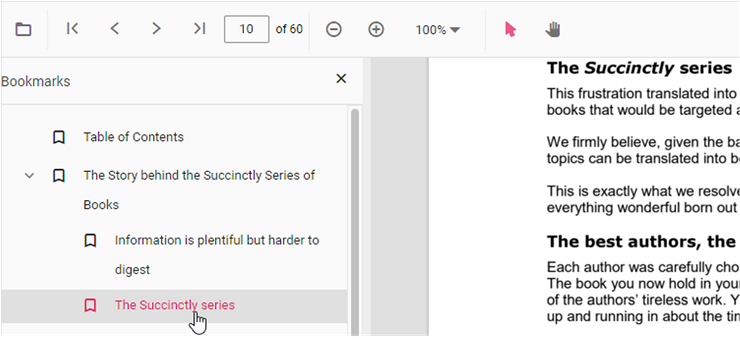
Programmatic bookmark navigation
Use the goToBookmark method to navigate to a bookmark programmatically. The method expects valid bookmark coordinates (zero-based page index and a Y offset). If the specified bookmark does not exist, the call may throw an error—guard calls with error handling or verify existence first using getBookmarks().
<template>
  <div>
    <button @click="goToBookmark">Go to bookmark</button>
    <button @click="getBookmarks">List bookmarks</button>
    <ejs-pdfviewer
      id="pdfViewer"
      ref="pdfViewer"
      :documentPath="documentPath"
      :resourceUrl="resourceUrl"
      :enableBookmark="true"
    ></ejs-pdfviewer>
  </div>
</template>

<script setup>
import {
  PdfViewerComponent as EjsPdfviewer,
  Toolbar,
  Magnification,
  Navigation,
  LinkAnnotation,
  BookmarkView,
  Annotation,
  ThumbnailView,
  Print,
  TextSelection,
  TextSearch
} from '@syncfusion/ej2-vue-pdfviewer';
import { provide, ref } from 'vue';

const pdfViewer = ref(null);
const documentPath = 'https://cdn.syncfusion.com/content/pdf/pdf-succinctly.pdf';
const resourceUrl = 'https://cdn.syncfusion.com/ej2/31.2.2/dist/ej2-pdfviewer-lib';

provide('PdfViewer', [
  Toolbar,
  Magnification,
  Navigation,
  LinkAnnotation,
  BookmarkView,
  Annotation,
  ThumbnailView,
  Print,
  TextSelection,
  TextSearch
]);

const goToBookmark = () => {
  pdfViewer.value.ej2Instances.bookmark.goToBookmark(1, 0);
};

const getBookmarks = () => {
  const bookmarks = pdfViewer.value.ej2Instances.bookmark.getBookmarks();
  console.log(bookmarks);
};
</script><template>
<div>
<button @click="goToBookmark">Go to bookmark</button>
<button @click="getBookmarks">List bookmarks</button>
<ejs-pdfviewer
id="pdfViewer"
ref="pdfViewer"
:documentPath="documentPath"
:resourceUrl="resourceUrl"
:enableBookmark="true"
></ejs-pdfviewer>
</div>
</template>
<script>
import {
PdfViewerComponent,
Toolbar,
Magnification,
Navigation,
LinkAnnotation,
BookmarkView,
Annotation,
ThumbnailView,
Print,
TextSelection,
TextSearch
} from '@syncfusion/ej2-vue-pdfviewer';
export default {
name: 'App',
components: {
'ejs-pdfviewer': PdfViewerComponent
},
data() {
return {
documentPath: 'https://cdn.syncfusion.com/content/pdf/pdf-succinctly.pdf',
resourceUrl: 'https://cdn.syncfusion.com/ej2/31.2.2/dist/ej2-pdfviewer-lib'
};
},
provide: {
PdfViewer: [
Toolbar,
Magnification,
Navigation,
LinkAnnotation,
BookmarkView,
Annotation,
ThumbnailView,
Print,
TextSelection,
TextSearch
]
},
methods: {
goToBookmark() {
this.$refs.pdfViewer.ej2Instances.bookmark.goToBookmark(1, 0);
},
getBookmarks() {
const bookmarks = this.$refs.pdfViewer.ej2Instances.bookmark.getBookmarks();
console.log(bookmarks);
}
}
};
</script>Use the getBookmarks method to retrieve the bookmark collection. Each item contains the bookmark title, destination page, and position information.