Sticky Notes Annotation in Vue PDF Viewer
14 Aug 202624 minutes to read
The PDF Viewer control provides options to add, edit, and delete sticky note annotations in the PDF document.
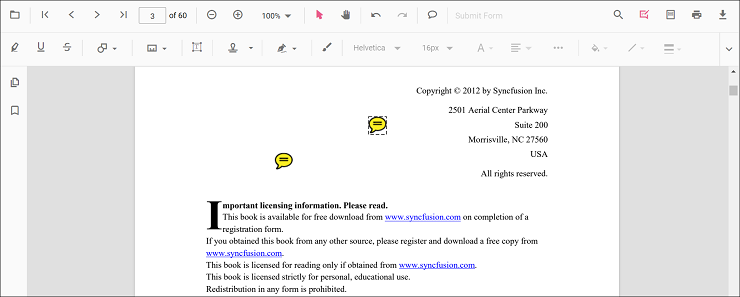
Add a sticky note annotation to the PDF document
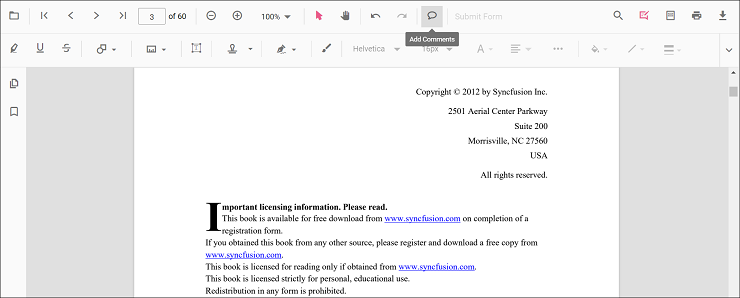
Sticky note annotations can be added to the PDF document using the annotation toolbar.
- Click the Comments button in the PDF Viewer toolbar to open the annotation toolbar.
- Click the position where the sticky note annotation should be added.
- The sticky note annotation appears at the selected position.
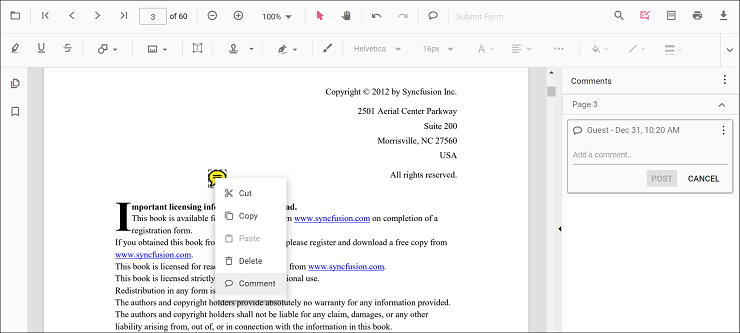
Annotation comments can be added using the comment panel.
- Select a sticky note annotation in the PDF document and right-click it.
- Choose Comment from the context menu.
- Add comments, replies, and status using the comment panel.
Add a sticky note annotation to the PDF document programmatically
The PDF Viewer library allows adding a sticky note annotation programmatically using the addAnnotation() method.
The following example shows how to add a sticky note annotation programmatically using addAnnotation():
<template>
  <div id="app">
    <button v-on:click="addAnnotation">Add Annotation programmatically</button>
    <ejs-pdfviewer id="pdfViewer" ref="pdfviewer" :documentPath="documentPath" :resourceUrl="resourceUrl">
    </ejs-pdfviewer>
  </div>
</template>

<script setup>
import {
  PdfViewerComponent as EjsPdfviewer, Toolbar, Magnification, Navigation, LinkAnnotation,
  BookmarkView, Annotation, ThumbnailView, Print, TextSelection,
  TextSearch, FormFields, FormDesigner, PageOrganizer
} from '@syncfusion/ej2-vue-pdfviewer';
import { provide, ref } from 'vue';

const pdfviewer = ref(null);
const documentPath = "https://cdn.syncfusion.com/content/pdf/pdf-succinctly.pdf";
const resourceUrl = 'https://cdn.syncfusion.com/ej2/31.2.2/dist/ej2-pdfviewer-lib';

provide('PdfViewer', [Toolbar, Magnification, Navigation, LinkAnnotation, BookmarkView, Annotation,
  ThumbnailView, Print, TextSelection, TextSearch, FormFields, FormDesigner, PageOrganizer])

const addAnnotation = function () {
  const viewer = pdfviewer.value.ej2Instances;
  viewer.annotation.addAnnotation("StickyNotes", {
    offset: { x: 100, y: 200 },
    pageNumber: 1,
    isLock: false
  });
}

</script><template>
<div id="app">
<button v-on:click="addAnnotation">Add Annotation programmatically</button>
<ejs-pdfviewer id="pdfViewer" ref="pdfviewer" :documentPath="documentPath" :resourceUrl="resourceUrl">
</ejs-pdfviewer>
</div>
</template>
<script>
import {
PdfViewerComponent, Toolbar, Magnification, Navigation, LinkAnnotation,
BookmarkView, Annotation, ThumbnailView, Print, TextSelection,
TextSearch, FormFields, FormDesigner, PageOrganizer
} from '@syncfusion/ej2-vue-pdfviewer';
export default {
name: "App",
components: {
"ejs-pdfviewer": PdfViewerComponent
},
data() {
return {
documentPath: "https://cdn.syncfusion.com/content/pdf/pdf-succinctly.pdf",
resourceUrl: 'https://cdn.syncfusion.com/ej2/31.2.2/dist/ej2-pdfviewer-lib',
};
},
provide: {
PdfViewer: [Toolbar, Magnification, Navigation, LinkAnnotation, BookmarkView, Annotation,
ThumbnailView, Print, TextSelection, TextSearch, FormFields, FormDesigner, PageOrganizer]
},
methods: {
addAnnotation: function () {
var viewer = this.$refs.pdfviewer.ej2Instances;
viewer.annotation.addAnnotation("StickyNotes", {
offset: { x: 100, y: 200 },
pageNumber: 1,
isLock: false
});
}
}
}
</script><template>
<div id="app">
<button v-on:click="addAnnotation">Add Annotation programmatically</button>
<ejs-pdfviewer id="pdfViewer" ref="pdfviewer" :documentPath="documentPath" :serviceUrl="serviceUrl">
</ejs-pdfviewer>
</div>
</template>
<script setup>
import {
PdfViewerComponent as EjsPdfviewer, Toolbar, Magnification, Navigation, LinkAnnotation,
BookmarkView, Annotation, ThumbnailView, Print, TextSelection,
TextSearch, FormFields, FormDesigner, PageOrganizer
} from '@syncfusion/ej2-vue-pdfviewer';
import { provide, ref } from 'vue';
const pdfviewer = ref(null);
const documentPath = "https://cdn.syncfusion.com/content/pdf/pdf-succinctly.pdf";
const serviceUrl = "https://document.syncfusion.com/web-services/pdf-viewer/api/pdfviewer";
provide('PdfViewer', [Toolbar, Magnification, Navigation, LinkAnnotation, BookmarkView, Annotation,
ThumbnailView, Print, TextSelection, TextSearch, FormFields, FormDesigner, PageOrganizer])
const addAnnotation = function () {
const viewer = pdfviewer.value.ej2Instances;
viewer.annotation.addAnnotation("StickyNotes", {
offset: { x: 100, y: 200 },
pageNumber: 1,
isLock: false
});
}
</script><template>
<div id="app">
<button v-on:click="addAnnotation">Add Annotation programmatically</button>
<ejs-pdfviewer id="pdfViewer" ref="pdfviewer" :documentPath="documentPath" :serviceUrl="serviceUrl">
</ejs-pdfviewer>
</div>
</template>
<script>
import {
PdfViewerComponent, Toolbar, Magnification, Navigation, LinkAnnotation,
BookmarkView, Annotation, ThumbnailView, Print, TextSelection,
TextSearch, FormFields, FormDesigner, PageOrganizer
} from '@syncfusion/ej2-vue-pdfviewer';
export default {
name: "App",
components: {
"ejs-pdfviewer": PdfViewerComponent
},
data() {
return {
documentPath: "https://cdn.syncfusion.com/content/pdf/pdf-succinctly.pdf",
serviceUrl: "https://document.syncfusion.com/web-services/pdf-viewer/api/pdfviewer",
};
},
provide: {
PdfViewer: [Toolbar, Magnification, Navigation, LinkAnnotation, BookmarkView, Annotation,
ThumbnailView, Print, TextSelection, TextSearch, FormFields, FormDesigner, PageOrganizer]
},
methods: {
addAnnotation: function () {
const viewer = this.$refs.pdfviewer.ej2Instances;
viewer.annotation.addAnnotation("StickyNotes", {
offset: { x: 100, y: 200 },
pageNumber: 1,
isLock: false
});
}
}
}
</script>Edit an existing sticky note annotation programmatically
To modify an existing sticky note annotation programmatically, use the editAnnotation() method.
The following example shows how to modify an existing sticky note annotation using editAnnotation():
<template>
  <div id="app">
    <button v-on:click="editAnnotation">Edit Annotation programmatically</button>
    <ejs-pdfviewer id="pdfViewer" ref="pdfviewer" :documentPath="documentPath" :resourceUrl="resourceUrl">
    </ejs-pdfviewer>
  </div>
</template>

<script setup>
import {
  PdfViewerComponent as EjsPdfviewer, Toolbar, Magnification, Navigation, LinkAnnotation,
  BookmarkView, Annotation, ThumbnailView, Print, TextSelection,
  TextSearch, FormFields, FormDesigner, PageOrganizer
} from '@syncfusion/ej2-vue-pdfviewer';
import { provide, ref } from 'vue';

const pdfviewer = ref(null);
const documentPath = "https://cdn.syncfusion.com/content/pdf/pdf-succinctly.pdf";
const resourceUrl = 'https://cdn.syncfusion.com/ej2/31.2.2/dist/ej2-pdfviewer-lib';

provide('PdfViewer', [Toolbar, Magnification, Navigation, LinkAnnotation, BookmarkView, Annotation,
  ThumbnailView, Print, TextSelection, TextSearch, FormFields, FormDesigner, PageOrganizer])

const editAnnotation = function () {
  const viewer = pdfviewer.value.ej2Instances;
  for (let i = 0; i < viewer.annotationCollection.length; i++) {
    if (viewer.annotationCollection[i].shapeAnnotationType === "sticky") {
      var width = viewer.annotationCollection[i].bounds.width;
      var height = viewer.annotationCollection[i].bounds.height;
      viewer.annotationCollection[i].bounds = { x: 100, y: 100, width: width, height: height };
      viewer.annotation.editAnnotation(viewer.annotationCollection[i]);
    }
  }
}

</script><template>
<div id="app">
<button v-on:click="editAnnotation">Edit Annotation programmatically</button>
<ejs-pdfviewer id="pdfViewer" ref="pdfviewer" :documentPath="documentPath" :resourceUrl="resourceUrl">
</ejs-pdfviewer>
</div>
</template>
<script>
import {
PdfViewerComponent, Toolbar, Magnification, Navigation, LinkAnnotation,
BookmarkView, Annotation, ThumbnailView, Print, TextSelection,
TextSearch, FormFields, FormDesigner, PageOrganizer
} from '@syncfusion/ej2-vue-pdfviewer';
export default {
name: "App",
components: {
"ejs-pdfviewer": PdfViewerComponent
},
data() {
return {
documentPath: "https://cdn.syncfusion.com/content/pdf/pdf-succinctly.pdf",
resourceUrl: 'https://cdn.syncfusion.com/ej2/31.2.2/dist/ej2-pdfviewer-lib',
};
},
provide: {
PdfViewer: [Toolbar, Magnification, Navigation, LinkAnnotation, BookmarkView, Annotation,
ThumbnailView, Print, TextSelection, TextSearch, FormFields, FormDesigner, PageOrganizer]
},
methods: {
editAnnotation: function () {
const viewer = this.$refs.pdfviewer.ej2Instances;
for (let i = 0; i < viewer.annotationCollection.length; i++) {
if (viewer.annotationCollection[i].shapeAnnotationType === "sticky") {
var width = viewer.annotationCollection[i].bounds.width;
var height = viewer.annotationCollection[i].bounds.height;
viewer.annotationCollection[i].bounds = { x: 100, y: 100, width: width, height: height };
viewer.annotation.editAnnotation(viewer.annotationCollection[i]);
}
}
}
}
}
</script><template>
<div id="app">
<button v-on:click="editAnnotation">Edit Annotation programmatically</button>
<ejs-pdfviewer id="pdfViewer" ref="pdfviewer" :documentPath="documentPath" :serviceUrl="serviceUrl">
</ejs-pdfviewer>
</div>
</template>
<script setup>
import {
PdfViewerComponent as EjsPdfviewer, Toolbar, Magnification, Navigation, LinkAnnotation,
BookmarkView, Annotation, ThumbnailView, Print, TextSelection,
TextSearch, FormFields, FormDesigner, PageOrganizer
} from '@syncfusion/ej2-vue-pdfviewer';
import { provide, ref } from 'vue';
const pdfviewer = ref(null);
const documentPath = "https://cdn.syncfusion.com/content/pdf/pdf-succinctly.pdf";
const serviceUrl = "https://document.syncfusion.com/web-services/pdf-viewer/api/pdfviewer";
provide('PdfViewer', [Toolbar, Magnification, Navigation, LinkAnnotation, BookmarkView, Annotation,
ThumbnailView, Print, TextSelection, TextSearch, FormFields, FormDesigner, PageOrganizer])
const editAnnotation = function () {
const viewer = pdfviewer.value.ej2Instances;
for (let i = 0; i < viewer.annotationCollection.length; i++) {
if (viewer.annotationCollection[i].shapeAnnotationType === "sticky") {
const width = viewer.annotationCollection[i].bounds.width;
const height = viewer.annotationCollection[i].bounds.height;
viewer.annotationCollection[i].bounds = { x: 100, y: 100, width: width, height: height };
viewer.annotation.editAnnotation(viewer.annotationCollection[i]);
}
}
}
</script><template>
<div id="app">
<button v-on:click="editAnnotation">Edit Annotation programmatically</button>
<ejs-pdfviewer id="pdfViewer" ref="pdfviewer" :documentPath="documentPath" :serviceUrl="serviceUrl">
</ejs-pdfviewer>
</div>
</template>
<script>
import {
PdfViewerComponent, Toolbar, Magnification, Navigation, LinkAnnotation,
BookmarkView, Annotation, ThumbnailView, Print, TextSelection,
TextSearch, FormFields, FormDesigner, PageOrganizer
} from '@syncfusion/ej2-vue-pdfviewer';
export default {
name: "App",
components: {
"ejs-pdfviewer": PdfViewerComponent
},
data() {
return {
documentPath: "https://cdn.syncfusion.com/content/pdf/pdf-succinctly.pdf",
serviceUrl: "https://document.syncfusion.com/web-services/pdf-viewer/api/pdfviewer",
};
},
provide: {
PdfViewer: [Toolbar, Magnification, Navigation, LinkAnnotation, BookmarkView, Annotation,
ThumbnailView, Print, TextSelection, TextSearch, FormFields, FormDesigner, PageOrganizer]
},
methods: {
editAnnotation: function () {
const viewer = this.$refs.pdfviewer.ej2Instances;
for (let i = 0; i < viewer.annotationCollection.length; i++) {
if (viewer.annotationCollection[i].shapeAnnotationType === "sticky") {
const width = viewer.annotationCollection[i].bounds.width;
const height = viewer.annotationCollection[i].bounds.height;
viewer.annotationCollection[i].bounds = { x: 100, y: 100, width: width, height: height };
viewer.annotation.editAnnotation(viewer.annotationCollection[i]);
}
}
}
}
}
</script>Edit the properties of sticky note annotations
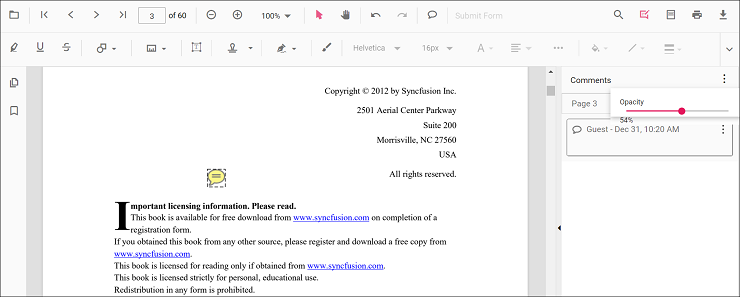
Editing opacity
Edit opacity using the range slider in the Edit Opacity tool.
Editing comments
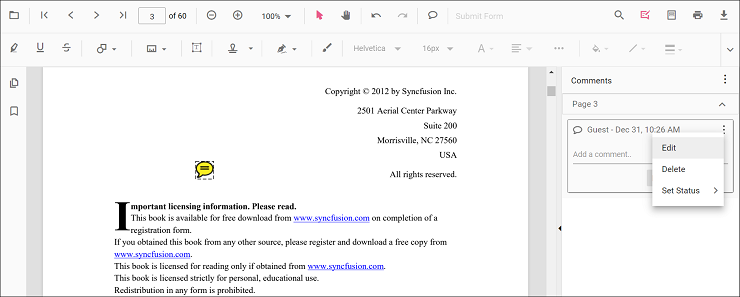
Comment text, replies, and status can be edited in the comment panel.
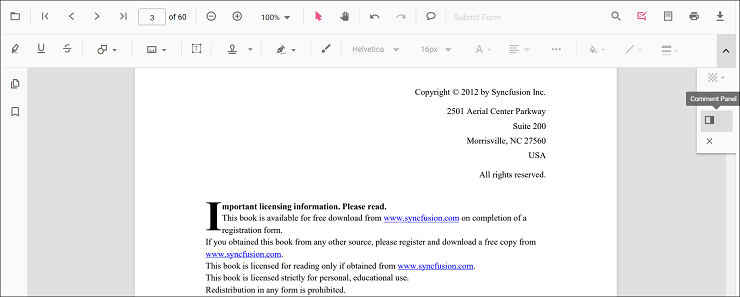
- Open the comment panel using the Comment Panel button in the annotation toolbar.
Modify or delete comments or replies, and change status using the menu options in the comment panel.
Set default properties during control initialization
Default properties for sticky note annotations can be set before creating the control using StickyNotesSettings.
After changing default opacity with the Edit Opacity tool, the selected value is applied to new sticky note annotations. The following example sets default sticky note annotation properties.
<template>
  <div id="app">
    <ejs-pdfviewer id="pdfViewer" ref="pdfviewer" :documentPath="documentPath" :resourceUrl="resourceUrl"
      :stickyNotesSettings="stickyNotesSettings">
    </ejs-pdfviewer>
  </div>
</template>

<script setup>
import {
  PdfViewerComponent as EjsPdfviewer, Toolbar, Magnification, Navigation, LinkAnnotation,
  BookmarkView, Annotation, ThumbnailView, Print, TextSelection,
  TextSearch, FormFields, FormDesigner, PageOrganizer
} from '@syncfusion/ej2-vue-pdfviewer';
import { provide } from 'vue';


const documentPath = "https://cdn.syncfusion.com/content/pdf/pdf-succinctly.pdf";
const resourceUrl = 'https://cdn.syncfusion.com/ej2/31.2.2/dist/ej2-pdfviewer-lib';
const stickyNotesSettings = { author: 'Syncfusion' };

provide('PdfViewer', [Toolbar, Magnification, Navigation, LinkAnnotation, BookmarkView, ThumbnailView,
  Print, TextSelection, TextSearch, Annotation, FormFields, FormDesigner, PageOrganizer])

</script><template>
<div id="app">
<ejs-pdfviewer id="pdfViewer" ref="pdfviewer" :documentPath="documentPath" :resourceUrl="resourceUrl"
:stickyNotesSettings="stickyNotesSettings">
</ejs-pdfviewer>
</div>
</template>
<script>
import {
PdfViewerComponent, Toolbar, Magnification, Navigation, LinkAnnotation,
BookmarkView, Annotation, ThumbnailView, Print, TextSelection,
TextSearch, FormFields, FormDesigner, PageOrganizer
} from '@syncfusion/ej2-vue-pdfviewer';
export default {
name: "App",
components: {
"ejs-pdfviewer": PdfViewerComponent
},
data() {
return {
documentPath: "https://cdn.syncfusion.com/content/pdf/pdf-succinctly.pdf",
resourceUrl: 'https://cdn.syncfusion.com/ej2/31.2.2/dist/ej2-pdfviewer-lib',
stickyNotesSettings: { author: 'Syncfusion' }
};
},
provide: {
PdfViewer: [Toolbar, Magnification, Navigation, LinkAnnotation, BookmarkView, ThumbnailView,
Print, TextSelection, TextSearch, Annotation, FormFields, FormDesigner, PageOrganizer]
}
}
</script><template>
<div id="app">
<ejs-pdfviewer id="pdfViewer" ref="pdfviewer" :serviceUrl="serviceUrl" :documentPath="documentPath"
:stickyNotesSettings="stickyNotesSettings">
</ejs-pdfviewer>
</div>
</template>
<script setup>
import {
PdfViewerComponent as EjsPdfviewer, Toolbar, Magnification, Navigation, LinkAnnotation,
BookmarkView, Annotation, ThumbnailView, Print, TextSelection,
TextSearch, FormFields, FormDesigner, PageOrganizer
} from '@syncfusion/ej2-vue-pdfviewer';
import { provide } from 'vue';
const serviceUrl = "https://document.syncfusion.com/web-services/pdf-viewer/api/pdfviewer";
const documentPath = "https://cdn.syncfusion.com/content/pdf/pdf-succinctly.pdf";
const stickyNotesSettings = { author: 'Syncfusion' };
provide('PdfViewer', [Toolbar, Magnification, Navigation, LinkAnnotation, BookmarkView, ThumbnailView,
Print, TextSelection, TextSearch, Annotation, FormFields, FormDesigner, PageOrganizer])
</script><template>
<div id="app">
<ejs-pdfviewer id="pdfViewer" ref="pdfviewer" :serviceUrl="serviceUrl" :documentPath="documentPath"
:stickyNotesSettings="stickyNotesSettings">
</ejs-pdfviewer>
</div>
</template>
<script>
import {
PdfViewerComponent, Toolbar, Magnification, Navigation, LinkAnnotation,
BookmarkView, Annotation, ThumbnailView, Print, TextSelection,
TextSearch, FormFields, FormDesigner, PageOrganizer
} from '@syncfusion/ej2-vue-pdfviewer';
export default {
name: "App",
components: {
"ejs-pdfviewer": PdfViewerComponent
},
data() {
return {
serviceUrl: "https://document.syncfusion.com/web-services/pdf-viewer/api/pdfviewer",
documentPath: "https://cdn.syncfusion.com/content/pdf/pdf-succinctly.pdf",
stickyNotesSettings: { author: 'Syncfusion' }
};
},
provide: {
PdfViewer: [Toolbar, Magnification, Navigation, LinkAnnotation, BookmarkView, ThumbnailView,
Print, TextSelection, TextSearch, Annotation, FormFields, FormDesigner, PageOrganizer]
}
}
</script>Disable sticky note annotations
The PDF Viewer control provides an option to disable sticky note annotations. The following example shows how to disable the feature.
<template>
  <div id="app">
    <ejs-pdfviewer id="pdfViewer" ref="pdfviewer" :documentPath="documentPath" :resourceUrl="resourceUrl"
      :enableStickyNotesAnnotation="enableStickyNotesAnnotation">
    </ejs-pdfviewer>
  </div>
</template>

<script setup>

import {
  PdfViewerComponent as EjsPdfviewer, Toolbar, Magnification, Navigation, LinkAnnotation,
  BookmarkView, Annotation, ThumbnailView, Print, TextSelection,
  TextSearch, FormFields, FormDesigner, PageOrganizer
} from '@syncfusion/ej2-vue-pdfviewer';
import { provide } from 'vue';

const documentPath = "https://cdn.syncfusion.com/content/pdf/pdf-succinctly.pdf";
const resourceUrl = 'https://cdn.syncfusion.com/ej2/31.2.2/dist/ej2-pdfviewer-lib';
const enableStickyNotesAnnotation = false;

provide('PdfViewer', [Toolbar, Magnification, Navigation, LinkAnnotation, BookmarkView, ThumbnailView,
  Print, TextSelection, TextSearch, Annotation, FormFields, FormDesigner, PageOrganizer])

</script><template>
<div id="app">
<ejs-pdfviewer id="pdfViewer" ref="pdfviewer" :documentPath="documentPath" :resourceUrl="resourceUrl"
:enableStickyNotesAnnotation="enableStickyNotesAnnotation">
</ejs-pdfviewer>
</div>
</template>
<script>
import {
PdfViewerComponent, Toolbar, Magnification, Navigation, LinkAnnotation,
BookmarkView, Annotation, ThumbnailView, Print, TextSelection,
TextSearch, FormFields, FormDesigner, PageOrganizer
} from '@syncfusion/ej2-vue-pdfviewer';
export default {
name: "App",
components: {
"ejs-pdfviewer": PdfViewerComponent
},
data() {
return {
documentPath: "https://cdn.syncfusion.com/content/pdf/pdf-succinctly.pdf",
resourceUrl: 'https://cdn.syncfusion.com/ej2/31.2.2/dist/ej2-pdfviewer-lib',
enableStickyNotesAnnotation: false
};
},
provide: {
PdfViewer: [Toolbar, Magnification, Navigation, LinkAnnotation, BookmarkView, ThumbnailView,
Print, TextSelection, TextSearch, Annotation, FormFields, FormDesigner, PageOrganizer]
}
}
</script><template>
<div id="app">
<ejs-pdfviewer id="pdfViewer" ref="pdfviewer" :serviceUrl="serviceUrl" :documentPath="documentPath"
:enableStickyNotesAnnotation="enableStickyNotesAnnotation">
</ejs-pdfviewer>
</div>
</template>
<script setup>
import {
PdfViewerComponent as EjsPdfviewer, Toolbar, Magnification, Navigation, LinkAnnotation,
BookmarkView, Annotation, ThumbnailView, Print, TextSelection,
TextSearch, FormFields, FormDesigner, PageOrganizer
} from '@syncfusion/ej2-vue-pdfviewer';
import { provide } from 'vue';
const serviceUrl = "https://document.syncfusion.com/web-services/pdf-viewer/api/pdfviewer";
const documentPath = "https://cdn.syncfusion.com/content/pdf/pdf-succinctly.pdf";
const enableStickyNotesAnnotation = false;
provide('PdfViewer', [Toolbar, Magnification, Navigation, LinkAnnotation, BookmarkView, ThumbnailView,
Print, TextSelection, TextSearch, Annotation, FormFields, FormDesigner, PageOrganizer])
</script><template>
<div id="app">
<ejs-pdfviewer id="pdfViewer" ref="pdfviewer" :serviceUrl="serviceUrl" :documentPath="documentPath"
:enableStickyNotesAnnotation="enableStickyNotesAnnotation">
</ejs-pdfviewer>
</div>
</template>
<script>
import {
PdfViewerComponent, Toolbar, Magnification, Navigation, LinkAnnotation,
BookmarkView, Annotation, ThumbnailView, Print, TextSelection,
TextSearch, FormFields, FormDesigner, PageOrganizer
} from '@syncfusion/ej2-vue-pdfviewer';
export default {
name: "App",
components: {
"ejs-pdfviewer": PdfViewerComponent
},
data() {
return {
serviceUrl: "https://document.syncfusion.com/web-services/pdf-viewer/api/pdfviewer",
documentPath: "https://cdn.syncfusion.com/content/pdf/pdf-succinctly.pdf",
enableStickyNotesAnnotation: false
};
},
provide: {
PdfViewer: [Toolbar, Magnification, Navigation, LinkAnnotation, BookmarkView, ThumbnailView,
Print, TextSelection, TextSearch, Annotation, FormFields, FormDesigner, PageOrganizer]
}
}
</script>