Measurement Annotation in Vue PDF Viewer
14 Aug 202624 minutes to read
The PDF Viewer provides options to add measurement annotations. The supported measurement annotations are:
- Distance
- Perimeter
- Area
- Radius
- Volume
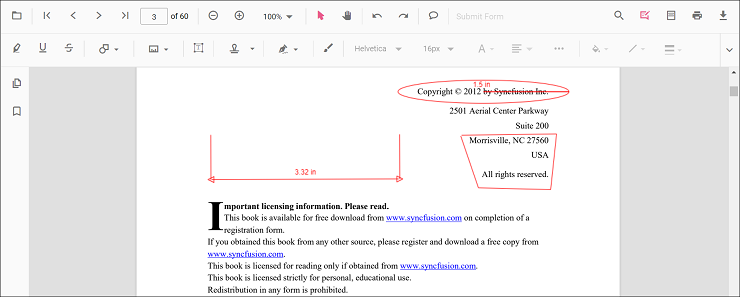
Adding measurement annotations to the PDF document
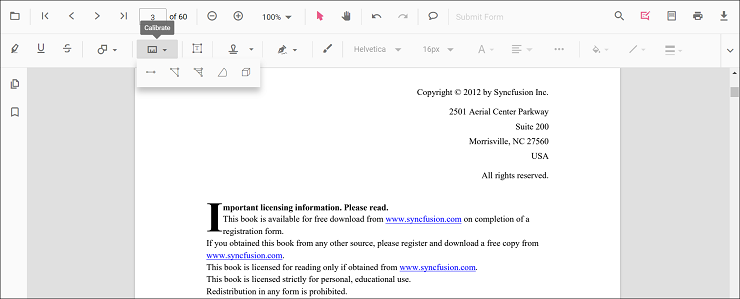
Measurement annotations can be added to the PDF document using the annotation toolbar.
- Click the Edit Annotation button in the PDF Viewer toolbar. A toolbar appears below it.
- Click the Measurement Annotation drop-down button. The pop-up lists available measurement annotation types.
- Select a measurement type to enable its annotation mode.
- Measure and add annotations on the pages of the PDF document.
When the viewer is in pan mode, selecting a measurement annotation switches it to text selection mode.
The following example switches to distance annotation mode.
<template>
  <div id="app">
    <button id="set">Distance</button>
    <ejs-pdfviewer id="pdfViewer" ref="pdfviewer" :documentPath="documentPath" :resourceUrl="resourceUrl"
      :documentLoad="documentLoad">
    </ejs-pdfviewer>
  </div>
</template>

<script setup>
import {
  PdfViewerComponent as EjsPdfviewer, Toolbar, Magnification, Navigation, LinkAnnotation,
  BookmarkView, Annotation, ThumbnailView, Print, TextSelection,
  TextSearch, FormFields, FormDesigner, PageOrganizer
} from '@syncfusion/ej2-vue-pdfviewer';
import { provide, ref } from 'vue';

const pdfviewer = ref(null);
const documentPath = "https://cdn.syncfusion.com/content/pdf/pdf-succinctly.pdf";
const resourceUrl = 'https://cdn.syncfusion.com/ej2/31.2.2/dist/ej2-pdfviewer-lib';

provide('PdfViewer', [Toolbar, Magnification, Navigation, LinkAnnotation, BookmarkView, ThumbnailView,
  Print, TextSelection, TextSearch, Annotation, FormFields, FormDesigner, PageOrganizer])

const documentLoad = () => {
  const viewer = pdfviewer.value.ej2Instances;
  document.getElementById('set').addEventListener('click', () => {
    viewer.annotation.setAnnotationMode('Distance');
  });
}
</script><template>
<div id="app">
<button id="set">Distance</button>
<ejs-pdfviewer id="pdfViewer" ref="pdfviewer" :documentPath="documentPath" :resourceUrl="resourceUrl"
:documentLoad="documentLoad">
</ejs-pdfviewer>
</div>
</template>
<script>
import {
PdfViewerComponent, Toolbar, Magnification, Navigation, LinkAnnotation,
BookmarkView, Annotation, ThumbnailView, Print, TextSelection,
TextSearch, FormFields, FormDesigner, PageOrganizer
} from '@syncfusion/ej2-vue-pdfviewer';
export default {
name: "App",
components: {
"ejs-pdfviewer": PdfViewerComponent
},
data() {
return {
documentPath: "https://cdn.syncfusion.com/content/pdf/pdf-succinctly.pdf",
resourceUrl: 'https://cdn.syncfusion.com/ej2/31.2.2/dist/ej2-pdfviewer-lib',
};
},
provide: {
PdfViewer: [Toolbar, Magnification, Navigation, LinkAnnotation, BookmarkView, ThumbnailView,
Print, TextSelection, TextSearch, Annotation, FormFields, FormDesigner, PageOrganizer]
},
methods: {
documentLoad() {
const viewer = this.$refs.pdfviewer.ej2Instances;
document.getElementById('set').addEventListener('click', () => {
viewer.annotation.setAnnotationMode('Distance');
});
}
}
}
</script><template>
<div id="app">
<button id="set">Distance</button>
<ejs-pdfviewer id="pdfViewer" ref="pdfviewer" :serviceUrl="serviceUrl" :documentPath="documentPath"
:documentLoad="documentLoad">
</ejs-pdfviewer>
</div>
</template>
<script setup>
import {
PdfViewerComponent as EjsPdfviewer, Toolbar, Magnification, Navigation, LinkAnnotation,
BookmarkView, Annotation, ThumbnailView, Print, TextSelection,
TextSearch, FormFields, FormDesigner, PageOrganizer
} from '@syncfusion/ej2-vue-pdfviewer';
import { provide, ref } from 'vue';
const pdfviewer = ref(null);
const serviceUrl = "https://document.syncfusion.com/web-services/pdf-viewer/api/pdfviewer";
const documentPath = "https://cdn.syncfusion.com/content/pdf/pdf-succinctly.pdf";
provide('PdfViewer', [Toolbar, Magnification, Navigation, LinkAnnotation, BookmarkView, ThumbnailView,
Print, TextSelection, TextSearch, Annotation, FormFields, FormDesigner, PageOrganizer])
const documentLoad = () => {
const viewer = pdfviewer.value.ej2Instances;
document.getElementById('set').addEventListener('click', () => {
viewer.annotation.setAnnotationMode('Distance');
});
}
</script><template>
<div id="app">
<button id="set">Distance</button>
<ejs-pdfviewer id="pdfViewer" ref="pdfviewer" :serviceUrl="serviceUrl" :documentPath="documentPath"
:documentLoad="documentLoad">
</ejs-pdfviewer>
</div>
</template>
<script>
import {
PdfViewerComponent, Toolbar, Magnification, Navigation, LinkAnnotation,
BookmarkView, Annotation, ThumbnailView, Print, TextSelection,
TextSearch, FormFields, FormDesigner, PageOrganizer
} from '@syncfusion/ej2-vue-pdfviewer';
export default {
name: "App",
components: {
"ejs-pdfviewer": PdfViewerComponent
},
data() {
return {
serviceUrl: "https://document.syncfusion.com/web-services/pdf-viewer/api/pdfviewer",
documentPath: "https://cdn.syncfusion.com/content/pdf/pdf-succinctly.pdf"
};
},
provide: {
PdfViewer: [Toolbar, Magnification, Navigation, LinkAnnotation, BookmarkView, ThumbnailView,
Print, TextSelection, TextSearch, Annotation, FormFields, FormDesigner, PageOrganizer]
},
methods: {
documentLoad() {
const viewer = this.$refs.pdfviewer.ej2Instances;
document.getElementById('set').addEventListener('click', () => {
viewer.annotation.setAnnotationMode('Distance');
});
}
}
}
</script>Add a measurement annotation to the PDF document programmatically
The PDF Viewer library allows adding measurement annotations programmatically using the addAnnotation() method.
Here is an example showing how to add measurement annotations programmatically using addAnnotation():
<template>
  <div id="app">
    <button v-on:click="addDistanceAnnotation">Add Distance Annotation programmatically</button>
    <button v-on:click="addPerimeterAnnotation">Add Perimeter Annotation programmatically</button>
    <button v-on:click="addAreaAnnotation">Add Area Annotation programmatically</button>
    <button v-on:click="addRadiusAnnotation">Add Radius Annotation programmatically</button>
    <button v-on:click="addVolumeAnnotation">Add Volume Annotation programmatically</button>
    <ejs-pdfviewer id="pdfViewer" ref="pdfviewer" :documentPath="documentPath" :resourceUrl="resourceUrl">
    </ejs-pdfviewer>
  </div>
</template>

<script setup>
import {
  PdfViewerComponent as EjsPdfviewer, Toolbar, Magnification, Navigation, LinkAnnotation,
  BookmarkView, Annotation, ThumbnailView, Print, TextSelection,
  TextSearch, FormFields, FormDesigner, PageOrganizer
} from '@syncfusion/ej2-vue-pdfviewer';
import { provide, ref } from 'vue';

const pdfviewer = ref(null);
const documentPath = "https://cdn.syncfusion.com/content/pdf/pdf-succinctly.pdf";
const resourceUrl = 'https://cdn.syncfusion.com/ej2/31.2.2/dist/ej2-pdfviewer-lib';

provide('PdfViewer', [Toolbar, Magnification, Navigation, LinkAnnotation, BookmarkView, Annotation,
  ThumbnailView, Print, TextSelection, TextSearch, FormFields, FormDesigner, PageOrganizer])

const addDistanceAnnotation = function () {
  pdfviewer.value.ej2Instances.annotation.addAnnotation("Distance", {
    offset: { x: 200, y: 230 },
    pageNumber: 1,
    vertexPoints: [{ x: 200, y: 230 }, { x: 350, y: 230 }]
  });
}

const addPerimeterAnnotation = function () {
  pdfviewer.value.ej2Instances.annotation.addAnnotation("Perimeter", {
    offset: { x: 200, y: 350 },
    pageNumber: 1,
    vertexPoints: [{ x: 200, y: 350 }, { x: 285, y: 350 }, { x: 286, y: 412 }]
  });
}

const addAreaAnnotation = function () {
  pdfviewer.value.ej2Instances.annotation.addAnnotation("Area", {
    offset: { x: 200, y: 500 },
    pageNumber: 1,
    vertexPoints: [{ x: 200, y: 500 }, { x: 288, y: 499 }, { x: 289, y: 553 }, { x: 200, y: 500 }]
  });
}

const addRadiusAnnotation = function () {
  pdfviewer.value.ej2Instances.annotation.addAnnotation("Radius", {
    offset: { x: 200, y: 630 },
    pageNumber: 1,
    width: 90,
    height: 90
  });
}

const addVolumeAnnotation = function () {
  pdfviewer.value.ej2Instances.annotation.addAnnotation("Volume", {
    offset: { x: 200, y: 810 },
    pageNumber: 1,
    vertexPoints: [{ x: 200, y: 810 }, { x: 200, y: 919 }, { x: 320, y: 919 }, { x: 320, y: 809 }, { x: 200, y: 810 }]
  });
}
</script><template>
<div id="app">
<button v-on:click="addDistanceAnnotation">Add Distance Annotation programmatically</button>
<button v-on:click="addPerimeterAnnotation">Add Perimeter Annotation programmatically</button>
<button v-on:click="addAreaAnnotation">Add Area Annotation programmatically</button>
<button v-on:click="addRadiusAnnotation">Add Radius Annotation programmatically</button>
<button v-on:click="addVolumeAnnotation">Add Volume Annotation programmatically</button>
<ejs-pdfviewer id="pdfViewer" ref="pdfviewer" :documentPath="documentPath" :resourceUrl="resourceUrl">
</ejs-pdfviewer>
</div>
</template>
<script>
import {
PdfViewerComponent, Toolbar, Magnification, Navigation, LinkAnnotation,
BookmarkView, Annotation, ThumbnailView, Print, TextSelection,
TextSearch, FormFields, FormDesigner, PageOrganizer
} from '@syncfusion/ej2-vue-pdfviewer';
export default {
name: "App",
components: {
"ejs-pdfviewer": PdfViewerComponent
},
data() {
return {
documentPath: "https://cdn.syncfusion.com/content/pdf/pdf-succinctly.pdf",
resourceUrl: 'https://cdn.syncfusion.com/ej2/31.2.2/dist/ej2-pdfviewer-lib',
};
},
provide: {
PdfViewer: [Toolbar, Magnification, Navigation, LinkAnnotation, BookmarkView, Annotation,
ThumbnailView, Print, TextSelection, TextSearch, FormFields, FormDesigner, PageOrganizer]
},
methods: {
addDistanceAnnotation: function () {
this.$refs.pdfviewer.ej2Instances.annotation.addAnnotation("Distance", {
offset: { x: 200, y: 230 },
pageNumber: 1,
vertexPoints: [{ x: 200, y: 230 }, { x: 350, y: 230 }]
});
},
addPerimeterAnnotation: function () {
this.$refs.pdfviewer.ej2Instances.annotation.addAnnotation("Perimeter", {
offset: { x: 200, y: 350 },
pageNumber: 1,
vertexPoints: [{ x: 200, y: 350 }, { x: 285, y: 350 }, { x: 286, y: 412 }]
});
},
addAreaAnnotation: function () {
this.$refs.pdfviewer.ej2Instances.annotation.addAnnotation("Area", {
offset: { x: 200, y: 500 },
pageNumber: 1,
vertexPoints: [{ x: 200, y: 500 }, { x: 288, y: 499 }, { x: 289, y: 553 }, { x: 200, y: 500 }]
});
},
addRadiusAnnotation: function () {
this.$refs.pdfviewer.ej2Instances.annotation.addAnnotation("Radius", {
offset: { x: 200, y: 630 },
pageNumber: 1,
width: 90,
height: 90
});
},
addVolumeAnnotation: function () {
this.$refs.pdfviewer.ej2Instances.annotation.addAnnotation("Volume", {
offset: { x: 200, y: 810 },
pageNumber: 1,
vertexPoints: [{ x: 200, y: 810 }, { x: 200, y: 919 }, { x: 320, y: 919 }, { x: 320, y: 809 }, { x: 200, y: 810 }]
});
}
}
}
</script><template>
<div id="app">
<button v-on:click="addDistanceAnnotation">Add Distance Annotation programmatically</button>
<button v-on:click="addPerimeterAnnotation">Add Perimeter Annotation programmatically</button>
<button v-on:click="addAreaAnnotation">Add Area Annotation programmatically</button>
<button v-on:click="addRadiusAnnotation">Add Radius Annotation programmatically</button>
<button v-on:click="addVolumeAnnotation">Add Volume Annotation programmatically</button>
<ejs-pdfviewer id="pdfViewer" ref="pdfviewer" :documentPath="documentPath" :serviceUrl="serviceUrl">
</ejs-pdfviewer>
</div>
</template>
<script setup>
import {
PdfViewerComponent as EjsPdfviewer, Toolbar, Magnification, Navigation, LinkAnnotation,
BookmarkView, Annotation, ThumbnailView, Print, TextSelection,
TextSearch, FormFields, FormDesigner, PageOrganizer
} from '@syncfusion/ej2-vue-pdfviewer';
import { provide, ref } from 'vue';
const pdfviewer = ref(null);
const documentPath = "https://cdn.syncfusion.com/content/pdf/pdf-succinctly.pdf";
const serviceUrl = "https://document.syncfusion.com/web-services/pdf-viewer/api/pdfviewer";
provide('PdfViewer', [Toolbar, Magnification, Navigation, LinkAnnotation, BookmarkView, Annotation,
ThumbnailView, Print, TextSelection, TextSearch, FormFields, FormDesigner, PageOrganizer])
const addDistanceAnnotation = function () {
pdfviewer.value.ej2Instances.annotation.addAnnotation("Distance", {
offset: { x: 200, y: 230 },
pageNumber: 1,
vertexPoints: [{ x: 200, y: 230 }, { x: 350, y: 230 }]
});
}
const addPerimeterAnnotation = function () {
pdfviewer.value.ej2Instances.annotation.addAnnotation("Perimeter", {
offset: { x: 200, y: 350 },
pageNumber: 1,
vertexPoints: [{ x: 200, y: 350 }, { x: 285, y: 350 }, { x: 286, y: 412 }]
});
}
const addAreaAnnotation = function () {
pdfviewer.value.ej2Instances.annotation.addAnnotation("Area", {
offset: { x: 200, y: 500 },
pageNumber: 1,
vertexPoints: [{ x: 200, y: 500 }, { x: 288, y: 499 }, { x: 289, y: 553 }, { x: 200, y: 500 }]
});
}
const addRadiusAnnotation = function () {
pdfviewer.value.ej2Instances.annotation.addAnnotation("Radius", {
offset: { x: 200, y: 630 },
pageNumber: 1,
width: 90,
height: 90
});
}
const addVolumeAnnotation = function () {
pdfviewer.value.ej2Instances.annotation.addAnnotation("Volume", {
offset: { x: 200, y: 810 },
pageNumber: 1,
vertexPoints: [{ x: 200, y: 810 }, { x: 200, y: 919 }, { x: 320, y: 919 }, { x: 320, y: 809 }, { x: 200, y: 810 }]
});
}
</script><template>
<div id="app">
<button v-on:click="addDistanceAnnotation">Add Distance Annotation programmatically</button>
<button v-on:click="addPerimeterAnnotation">Add Perimeter Annotation programmatically</button>
<button v-on:click="addAreaAnnotation">Add Area Annotation programmatically</button>
<button v-on:click="addRadiusAnnotation">Add Radius Annotation programmatically</button>
<button v-on:click="addVolumeAnnotation">Add Volume Annotation programmatically</button>
<ejs-pdfviewer id="pdfViewer" ref="pdfviewer" :documentPath="documentPath" :serviceUrl="serviceUrl">
</ejs-pdfviewer>
</div>
</template>
<script>
import {
PdfViewerComponent, Toolbar, Magnification, Navigation, LinkAnnotation,
BookmarkView, Annotation, ThumbnailView, Print, TextSelection,
TextSearch, FormFields, FormDesigner, PageOrganizer
} from '@syncfusion/ej2-vue-pdfviewer';
export default {
name: "App",
components: {
"ejs-pdfviewer": PdfViewerComponent
},
data() {
return {
documentPath: "https://cdn.syncfusion.com/content/pdf/pdf-succinctly.pdf",
serviceUrl: "https://document.syncfusion.com/web-services/pdf-viewer/api/pdfviewer",
};
},
provide: {
PdfViewer: [Toolbar, Magnification, Navigation, LinkAnnotation, BookmarkView, Annotation,
ThumbnailView, Print, TextSelection, TextSearch, FormFields, FormDesigner, PageOrganizer]
},
methods: {
addDistanceAnnotation: function () {
this.$refs.pdfviewer.ej2Instances.annotation.addAnnotation("Distance", {
offset: { x: 200, y: 230 },
pageNumber: 1,
vertexPoints: [{ x: 200, y: 230 }, { x: 350, y: 230 }]
});
},
addPerimeterAnnotation: function () {
this.$refs.pdfviewer.ej2Instances.annotation.addAnnotation("Perimeter", {
offset: { x: 200, y: 350 },
pageNumber: 1,
vertexPoints: [{ x: 200, y: 350 }, { x: 285, y: 350 }, { x: 286, y: 412 }]
});
},
addAreaAnnotation: function () {
this.$refs.pdfviewer.ej2Instances.annotation.addAnnotation("Area", {
offset: { x: 200, y: 500 },
pageNumber: 1,
vertexPoints: [{ x: 200, y: 500 }, { x: 288, y: 499 }, { x: 289, y: 553 }, { x: 200, y: 500 }]
});
},
addRadiusAnnotation: function () {
this.$refs.pdfviewer.ej2Instances.annotation.addAnnotation("Radius", {
offset: { x: 200, y: 630 },
pageNumber: 1,
width: 90,
height: 90
});
},
addVolumeAnnotation: function () {
this.$refs.pdfviewer.ej2Instances.annotation.addAnnotation("Volume", {
offset: { x: 200, y: 810 },
pageNumber: 1,
vertexPoints: [{ x: 200, y: 810 }, { x: 200, y: 919 }, { x: 320, y: 919 }, { x: 320, y: 809 }, { x: 200, y: 810 }]
});
}
}
}
</script>Edit an existing measurement annotation programmatically
To modify an existing measurement annotation programmatically, use the editAnnotation() method.
Here is an example of using editAnnotation():
<template>
  <div id="app">
    <button v-on:click="editDistanceAnnotation">Edit Distance Annotation programmatically</button>
    <button v-on:click="editPerimeterAnnotation">Edit Perimeter Annotation programmatically</button>
    <button v-on:click="editAreaAnnotation">Edit Area Annotation programmatically</button>
    <button v-on:click="editRadiusAnnotation">Edit Radius Annotation programmatically</button>
    <button v-on:click="editVolumeAnnotation">Edit Volume Annotation programmatically</button>
    <ejs-pdfviewer id="pdfViewer" ref="pdfviewer" :documentPath="documentPath" :resourceUrl="resourceUrl">
    </ejs-pdfviewer>
  </div>
</template>

<script setup>
import {
  PdfViewerComponent as EjsPdfviewer, Toolbar, Magnification, Navigation, LinkAnnotation,
  BookmarkView, Annotation, ThumbnailView, Print, TextSelection,
  TextSearch, FormFields, FormDesigner, PageOrganizer
} from '@syncfusion/ej2-vue-pdfviewer';
import { provide, ref } from 'vue';

const pdfviewer = ref(null);
const documentPath = "https://cdn.syncfusion.com/content/pdf/pdf-succinctly.pdf";
const resourceUrl = 'https://cdn.syncfusion.com/ej2/31.2.2/dist/ej2-pdfviewer-lib';

provide('PdfViewer', [Toolbar, Magnification, Navigation, LinkAnnotation, BookmarkView, Annotation,
  ThumbnailView, Print, TextSelection, TextSearch, FormFields, FormDesigner, PageOrganizer]);

const editDistanceAnnotation = function () {
  const viewer = pdfviewer.value.ej2Instances;
  for (let i = 0; i < viewer.annotationCollection.length; i++) {
    if (viewer.annotationCollection[i].subject === "Distance calculation") {
      viewer.annotationCollection[i].annotationSelectorSettings.resizerShape = "Circle"
      viewer.annotationCollection[i].strokeColor = "#0000FF";
      viewer.annotationCollection[i].thickness = 2;
      viewer.annotationCollection[i].fillColor = "#FFFF00";
      viewer.annotation.editAnnotation(viewer.annotationCollection[i]);
    }
  }
}
const editPerimeterAnnotation = function () {
  const viewer = pdfviewer.value.ej2Instances;
  for (let i = 0; i < viewer.annotationCollection.length; i++) {
    if (viewer.annotationCollection[i].subject === "Perimeter calculation") {
      viewer.annotationCollection[i].annotationSelectorSettings.resizerShape = "Circle"
      viewer.annotationCollection[i].strokeColor = "#0000FF";
      viewer.annotationCollection[i].thickness = 2;
      viewer.annotationCollection[i].fillColor = "#FFFF00";
      viewer.annotation.editAnnotation(viewer.annotationCollection[i]);
    }
  }
}
const editAreaAnnotation = function () {
  const viewer = pdfviewer.value.ej2Instances;
  for (let i = 0; i < viewer.annotationCollection.length; i++) {
    if (viewer.annotationCollection[i].subject === "Area calculation") {
      viewer.annotationCollection[i].annotationSelectorSettings.resizerShape = "Circle"
      viewer.annotationCollection[i].strokeColor = "#0000FF";
      viewer.annotationCollection[i].thickness = 2;
      viewer.annotationCollection[i].fillColor = "#FFFF00";
      viewer.annotation.editAnnotation(viewer.annotationCollection[i]);
    }
  }
}
const editRadiusAnnotation = function () {
  const viewer = pdfviewer.value.ej2Instances;
  for (let i = 0; i < viewer.annotationCollection.length; i++) {
    if (viewer.annotationCollection[i].subject === "Radius calculation") {
      viewer.annotationCollection[i].annotationSelectorSettings.resizerShape = "Circle"
      viewer.annotationCollection[i].strokeColor = "#0000FF";
      viewer.annotationCollection[i].thickness = 2;
      viewer.annotationCollection[i].fillColor = "#FFFF00";
      viewer.annotation.editAnnotation(viewer.annotationCollection[i]);
    }
  }
}
const editVolumeAnnotation = function () {
  const viewer = pdfviewer.value.ej2Instances;
  for (let i = 0; i < viewer.annotationCollection.length; i++) {
    if (viewer.annotationCollection[i].subject === "Volume calculation") {
      viewer.annotationCollection[i].annotationSelectorSettings.resizerShape = "Circle"
      viewer.annotationCollection[i].strokeColor = "#0000FF";
      viewer.annotationCollection[i].thickness = 2;
      viewer.annotationCollection[i].fillColor = "#FFFF00";
      viewer.annotation.editAnnotation(viewer.annotationCollection[i]);
    }
  }
}
</script><template>
<div id="app">
<button v-on:click="editDistanceAnnotation">Edit Distance Annotation programmatically</button>
<button v-on:click="editPerimeterAnnotation">Edit Perimeter Annotation programmatically</button>
<button v-on:click="editAreaAnnotation">Edit Area Annotation programmatically</button>
<button v-on:click="editRadiusAnnotation">Edit Radius Annotation programmatically</button>
<button v-on:click="editVolumeAnnotation">Edit Volume Annotation programmatically</button>
<ejs-pdfviewer id="pdfViewer" ref="pdfviewer" :documentPath="documentPath" :resourceUrl="resourceUrl">
</ejs-pdfviewer>
</div>
</template>
<script>
import {
PdfViewerComponent, Toolbar, Magnification, Navigation, LinkAnnotation,
BookmarkView, Annotation, ThumbnailView, Print, TextSelection,
TextSearch, FormFields, FormDesigner, PageOrganizer
} from '@syncfusion/ej2-vue-pdfviewer';
export default {
name: "App",
components: {
"ejs-pdfviewer": PdfViewerComponent
},
data() {
return {
documentPath: "https://cdn.syncfusion.com/content/pdf/pdf-succinctly.pdf",
resourceUrl: 'https://cdn.syncfusion.com/ej2/31.2.2/dist/ej2-pdfviewer-lib',
};
},
provide: {
PdfViewer: [Toolbar, Magnification, Navigation, LinkAnnotation, BookmarkView, Annotation,
ThumbnailView, Print, TextSelection, TextSearch, FormFields, FormDesigner, PageOrganizer]
},
methods: {
editDistanceAnnotation: function () {
const viewer = this.$refs.pdfviewer.ej2Instances;
for (let i = 0; i < viewer.annotationCollection.length; i++) {
if (viewer.annotationCollection[i].subject === "Distance calculation") {
viewer.annotationCollection[i].annotationSelectorSettings.resizerShape = "Circle"
viewer.annotationCollection[i].strokeColor = "#0000FF";
viewer.annotationCollection[i].thickness = 2;
viewer.annotationCollection[i].fillColor = "#FFFF00";
viewer.annotation.editAnnotation(viewer.annotationCollection[i]);
}
}
},
editPerimeterAnnotation: function () {
const viewer = this.$refs.pdfviewer.ej2Instances;
for (let i = 0; i < viewer.annotationCollection.length; i++) {
if (viewer.annotationCollection[i].subject === "Perimeter calculation") {
viewer.annotationCollection[i].annotationSelectorSettings.resizerShape = "Circle"
viewer.annotationCollection[i].strokeColor = "#0000FF";
viewer.annotationCollection[i].thickness = 2;
viewer.annotationCollection[i].fillColor = "#FFFF00";
viewer.annotation.editAnnotation(viewer.annotationCollection[i]);
}
}
},
editAreaAnnotation: function () {
const viewer = this.$refs.pdfviewer.ej2Instances;
for (let i = 0; i < viewer.annotationCollection.length; i++) {
if (viewer.annotationCollection[i].subject === "Area calculation") {
viewer.annotationCollection[i].annotationSelectorSettings.resizerShape = "Circle"
viewer.annotationCollection[i].strokeColor = "#0000FF";
viewer.annotationCollection[i].thickness = 2;
viewer.annotationCollection[i].fillColor = "#FFFF00";
viewer.annotation.editAnnotation(viewer.annotationCollection[i]);
}
}
},
editRadiusAnnotation: function () {
const viewer = this.$refs.pdfviewer.ej2Instances;
for (let i = 0; i < viewer.annotationCollection.length; i++) {
if (viewer.annotationCollection[i].subject === "Radius calculation") {
viewer.annotationCollection[i].annotationSelectorSettings.resizerShape = "Circle"
viewer.annotationCollection[i].strokeColor = "#0000FF";
viewer.annotationCollection[i].thickness = 2;
viewer.annotationCollection[i].fillColor = "#FFFF00";
viewer.annotation.editAnnotation(viewer.annotationCollection[i]);
}
}
},
editVolumeAnnotation: function () {
const viewer = this.$refs.pdfviewer.ej2Instances;
for (let i = 0; i < viewer.annotationCollection.length; i++) {
if (viewer.annotationCollection[i].subject === "Volume calculation") {
viewer.annotationCollection[i].annotationSelectorSettings.resizerShape = "Circle"
viewer.annotationCollection[i].strokeColor = "#0000FF";
viewer.annotationCollection[i].thickness = 2;
viewer.annotationCollection[i].fillColor = "#FFFF00";
viewer.annotation.editAnnotation(viewer.annotationCollection[i]);
}
}
}
}
}
</script><template>
<div id="app">
<button v-on:click="editDistanceAnnotation">Edit Distance Annotation programmatically</button>
<button v-on:click="editPerimeterAnnotation">Edit Perimeter Annotation programmatically</button>
<button v-on:click="editAreaAnnotation">Edit Area Annotation programmatically</button>
<button v-on:click="editRadiusAnnotation">Edit Radius Annotation programmatically</button>
<button v-on:click="editVolumeAnnotation">Edit Volume Annotation programmatically</button>
<ejs-pdfviewer id="pdfViewer" ref="pdfviewer" :documentPath="documentPath" :serviceUrl="serviceUrl">
</ejs-pdfviewer>
</div>
</template>
<script setup>
import {
PdfViewerComponent as EjsPdfviewer, Toolbar, Magnification, Navigation, LinkAnnotation,
BookmarkView, Annotation, ThumbnailView, Print, TextSelection,
TextSearch, FormFields, FormDesigner, PageOrganizer
} from '@syncfusion/ej2-vue-pdfviewer';
import { provide, ref } from 'vue';
const pdfviewer = ref(null);
const documentPath = "https://cdn.syncfusion.com/content/pdf/pdf-succinctly.pdf";
const serviceUrl = "https://document.syncfusion.com/web-services/pdf-viewer/api/pdfviewer";
provide('PdfViewer', [Toolbar, Magnification, Navigation, LinkAnnotation, BookmarkView, Annotation,
ThumbnailView, Print, TextSelection, TextSearch, FormFields, FormDesigner, PageOrganizer])
const editDistanceAnnotation = function () {
const viewer = pdfviewer.value.ej2Instances;
for (let i = 0; i < viewer.annotationCollection.length; i++) {
if (viewer.annotationCollection[i].subject === "Distance calculation") {
viewer.annotationCollection[i].annotationSelectorSettings.resizerShape = "Circle"
viewer.annotationCollection[i].strokeColor = "#0000FF";
viewer.annotationCollection[i].thickness = 2;
viewer.annotationCollection[i].fillColor = "#FFFF00";
viewer.annotation.editAnnotation(viewer.annotationCollection[i]);
}
}
}
const editPerimeterAnnotation = function () {
const viewer = pdfviewer.value.ej2Instances;
for (let i = 0; i < viewer.annotationCollection.length; i++) {
if (viewer.annotationCollection[i].subject === "Perimeter calculation") {
viewer.annotationCollection[i].annotationSelectorSettings.resizerShape = "Circle"
viewer.annotationCollection[i].strokeColor = "#0000FF";
viewer.annotationCollection[i].thickness = 2;
viewer.annotationCollection[i].fillColor = "#FFFF00";
viewer.annotation.editAnnotation(viewer.annotationCollection[i]);
}
}
}
const editAreaAnnotation = function () {
const viewer = pdfviewer.value.ej2Instances;
for (let i = 0; i < viewer.annotationCollection.length; i++) {
if (viewer.annotationCollection[i].subject === "Area calculation") {
viewer.annotationCollection[i].annotationSelectorSettings.resizerShape = "Circle"
viewer.annotationCollection[i].strokeColor = "#0000FF";
viewer.annotationCollection[i].thickness = 2;
viewer.annotationCollection[i].fillColor = "#FFFF00";
viewer.annotation.editAnnotation(viewer.annotationCollection[i]);
}
}
}
const editRadiusAnnotation = function () {
const viewer = pdfviewer.value.ej2Instances;
for (let i = 0; i < viewer.annotationCollection.length; i++) {
if (viewer.annotationCollection[i].subject === "Radius calculation") {
viewer.annotationCollection[i].annotationSelectorSettings.resizerShape = "Circle"
viewer.annotationCollection[i].strokeColor = "#0000FF";
viewer.annotationCollection[i].thickness = 2;
viewer.annotationCollection[i].fillColor = "#FFFF00";
viewer.annotation.editAnnotation(viewer.annotationCollection[i]);
}
}
}
const editVolumeAnnotation = function () {
const viewer = pdfviewer.value.ej2Instances;
for (let i = 0; i < viewer.annotationCollection.length; i++) {
if (viewer.annotationCollection[i].subject === "Volume calculation") {
viewer.annotationCollection[i].annotationSelectorSettings.resizerShape = "Circle"
viewer.annotationCollection[i].strokeColor = "#0000FF";
viewer.annotationCollection[i].thickness = 2;
viewer.annotationCollection[i].fillColor = "#FFFF00";
viewer.annotation.editAnnotation(viewer.annotationCollection[i]);
}
}
}
</script><template>
<div id="app">
<button v-on:click="editDistanceAnnotation">Edit Distance Annotation programmatically</button>
<button v-on:click="editPerimeterAnnotation">Edit Perimeter Annotation programmatically</button>
<button v-on:click="editAreaAnnotation">Edit Area Annotation programmatically</button>
<button v-on:click="editRadiusAnnotation">Edit Radius Annotation programmatically</button>
<button v-on:click="editVolumeAnnotation">Edit Volume Annotation programmatically</button>
<ejs-pdfviewer id="pdfViewer" ref="pdfviewer" :documentPath="documentPath" :serviceUrl="serviceUrl">
</ejs-pdfviewer>
</div>
</template>
<script>
import {
PdfViewerComponent, Toolbar, Magnification, Navigation, LinkAnnotation,
BookmarkView, Annotation, ThumbnailView, Print, TextSelection,
TextSearch, FormFields, FormDesigner, PageOrganizer
} from '@syncfusion/ej2-vue-pdfviewer';
export default {
name: "App",
components: {
"ejs-pdfviewer": PdfViewerComponent
},
data() {
return {
documentPath: "https://cdn.syncfusion.com/content/pdf/pdf-succinctly.pdf",
serviceUrl: "https://document.syncfusion.com/web-services/pdf-viewer/api/pdfviewer",
};
},
provide: {
PdfViewer: [Toolbar, Magnification, Navigation, LinkAnnotation, BookmarkView, Annotation,
ThumbnailView, Print, TextSelection, TextSearch, FormFields, FormDesigner, PageOrganizer]
},
methods: {
editDistanceAnnotation: function () {
const viewer = this.$refs.pdfviewer.ej2Instances;
for (let i = 0; i < viewer.annotationCollection.length; i++) {
if (viewer.annotationCollection[i].subject === "Distance calculation") {
viewer.annotationCollection[i].annotationSelectorSettings.resizerShape = "Circle"
viewer.annotationCollection[i].strokeColor = "#0000FF";
viewer.annotationCollection[i].thickness = 2;
viewer.annotationCollection[i].fillColor = "#FFFF00";
viewer.annotation.editAnnotation(viewer.annotationCollection[i]);
}
}
},
editPerimeterAnnotation: function () {
const viewer = this.$refs.pdfviewer.ej2Instances;
for (let i = 0; i < viewer.annotationCollection.length; i++) {
if (viewer.annotationCollection[i].subject === "Perimeter calculation") {
viewer.annotationCollection[i].annotationSelectorSettings.resizerShape = "Circle"
viewer.annotationCollection[i].strokeColor = "#0000FF";
viewer.annotationCollection[i].thickness = 2;
viewer.annotationCollection[i].fillColor = "#FFFF00";
viewer.annotation.editAnnotation(viewer.annotationCollection[i]);
}
}
},
editAreaAnnotation: function () {
const viewer = this.$refs.pdfviewer.ej2Instances;
for (let i = 0; i < viewer.annotationCollection.length; i++) {
if (viewer.annotationCollection[i].subject === "Area calculation") {
viewer.annotationCollection[i].annotationSelectorSettings.resizerShape = "Circle"
viewer.annotationCollection[i].strokeColor = "#0000FF";
viewer.annotationCollection[i].thickness = 2;
viewer.annotationCollection[i].fillColor = "#FFFF00";
viewer.annotation.editAnnotation(viewer.annotationCollection[i]);
}
}
},
editRadiusAnnotation: function () {
const viewer = this.$refs.pdfviewer.ej2Instances;
for (let i = 0; i < viewer.annotationCollection.length; i++) {
if (viewer.annotationCollection[i].subject === "Radius calculation") {
viewer.annotationCollection[i].annotationSelectorSettings.resizerShape = "Circle"
viewer.annotationCollection[i].strokeColor = "#0000FF";
viewer.annotationCollection[i].thickness = 2;
viewer.annotationCollection[i].fillColor = "#FFFF00";
viewer.annotation.editAnnotation(viewer.annotationCollection[i]);
}
}
},
editVolumeAnnotation: function () {
const viewer = this.$refs.pdfviewer.ej2Instances;
for (let i = 0; i < viewer.annotationCollection.length; i++) {
if (viewer.annotationCollection[i].subject === "Volume calculation") {
viewer.annotationCollection[i].annotationSelectorSettings.resizerShape = "Circle"
viewer.annotationCollection[i].strokeColor = "#0000FF";
viewer.annotationCollection[i].thickness = 2;
viewer.annotationCollection[i].fillColor = "#FFFF00";
viewer.annotation.editAnnotation(viewer.annotationCollection[i]);
}
}
}
}
}
</script>Edit the properties of measurement annotations
The fill color, stroke color, thickness, and opacity can be edited using the Edit Color, Edit Stroke Color, Edit Thickness, and Edit Opacity tools in the annotation toolbar.
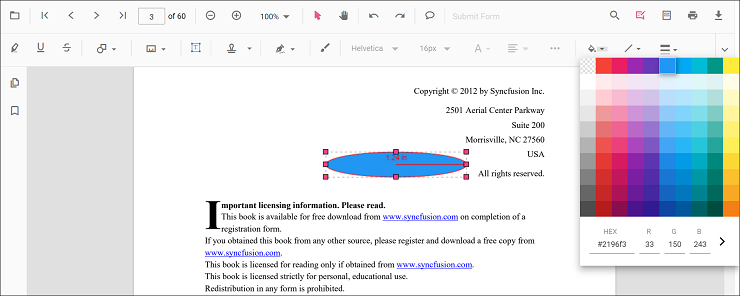
Edit fill color
The fill color of the annotation can be edited using the color palette provided in the Edit Color tool.
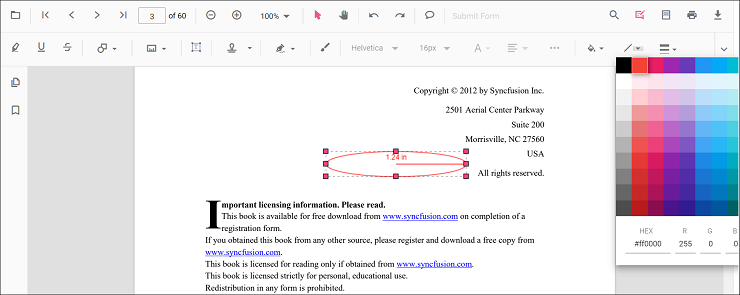
Edit stroke color
The stroke color of the annotation can be edited using the color palette provided in the Edit Stroke Color tool.
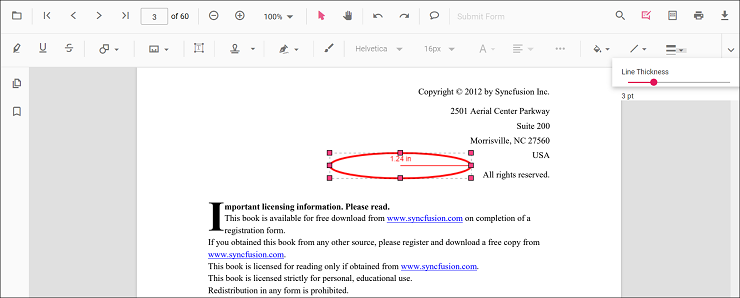
Edit thickness
Edit border thickness using the range slider provided in the Edit Thickness tool.
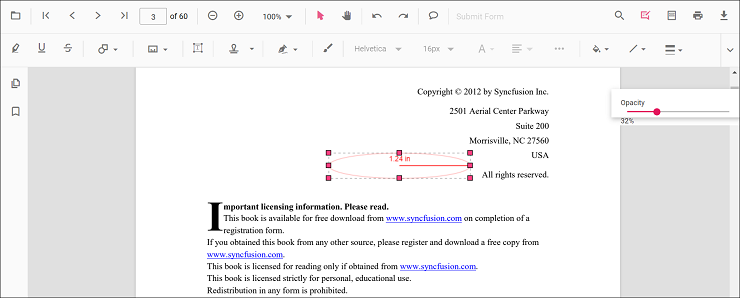
Edit opacity
The opacity of the annotation can be edited using the range slider provided in the Edit Opacity tool.
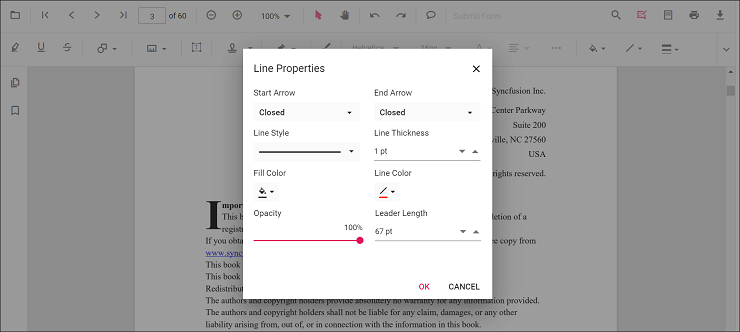
Edit the line properties
Line-based measurement annotations (distance and perimeter) have additional options in the Line Properties window. Open it by right-clicking the annotation and selecting Properties from the context menu.
Set default properties during control initialization
Default properties for measurement annotations can be set before creating the control using distanceSettings, perimeterSettings, areaSettings, radiusSettings, and volumeSettings.
<template>
  <div id="app">
    <ejs-pdfviewer id="pdfViewer" ref="pdfviewer" :resourceUrl="resourceUrl" :documentPath="documentPath"
      :distanceSettings="distanceSettings" :perimeterSettings="perimeterSettings" :areaSettings="areaSettings"
      :radiusSettings="radiusSettings" :volumeSettings="volumeSettings">
    </ejs-pdfviewer>
  </div>
</template>

<script setup>
import {
  PdfViewerComponent as EjsPdfviewer, Toolbar, Magnification, Navigation, LinkAnnotation,
  BookmarkView, Annotation, ThumbnailView, Print, TextSelection,
  TextSearch, FormFields, FormDesigner, PageOrganizer
} from '@syncfusion/ej2-vue-pdfviewer';
import { provide } from 'vue';

const documentPath = "https://cdn.syncfusion.com/content/pdf/pdf-succinctly.pdf";
const resourceUrl = 'https://cdn.syncfusion.com/ej2/31.2.2/dist/ej2-pdfviewer-lib';
const distanceSettings = { fillColor: 'blue', opacity: 0.6, strokeColor: 'green' };
const perimeterSettings = { fillColor: 'green', opacity: 0.6, strokeColor: 'blue' };
const areaSettings = { fillColor: 'yellow', opacity: 0.6, strokeColor: 'orange' };
const radiusSettings = { fillColor: 'orange', opacity: 0.6, strokeColor: 'pink' };
const volumeSettings = { fillColor: 'pink', opacity: 0.6, strokeColor: 'yellow' };

provide('PdfViewer', [Toolbar, Magnification, Navigation, LinkAnnotation, BookmarkView, ThumbnailView,
  Print, TextSelection, TextSearch, Annotation, FormFields, FormDesigner, PageOrganizer])

</script><template>
<div id="app">
<ejs-pdfviewer id="pdfViewer" ref="pdfviewer" :resourceUrl="resourceUrl" :documentPath="documentPath"
:distanceSettings="distanceSettings" :perimeterSettings="perimeterSettings" :areaSettings="areaSettings"
:radiusSettings="radiusSettings" :volumeSettings="volumeSettings">
</ejs-pdfviewer>
</div>
</template>
<script>
import {
PdfViewerComponent, Toolbar, Magnification, Navigation, LinkAnnotation,
BookmarkView, Annotation, ThumbnailView, Print, TextSelection,
TextSearch, FormFields, FormDesigner, PageOrganizer
} from '@syncfusion/ej2-vue-pdfviewer';
export default {
name: "App",
components: {
"ejs-pdfviewer": PdfViewerComponent
},
data() {
return {
documentPath: "https://cdn.syncfusion.com/content/pdf/pdf-succinctly.pdf",
resourceUrl: 'https://cdn.syncfusion.com/ej2/31.2.2/dist/ej2-pdfviewer-lib',
distanceSettings: { fillColor: 'blue', opacity: 0.6, strokeColor: 'green' },
perimeterSettings: { fillColor: 'green', opacity: 0.6, strokeColor: 'blue' },
areaSettings: { fillColor: 'yellow', opacity: 0.6, strokeColor: 'orange' },
radiusSettings: { fillColor: 'orange', opacity: 0.6, strokeColor: 'pink' },
volumeSettings: { fillColor: 'pink', opacity: 0.6, strokeColor: 'yellow' }
};
},
provide: {
PdfViewer: [Toolbar, Magnification, Navigation, LinkAnnotation, BookmarkView, ThumbnailView,
Print, TextSelection, TextSearch, Annotation, FormFields, FormDesigner, PageOrganizer]
}
}
</script><template>
<div id="app">
<ejs-pdfviewer id="pdfViewer" ref="pdfviewer" :serviceUrl="serviceUrl" :documentPath="documentPath"
:distanceSettings="distanceSettings" :perimeterSettings="perimeterSettings" :areaSettings="areaSettings"
:radiusSettings="radiusSettings" :volumeSettings="volumeSettings">
</ejs-pdfviewer>
</div>
</template>
<script setup>
import {
PdfViewerComponent as EjsPdfviewer, Toolbar, Magnification, Navigation, LinkAnnotation,
BookmarkView, Annotation, ThumbnailView, Print, TextSelection,
TextSearch, FormFields, FormDesigner, PageOrganizer
} from '@syncfusion/ej2-vue-pdfviewer';
import { provide } from 'vue';
const serviceUrl = "https://document.syncfusion.com/web-services/pdf-viewer/api/pdfviewer";
const documentPath = "https://cdn.syncfusion.com/content/pdf/pdf-succinctly.pdf";
const distanceSettings = { fillColor: 'blue', opacity: 0.6, strokeColor: 'green' };
const perimeterSettings = { fillColor: 'green', opacity: 0.6, strokeColor: 'blue' };
const areaSettings = { fillColor: 'yellow', opacity: 0.6, strokeColor: 'orange' };
const radiusSettings = { fillColor: 'orange', opacity: 0.6, strokeColor: 'pink' };
const volumeSettings = { fillColor: 'pink', opacity: 0.6, strokeColor: 'yellow' };
provide('PdfViewer', [Toolbar, Magnification, Navigation, LinkAnnotation, BookmarkView, ThumbnailView,
Print, TextSelection, TextSearch, Annotation, FormFields, FormDesigner, PageOrganizer])
</script><template>
<div id="app">
<ejs-pdfviewer id="pdfViewer" ref="pdfviewer" :serviceUrl="serviceUrl" :documentPath="documentPath"
:distanceSettings="distanceSettings" :perimeterSettings="perimeterSettings" :areaSettings="areaSettings"
:radiusSettings="radiusSettings" :volumeSettings="volumeSettings">
</ejs-pdfviewer>
</div>
</template>
<script>
import {
PdfViewerComponent, Toolbar, Magnification, Navigation, LinkAnnotation,
BookmarkView, Annotation, ThumbnailView, Print, TextSelection,
TextSearch, FormFields, FormDesigner, PageOrganizer
} from '@syncfusion/ej2-vue-pdfviewer';
export default {
name: "App",
components: {
"ejs-pdfviewer": PdfViewerComponent
},
data() {
return {
serviceUrl: "https://document.syncfusion.com/web-services/pdf-viewer/api/pdfviewer",
documentPath: "https://cdn.syncfusion.com/content/pdf/pdf-succinctly.pdf",
distanceSettings: { fillColor: 'blue', opacity: 0.6, strokeColor: 'green' },
perimeterSettings: { fillColor: 'green', opacity: 0.6, strokeColor: 'blue' },
areaSettings: { fillColor: 'yellow', opacity: 0.6, strokeColor: 'orange' },
radiusSettings: { fillColor: 'orange', opacity: 0.6, strokeColor: 'pink' },
volumeSettings: { fillColor: 'pink', opacity: 0.6, strokeColor: 'yellow' }
};
},
provide: {
PdfViewer: [Toolbar, Magnification, Navigation, LinkAnnotation, BookmarkView, ThumbnailView,
Print, TextSelection, TextSearch, Annotation, FormFields, FormDesigner, PageOrganizer]
}
}
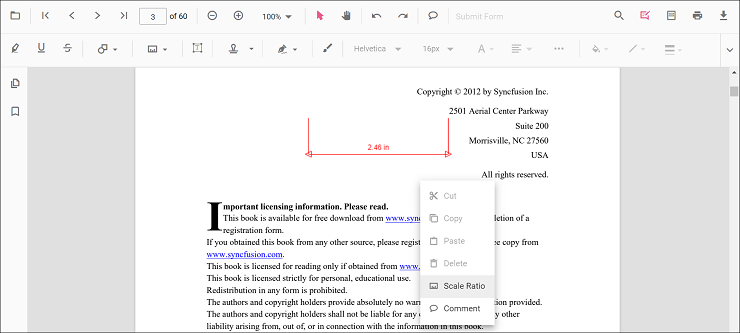
</script>Editing scale ratio and unit of the measurement annotation
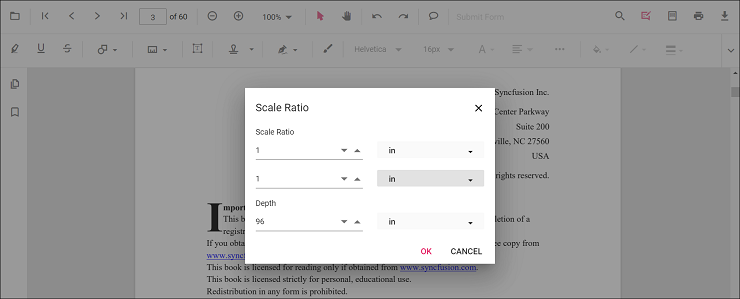
The scale ratio and unit of measurement can be modified using the scale ratio option provided in the context menu of the PDF Viewer control.
The PDF Viewer supports the following measurement units:
- Inch
- Millimeter
- Centimeter
- Point
- Pica
- Feet
Setting default scale ratio settings during control initialization
The properties of scale ratio for measurement annotation can be set before creating the control using ScaleRatioSettings as shown in the following code snippet.
<template>
  <div id="app">
    <ejs-pdfviewer id="pdfViewer" ref="pdfviewer" :documentPath="documentPath" :resourceUrl="resourceUrl"
      :measurementSettings="measurementSettings">
    </ejs-pdfviewer>
  </div>
</template>

<script setup>
import {
  PdfViewerComponent as EjsPdfviewer, Toolbar, Magnification, Navigation, LinkAnnotation,
  BookmarkView, Annotation, ThumbnailView, Print, TextSelection,
  TextSearch, FormFields, FormDesigner, PageOrganizer
} from '@syncfusion/ej2-vue-pdfviewer';
import { provide, ref } from 'vue';

const pdfviewer = ref(null);
const documentPath = "https://cdn.syncfusion.com/content/pdf/pdf-succinctly.pdf";
const resourceUrl = 'https://cdn.syncfusion.com/ej2/31.2.2/dist/ej2-pdfviewer-lib';
const measurementSettings = { scaleRatio: 2, conversionUnit: 'cm', displayUnit: 'cm' };

provide('PdfViewer', [Toolbar, Magnification, Navigation, LinkAnnotation, BookmarkView, ThumbnailView,
  Print, TextSelection, TextSearch, Annotation, FormFields, FormDesigner, PageOrganizer])

const documentLoad = () => {
  const viewer = pdfviewer.value.ej2Instances;
  document.getElementById('set').addEventListener('click', () => {
    viewer.annotation.setAnnotationMode('Distance');
  });
}
</script><template>
<div id="app">
<ejs-pdfviewer id="pdfViewer" ref="pdfviewer" :documentPath="documentPath" :resourceUrl="resourceUrl"
:measurementSettings="measurementSettings">
</ejs-pdfviewer>
</div>
</template>
<script>
import {
PdfViewerComponent, Toolbar, Magnification, Navigation, LinkAnnotation,
BookmarkView, Annotation, ThumbnailView, Print, TextSelection,
TextSearch, FormFields, FormDesigner, PageOrganizer
} from '@syncfusion/ej2-vue-pdfviewer';
export default {
name: "App",
components: {
"ejs-pdfviewer": PdfViewerComponent
},
data() {
return {
documentPath: "https://cdn.syncfusion.com/content/pdf/pdf-succinctly.pdf",
resourceUrl: 'https://cdn.syncfusion.com/ej2/31.2.2/dist/ej2-pdfviewer-lib',
measurementSettings: { scaleRatio: 2, conversionUnit: 'cm', displayUnit: 'cm' }
};
},
provide: {
PdfViewer: [Toolbar, Magnification, Navigation, LinkAnnotation, BookmarkView, ThumbnailView,
Print, TextSelection, TextSearch, Annotation, FormFields, FormDesigner, PageOrganizer]
},
methods: {
documentLoad() {
const viewer = this.$refs.pdfviewer.ej2Instances;
document.getElementById('set').addEventListener('click', () => {
viewer.annotation.setAnnotationMode('Distance');
});
}
}
}
</script><template>
<div id="app">
<ejs-pdfviewer id="pdfViewer" ref="pdfviewer" :documentPath="documentPath" :serviceUrl="serviceUrl"
:measurementSettings="measurementSettings">
</ejs-pdfviewer>
</div>
</template>
<script setup>
import {
PdfViewerComponent as EjsPdfviewer, Toolbar, Magnification, Navigation, LinkAnnotation,
BookmarkView, Annotation, ThumbnailView, Print, TextSelection,
TextSearch, FormFields, FormDesigner, PageOrganizer
} from '@syncfusion/ej2-vue-pdfviewer';
import { provide, ref } from 'vue';
const pdfviewer = ref(null);
const serviceUrl = "https://document.syncfusion.com/web-services/pdf-viewer/api/pdfviewer";
const documentPath = "https://cdn.syncfusion.com/content/pdf/pdf-succinctly.pdf";
const measurementSettings = { scaleRatio: 2, conversionUnit: 'cm', displayUnit: 'cm' };
provide('PdfViewer', [Toolbar, Magnification, Navigation, LinkAnnotation, BookmarkView, ThumbnailView,
Print, TextSelection, TextSearch, Annotation, FormFields, FormDesigner, PageOrganizer])
const documentLoad = () => {
const viewer = pdfviewer.value.ej2Instances;
document.getElementById('set').addEventListener('click', () => {
viewer.annotation.setAnnotationMode('Distance');
});
}
</script><template>
<div id="app">
<ejs-pdfviewer id="pdfViewer" ref="pdfviewer" :documentPath="documentPath" :serviceUrl="serviceUrl"
:measurementSettings="measurementSettings">
</ejs-pdfviewer>
</div>
</template>
<script>
import {
PdfViewerComponent, Toolbar, Magnification, Navigation, LinkAnnotation,
BookmarkView, Annotation, ThumbnailView, Print, TextSelection,
TextSearch, FormFields, FormDesigner, PageOrganizer
} from '@syncfusion/ej2-vue-pdfviewer';
export default {
name: "App",
components: {
"ejs-pdfviewer": PdfViewerComponent
},
data() {
return {
serviceUrl: "https://document.syncfusion.com/web-services/pdf-viewer/api/pdfviewer",
documentPath: "https://cdn.syncfusion.com/content/pdf/pdf-succinctly.pdf",
measurementSettings: { scaleRatio: 2, conversionUnit: 'cm', displayUnit: 'cm' }
};
},
provide: {
PdfViewer: [Toolbar, Magnification, Navigation, LinkAnnotation, BookmarkView, ThumbnailView,
Print, TextSelection, TextSearch, Annotation, FormFields, FormDesigner, PageOrganizer]
},
methods: {
documentLoad() {
const viewer = this.$refs.pdfviewer.ej2Instances;
document.getElementById('set').addEventListener('click', () => {
viewer.annotation.setAnnotationMode('Distance');
});
}
}
}
</script>