Free Text Annotation in Vue PDF Viewer
14 Aug 202624 minutes to read
The PDF Viewer control supports adding, editing, and deleting free text annotations. This article explains how to add free text annotations using the toolbar and programmatically, modify their properties, and manage selection and focus.
Add a free text annotation to the PDF document
Free text annotations can be added to the PDF document using the annotation toolbar.
- Click the Edit Annotation button in the PDF Viewer toolbar. The annotation toolbar appears below it.
- Select the Free Text Annotation button to enable free text annotation mode.
- Add text anywhere on the pages of the PDF document.
When in pan mode, selecting free text annotation switches the PDF Viewer to text-selection mode.
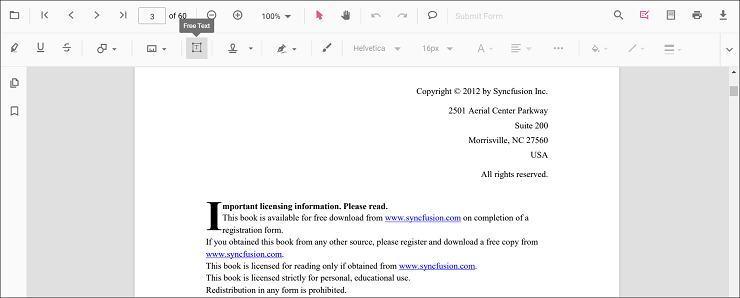
The following example switches to free text annotation mode using a button click.
<template>
  <div id="app">
    <button id="set">FreeText</button>
    <ejs-pdfviewer id="pdfViewer" ref="pdfviewer" :documentPath="documentPath" :resourceUrl="resourceUrl"
      :documentLoad="documentLoad">
    </ejs-pdfviewer>
  </div>
</template>

<script setup>
import {
  PdfViewerComponent as EjsPdfviewer, Toolbar, Magnification, Navigation, LinkAnnotation,
  BookmarkView, Annotation, ThumbnailView, Print, TextSelection,
  TextSearch, FormFields, FormDesigner, PageOrganizer
} from '@syncfusion/ej2-vue-pdfviewer';
import { provide, ref } from 'vue';

const pdfviewer = ref(null);
const documentPath = "https://cdn.syncfusion.com/content/pdf/pdf-succinctly.pdf";
const resourceUrl = 'https://cdn.syncfusion.com/ej2/31.2.2/dist/ej2-pdfviewer-lib';

provide('PdfViewer', [Toolbar, Magnification, Navigation, LinkAnnotation, BookmarkView, Annotation,
  ThumbnailView, Print, TextSelection, TextSearch, FormFields, FormDesigner, PageOrganizer])

const documentLoad = () => {
  document.getElementById('set').addEventListener('click', () => {
    pdfviewer.value.ej2Instances.annotation.setAnnotationMode('FreeText');
  });
}

</script><template>
<div id="app">
<button id="set">FreeText</button>
<ejs-pdfviewer id="pdfViewer" ref="pdfviewer" :documentPath="documentPath" :resourceUrl="resourceUrl"
:documentLoad="documentLoad">
</ejs-pdfviewer>
</div>
</template>
<script>
import {
PdfViewerComponent, Toolbar, Magnification, Navigation, LinkAnnotation,
BookmarkView, Annotation, ThumbnailView, Print, TextSelection,
TextSearch, FormFields, FormDesigner, PageOrganizer
} from '@syncfusion/ej2-vue-pdfviewer';
export default {
name: "App",
components: {
"ejs-pdfviewer": PdfViewerComponent
},
data() {
return {
documentPath: "https://cdn.syncfusion.com/content/pdf/pdf-succinctly.pdf",
resourceUrl: 'https://cdn.syncfusion.com/ej2/31.2.2/dist/ej2-pdfviewer-lib',
};
},
provide: {
PdfViewer: [Toolbar, Magnification, Navigation, LinkAnnotation, BookmarkView, Annotation,
ThumbnailView, Print, TextSelection, TextSearch, FormFields, FormDesigner, PageOrganizer]
},
methods: {
documentLoad() {
document.getElementById('set').addEventListener('click', () => {
this.$refs.pdfviewer.ej2Instances.annotation.setAnnotationMode('FreeText');
});
}
}
}
</script><template>
<div id="app">
<button id="set">FreeText</button>
<ejs-pdfviewer id="pdfViewer" ref="pdfviewer" :documentPath="documentPath" :serviceUrl="serviceUrl"
:documentLoad="documentLoad">
</ejs-pdfviewer>
</div>
</template>
<script setup>
import {
PdfViewerComponent as EjsPdfviewer, Toolbar, Magnification, Navigation, LinkAnnotation,
BookmarkView, Annotation, ThumbnailView, Print, TextSelection,
TextSearch, FormFields, FormDesigner, PageOrganizer
} from '@syncfusion/ej2-vue-pdfviewer';
import { provide, ref } from 'vue';
const pdfviewer = ref(null);
const serviceUrl = "https://document.syncfusion.com/web-services/pdf-viewer/api/pdfviewer";
const documentPath = "https://cdn.syncfusion.com/content/pdf/pdf-succinctly.pdf";
provide('PdfViewer', [Toolbar, Magnification, Navigation, LinkAnnotation, BookmarkView, Annotation,
ThumbnailView, Print, TextSelection, TextSearch, FormFields, FormDesigner, PageOrganizer])
const documentLoad = () => {
document.getElementById('set').addEventListener('click', () => {
pdfviewer.value.ej2Instances.annotation.setAnnotationMode('FreeText');
});
}
</script><template>
<div id="app">
<button id="set">FreeText</button>
<ejs-pdfviewer id="pdfViewer" ref="pdfviewer" :documentPath="documentPath" :serviceUrl="serviceUrl"
:documentLoad="documentLoad">
</ejs-pdfviewer>
</div>
</template>
<script>
import {
PdfViewerComponent, Toolbar, Magnification, Navigation, LinkAnnotation,
BookmarkView, Annotation, ThumbnailView, Print, TextSelection,
TextSearch, FormFields, FormDesigner, PageOrganizer
} from '@syncfusion/ej2-vue-pdfviewer';
export default {
name: "App",
components: {
"ejs-pdfviewer": PdfViewerComponent
},
data() {
return {
serviceUrl: "https://document.syncfusion.com/web-services/pdf-viewer/api/pdfviewer",
documentPath: "https://cdn.syncfusion.com/content/pdf/pdf-succinctly.pdf"
};
},
provide: {
PdfViewer: [Toolbar, Magnification, Navigation, LinkAnnotation, BookmarkView, Annotation,
ThumbnailView, Print, TextSelection, TextSearch, FormFields, FormDesigner, PageOrganizer]
},
methods: {
documentLoad() {
document.getElementById('set').addEventListener('click', () => {
this.$refs.pdfviewer.ej2Instances.annotation.setAnnotationMode('FreeText');
});
}
}
}
</script>Add a free text annotation programmatically to the PDF document
The PDF Viewer library allows adding a free text annotation programmatically using the addAnnotation() method.
Here is an example of adding a free text annotation programmatically using addAnnotation():
<template>
  <div id="app">
    <button v-on:click="addAnnotation">Add Annotation programatically</button>
    <ejs-pdfviewer id="pdfViewer" ref="pdfviewer" :documentPath="documentPath" :resourceUrl="resourceUrl"
      :addAnnotation="addAnnotation">
    </ejs-pdfviewer>
  </div>
</template>

<script setup>
import {
  PdfViewerComponent as EjsPdfviewer, Toolbar, Magnification, Navigation, LinkAnnotation,
  BookmarkView, Annotation, ThumbnailView, Print, TextSelection,
  TextSearch, FormFields, FormDesigner, PageOrganizer
} from '@syncfusion/ej2-vue-pdfviewer';
import { provide, ref } from 'vue';

const pdfviewer = ref(null);
const documentPath = "https://cdn.syncfusion.com/content/pdf/pdf-succinctly.pdf";
const resourceUrl = 'https://cdn.syncfusion.com/ej2/31.2.2/dist/ej2-pdfviewer-lib';

provide('PdfViewer', [Toolbar, Magnification, Navigation, LinkAnnotation, BookmarkView, Annotation,
  ThumbnailView, Print, TextSelection, TextSearch, FormFields, FormDesigner, PageOrganizer])

const addAnnotation = function () {
  pdfviewer.value.ej2Instances.annotation.addAnnotation("FreeText", {
    offset: { x: 100, y: 150 },
    fontSize: 16,
    fontFamily: "Helvetica",
    pageNumber: 1,
    width: 200,
    height: 40,
    isLock: false,
    textAlignment: 'Center',
    borderStyle: 'solid',
    borderWidth: 2,
    borderColor: 'red',
    fillColor: 'blue',
    fontColor: 'white',
    defaultText: "Syncfusion"
  });
}
</script><template>
<div id="app">
<button v-on:click="addAnnotation">Add Annotation programatically</button>
<ejs-pdfviewer id="pdfViewer" ref="pdfviewer" :documentPath="documentPath" :resourceUrl="resourceUrl"
:addAnnotation="addAnnotation">
</ejs-pdfviewer>
</div>
</template>
<script>
import {
PdfViewerComponent, Toolbar, Magnification, Navigation, LinkAnnotation,
BookmarkView, Annotation, ThumbnailView, Print, TextSelection,
TextSearch, FormFields, FormDesigner, PageOrganizer
} from '@syncfusion/ej2-vue-pdfviewer';
export default {
name: "App",
components: {
"ejs-pdfviewer": PdfViewerComponent
},
data() {
return {
documentPath: "https://cdn.syncfusion.com/content/pdf/pdf-succinctly.pdf",
resourceUrl: 'https://cdn.syncfusion.com/ej2/31.2.2/dist/ej2-pdfviewer-lib',
};
},
provide: {
PdfViewer: [Toolbar, Magnification, Navigation, LinkAnnotation, BookmarkView, Annotation,
ThumbnailView, Print, TextSelection, TextSearch, FormFields, FormDesigner, PageOrganizer]
},
methods: {
addAnnotation: function () {
this.$refs.pdfviewer.ej2Instances.annotation.addAnnotation("FreeText", {
offset: { x: 100, y: 150 },
fontSize: 16,
fontFamily: "Helvetica",
pageNumber: 1,
width: 200,
height: 40,
isLock: false,
textAlignment: 'Center',
borderStyle: 'solid',
borderWidth: 2,
borderColor: 'red',
fillColor: 'blue',
fontColor: 'white',
defaultText: "Syncfusion"
});
}
}
}
</script><template>
<div id="app">
<button v-on:click="addAnnotation">Add Annotation programatically</button>
<ejs-pdfviewer id="pdfViewer" ref="pdfviewer" :documentPath="documentPath" :serviceUrl="serviceUrl"
:addAnnotation="addAnnotation">
</ejs-pdfviewer>
</div>
</template>
<script setup>
import {
PdfViewerComponent, Toolbar, Magnification, Navigation, LinkAnnotation,
BookmarkView, Annotation, ThumbnailView, Print, TextSelection,
TextSearch, FormFields, FormDesigner, PageOrganizer
} from '@syncfusion/ej2-vue-pdfviewer';
import { provide } from 'vue';
const pdfviewer = ref(null);
const documentPath = "https://cdn.syncfusion.com/content/pdf/pdf-succinctly.pdf";
const serviceUrl = "https://document.syncfusion.com/web-services/pdf-viewer/api/pdfviewer";
provide('PdfViewer', [Toolbar, Magnification, Navigation, LinkAnnotation, BookmarkView, Annotation,
ThumbnailView, Print, TextSelection, TextSearch, FormFields, FormDesigner, PageOrganizer])
const addAnnotation = function () {
pdfviewer.value.ej2Instances.annotation.addAnnotation("FreeText", {
offset: { x: 100, y: 150 },
fontSize: 16,
fontFamily: "Helvetica",
pageNumber: 1,
width: 200,
height: 40,
isLock: false,
textAlignment: 'Center',
borderStyle: 'solid',
borderWidth: 2,
borderColor: 'red',
fillColor: 'blue',
fontColor: 'white',
defaultText: "Syncfusion"
});
}
</script><template>
<div id="app">
<button v-on:click="addAnnotation">Add Annotation programatically</button>
<ejs-pdfviewer id="pdfViewer" ref="pdfviewer" :documentPath="documentPath" :serviceUrl="serviceUrl"
:addAnnotation="addAnnotation">
</ejs-pdfviewer>
</div>
</template>
<script>
import {
PdfViewerComponent, Toolbar, Magnification, Navigation, LinkAnnotation,
BookmarkView, Annotation, ThumbnailView, Print, TextSelection,
TextSearch, FormFields, FormDesigner, PageOrganizer
} from '@syncfusion/ej2-vue-pdfviewer';
export default {
name: "App",
components: {
"ejs-pdfviewer": PdfViewerComponent
},
data() {
return {
documentPath: "https://cdn.syncfusion.com/content/pdf/pdf-succinctly.pdf",
serviceUrl: "https://document.syncfusion.com/web-services/pdf-viewer/api/pdfviewer",
};
},
provide: {
PdfViewer: [Toolbar, Magnification, Navigation, LinkAnnotation, BookmarkView, Annotation,
ThumbnailView, Print, TextSelection, TextSearch, FormFields, FormDesigner, PageOrganizer]
},
methods: {
addAnnotation: function () {
this.$refs.pdfviewer.ej2Instances.annotation.addAnnotation("FreeText", {
offset: { x: 100, y: 150 },
fontSize: 16,
fontFamily: "Helvetica",
pageNumber: 1,
width: 200,
height: 40,
isLock: false,
textAlignment: 'Center',
borderStyle: 'solid',
borderWidth: 2,
borderColor: 'red',
fillColor: 'blue',
fontColor: 'white',
defaultText: "Syncfusion"
});
}
}
}
</script>Change the content of an existing free text annotation programmatically
To change the content of an existing free text annotation programmatically, use the editAnnotation() method.
Here is an example of changing the content of a free text annotation using editAnnotation():
<template>
  <div id="app">
    <button v-on:click="editAnnotation">Edit Annotation programatically</button>
    <ejs-pdfviewer id="pdfViewer" ref="pdfviewer" :documentPath="documentPath" :resourceUrl="resourceUrl">
    </ejs-pdfviewer>
  </div>
</template>

<script setup>

import {
  PdfViewerComponent as EjsPdfviewer, Toolbar, Magnification, Navigation, LinkAnnotation,
  BookmarkView, Annotation, ThumbnailView, Print, TextSelection,
  TextSearch, FormFields, FormDesigner, PageOrganizer
} from '@syncfusion/ej2-vue-pdfviewer';
import { provide, ref } from 'vue';

const pdfviewer = ref(null);
const documentPath = "https://cdn.syncfusion.com/content/pdf/pdf-succinctly.pdf";
const resourceUrl = 'https://cdn.syncfusion.com/ej2/31.2.2/dist/ej2-pdfviewer-lib';

provide('PdfViewer', [Toolbar, Magnification, Navigation, LinkAnnotation, BookmarkView, Annotation,
  ThumbnailView, Print, TextSelection, TextSearch, FormFields, FormDesigner, PageOrganizer])

const editAnnotation = function () {
  const viewer = pdfviewer.value.ej2Instances;
  for (let i = 0; i < viewer.annotationCollection.length; i++) {
    if (viewer.annotationCollection[i].subject === "Text Box") {
      const width = viewer.annotationCollection[i].bounds.width;
      const height = viewer.annotationCollection[i].bounds.height;
      viewer.annotationCollection[i].bounds = { x: 100, y: 100, width: width, height: height };
      viewer.annotationCollection[i].dynamicText = 'syncfusion';
      viewer.annotation.editAnnotation(viewer.annotationCollection[i]);
    }
  }
}
</script><template>
<div id="app">
<button v-on:click="editAnnotation">Edit Annotation programatically</button>
<ejs-pdfviewer id="pdfViewer" ref="pdfviewer" :documentPath="documentPath" :resourceUrl="resourceUrl">
</ejs-pdfviewer>
</div>
</template>
<script>
import {
PdfViewerComponent, Toolbar, Magnification, Navigation, LinkAnnotation,
BookmarkView, Annotation, ThumbnailView, Print, TextSelection,
TextSearch, FormFields, FormDesigner, PageOrganizer
} from '@syncfusion/ej2-vue-pdfviewer';
export default {
name: "App",
components: {
"ejs-pdfviewer": PdfViewerComponent
},
data() {
return {
documentPath: "https://cdn.syncfusion.com/content/pdf/pdf-succinctly.pdf",
resourceUrl: 'https://cdn.syncfusion.com/ej2/31.2.2/dist/ej2-pdfviewer-lib',
};
},
provide: {
PdfViewer: [Toolbar, Magnification, Navigation, LinkAnnotation, BookmarkView, Annotation,
ThumbnailView, Print, TextSelection, TextSearch, FormFields, FormDesigner, PageOrganizer]
},
methods: {
editAnnotation: function () {
const viewer = this.$refs.pdfviewer.ej2Instances;
for (let i = 0; i < viewer.annotationCollection.length; i++) {
if (viewer.annotationCollection[i].subject === "Text Box") {
const width = viewer.annotationCollection[i].bounds.width;
const height = viewer.annotationCollection[i].bounds.height;
viewer.annotationCollection[i].bounds = { x: 100, y: 100, width: width, height: height };
viewer.annotationCollection[i].dynamicText = 'syncfusion';
viewer.annotation.editAnnotation(viewer.annotationCollection[i]);
}
}
}
}
}
</script><template>
<div id="app">
<button v-on:click="editAnnotation">Edit Annotation programatically</button>
<ejs-pdfviewer id="pdfViewer" ref="pdfviewer" :documentPath="documentPath" :serviceUrl="serviceUrl">
</ejs-pdfviewer>
</div>
</template>
<script setup>
import {
PdfViewerComponent as EjsPdfviewer, Toolbar, Magnification, Navigation, LinkAnnotation,
BookmarkView, Annotation, ThumbnailView, Print, TextSelection,
TextSearch, FormFields, FormDesigner, PageOrganizer
} from '@syncfusion/ej2-vue-pdfviewer';
import { provide, ref } from 'vue';
const pdfviewer = ref(null);
const documentPath = "https://cdn.syncfusion.com/content/pdf/pdf-succinctly.pdf";
const serviceUrl = "https://document.syncfusion.com/web-services/pdf-viewer/api/pdfviewer";
provide('PdfViewer', [Toolbar, Magnification, Navigation, LinkAnnotation, BookmarkView, Annotation,
ThumbnailView, Print, TextSelection, TextSearch, FormFields, FormDesigner, PageOrganizer])
const editAnnotation = function () {
const viewer = pdfviewer.value.ej2Instances;
for (let i = 0; i < viewer.annotationCollection.length; i++) {
if (viewer.annotationCollection[i].subject === "Text Box") {
const width = viewer.annotationCollection[i].bounds.width;
const height = viewer.annotationCollection[i].bounds.height;
viewer.annotationCollection[i].bounds = { x: 100, y: 100, width: width, height: height };
viewer.annotationCollection[i].dynamicText = 'syncfusion';
viewer.annotation.editAnnotation(viewer.annotationCollection[i]);
}
}
}
</script><template>
<div id="app">
<button v-on:click="editAnnotation">Edit Annotation programatically</button>
<ejs-pdfviewer id="pdfViewer" ref="pdfviewer" :documentPath="documentPath" :serviceUrl="serviceUrl">
</ejs-pdfviewer>
</div>
</template>
<script>
import {
PdfViewerComponent, Toolbar, Magnification, Navigation, LinkAnnotation,
BookmarkView, Annotation, ThumbnailView, Print, TextSelection,
TextSearch, FormFields, FormDesigner, PageOrganizer
} from '@syncfusion/ej2-vue-pdfviewer';
export default {
name: "App",
components: {
"ejs-pdfviewer": PdfViewerComponent
},
data() {
return {
documentPath: "https://cdn.syncfusion.com/content/pdf/pdf-succinctly.pdf",
serviceUrl: "https://document.syncfusion.com/web-services/pdf-viewer/api/pdfviewer",
};
},
provide: {
PdfViewer: [Toolbar, Magnification, Navigation, LinkAnnotation, BookmarkView, Annotation,
ThumbnailView, Print, TextSelection, TextSearch, FormFields, FormDesigner, PageOrganizer]
},
methods: {
editAnnotation: function () {
const viewer = this.$refs.pdfviewer.ej2Instances;
for (let i = 0; i < viewer.annotationCollection.length; i++) {
if (viewer.annotationCollection[i].subject === "Text Box") {
const width = viewer.annotationCollection[i].bounds.width;
const height = viewer.annotationCollection[i].bounds.height;
viewer.annotationCollection[i].bounds = { x: 100, y: 100, width: width, height: height };
viewer.annotationCollection[i].dynamicText = 'syncfusion';
viewer.annotation.editAnnotation(viewer.annotationCollection[i]);
}
}
}
}
}
</script>The current version of the PDF Viewer does not edit existing document text. New free text annotations can be added and modified within the document.
Edit free text annotation properties
Free text annotation properties that can be modified using the annotation toolbar include font family, font size, font styles, font color, text alignment, fill color, stroke color, border thickness, and opacity. The toolbar provides dedicated controls for each of these settings.
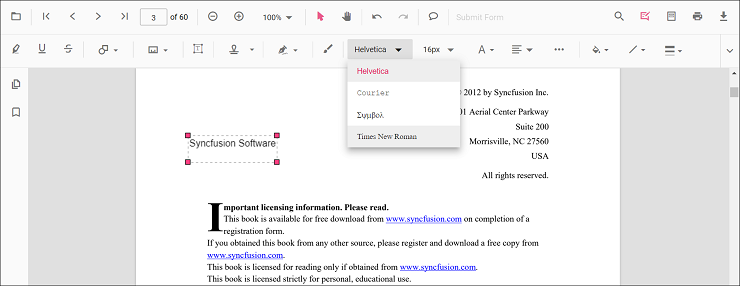
Font family
Choose a font family from the Font Family tool to update the annotation text.
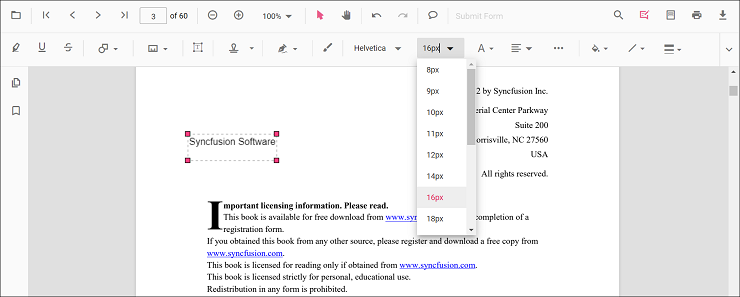
Font size
Choose a size from the Font Size tool to update the annotation text size.
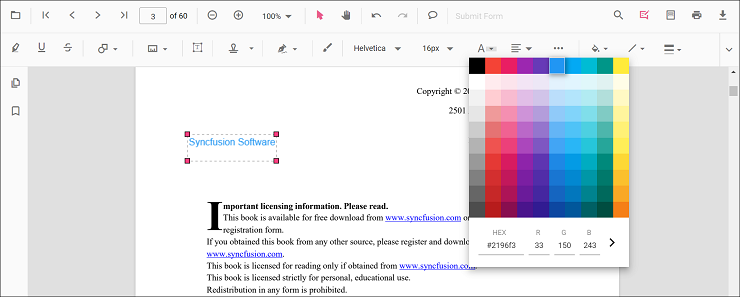
Font color
Select a color from the Font Color palette to change the font color.
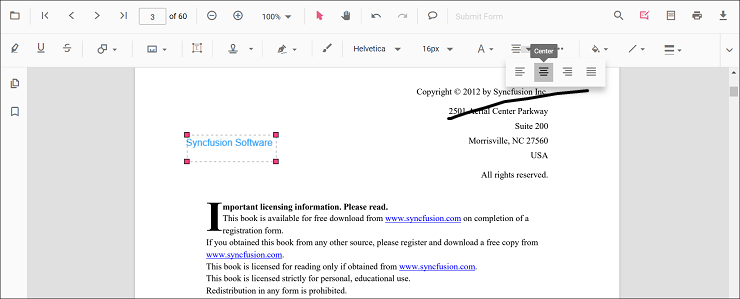
Text alignment
Use the Text Align tool to set the annotation text alignment.
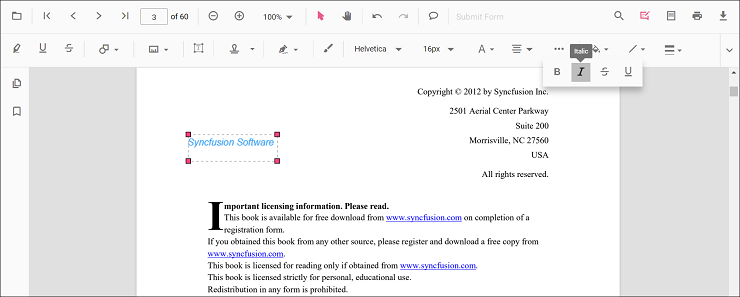
Font styles
Enable bold, italic, or underline using the Font Style tool.
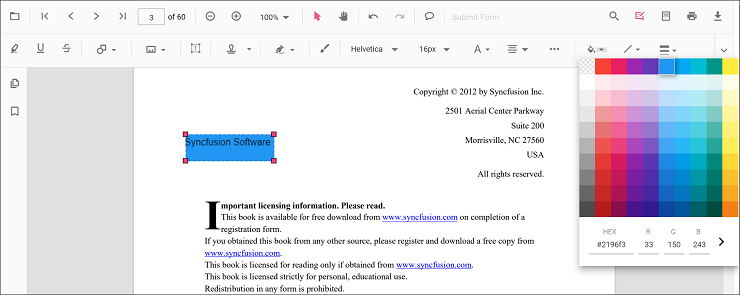
Fill color
Set the annotation background using the Edit Color tool.
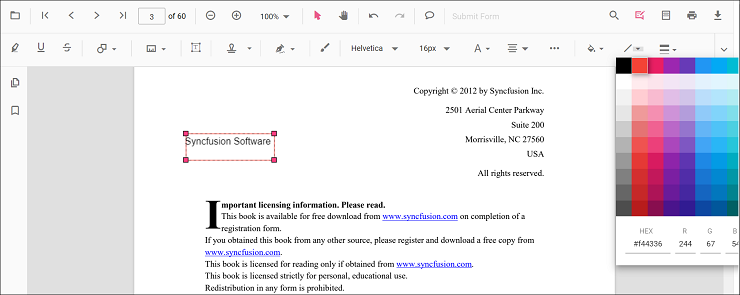
Stroke color
Set the annotation border color using the Edit Stroke Color tool.
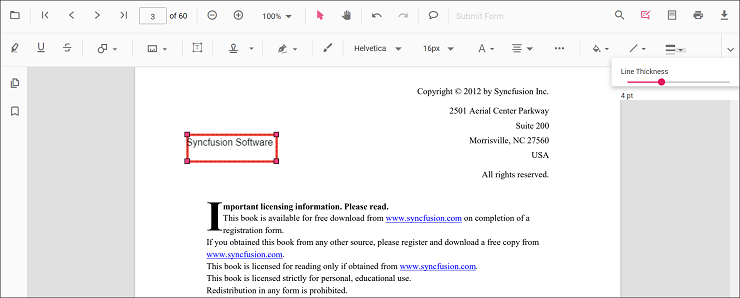
Thickness
Adjust border thickness with the Edit Thickness slider.
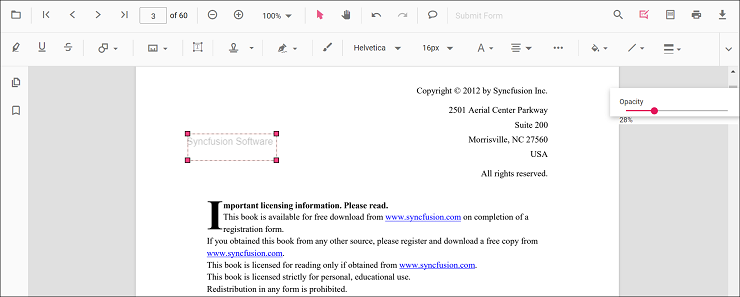
Opacity
Adjust annotation opacity with the Edit Opacity slider.
Set default properties during control initialization
Default properties for free text annotations can be set before creating the control using FreeTextSettings.
After changing default values, the selected values are applied. The following example sets default free text annotation settings.
<template>
  <div id="app">
    <ejs-pdfviewer id="pdfViewer" ref="pdfviewer" :documentPath="documentPath" :resourceUrl="resourceUrl"
      :freeTextSettings="freetextSettings">
    </ejs-pdfviewer>
  </div>
</template>

<script setup>
import {
  PdfViewerComponent as EjsPdfviewer, Toolbar, Magnification, Navigation, LinkAnnotation,
  BookmarkView, Annotation, ThumbnailView, Print, TextSelection,
  TextSearch, FormFields, FormDesigner, PageOrganizer
} from '@syncfusion/ej2-vue-pdfviewer';
import { provide } from 'vue';

const documentPath = "https://cdn.syncfusion.com/content/pdf/pdf-succinctly.pdf";
const resourceUrl = 'https://cdn.syncfusion.com/ej2/31.2.2/dist/ej2-pdfviewer-lib';
const freetextSettings = { fillColor: 'green', borderColor: 'blue', fontColor: 'yellow' };

provide('PdfViewer', [Toolbar, Magnification, Navigation, LinkAnnotation, BookmarkView, Annotation,
  ThumbnailView, Print, TextSelection, TextSearch, FormFields, FormDesigner, PageOrganizer])

</script><template>
<div id="app">
<ejs-pdfviewer id="pdfViewer" ref="pdfviewer" :documentPath="documentPath" :resourceUrl="resourceUrl"
:freeTextSettings="freetextSettings">
</ejs-pdfviewer>
</div>
</template>
<script>
import {
PdfViewerComponent, Toolbar, Magnification, Navigation, LinkAnnotation,
BookmarkView, Annotation, ThumbnailView, Print, TextSelection,
TextSearch, FormFields, FormDesigner, PageOrganizer
} from '@syncfusion/ej2-vue-pdfviewer';
export default {
name: "App",
components: {
"ejs-pdfviewer": PdfViewerComponent
},
data() {
return {
documentPath: "https://cdn.syncfusion.com/content/pdf/pdf-succinctly.pdf",
resourceUrl: 'https://cdn.syncfusion.com/ej2/31.2.2/dist/ej2-pdfviewer-lib',
freetextSettings: { fillColor: 'green', borderColor: 'blue', fontColor: 'yellow' }
};
},
provide: {
PdfViewer: [Toolbar, Magnification, Navigation, LinkAnnotation, BookmarkView, Annotation,
ThumbnailView, Print, TextSelection, TextSearch, FormFields, FormDesigner, PageOrganizer]
},
}
</script><template>
<div id="app">
<ejs-pdfviewer id="pdfViewer" ref="pdfviewer" :documentPath="documentPath" :serviceUrl="serviceUrl"
:freeTextSettings="freetextSettings">
</ejs-pdfviewer>
</div>
</template>
<script setup>
import {
PdfViewerComponent as EjsPdfviewer, Toolbar, Magnification, Navigation, LinkAnnotation,
BookmarkView, Annotation, ThumbnailView, Print, TextSelection,
TextSearch, FormFields, FormDesigner, PageOrganizer
} from '@syncfusion/ej2-vue-pdfviewer';
import { provide } from 'vue';
const serviceUrl = "https://document.syncfusion.com/web-services/pdf-viewer/api/pdfviewer";
const documentPath = "https://cdn.syncfusion.com/content/pdf/pdf-succinctly.pdf";
const freetextSettings = { fillColor: 'green', borderColor: 'blue', fontColor: 'yellow' }
provide('PdfViewer', [Toolbar, Magnification, Navigation, LinkAnnotation, BookmarkView, Annotation,
ThumbnailView, Print, TextSelection, TextSearch, FormFields, FormDesigner, PageOrganizer])
</script><template>
<div id="app">
<ejs-pdfviewer id="pdfViewer" ref="pdfviewer" :documentPath="documentPath" :serviceUrl="serviceUrl"
:freeTextSettings="freetextSettings">
</ejs-pdfviewer>
</div>
</template>
<script>
import {
PdfViewerComponent, Toolbar, Magnification, Navigation, LinkAnnotation,
BookmarkView, Annotation, ThumbnailView, Print, TextSelection,
TextSearch, FormFields, FormDesigner, PageOrganizer
} from '@syncfusion/ej2-vue-pdfviewer';
export default {
name: "App",
components: {
"ejs-pdfviewer": PdfViewerComponent
},
data() {
return {
serviceUrl: "https://document.syncfusion.com/web-services/pdf-viewer/api/pdfviewer",
documentPath: "https://cdn.syncfusion.com/content/pdf/pdf-succinctly.pdf",
freetextSettings: { fillColor: 'green', borderColor: 'blue', fontColor: 'yellow' }
};
},
provide: {
PdfViewer: [Toolbar, Magnification, Navigation, LinkAnnotation, BookmarkView, Annotation,
ThumbnailView, Print, TextSelection, TextSearch, FormFields, FormDesigner, PageOrganizer]
}
}
</script>