How can I help you?
Navigation in React PDF Viewer component
25 Feb 202618 minutes to read
The PDF Viewer supports several internal and external navigation options.
Toolbar page navigation options
The default toolbar of the PDF Viewer contains the following page navigation options:
- Go to page: Navigate to a specific page of a PDF document.
- Show next page: Navigate to the next page.
- Show previous page: Navigate to the previous page.
- Show first page: Navigate to the first page.
- Show last page: Navigate to the last page.
Enable or disable page navigation in the PDF Viewer using the following code snippet.
import * as ReactDOM from 'react-dom';
import * as React from 'react';
import './index.css';
import { PdfViewerComponent, Toolbar, Magnification, Navigation, LinkAnnotation, BookmarkView,
         ThumbnailView, Print, TextSelection, TextSearch, Annotation, Inject } from '@syncfusion/ej2-react-pdfviewer';

function App() {
    return (<div>
    <div className='control-section'>
    {/* Render the PDF Viewer */}
      <PdfViewerComponent
        id="container"
        documentPath="https://cdn.syncfusion.com/content/pdf/pdf-succinctly.pdf"
        resourceUrl="https://cdn.syncfusion.com/ej2/31.2.2/dist/ej2-pdfviewer-lib"
        enableNavigation={true}
        style={{ 'height': '640px' }}>

              <Inject services={[ Toolbar, Annotation, Magnification, Navigation, LinkAnnotation,
                                  BookmarkView, ThumbnailView, Print, TextSelection, TextSearch ]} />
      </PdfViewerComponent>
    </div>
  </div>);
}
const root = ReactDOM.createRoot(document.getElementById('sample'));
root.render(<App />);
import * as ReactDOM from 'react-dom';
import * as React from 'react';
import './index.css';
import { PdfViewerComponent, Toolbar, Magnification, Navigation, LinkAnnotation, BookmarkView,
ThumbnailView, Print, TextSelection, TextSearch, Annotation, Inject } from '@syncfusion/ej2-react-pdfviewer';
function App() {
return (<div>
<div className='control-section'>
{/* Render the PDF Viewer */}
<PdfViewerComponent
id="container"
documentPath="https://cdn.syncfusion.com/content/pdf/pdf-succinctly.pdf"
enableNavigation={true}
serviceUrl="https://document.syncfusion.com/web-services/pdf-viewer/api/pdfviewer"
style={{ 'height': '640px' }}>
<Inject services={[ Toolbar, Annotation, Magnification, Navigation, LinkAnnotation,
BookmarkView, ThumbnailView, Print, TextSelection, TextSearch ]} />
</PdfViewerComponent>
</div>
</div>);
}
const root = ReactDOM.createRoot(document.getElementById('sample'));
root.render(<App />);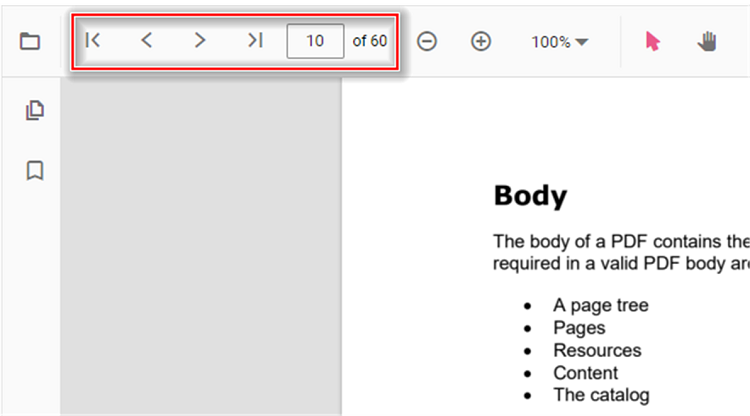
Bookmark navigation
Bookmarks embedded in PDF files are loaded for quick navigation. Enable or disable bookmark navigation using the following code snippet.
import * as ReactDOM from 'react-dom';
import * as React from 'react';
import './index.css';
import { PdfViewerComponent, Toolbar, Magnification, Navigation, LinkAnnotation, BookmarkView,
         ThumbnailView, Print, TextSelection, TextSearch, Annotation, Inject } from '@syncfusion/ej2-react-pdfviewer';

function App() {
    return (<div>
    <div className='control-section'>
    {/* Render the PDF Viewer */}
      <PdfViewerComponent
        id="container"
        documentPath="https://cdn.syncfusion.com/content/pdf/pdf-succinctly.pdf"
        resourceUrl="https://cdn.syncfusion.com/ej2/31.2.2/dist/ej2-pdfviewer-lib"
        enableBookmark={true}
        style={{ 'height': '640px' }}>

              <Inject services={[ Toolbar, Annotation, Magnification, Navigation, LinkAnnotation,
                                  BookmarkView, ThumbnailView, Print, TextSelection, TextSearch ]} />
      </PdfViewerComponent>
    </div>
  </div>);
}
const root = ReactDOM.createRoot(document.getElementById('sample'));
root.render(<App />);
import * as ReactDOM from 'react-dom';
import * as React from 'react';
import './index.css';
import { PdfViewerComponent, Toolbar, Magnification, Navigation, LinkAnnotation, BookmarkView,
ThumbnailView, Print, TextSelection, TextSearch, Annotation, Inject } from '@syncfusion/ej2-react-pdfviewer';
function App() {
return (<div>
<div className='control-section'>
{/* Render the PDF Viewer */}
<PdfViewerComponent
id="container"
documentPath="https://cdn.syncfusion.com/content/pdf/pdf-succinctly.pdf"
enableBookmark={true}
serviceUrl="https://document.syncfusion.com/web-services/pdf-viewer/api/pdfviewer"
style={{ 'height': '640px' }}>
<Inject services={[ Toolbar, Annotation, Magnification, Navigation, LinkAnnotation,
BookmarkView, ThumbnailView, Print, TextSelection, TextSearch ]} />
</PdfViewerComponent>
</div>
</div>);
}
const root = ReactDOM.createRoot(document.getElementById('sample'));
root.render(<App />);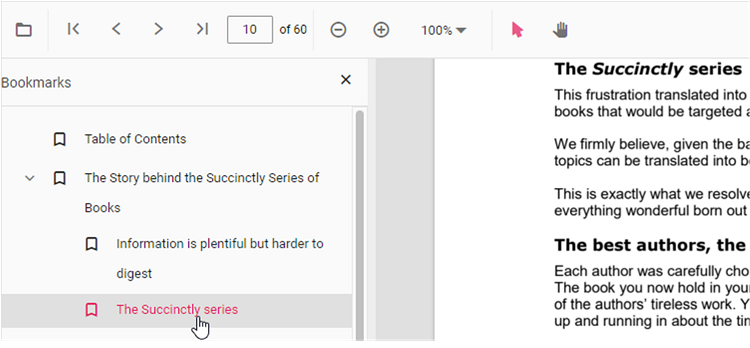
Thumbnail navigation
Thumbnails are miniature representations of the pages in a PDF. This feature displays page thumbnails and enables quick navigation. Enable or disable thumbnail navigation using the following code snippet.
import * as ReactDOM from 'react-dom';
import * as React from 'react';
import './index.css';
import { PdfViewerComponent, Toolbar, Magnification, Navigation, LinkAnnotation, BookmarkView,
         ThumbnailView, Print, TextSelection, TextSearch, Annotation, Inject } from '@syncfusion/ej2-react-pdfviewer';

function App() {

  return (<div>
    <div className='control-section'>
    {/* Render the PDF Viewer */}
      <PdfViewerComponent
        id="container"
        documentPath="https://cdn.syncfusion.com/content/pdf/pdf-succinctly.pdf"
        resourceUrl="https://cdn.syncfusion.com/ej2/31.2.2/dist/ej2-pdfviewer-lib"
        enableThumbnail={true}
        style={{ 'height': '640px' }}>

              <Inject services={[ Toolbar, Annotation, Magnification, Navigation, LinkAnnotation,
                                  BookmarkView, ThumbnailView, Print, TextSelection, TextSearch ]} />
      </PdfViewerComponent>
    </div>
  </div>);
}
const root = ReactDOM.createRoot(document.getElementById('sample'));
root.render(<App />);
import * as ReactDOM from 'react-dom';
import * as React from 'react';
import './index.css';
import { PdfViewerComponent, Toolbar, Magnification, Navigation, LinkAnnotation, BookmarkView,
ThumbnailView, Print, TextSelection, TextSearch, Annotation, Inject } from '@syncfusion/ej2-react-pdfviewer';
function App() {
return (<div>
<div className='control-section'>
{/* Render the PDF Viewer */}
<PdfViewerComponent
id="container"
documentPath="https://cdn.syncfusion.com/content/pdf/pdf-succinctly.pdf"
enableThumbnail={true}
serviceUrl="https://document.syncfusion.com/web-services/pdf-viewer/api/pdfviewer"
style={{ 'height': '640px' }}>
<Inject services={[ Toolbar, Annotation, Magnification, Navigation, LinkAnnotation,
BookmarkView, ThumbnailView, Print, TextSelection, TextSearch ]} />
</PdfViewerComponent>
</div>
</div>);
}
const root = ReactDOM.createRoot(document.getElementById('sample'));
root.render(<App />);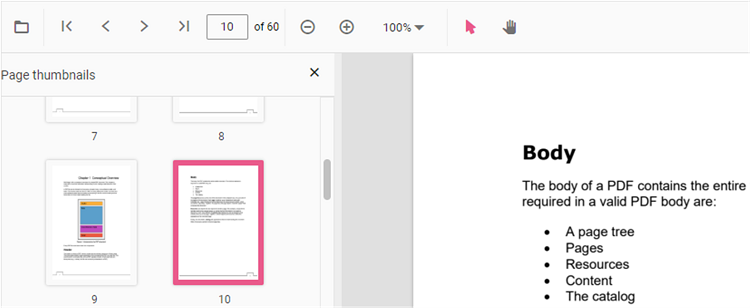
Hyperlink navigation
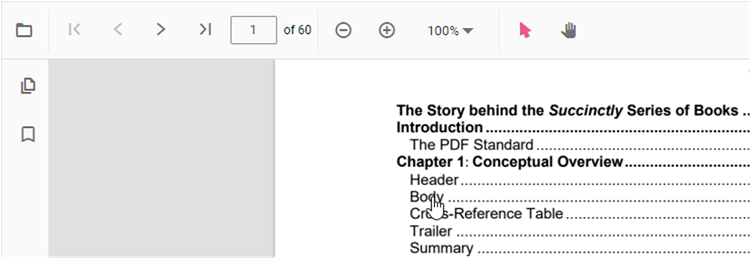
Hyperlink navigation enables navigation to external URLs contained in a PDF file.
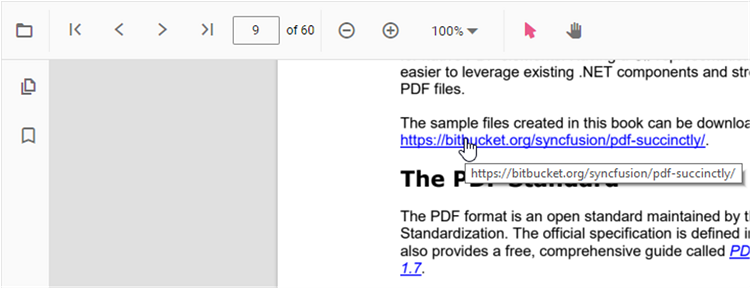
Table of contents navigation
Table of contents navigation lets users jump to sections listed in a PDF’s table of contents.
Enable or disable link navigation using the following code snippet.
import * as ReactDOM from 'react-dom';
import * as React from 'react';
import './index.css';
import { PdfViewerComponent, Toolbar, Magnification, Navigation, LinkAnnotation, BookmarkView,
         ThumbnailView, Print, TextSelection, TextSearch, Annotation, Inject } from '@syncfusion/ej2-react-pdfviewer';

function App() {

  return (<div>
    <div className='control-section'>
    {/* Render the PDF Viewer */}
      <PdfViewerComponent
        id="container"
        documentPath="https://cdn.syncfusion.com/content/pdf/pdf-succinctly.pdf"
        resourceUrl="https://cdn.syncfusion.com/ej2/31.2.2/dist/ej2-pdfviewer-lib"
        enableHyperlink={true}
        style={{ 'height': '640px' }}>

              <Inject services={[ Toolbar, Annotation, Magnification, Navigation, LinkAnnotation,
                                  BookmarkView, ThumbnailView, Print, TextSelection, TextSearch ]} />
      </PdfViewerComponent>
    </div>
  </div>);
}
const root = ReactDOM.createRoot(document.getElementById('sample'));
root.render(<App />);
import * as ReactDOM from 'react-dom';
import * as React from 'react';
import './index.css';
import { PdfViewerComponent, Toolbar, Magnification, Navigation, LinkAnnotation, BookmarkView,
ThumbnailView, Print, TextSelection, TextSearch, Annotation, Inject } from '@syncfusion/ej2-react-pdfviewer';
function App() {
return (<div>
<div className='control-section'>
{/* Render the PDF Viewer */}
<PdfViewerComponent
id="container"
documentPath="https://cdn.syncfusion.com/content/pdf/pdf-succinctly.pdf"
enableHyperlink={true}
serviceUrl="https://document.syncfusion.com/web-services/pdf-viewer/api/pdfviewer"
style={{ 'height': '640px' }}>
<Inject services={[ Toolbar, Annotation, Magnification, Navigation, LinkAnnotation,
BookmarkView, ThumbnailView, Print, TextSelection, TextSearch ]} />
</PdfViewerComponent>
</div>
</div>);
}
const root = ReactDOM.createRoot(document.getElementById('sample'));
root.render(<App />);Change the hyperlink open state using the following code snippet.
import * as ReactDOM from 'react-dom';
import * as React from 'react';
import './index.css';
import { PdfViewerComponent, Toolbar, Magnification, Navigation, LinkAnnotation, BookmarkView,
         ThumbnailView, Print, TextSelection, TextSearch, Annotation, Inject } from '@syncfusion/ej2-react-pdfviewer';

function App() {

  return (<div>
    <div className='control-section'>
    {/* Render the PDF Viewer */}
      <PdfViewerComponent
        id="container"
        documentPath="https://cdn.syncfusion.com/content/pdf/pdf-succinctly.pdf"
        resourceUrl="https://cdn.syncfusion.com/ej2/31.2.2/dist/ej2-pdfviewer-lib"
        enableHyperlink="true"
        hyperlinkOpenState="NewTab"
        style={{ 'height': '640px' }}>

              <Inject services={[ Toolbar, Annotation, Magnification, Navigation, LinkAnnotation,
                                  BookmarkView, ThumbnailView, Print, TextSelection, TextSearch ]} />
      </PdfViewerComponent>
    </div>
  </div>);
}
const root = ReactDOM.createRoot(document.getElementById('sample'));
root.render(<App />);
import * as ReactDOM from 'react-dom';
import * as React from 'react';
import './index.css';
import { PdfViewerComponent, Toolbar, Magnification, Navigation, LinkAnnotation, BookmarkView,
ThumbnailView, Print, TextSelection, TextSearch, Annotation, Inject } from '@syncfusion/ej2-react-pdfviewer';
function App() {
return (<div>
<div className='control-section'>
{/* Render the PDF Viewer */}
<PdfViewerComponent
id="container"
documentPath="https://cdn.syncfusion.com/content/pdf/pdf-succinctly.pdf"
enableHyperlink="true"
hyperlinkOpenState="NewTab"
serviceUrl="https://document.syncfusion.com/web-services/pdf-viewer/api/pdfviewer"
style={{ 'height': '640px' }}>
<Inject services={[ Toolbar, Annotation, Magnification, Navigation, LinkAnnotation,
BookmarkView, ThumbnailView, Print, TextSelection, TextSearch ]} />
</PdfViewerComponent>
</div>
</div>);
}
const root = ReactDOM.createRoot(document.getElementById('sample'));
root.render(<App />);