Page Navigation in React PDF Viewer
14 Aug 20267 minutes to read
This guide explains how to implement page navigation in the React PDF Viewer. You will learn how to enable toolbar navigation and programmatically navigate to specific pages using the PDF Viewer’s navigation methods.
Enable Page Navigation
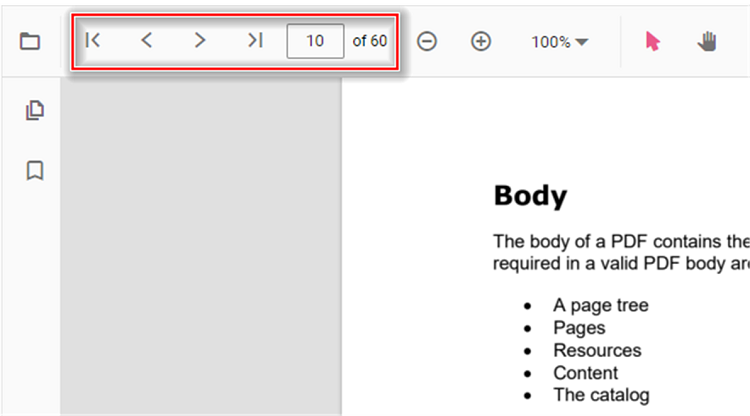
Page navigation is enabled by default in the PDF Viewer. When enabled, the default toolbar shows the first, previous, next, and last page controls along with the current page indicator. To toggle this behavior, set the enableNavigation property (default: true) on the PdfViewerComponent.
import {
    PdfViewerComponent, Toolbar, Magnification, Navigation, LinkAnnotation, BookmarkView,
    ThumbnailView, Print, TextSelection, Annotation, TextSearch, FormFields, FormDesigner,
    PageOrganizer, Inject
} from '@syncfusion/ej2-react-pdfviewer';
import { useRef, RefObject } from 'react';

export default function App() {
    const viewerRef: RefObject<PdfViewerComponent | null> = useRef<PdfViewerComponent>(null);
    return (
        <div style={{ height: '100vh' }}>
            <PdfViewerComponent
                id="PdfViewer"
                ref={viewerRef}
                documentPath="https://cdn.syncfusion.com/content/pdf/pdf-succinctly.pdf"
                resourceUrl="https://cdn.syncfusion.com/ej2/32.2.3/dist/ej2-pdfviewer-lib"
                style={{ height: '100%' }}
                enableNavigation={true}
            >
                <Inject
                    services={[
                        Toolbar, Magnification, Navigation, Annotation, LinkAnnotation, BookmarkView,
                        ThumbnailView, Print, TextSelection, TextSearch, FormFields, FormDesigner, PageOrganizer
                    ]}
                />
            </PdfViewerComponent>
        </div>
    );
}
Toolbar Navigation Options
The default toolbar of the PDF Viewer provides the following navigation options:
- Go to first page: Navigates to the first page in the document.
- Go to previous page: Navigates to the page before the current page.
- Go to next page: Navigates to the page after the current page.
- Go to last page: Navigates to the last page in the document.
- Current page indicator: Displays the current page number and total page count, and lets you jump to a specific page.
Programmatic Navigation
You can programmatically perform page navigation using the methods on the navigation module of the PDF Viewer instance.
import {
    PdfViewerComponent, Toolbar, Magnification, Navigation, LinkAnnotation, BookmarkView,
    ThumbnailView, Print, TextSelection, Annotation, TextSearch, FormFields, FormDesigner,
    PageOrganizer, Inject
} from '@syncfusion/ej2-react-pdfviewer';
import { useRef, RefObject } from 'react';

export default function App() {
    const viewerRef: RefObject<PdfViewerComponent | null> = useRef<PdfViewerComponent>(null);
    const onGoToFirstPage = () => viewerRef.current && viewerRef.current.navigation.goToFirstPage();
    const onGoToLastPage = () => viewerRef.current && viewerRef.current.navigation.goToLastPage();
    const onGoToNextPage = () => viewerRef.current && viewerRef.current.navigation.goToNextPage();
    const onGoToPage = () => viewerRef.current && viewerRef.current.navigation.goToPage(4);
    const onGoToPreviousPage = () => viewerRef.current && viewerRef.current.navigation.goToPreviousPage();
    return (
        <div style={{ height: '100vh' }}>
            <button onClick={onGoToFirstPage}>Go To First Page</button>
            <button onClick={onGoToLastPage}>Go To Last Page</button>
            <button onClick={onGoToNextPage}>Go To Next Page</button>
            <button onClick={onGoToPage}>Go To Page 4</button>
            <button onClick={onGoToPreviousPage}>Go To Previous Page</button>
            <PdfViewerComponent
                id="PdfViewer"
                ref={viewerRef}
                documentPath="https://cdn.syncfusion.com/content/pdf/pdf-succinctly.pdf"
                resourceUrl="https://cdn.syncfusion.com/ej2/32.2.3/dist/ej2-pdfviewer-lib"
                style={{ height: '100%' }}
            >
                <Inject
                    services={[
                        Toolbar, Magnification, Navigation, Annotation, LinkAnnotation, BookmarkView,
                        ThumbnailView, Print, TextSelection, TextSearch, FormFields, FormDesigner, PageOrganizer
                    ]}
                />
            </PdfViewerComponent>
        </div>
    );
}
See the StackBlitz sample for an interactive demonstration.
Troubleshooting
Navigation buttons not working
Ensure that the Navigation service is included in the Inject services array. Without this service, navigation functionality will not be available.
Page number out of range
When using goToPage(), ensure the page number is within the valid range (1 to total pages). Passing an invalid page number will result in no navigation.