How to Create a Custom PDF Viewer Service in JavaScript (ES6) PDF
14 Aug 202620 minutes to read
The JavaScript PDF Viewer requires a server-side service to process PDF documents for rendering. This document explains how to create an ASP.NET MVC Web API service that performs server-side preprocessing and operations used by the client.
This guide covers rendering, text extraction, thumbnail generation, annotation import/export, and other server-side capabilities required by the viewer.
Prerequisites
To get started with an ASP.NET MVC Web API service, ensure the following software and tooling are available:
- Visual Studio 2019 or later (recommended)
- .NET Framework 4.5 or later (use the version supported by the target project)
- ASP.NET MVC 4 or 5 and Web API 2
-
Syncfusion.EJ2.PdfViewer.AspNet.MVC5— use the latest stable release compatible with the target framework
Set up an ASP.NET MVC application with Web API for the PDF Viewer service
Follow these steps to create the PDF Viewer service
Step 1: Create a new ASP.NET web application using the default template in Visual Studio.
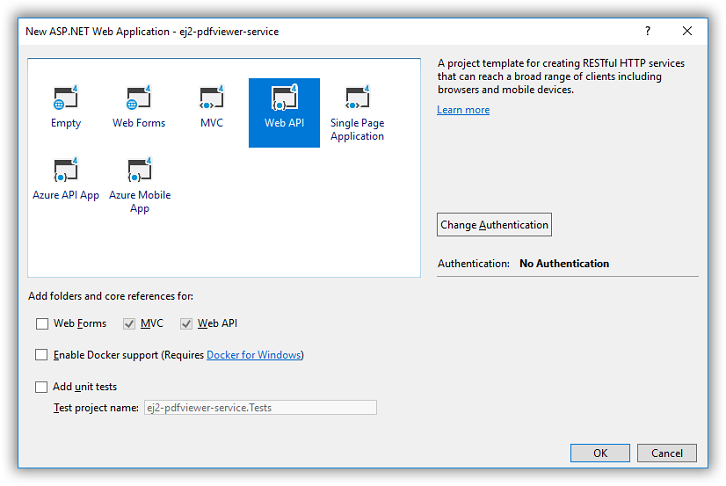
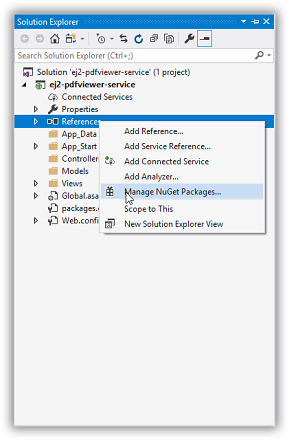
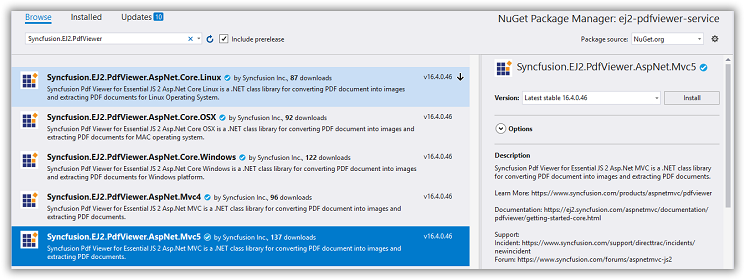
Step 2: After creating the project, add the Syncfusion.EJ2.PdfViewer.AspNet.MVC5 dependency using the NuGet Package Manager.
Open the NuGet Package Manager and install the Syncfusion.EJ2.PdfViewer.AspNet.MVC5 package.
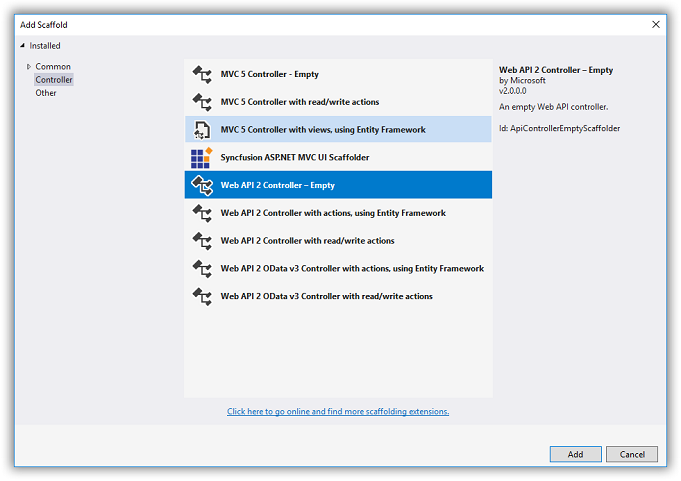
Step 3: Add a Web API 2 controller to the project and name it PdfViewerController.
Step 4: Add the following code to PdfViewerController.cs.
using Newtonsoft.Json;
using Syncfusion.EJ2.PdfViewer;
using System;
using System.Collections.Generic;
using System.IO;
using System.Linq;
using System.Net;
using System.Net.Http;
using System.Web;
using System.Web.Http;

namespace MvcWebService.webapi
{
    public class PdfViewerController : ApiController
    {
        [System.Web.Mvc.HttpPost]
        public object Load(Dictionary<string, string> jsonObject)
        {
            PdfRenderer pdfviewer = new PdfRenderer();
            MemoryStream stream = new MemoryStream();
            object jsonResult = new object();
   if (jsonObject != null && jsonObject.ContainsKey("document"))
            {
                if (bool.Parse(jsonObject["isFileName"]))
                {
                    string documentPath = GetDocumentPath(jsonObject["document"]);
                    if (!string.IsNullOrEmpty(documentPath))
                    {
                        byte[] bytes = System.IO.File.ReadAllBytes(documentPath);
                        stream = new MemoryStream(bytes);
                    }
                    else
                    {
                        string fileName = jsonObject["document"].Split(new string[] { "://" }, StringSplitOptions.None)[0];

                        if (fileName == "http" || fileName == "https")
                        {
                            WebClient WebClient = new WebClient();
                            byte[] pdfDoc = WebClient.DownloadData(jsonObject["document"]);
                            stream = new MemoryStream(pdfDoc);
                        }

                        else
                        {
                            return (jsonObject["document"] + " is not found");
                        }
                    }
                }
                else
                {
                    byte[] bytes = Convert.FromBase64String(jsonObject["document"]);
                    stream = new MemoryStream(bytes);
                }
            }
            jsonResult = pdfviewer.Load(stream, jsonObject);
            return (JsonConvert.SerializeObject(jsonResult));
        }
        [System.Web.Mvc.HttpPost]
        public object Bookmarks(Dictionary<string, string> jsonObject)
        {
            PdfRenderer pdfviewer = new PdfRenderer();
            var jsonResult = pdfviewer.GetBookmarks(jsonObject);
            return (jsonResult);
        }
        [System.Web.Mvc.HttpPost]
        public object RenderPdfPages(Dictionary<string, string> jsonObject)
        {
            PdfRenderer pdfviewer = new PdfRenderer();
            object jsonResult = pdfviewer.GetPage(jsonObject);
            return (JsonConvert.SerializeObject(jsonResult));
        }
        [System.Web.Mvc.HttpPost]
        public object RenderThumbnailImages(Dictionary<string, string> jsonObject)
        {
            PdfRenderer pdfviewer = new PdfRenderer();
            object result = pdfviewer.GetThumbnailImages(jsonObject);
            return (JsonConvert.SerializeObject(result));
        }
        [System.Web.Mvc.HttpPost]
        public object RenderPdfTexts(Dictionary<string, string> jsonObject)
        {
            PdfRenderer pdfviewer = new PdfRenderer();
            object result = pdfviewer.GetDocumentText(jsonObject);
            return (JsonConvert.SerializeObject(result));
        }


        [System.Web.Mvc.HttpPost]
        public object RenderAnnotationComments(Dictionary<string, string> jsonObject)
        {
            PdfRenderer pdfviewer = new PdfRenderer();
            object jsonResult = pdfviewer.GetAnnotationComments(jsonObject);
            return (JsonConvert.SerializeObject(jsonResult));
        }
        [System.Web.Mvc.HttpPost]
        public object Unload(Dictionary<string, string> jsonObject)
        {
            PdfRenderer pdfviewer = new PdfRenderer();
            pdfviewer.ClearCache(jsonObject);
            return ("Document cache is cleared");
        }
        [System.Web.Mvc.HttpPost]
        public HttpResponseMessage Download(Dictionary<string, string> jsonObject)
        {

            PdfRenderer pdfviewer = new PdfRenderer();
            string documentBase = pdfviewer.GetDocumentAsBase64(jsonObject);
            return (GetPlainText(documentBase));
        }

        [System.Web.Mvc.HttpPost]
        public object PrintImages(Dictionary<string, string> jsonObject)
        {
            PdfRenderer pdfviewer = new PdfRenderer();
            object pageImage = pdfviewer.GetPrintImage(jsonObject);
            return (pageImage);
        }
        private HttpResponseMessage GetPlainText(string pageImage)
        {
            var responseText = new HttpResponseMessage(HttpStatusCode.OK);
            responseText.Content = new StringContent(pageImage, System.Text.Encoding.UTF8, "text/plain");
            return responseText;
        }
        private string GetDocumentPath(string document)
        {
            string documentPath = string.Empty;
            if (!System.IO.File.Exists(document))
            {
                var path = HttpContext.Current.Request.PhysicalApplicationPath;
                if (System.IO.File.Exists(path + "/Data/" + document))
                    documentPath = path + "/Data/" + document;
            }
            else
            {
                documentPath = document;
            }
            return documentPath;
        }

        // GET api/values
        [System.Web.Mvc.HttpPost]
        public IEnumerable<string> Get()
        {
            return new string[] { "value1", "value2" };
        }

        [System.Web.Mvc.HttpPost]
        //Post action to export annotations
        [System.Web.Mvc.Route("{id}/ExportAnnotations")]

        public HttpResponseMessage ExportAnnotations(Dictionary<string, string> jsonObject)
        {
            PdfRenderer pdfviewer = new PdfRenderer();
            string jsonResult = pdfviewer.ExportAnnotation(jsonObject);
            return (GetPlainText(jsonResult));
        }

        [System.Web.Mvc.HttpPost]
        //Post action to import annotations
        public object ImportAnnotations(Dictionary<string, string> jsonObject)
        {
            PdfRenderer pdfviewer = new PdfRenderer();
            string jsonResult = string.Empty;
            object JsonResult;
            if (jsonObject != null && jsonObject.ContainsKey("fileName"))
            {
                string documentPath = GetDocumentPath(jsonObject["fileName"]);
                if (!string.IsNullOrEmpty(documentPath))
                {
                    jsonResult = System.IO.File.ReadAllText(documentPath);
                }
                else
                {
                    return (jsonObject["document"] + " is not found");
                }
            }
            else
            {
                string extension = Path.GetExtension(jsonObject["importedData"]);
                if (extension != ".xfdf")
                {
                    JsonResult = pdfviewer.ImportAnnotation(jsonObject);
                    return (GetPlainText((JsonConvert.SerializeObject(JsonResult))));
                }
                else
                {
                    string documentPath = GetDocumentPath(jsonObject["importedData"]);
                    if (!string.IsNullOrEmpty(documentPath))
                    {
                        byte[] bytes = System.IO.File.ReadAllBytes(documentPath);
                        jsonObject["importedData"] = Convert.ToBase64String(bytes);
                        JsonResult = pdfviewer.ImportAnnotation(jsonObject);
                        return (GetPlainText((JsonConvert.SerializeObject(JsonResult))));
                    }
                    else
                    {
                        return (jsonObject["document"] + " is not found");
                    }
                }
            }
            return (GetPlainText((jsonResult)));
        }

    }
}
Step 5: Configure the CORS policy in web.config to allow cross-origin requests from the client application. Example custom headers are shown below; adjust origins and headers to follow security best practices for production.
 <system.webServer>
    <httpProtocol>
      <customHeaders>
        <add name="Access-Control-Allow-Headers" value="accept, maxdataserviceversion, origin, x-requested-with, dataserviceversion,content-type" />
        <add name="Access-Control-Allow-Origin" value="*" />
        <add name="Access-Control-Max-Age" value="1728000" />
      </customHeaders>
    </httpProtocol>
  </system.webServer>
Step 6: Configure global Web API routing in Global.asax:
    System.Web.Http.GlobalConfiguration.Configuration.Routes.MapHttpRoute(
    name: "DefaultApi",
    routeTemplate: "api/{controller}/{action}/{id}",
    defaults: new { id = RouteParameter.Optional });
    AppDomain.CurrentDomain.SetData("SQLServerCompactEditionUnderWebHosting", true);
Download the sample: PDF Viewer web service sample (MVC)