About Syncfusion JavaScript (ES5) PDF Viewer Print
14 Aug 20265 minutes to read
The JavaScript PDF Viewer includes built-in printing via the toolbar and APIs so users can control how documents are printed and monitor the process.
Select Print in the built-in toolbar to open the browser print dialog.
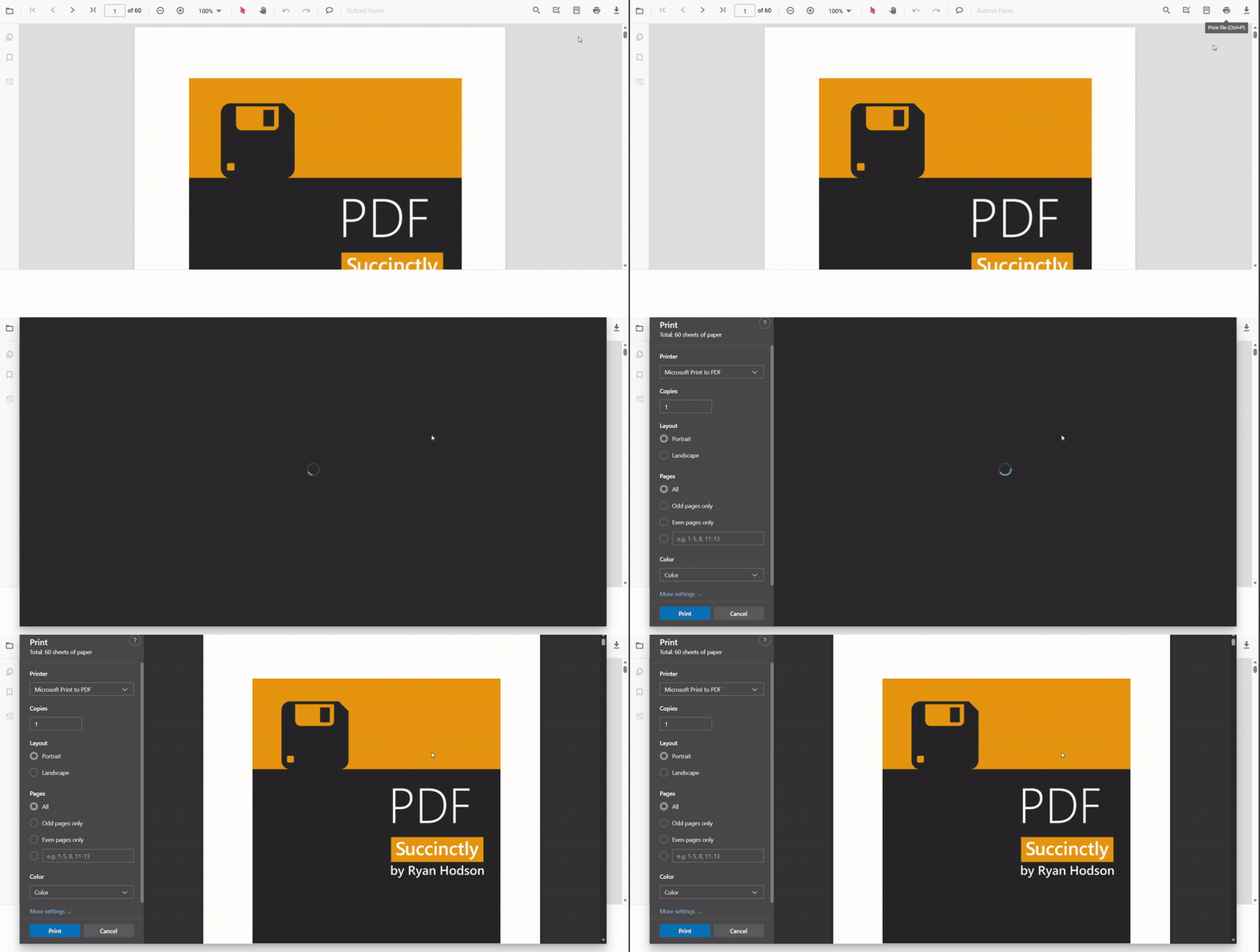
Enable or Disable Print in JavaScript PDF Viewer
The JavaScript PDF Viewer component lets users print a loaded PDF document through the built-in toolbar or programmatic calls. Control whether printing is available by setting the enablePrint property (true enables printing; false disables it).
The following JavaScript examples render the PDF Viewer with printing enabled in standalone and server-backed applications.
ej.pdfviewer.PdfViewer.Inject(
    ej.pdfviewer.Toolbar,
    ej.pdfviewer.Magnification,
    ej.pdfviewer.Navigation,
    ej.pdfviewer.Annotation,
    ej.pdfviewer.LinkAnnotation,
    ej.pdfviewer.ThumbnailView,
    ej.pdfviewer.BookmarkView,
    ej.pdfviewer.TextSelection,
    ej.pdfviewer.Print
);

var pdfviewer = new ej.pdfviewer.PdfViewer({
    enablePrint: true,
    documentPath: 'https://cdn.syncfusion.com/content/pdf/pdf-succinctly.pdf',
    resourceUrl: 'https://cdn.syncfusion.com/ej2/34.1.32/dist/ej2-pdfviewer-lib'
});
pdfviewer.appendTo('#PdfViewer');ej.pdfviewer.PdfViewer.Inject(
ej.pdfviewer.Toolbar,
ej.pdfviewer.Magnification,
ej.pdfviewer.Navigation,
ej.pdfviewer.Annotation,
ej.pdfviewer.LinkAnnotation,
ej.pdfviewer.ThumbnailView,
ej.pdfviewer.BookmarkView,
ej.pdfviewer.TextSelection,
ej.pdfviewer.Print
);
var pdfviewer = new ej.pdfviewer.PdfViewer({
enablePrint: true,
documentPath: 'https://cdn.syncfusion.com/content/pdf/pdf-succinctly.pdf',
serviceUrl: 'https://document.syncfusion.com/web-services/pdf-viewer/api/pdfviewer/'
});
pdfviewer.appendTo('#PdfViewer');Print programmatically in JavaScript PDF Viewer
To start printing from code, call the pdfviewer.print.print() method after the document is fully loaded. This approach is useful when wiring up custom UI or initiating printing automatically; calling print before the document finishes loading can result in no output or an empty print dialog.
<button id="print">Print PDF</button>ej.pdfviewer.PdfViewer.Inject(
ej.pdfviewer.TextSelection,
ej.pdfviewer.TextSearch,
ej.pdfviewer.Print,
ej.pdfviewer.Navigation,
ej.pdfviewer.Toolbar,
ej.pdfviewer.Magnification,
ej.pdfviewer.Annotation,
ej.pdfviewer.FormDesigner,
ej.pdfviewer.FormFields
);
var pdfviewer = new ej.pdfviewer.PdfViewer({
documentPath: 'https://cdn.syncfusion.com/content/pdf/pdf-succinctly.pdf',
resourceUrl: 'https://cdn.syncfusion.com/ej2/34.1.32/dist/ej2-pdfviewer-lib'
});
pdfviewer.appendTo('#PdfViewer');
//print on button click
var printButton = document.getElementById('print');
if (printButton) {
printButton.onclick = function () {
pdfviewer.print.print();
};
}ej.pdfviewer.PdfViewer.Inject(
ej.pdfviewer.TextSelection,
ej.pdfviewer.TextSearch,
ej.pdfviewer.Print,
ej.pdfviewer.Navigation,
ej.pdfviewer.Toolbar,
ej.pdfviewer.Magnification,
ej.pdfviewer.Annotation,
ej.pdfviewer.FormDesigner,
ej.pdfviewer.FormFields
);
var pdfviewer = new ej.pdfviewer.PdfViewer({
documentPath: 'https://cdn.syncfusion.com/content/pdf/pdf-succinctly.pdf',
serviceUrl: 'https://document.syncfusion.com/web-services/pdf-viewer/api/pdfviewer/'
});
pdfviewer.appendTo('#PdfViewer');
//print on button click
var printButton = document.getElementById('print');
if (printButton) {
printButton.onclick = function () {
pdfviewer.print.print();
};
}Key capabilities
- Enable or disable printing with the enablePrint property
- Start printing from UI (toolbar Print) or programmatically using print.print()
- Control output quality with the printScaleFactor property (0.5–5)
- Auto-rotate pages during print using enablePrintRotation
- Choose where printing happens with printMode (Default or NewWindow)
- Track the lifecycle with printStart and printEnd events
Ensure the
resourceUrlvalue matches the deployedej2-pdfviewer-libversion. Callingprint()launches the browser print dialog; behavior varies by browser and may be affected by popup blockers or browser settings.